For photographers, especially those who prefer to abstain from software subscriptions and support the open-source community, finding a robust alternative to Adobe Lightroom Classic can feel like a quest for a digital holy grail. The open-source software movement, characterized by its collaborative development and free accessibility, offers a compelling alternative. While the quality of open-source applications can vary, the movement has produced powerful tools that are not only free to download and use but also allow for modification of their underlying source code. This ethos of community-driven development has led to the creation of software capable of rivaling even established commercial giants like Adobe's Lightroom. This article delves into the most promising open-source Lightroom alternatives for Linux users, examining their features, strengths, and weaknesses.
Understanding Open-Source Software
The open-source software movement is built on the principle of shared creation and maintenance, often driven by passion and a desire to contribute to the community. Unlike proprietary software, open-source applications are typically free to use, and their source code is accessible, allowing technically skilled users to modify and improve them. This model, while offering immense benefits, also means that the quality and support for these applications can vary significantly. Some projects boast active development and strong user bases, while others may be less maintained or have smaller communities. Despite these variations, the impact of open-source software is undeniable, with many commercial products built upon its foundations. The question remains: can these free, community-driven tools stand up to the professional-grade capabilities of Adobe Lightroom Classic?
RawTherapee: A Deeply Functional, Yet Potentially Intimidating, Contender
RawTherapee, which debuted in 2005 and was open-sourced in 2010, stands as a significant player in the open-source photo editing landscape. Its origins trace back to a modification of Dave Coffin's dcraw, a command-line raw converter, and it continues to rely on this open-source, platform-agnostic foundation.
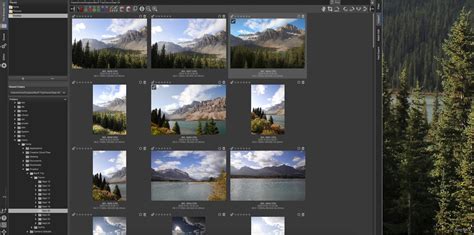
Unlike Lightroom's centralized catalog system, RawTherapee manages edits through sidecar files stored alongside your images. This approach offers a degree of flexibility but requires a different organizational mindset. The software boasts impressive raw file support, accommodating a wide range of cameras, including those with complex sensor technologies like Fujifilm's X-Trans and Sigma's Foveon. It also handles advanced formats such as Canon's Dual Pixel Raw and the multi-shot resolution-enhancing modes from manufacturers like Olympus/OM System, Pentax, and Sony.
Development for RawTherapee is generally consistent, with an average of two to four updates per year. However, like many projects, its pace has seen some impact since the onset of the pandemic. A notable feature is its comprehensive lens correction capabilities. These can be applied automatically if your lens is supported by the third-party Lensfun library, or the software can detect and mimic corrections embedded in the raw image's preview data.
While RawTherapee lacks a single "Auto" button, it attempts to match the tone curve of the embedded preview, often resulting in reasonable exposures, good color rendition, and ample detail straight out of the box. The sheer number of manual controls available for image adjustment is staggering, offering granular control to those who seek it.
However, the depth of its features can also be its downfall for some users. The user interface can appear intimidating, packed with numerous tools, some with technical names like "Retinex" or "Wavelet Levels" that might require a learning curve. Furthermore, RawTherapee does not support camera tethering, nor does it offer a map view for geolocation enthusiasts. Its export options are limited to raster images, precluding direct printing, slideshow creation, or the generation of web galleries or photo books. Performance-wise, RawTherapee is notably slower than Lightroom Classic, with final image rendering taking approximately 3.5 to 4 times longer.
Darktable: A Feature-Rich and Powerful Lightroom Alternative
Darktable, born from the work of another PhD student, Johannes Hanika, emerged in 2009 and has consistently maintained an impressive development cycle with an average of six to eight updates annually. Its primary advantage lies in its proprietary RawSpeed processing engine. While not universally applied-Darktable reverts to a dcraw fork called libraw for unsupported cameras-this engine significantly enhances processing performance, often exceeding RawTherapee's speed by more than double for compatible models.
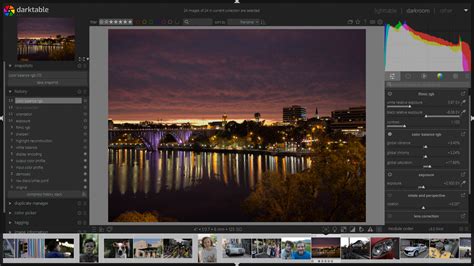
Like RawTherapee, Darktable provides comprehensive, multilingual documentation and an extensive list of supported cameras. A key differentiator is its editing workflow: while RawTherapee relies solely on sidecar files, Darktable primarily stores edits in a database, using sidecars as a supplementary method for inter-application communication. Lens corrections are also supported via the Lensfun library, mirroring RawTherapee's capabilities.
Darktable demonstrates broader compatibility with certain camera models where RawTherapee might struggle, such as the Panasonic ZS70 and Canon T8i/SL3. For macOS and Linux users, Darktable offers printing and tethering functionalities, features absent in its Windows version. All versions include a map view for geotagged images, though this feature has been reported to be unstable, occasionally causing crashes.
The inclusion of local editing capabilities, alongside global adjustments, elevates Darktable as a more comprehensive Lightroom alternative, particularly for Mac and Linux users. While its global editing toolset might be less extensive than RawTherapee's, it covers all essential functions for robust image control. However, Darktable forgoes the ability to create photo books and web galleries, and its slideshow tool is local-only, lacking exportable options.
Darktable vs Lightroom (2026) - Which One Is BETTER?
LightZone: A Unique Approach Rooted in the Zone System
LightZone's journey began as a commercial application for Mac users in 2005 before being withdrawn from sale in 2011. Historically recognized as a top-tier open-source Lightroom alternative, the project's current development activity appears to have slowed, with typically only one to three updates per year. Despite a somewhat dated user interface, LightZone's unique selling proposition is its adaptation of Ansel Adams' famed Zone System.
Instead of Adams' 10 zones, LightZone utilizes 16. The ZoneMapper tool provides a visual preview of image areas corresponding to each zone, allowing users to adjust their positions to achieve desired luminance levels. Camera and lens support in LightZone seems more limited compared to its rivals, and a definitive list of supported hardware is not readily available.
The image quality at default settings is often considered the weakest among the trio, with images appearing softer and exposures frequently requiring significant correction. Although built on the raw engines powering both RawTherapee and Darktable, its performance lags considerably behind Darktable and even further behind Lightroom Classic. LightZone offers the most limited selection of global editing tools and lacks features like map view, tethering, slideshows, or web gallery creation. Beyond performance and feature limitations, users have reported usability issues, including a peculiar problem with touchpads where scrolling would reset upon release.
Other Notable Mentions and Considerations
While RawTherapee, Darktable, and LightZone represent the most prominent open-source contenders, other software and commercial alternatives warrant brief mention for users seeking different approaches or features.
OM Workspace
Exclusively for Olympus and OM System camera owners, OM Workspace is a free application that requires a camera serial number for download. It offers a familiar basic develop panel and impressive AI noise reduction. While it allows image rating and cataloging, its performance can be sluggish, and it lacks support for presets or LUTs beyond in-camera Olympus filters. Despite these limitations, it's considered a strong free option for compatible camera users.
Luminar Neo
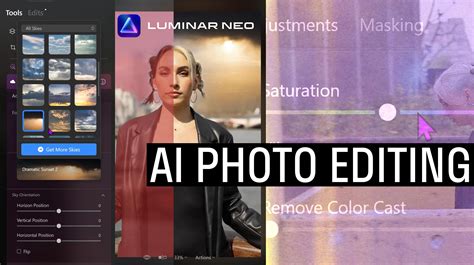
Luminar Neo offers a lifetime license for around £99 and is known for its user-friendly interface, allowing users to get started quickly. While past versions were processor-heavy, recent updates have improved performance. It boasts a rich feature set for its price point, including AI-powered tools, some of which are quite effective, such as the "Glow" feature for an Orton Effect. Luminar Neo can be used as a plugin alongside Lightroom, highlighting its versatility.
ON1 Photo RAW
Often considered a strong contender due to its similarity to Lightroom's interface and workflow, ON1 Photo RAW is available for a one-off payment, typically around £60, and is frequently on offer. The American company provides extensive tools and tutorials for new users. Its sliders and interface feel modern and responsive, often performing better than Luminar Neo on less powerful systems. ON1 Photo RAW includes Photoshop-style features like AI-generated canvas expansion, making it a potential all-in-one solution for some users. It also supports LUTs as neatly organized presets and offers an Orton Effect glow, alongside other features found in Luminar. A generous 30-day trial with all features unlocked is available.
The Verdict for Linux Users
For Linux users seeking a free and powerful alternative to Adobe Lightroom Classic, Darktable emerges as the most compelling option. Its extensive feature set, robust development, and inclusion of printing and tethering (on Linux and macOS) bring it closest to the professional workflow that Lightroom offers. While it may not achieve the same out-of-the-box image quality as its commercial counterpart without user intervention, its open-source nature and continuous improvement make it a highly viable choice.
RawTherapee remains a powerful tool, particularly for those who appreciate its deep control over raw processing, but its user interface and performance can be a hurdle for some. LightZone, while unique in its approach, suffers from slower development and more limited features and usability.
Ultimately, the "best" alternative depends on individual needs and preferences. The open-source community continues to innovate, providing increasingly capable tools that challenge the dominance of subscription-based software. While a perfect one-to-one replacement for Lightroom may not exist, the alternatives available today offer significant functionality and value, especially for users committed to the open-source ethos and seeking to avoid recurring software fees. The ability to try these applications without financial commitment allows users to experiment and find the workflow that best suits their photographic journey.
tags: #lightroom #linux #equivalent