Adobe Photoshop stands as the undisputed leader in image editing software, celebrated for its expansive versatility and potent toolset. It caters to a broad spectrum of users, from seasoned professionals to passionate hobbyists and photographers, offering all the necessary instruments to fulfill diverse creative requirements. Photoshop excels in providing a comprehensive array of image-editing features designed for pixel-based images, vector graphics, and raster graphics alike. As a cornerstone of the Adobe Creative Cloud, it ensures fluid integration with other essential Adobe applications such as Photoshop Lightroom, Illustrator, and Dreamweaver, fostering a cohesive and efficient creative workflow.
The Multifaceted Utility of Adobe Photoshop
At its core, Adobe Photoshop serves as the premier application for image and photo manipulation. Its capabilities extend to the meticulous removal of unwanted background elements or imperfections, precise adjustments of color, brightness, and contrast within images, and the seamless combination of multiple photographic sources. Furthermore, it allows for the application of a vast spectrum of filters and effects, transforming ordinary images into extraordinary visual narratives. While primarily utilized for image manipulation, Photoshop's utility is not confined to this domain; it is equally adept at generating digital illustrations and creating design assets. Through the intuitive use of pens, brushes, and shape tools, users can craft original imagery, employing masks and layers for sophisticated compositing techniques. Beyond its prowess in static imagery, Photoshop also offers robust capabilities for video editing, underscoring its status as a remarkably versatile and powerful tool with an extensive range of features and applications. It is indispensable for creating print-ready artwork for marketing materials like flyers, posters, and packaging, as well as for crafting engaging web content.
Navigating the Photoshop Interface
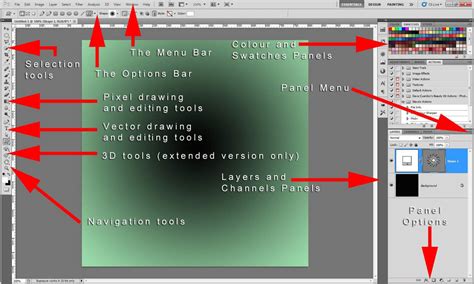
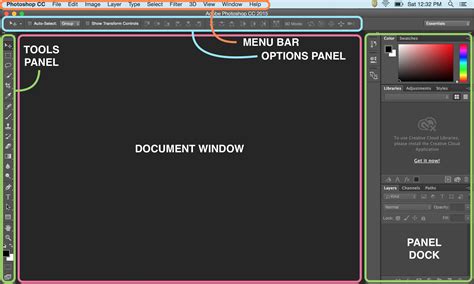
Upon downloading Adobe Photoshop for Mac, an initial step involves familiarizing oneself with its interface, the central hub where all creative operations unfold. This environment houses the application's menus, panels, and tools, with the canvas occupying the prime central real estate for image editing.
The menu bar, positioned at the very top of the screen, is the uppermost section. It comprises essential menu items such as File, Edit, Layer, Image, and Help. Each of these menu items contains a comprehensive list of commands and options that empower users to execute a wide array of actions within the application. Through these menus, users can access supplementary features and tools, and importantly, customize their preferences and settings to tailor the software to their specific workflow.
Adjacent to the menu bar, the toolbar is also located at the top of the interface. This dynamic component hosts the most frequently utilized tools, including the Magic Wand, Lasso, Crop, Marquee, and Brush tools, among others. The toolbar provides swift access to these essential instruments, which can also be reached via the menu bar by navigating to Window and then selecting Tools.
Panels, typically situated on the right side of the interface, offer access to more advanced functionalities and options. Features like Layers, Color, and Character each have their dedicated panel. The layout of these panels is highly customizable; users can rearrange them by simply dragging and dropping, or achieve similar customization by selecting Window from the menu bar and then choosing Workspace.
Core Features of Adobe Photoshop
Adobe Photoshop boasts an extensive repertoire of features designed to assist users in manipulating photographs, digital images, and various forms of artwork. Among its most pivotal features are:
Layers and Masks: These fundamental tools allow users to meticulously organize, stack, and combine different elements of an image into distinct layers. Masks provide the crucial ability to conceal or reveal specific areas of a layer, facilitating non-destructive editing. This approach is vital as it preserves the original image in its unaltered state, with all adjustments meticulously stored separately. This separation makes it exceptionally simple to restore the original file should the need arise.
Selection Tools: A suite of sophisticated selection tools, including the Magic Wand, Lasso, and Quick Selection tools, empowers users to precisely isolate different objects or areas within an image for targeted editing.
Retouching Tools: Tools such as the Clone Stamp, Content-Aware Fill, and Healing Brush are indispensable for refining images by removing blemishes, unwanted elements, and imperfections with remarkable precision.
Filters and Adjustments: Central to image manipulation, this feature set enables users to apply a wide range of effects, including sharpening, blurring, and distorting images. Furthermore, users can fine-tune brightness, contrast, and color balance to significantly enhance overall image quality.
Brushes and Painting Tools: This feature allows for creative expression through a variety of brush styles, enabling users to generate artistic effects and incorporate unique details into their artwork. Photoshop also offers robust support for custom brushes, expanding the creative possibilities.
Text and Shapes: Photoshop provides the capability to add text and geometric shapes to images, with the added benefit of applying layer styles and effects for enhanced visual appeal.
Pen Tool: The Pen tool is particularly valuable for users who require precise control over drawing and creating custom shapes, allowing for freehand design work within Photoshop.
Hue and Saturation: This feature offers granular control over the vibrancy and depth of colors within an image, allowing for precise color correction and creative enhancement.
Slice Tool: The Slice tool is designed for web designers and developers, enabling the division of large images into smaller, independently shareable or loadable slices.
Export and Share: This feature streamlines the process of saving and sharing projects in a variety of popular formats, including JPEG, PNG, PSD, and GIF, catering to diverse output needs.
System Requirements for Photoshop on Mac
To ensure a smooth and efficient experience, Adobe Photoshop for Mac has specific system requirements. It is available for macOS X and later versions. To run the software effectively, your Mac must meet the following criteria:
- Processor: A multicore Intel processor or an Apple Silicon chip.
- Memory: A minimum of 8GB of RAM is recommended.
- Storage: At least 10GB of available hard drive space is required for installation and operation.
- Display: A screen resolution of 1024 x 768 or higher is necessary for optimal viewing.
- GPU: A graphics processing unit (GPU) with at least 1.5GB of VRAM is recommended. Crucially, the PC must support Metal graphics technology for optimal performance.
The Importance of Official Adobe Products
While the allure of pirated Adobe software might stem from the perceived cost savings, often presented as free downloads, this path is fraught with significant risks. Unauthorized versions typically rely on illicit serial numbers and cracks that circumvent critical security protocols, thereby leaving systems vulnerable to malware and cyber-attacks. The absence of official updates and technical support dramatically increases the likelihood of data loss. Furthermore, engaging with pirated software constitutes a violation of copyright laws, potentially leading to severe legal repercussions. In stark contrast, licensed Adobe software provides regular updates, dedicated technical support, and robust security, establishing it as the unequivocally more reliable and secure choice for both individual users and businesses.
Advanced AI-Powered Editing Tools
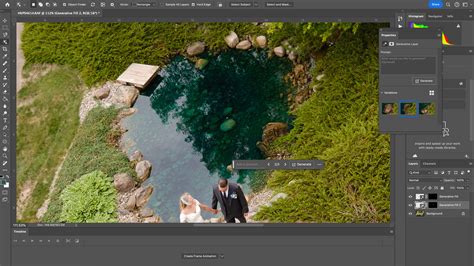
Adobe Photoshop continues its trajectory of innovation with cutting-edge AI enhancements, powered by Adobe Firefly and various partner AI models. These advancements are making image editing progressively faster and more intuitive. Recent updates have introduced significantly improved Generative Fill and Remove tools, capable of automatically eliminating unwanted elements such as stray wires, people, or distractions, all while seamlessly reconstructing the background.
The Generative Workspace (beta) offers assisted creative workflows that expedite ideation and iteration processes. Users can even select from multiple AI modelsâincluding Googleâs Gemini-based Nano Banana and FLUX.1 Kontextâto generate stylized visuals, realistic lighting effects, or intricate backgrounds directly within Photoshopâs familiar interface.
Projects and Cloud Collaboration Tools
A novel feature, Projects (beta), has been introduced to enhance the organization, management, and collaborative aspects of creative work. Projects allows users to consolidate all their assets within a shared workspace, thereby reducing the reliance on scattered local folders and manual file sharing. This tool proves particularly invaluable for teams engaged in complex campaigns or managing multiple deliverables, ensuring that files and their respective versions remain organized and synchronized via Adobe Cloud.
Expanded 32-bit and Color Workflow Support
Desktop Photoshop now incorporates advanced support for 32-bit workflows and OpenColorIO (OCIO) configurations. These capabilities are especially beneficial for film-grade color management and high-dynamic-range (HDR) projects. These enhancements empower artists to maintain superior fidelity and color accuracy without the necessity of converting images to lower bit depths, thus affording greater control when utilizing tools such as Dodge, Burn, and the Healing Brush within professional workflows.
Photoshop on Web and Mobile Platforms
Adobe has strategically expanded Photoshop's reach beyond the desktop, introducing a fully redesigned mobile and web version that brings its powerful editing tools to new platforms. This includes Photoshop on iPhone and a web-based version, both equipped with precision tools like the Magic Wand, Object Select, advanced color correction capabilities, and Firefly-powered generative features such as Generate Similar and Reference Image. These iterations synchronize seamlessly with desktop projects via Creative Cloud, facilitating a flexible, cross-device workflow that enables users to commence a project anywhere and finalize it on their Mac.
How to Use Photoshop on the Web | Adobe Photoshop
The Creative Cloud Ecosystem and App Integration
Adobe Photoshop operates harmoniously within the broader Adobe Creative Cloud ecosystem. This integration facilitates direct file syncing, the use of shared libraries, and cloud documents that are accessible across multiple devices. The seamless integration with other Adobe applications, such as Adobe Illustrator and Adobe Lightroom, allows creators to effortlessly transfer assets between vector, photo, and layout workflows without encountering format conflicts. This interconnected system is instrumental in supporting smoother multi-app production pipelines for professionals.
Apple Silicon Optimization
Recent versions of Photoshop have been comprehensively optimized for Apple Silicon chips, including the M1, M2, and newer Mac processors. This native performance support translates into tangible improvements, such as faster launch times, quicker filter rendering, and enhanced performance of AI-assisted tools. The result is a smoother multitasking experience and significantly reduced lag, even when handling large and complex compositing projects. This optimization also contributes to improved energy efficiency and greater stability on modern Mac devices.
Neural Filters and AI Enhancements
Photoshopâs Neural Filters continue to expand their capabilities, offering AI-driven features that simplify complex editing tasks. These include portrait relighting, skin smoothing, and color transfer. Powered by Adobeâs advanced machine learning framework, these tools automate intricate edits that previously demanded multiple manual adjustments. This ever-growing AI toolkit reinforces Photoshopâs strategic shift towards assisted creativity, while crucially preserving the detailed manual control that advanced users depend on.
Cloud Documents and Version History
Cloud Documents now feature automatic version history tracking. This invaluable functionality allows users to revert to earlier stages of their work without the need for manually saving multiple iterations of a file. This feature significantly enhances collaborative editing and mitigates the risk of accidentally overwriting critical changes. It also provides robust support for flexible workflows, particularly for teams managing evolving creative assets across various devices.
Content Credentials and Digital Transparency
Photoshop now incorporates Content Credentials, a transparency feature that meticulously records edit history and AI usage metadata within exported files. This initiative plays a crucial role in promoting digital authenticity by providing viewers with clear insights into how content was created or modified. As the prevalence of AI-generated imagery continues to rise, this feature is instrumental in strengthening trust and accountability within professional publishing workflows.
Your All-in-One Creative Toolbox
In essence, Adobe Photoshop for Mac stands as a powerful and versatile image editor, offering an extensive array of features and tools tailored to meet the demands of both professionals and hobbyists alike.
MacBook Air vs. iMac for Adobe Creative Cloud Apps
A common query among users seeking portability is the performance comparison between a MacBook Air and an iMac when running Adobe Creative Cloud applications. Specifically, users often wonder if a MacBook Air can operate as smoothly as an iMac when working with Adobe Photoshop, Illustrator, InDesign, and After Effects. While the intention is not to run all applications simultaneously, the ability to have Photoshop and Illustrator open at the same time on a MacBook Air without significant speed degradation is a key concern. Anecdotal evidence suggests that iMacs generally exhibit minimal speed issues.
Understanding Performance on Apple Silicon
For users operating Macs with Apple Silicon, recent versions of Photoshop are fully optimized to run natively. This native mode on Apple Silicon M1 chips, and subsequent iterations, significantly enhances performance, leading to faster execution of tasks and a more fluid user experience compared to older Intel-based Macs.
Legacy Features and Rosetta 2
It is important to note that as of July 2024, Photoshopâs legacy 3D features have been removed. Furthermore, Intel-based plugins will no longer appear in Photoshop. For users requiring compatibility with earlier versions or specific Intel-based plugins, opening Photoshop using Rosetta 2 technology is the recommended approach. This is also the designated mode for running extensions that rely on CEP.
Troubleshooting Performance Issues
If Photoshop consistently freezes during startup, particularly after an update to macOS 11.2.1, a potential solution involves creating a new administrator user account. Additionally, hiding or decreasing the size of the macOS Dock can sometimes alleviate performance-related issues.
Graphics Memory Constraints on Older Macs
For older Mac models, such as a 2014 13-inch MacBook Pro, there are inherent hardware limitations. These systems are hard-limited to 1.5GB of graphics memory, which is often further constrained by the total system memory. With only 8GB of total system memory, a significant portion is necessarily allocated to graphics memory, leaving less for general operations. Modern Apple Silicon Macs, with their integrated graphics hardware, execute AI features many times faster than a 9-year-old Intel Mac.
Software Support Lifecycles
A critical factor in software compatibility is the support lifecycle of operating systems. Both Apple and Adobe typically support the last three major versions of macOS. This means that as new versions of macOS are released annually, older versions gradually lose software support. For instance, if the current supported versions are macOS 14, 13, and 12, then macOS 11 would no longer receive support from either company. This is particularly relevant for older Macs, like the 2014 MacBook Pro, which are limited to older macOS versions, such as macOS 11, and may consequently lose support for newer Adobe software.
Premiere Rush Discontinuation
In related news regarding Adobe's mobile applications, Adobe Premiere Rush will be discontinued effective September 30, 2025, and will no longer be available on Adobe.com. Users are recommended to transition to Premiere on iPhone, with an Android version currently under development. While Adobe is actively working to ensure its other applications run natively on macOS computers with Apple Silicon, specific release dates for all apps are not yet finalized.