In the dynamic world of digital photography, achieving a consistent and distinctive aesthetic can be a significant challenge. Capture One, a powerful image editing software, offers a robust solution to this through its Styles and Presets features. While often used interchangeably by those familiar with other editing software, understanding the nuances between Styles and Presets in Capture One is key to unlocking their full potential. This article delves into the intricacies of Capture One Styles, exploring their functionality, creation, application, and how they can revolutionize your photographic workflow, from inspiration to efficient batch editing.
Understanding Styles vs. Presets in Capture One
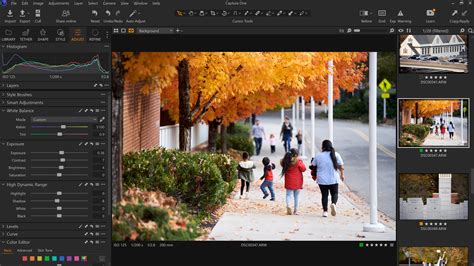
At its core, a Style in Capture One is a sophisticated collection of pre-made image adjustments that can be applied to one or multiple images with a single click. This comprehensive set of modifications can encompass a wide array of editing parameters, drawing from various tools within the software. This is a crucial distinction from Presets. In Capture One, a Preset is a more granular adjustment, specifically tailored for a single tool. For instance, a Preset created for the Film Grain tool will be accessible directly within that tool's interface, as well as within the general Styles and Presets tool. This means a Preset offers a focused adjustment, while a Style offers a holistic transformation.
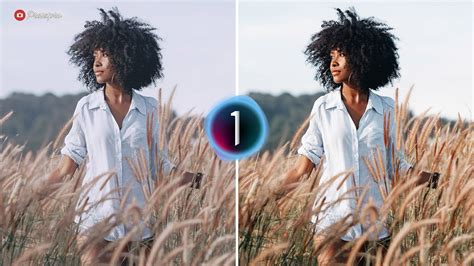
The concept of Styles can be likened to the filters found on social media platforms like Instagram, providing an instant visual enhancement. However, Capture One Styles offer a far greater depth and control. They are not merely superficial filters but rather sophisticated combinations of adjustments that can profoundly alter the mood, color, tone, and overall character of an image. For photographers aiming for a specific artistic vision, Styles serve as powerful tools to achieve that signature look with efficiency and consistency.
The Power and Versatility of Styles
Capture One Styles are a testament to the software's commitment to both creative expression and productivity. They empower photographers to imbue their images with a distinct mood or emotion, a desire that resonates with many who seek to emulate the distinctive qualities of classic film stocks or achieve a particular artistic grade. The ability to save and apply a complex series of adjustments with a single click can dramatically reduce editing time, especially when working with large batches of images. This is particularly beneficial for event, wedding, and portrait photographers who often face tight deadlines.
Furthermore, Styles can be applied automatically during the import process or when shooting tethered. This means that as images are brought into Capture One, they can already possess a foundational look, providing an immediate starting point for further refinement. This proactive approach to editing can significantly streamline the post-production workflow, allowing photographers to focus more on the creative aspects of their work rather than the repetitive tasks of applying basic adjustments. Even when applied automatically, any Style can be easily removed, returning the image to its original RAW state, offering a safety net and flexibility.
Built-in Styles and Beyond: A World of Creative Options
Capture One Pro comes equipped with a range of high-quality, built-in Styles that are designed to optimize workflow and save time. These foundational Styles can be used as they are, or they can serve as an excellent starting point for customization. For those seeking even more creative avenues, Capture One offers a vast library of Style Packs developed by leading photographers from various disciplines. These commercially available packs are often inspired by specific themes, aesthetics, or even the characteristics of iconic film stocks, allowing photographers to explore a wide spectrum of visual styles.
The Spectrum Styles Pack, for instance, is lauded for its understated qualities, offering subtle yet effective enhancements. Similarly, the Film Styles by Alexander Svet are a popular choice, with collections meticulously crafted to mimic the characteristics of renowned films like Agfa, Fuji, Kodak, and Polaroid. These sets, available in both color and black and white variations, capture the nostalgic essence and distinct tonalities that photographers once relied on film to achieve. The extended sets even offer variations with and without grain, with separate grain styles that can be added to any image or style, providing granular control over the desired analog feel.
Creating Your Own Styles: Unleashing Your Unique Vision
While the abundance of pre-made Styles is impressive, the true power of this feature lies in the ability to create your own Custom Styles. This empowers photographers to develop their unique aesthetic and to save time by automating their most frequently used editing sequences. The process of creating a Style involves making a series of adjustments using various tools within Capture One, and then saving that entire set of modifications as a single entity.
A crucial aspect of creating effective Styles is understanding their broad applicability. As a general rule of thumb, it's advisable to assume that any image you apply a Style to is correctly exposed and has a neutral white balance. This foundational neutrality makes it easier to guide the adjustments in the desired direction. For instance, if a Style needs a warmer or cooler tone, the Color Balance Tool's Master tab can be adjusted. Similarly, brightness adjustments are best handled with the Curves tool, aiming to minimize the direct use of slider tools where possible to maintain a more robust and adaptable Style.
When developing a Style, it's tempting to save it the moment it looks perfect on your current image. However, this is a critical juncture where rigorous testing is paramount. It is essential to apply the nascent Style to a diverse range of images shot under different conditions, and ideally, using different cameras if you work with more than one. This testing phase reveals whether the Style's adjustments remain effective and aesthetically pleasing across varied photographic scenarios. If the Style falters on other images, it indicates a need for refinement. The goal is to create Styles that are not overly processed but rather offer a strong foundation that can be easily enhanced or tweaked post-application, without sacrificing the core artistic intent.
Installation and Organization: Streamlining Your Workflow
Once Styles are created or acquired, their installation and organization become important for efficient workflow. Commercially available Style Packs often come as Mac packages that install themselves automatically. However, many Style sets, particularly those downloaded as folders, require manual copying to the correct Capture One Styles folder or using the import Styles function within the software.
For those who plan on using Styles regularly, creating a custom workspace in Capture One that includes a dedicated Tool Tab specifically for Styles is a highly recommended practice. This centralizes access to your Styles, making them readily available for browsing and application. Furthermore, organizing your Styles is key. You can create a "Favorites" folder for your most frequently used Styles or categorize them by editing tasks, looks, or even by client. This meticulous organization ensures that the right Style is always at your fingertips, further enhancing productivity.
Capture One Pro also introduces the concept of "Smart Styles," which can dynamically adjust based on image content, particularly for portraiture, using faces and skin tones as guides. This adds another layer of intelligent automation to the Style application process.
Advanced Techniques: Layers, Stacking, and Manual Editing
Capture One Pro's evolution has introduced even more sophisticated ways to utilize Styles. The ability to apply Styles to separate layers, for example, offers significant advantages. This allows for non-destructive editing and the blending of Styles using layer opacity. However, it's important to note that due to technical limitations, certain tools and their adjustments cannot be applied to layers or saved as part of a layered Style. In such cases, these adjustments are applied directly to the background.
The feature to "Stack Styles" is another powerful aspect of Capture One. When enabled, this allows for the application of multiple Styles sequentially. Crucially, only the adjustments contained in the later applied Style will overwrite those from earlier Styles for the same parameters. This enables a nuanced approach to editing, where different Styles can be combined to achieve complex looks, such as combining a film simulation Style with a separate grain Style. If "Stack Styles" is disabled, only the last applied Style will take effect, resetting all previous adjustments.
For advanced users, Capture One Styles, like Presets, are essentially XML files stored as plain text with the .costyle extension. This means they can be manually edited using a text editor. This capability, while requiring a good understanding of XML structure, allows for fine-tuning of specific values within a Style after it has been created. This level of control offers immense flexibility for those who need to make precise adjustments to existing Styles.
Styles and Presets: A Symbiotic Relationship
While Styles offer comprehensive adjustments, Presets remain invaluable for their focused application on individual tools. The ability to save and recall settings for specific tools, such as White Balance or Curves, means that Presets can be used to quickly apply common adjustments or to reset specific parameters. When combined with Styles, Presets can further enhance the editing workflow. For instance, a carefully crafted Style might be applied first, followed by a specific Preset to fine-tune a particular aspect of the image.
The management of both Styles and Presets is facilitated by their storage in specific user library folders on your computer. Knowing these locations is essential for backing up your work, transferring files to new computers, or manually installing Styles and Presets downloaded from third-party sources. For distribution, Capture One allows for the bundling of Styles into "Style Packs," which can be installed with a simple double-click, making it easier to share your creations with colleagues or clients.
In conclusion, Capture One Styles are far more than just quick filters; they are a sophisticated and versatile feature that can profoundly impact a photographer's workflow. By understanding the distinction between Styles and Presets, leveraging the built-in and commercially available options, and mastering the art of creating and organizing your own Styles, photographers can unlock new levels of creative efficiency and artistic control, ultimately leading to more compelling and consistent photographic output.