Navigating the landscape of video editing software can be a daunting task, with numerous options vying for your attention. Among the most prominent are Movavi Video Editor and DaVinci Resolve, each carving out a distinct niche in the market. While Movavi is celebrated for its exceptional ease of use, rapid setup, and robust foundational features, DaVinci Resolve stands out with its professional-grade utilities for color correction, audio post-production, and visual effects. This comprehensive comparison aims to dissect their features, user interfaces, system requirements, pricing, and suitability for different user levels, ultimately guiding you in selecting the software that best aligns with your specific needs.
Understanding the Target Audiences: Who is Each Software For?
When embarking on a comparison of DaVinci Resolve versus Movavi, it's crucial to first identify the intended user base for each program. This distinction is key to understanding their differing design philosophies and feature sets.
Movavi Video Editor is primarily engineered for beginners and hobbyists who aspire to edit and share videos without encountering a steep learning curve. Its remarkably intuitive user interface, coupled with an array of pre-made effects and straightforward editing functions, makes it an ideal choice for personal projects, academic assignments, or the creation of modest social media content. Movavi also extends its offerings with other specialized tools, such as a Slideshow Maker and the comprehensive Movavi Unlimited package, catering to a broader spectrum of multimedia needs.
DaVinci Resolve, conversely, is meticulously crafted for professional users. This includes seasoned video producers, editors, colorists, and sound engineers who demand a high degree of precision and advanced functionality. The software boasts a vast collection of sophisticated features, encompassing highly accurate color correction capabilities, intricate audio editing through its integrated Fairlight engine, and the creation of studio-quality visual effects. These powerful capacities render DaVinci Resolve particularly appealing to the professional film and television industry, where exacting standards are paramount.
A Feature-by-Feature Showdown: Movavi Video Editor vs. DaVinci Resolve
To truly grasp the differences between Movavi Video Editor and DaVinci Resolve, a detailed examination of their core features is essential. This will illuminate where each software shines and where its limitations may lie.
User Interface and Workflow
Movavi Video Editor is designed with utmost simplicity in mind. Its user interface is exceptionally self-explanatory, making it a perfect entry point for beginners. The effortless drag-and-drop functionality ensures that even those with no prior editing experience can quickly begin manipulating their media. This intuitive design fosters a stress-free editing process, allowing users to focus on their creative vision rather than wrestling with complex controls.
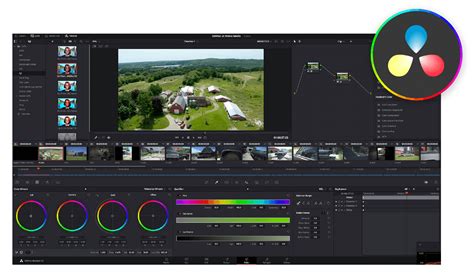
DaVinci Resolve, on the other hand, presents a more complex and modular interface. While this modularity allows for highly specialized workflows, it necessitates a period of familiarization. The software is divided into distinct "pages" or modules, such as Cut, Edit, Fusion, Color, and Fairlight, each dedicated to a specific aspect of post-production. This structure, while powerful for professionals, can initially feel overwhelming for newcomers.
Color Correction Capabilities
Color correction is a critical component of video production, and here, the divergence between Movavi and DaVinci Resolve becomes particularly pronounced.
Movavi Video Editor offers simple, automatic color correction tools, along with a selection of filters and basic manual adjustment sliders. While these are adequate for quick enhancements and achieving a generally pleasing look, they lack the granular control required for professional color grading.
DaVinci Resolve is renowned for its professional-grade color correction suite. It utilizes a node-based system, which offers unparalleled flexibility for complex color grading workflows. The software also includes advanced HDR tools, support for Look-Up Tables (LUTs), and comprehensive control over various color spaces, enabling users to achieve cinematic and broadcast-quality results.
Visual Effects (VFX)
When it comes to visual effects, both programs offer tools, but with vastly different scopes.
Movavi Video Editor provides a range of accessible effects, including transitions, filters, stickers, animations, and basic keyframe effects. These are sufficient for adding flair and polish to typical user-generated content.
DaVinci Resolve integrates the powerful Fusion page, a dedicated visual effects and motion graphics compositing environment. Fusion offers advanced capabilities for creating complex VFX, including compositing, motion tracking, 3D text generation, and sophisticated green screen keying. This makes it a formidable tool for professional VFX artists.
Audio Editing
Audio post-production is another area where DaVinci Resolve significantly outpaces Movavi.
Movavi Video Editor includes basic audio editing features. Users can adjust volume, apply an equalizer, perform noise reduction, and utilize an integrated music library. These tools are suitable for fundamental audio adjustments.
DaVinci Resolve features the Fairlight audio engine, a professional-grade digital audio workstation (DAW) built directly into the software. Fairlight provides an extensive array of tools for mixing, applying effects, and automating audio levels, allowing for intricate and high-fidelity sound design and mixing.
Export Options
Both programs offer flexible export options, though DaVinci Resolve provides a greater degree of professional control.
Movavi Video Editor allows for direct export to popular platforms like YouTube and supports common formats such as MP4, MOV, and GIF. It also offers presets tailored for various devices, simplifying the export process for common use cases.
DaVinci Resolve supports a wide array of professional export formats and codecs. Users have access to custom export settings, enabling them to fine-tune parameters for specific delivery requirements, including high-end professional codecs.
Advantages and Disadvantages: A Balanced Perspective
To provide a clear picture, let's summarize the key strengths and weaknesses of each software.
Movavi Video Editor
Advantages:
- User-Friendly: Extremely intuitive interface, ideal for beginners with no prior editing knowledge.
- Performance: Fast installation and smooth performance on most PCs, even those with lower specifications.
- Rich Asset Library: Numerous pre-made effects, filters, transitions, and titles readily available.
- Versatile Export: Supports numerous export formats and direct sharing to social media platforms.
- Affordable Entry Point: Competitively priced, especially compared to professional-grade software.
Disadvantages:
- Limited Professional Features: Lacks advanced capabilities for color correction and audio editing.
- Watermark: Projects may carry a watermark if the full version is not purchased.
- Plugin Limitations: Does not support OpenFX plugins or complex third-party visual effects.
- Less Flexible Track Management: Working with multiple video and audio tracks is less flexible than in high-end programs.
DaVinci Resolve
Advantages:
- Professional Color Grading: Industry-leading tools for precise and advanced color correction.
- Comprehensive Audio Suite: High-end audio editing and mixing capabilities through the Fairlight engine.
- Modular Workflow: Dedicated pages (Cut, Edit, Fusion, Color, Fairlight) facilitate specialized and efficient workflows.
- Powerful VFX: Advanced visual effects and motion graphics creation via the Fusion page.
- Generous Free Version: The free version offers a vast array of professional features.
- Industry Standard: Widely used in professional film and television production.
- Regular Updates: Continuous development and support from Blackmagic Design.
Disadvantages:
- High System Requirements: Demands powerful hardware, especially for 4K or VFX projects.
- Steep Learning Curve: Complex operation requires significant time and effort to master.
- Overwhelming for Beginners: The extensive feature set can be intimidating for newcomers.
Customer Reviews: What Users Are Saying
Feedback from users provides valuable insights into the practical experience of using these programs.
Movavi Video Editor Reviews
Users frequently praise Movavi Video Editor for its speed and ease of use, making it a go-to for straightforward projects. Its ample collection of ready-made templates and minimal hardware demands are often highlighted as significant benefits. Despite its strengths, some users note a lack of pro-level tools and suggest that certain editing steps could be more clearly delineated.
DaVinci Resolve Reviews
DaVinci Resolve is consistently lauded for its immense power and versatility, delivering excellent quality and an extensive feature set. However, many users concur that it can feel overwhelming for newcomers, often necessitating dedicated learning through tutorials. The depth of its capabilities means that mastering it is a significant undertaking.
When to Choose Which Program: Making the Right Decision
The ultimate choice between Movavi Video Editor and DaVinci Resolve hinges on your individual circumstances, project scope, and technical proficiency.
Opting for Movavi Video Editor
If you are working with an older or lower-specification PC, Movavi Video Editor is generally the more reliable choice. It maintains smooth and stable performance even without high-end hardware. For individuals without a background in video editing who need to achieve solid results quickly â think social media clips, YouTube videos, or personal projects â Movavi's clear layout and readily available effects make the entire process significantly less stressful. Its AI-powered toolkit also streamlines operations such as background swapping and sound denoising, contributing to a more pleasant and stress-free user experience. The "video library" feature, where all projects are stored, further simplifies media management by eliminating the need to navigate multiple folders and duplicates.
Movavi Video Editor - Tutorial for Beginners in 11 MINUTES! [ 2021 Updated ]
Opting for DaVinci Resolve
DaVinci Resolve is the superior choice when your work is more demanding or directly tied to professional post-production workflows. If your projects necessitate advanced color grading, intricate visual effects, or precise audio work for film, advertising, or high-end video productions, Resolve offers a powerful and versatile solution. However, it is essential to acknowledge that it benefits greatly from powerful hardware and a commitment to learning its more complex workflows. Its non-linear editing capabilities, coupled with the integrated Fusion and Fairlight suites, provide the tools needed for top-tier post-production abilities, making it a popular choice for professionals seeking sophisticated control.
Pricing Structures: Free vs. Paid
A significant differentiating factor between the two is their pricing model.
Movavi Video Editor Pricing
Movavi Video Editor typically operates on a subscription or perpetual license model. While a free trial is usually available, the full feature set and watermark-free export often require a purchase. The starting cost for a yearly subscription or a one-time purchase can be around $30.95, making it an accessible option for many users.
DaVinci Resolve Pricing
DaVinci Resolve is uniquely positioned with an exceptionally powerful free version that includes a vast majority of its professional features. This makes it an unparalleled offering for individuals or small teams looking to access industry-standard tools without a significant upfront investment. For those requiring even more advanced capabilities, such as collaborative features, more GPU acceleration, and additional Resolve FX, a professional Studio version is available for a one-time purchase, typically around $295.
Format Support: Handling Your Media
Both programs offer broad support for common media formats, but DaVinci Resolve extends its capabilities to more professional and high-resolution codecs.
Movavi Video Editor Supported Formats
Movavi Video Editor supports common video, audio, and picture formats like MP4, AVI, MOV, MP3, AAC, WAV, PNG, JPG, and TIFF. It handles 4K resolution, but its support for 8K and HDR content may be more limited, and it generally does not support high-end professional codecs like ProRes or RAW.
DaVinci Resolve Supported Formats
DaVinci Resolve boasts extensive format support, including common video, audio, and picture formats. Crucially, it offers robust support for 4K, 8K, and HDR content, along with professional codecs such as ProRes and RAW. This makes it suitable for a much wider range of professional production pipelines and high-resolution workflows.
Frequently Asked Questions
Addressing common queries can further clarify the distinctions between these two video editing powerhouses.
What are the limitations of Movavi Video Editor?
Movavi Video Editor is designed for ease of use and rapid results, which inherently means it lacks some advanced professional features. Its color correction is limited to basic adjustments and does not facilitate professional-grade grading. Working with multiple video and audio tracks is also less flexible compared to high-end programs. Furthermore, Movavi does not support OpenFX plugins or complex visual effects. While ideal for simple video projects, it reaches its limitations with more elaborate productions. The free version of Movavi Video Editor may also impose restrictions such as a watermark on exported clips, or limits on video and audio length, depending on the build.
Is DaVinci Resolve an industry standard?
Yes, DaVinci Resolve is unequivocally an industry standard in the film and television industry, utilized globally by professional editors, colorists, and sound designers. It provides a comprehensive suite of features, including advanced color grading, Fusion for visual effects, Fairlight for audio production, and powerful editing tools. Many feature films, television series, and commercials undergo post-processing with Resolve. The software is accessible in both a free and a paid version, with the latter enhancing its capabilities with additional features and plug-in support.
Can a beginner use DaVinci Resolve?
Theoretically, a beginner can use DaVinci Resolve, but the learning process can be quite challenging. The interface is professionally oriented and packed with numerous features that can initially appear overwhelming to newcomers. For individuals new to video editing or those focusing on simple projects, starting with more user-friendly software like Movavi Video Editor is often recommended. DaVinci Resolve is better suited for those willing to invest significant time and effort in learning, or for individuals who already possess some experience in video production.
What are the system requirements for each program?
DaVinci Resolve necessitates a powerful system. It requires a robust CPU, ample RAM (a minimum of 16 GB, with 32 GB or more being ideal), a dedicated graphics card, and an SSD for smooth operation. Color grading and rendering are particularly resource-intensive processes. Movavi Video Editor, in contrast, is significantly lighter and runs stably even on older or less powerful computers. Users typically experience immediate responses to their actions within the software.
What kind of support does each offer?
DaVinci Resolve, developed by Blackmagic Design, offers official forums, a comprehensive user manual, and extensive online training resources. However, its direct support is primarily geared towards professional users and larger production houses. Movavi typically provides customer support through its website, often including FAQs, tutorials, and email or chat support for user inquiries.
Conclusion: The Path Forward
The choice between Movavi Video Editor and DaVinci Resolve ultimately depends on your individual needs, experience level, and project aspirations. If you prioritize ease of use, a gentle learning curve, and quick results for personal or social media projects, Movavi Video Editor is an excellent and affordable choice. Its intuitive interface and ready-made effects make video creation accessible to everyone.
Conversely, if you are an aspiring professional, a seasoned editor, or someone seeking to delve into advanced color grading, complex visual effects, and professional audio mixing, DaVinci Resolve is the undisputed champion. Its powerful, industry-standard toolset, coupled with a remarkably generous free version, makes it an indispensable asset for serious video production. While it demands a greater investment in learning and hardware, the capabilities it unlocks are unparalleled.