In the fast-paced world of creative professionals, where ideas transform from initial sparks to final pixels, even the slightest friction can impede creative output. Whether the task involves compositing multiple elements into a single scene, refining lighting and image depth, or meticulously cleaning up details during iterative processes, time-consuming steps can often disrupt workflow. Adobe Photoshop, a cornerstone for creative professionals, has consistently evolved to address these challenges, with recent updates ushering in a new era of efficiency and creative possibility, particularly through its embrace of generative AI and advanced editing tools. The latest advancements, available across Photoshop on desktop, web, and mobile, are designed to serve the entire creative community, empowering users with unprecedented control and enabling the exploration of even the most ambitious ideas.
Revolutionizing Image Adjustments with Non-Destructive Power
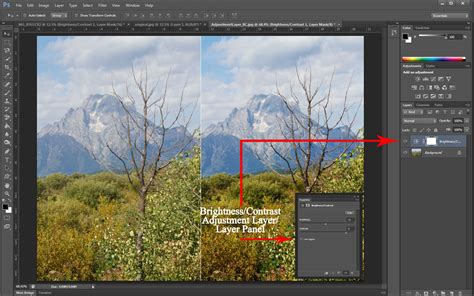
Creative professionals are constantly seeking ways to enhance their images with precision and flexibility. The introduction of powerful new adjustment layers directly into Photoshop offers a significant leap forward in this regard. Two particularly impactful additions are Clarity and Dehaze. These tools provide sophisticated, non-destructive adjustments that can be applied as layers, meaning they can be modified, masked, or removed entirely without permanently altering the original image data. This layer-based approach is crucial for maintaining a flexible workflow, allowing for extensive experimentation and refinement.
The Grain adjustment layer is another valuable addition, offering a film-like texture that can be applied subtly or dramatically to an image. This feature not only adds a stylistic element but can also be used to blend composite elements more seamlessly or to mask imperfections. The ability to control grain non-destructively, with full masking capabilities, ensures that these creative choices can be integrated artfully into any project. These tools, when used in conjunction with Photoshop’s robust masking system, give users granular control over every aspect of their image’s appearance, from overall tone and contrast to specific textural details.
Dynamic Text and Generative AI: Redefining Text and Image Creation

The way text is integrated and manipulated within Photoshop has also seen significant innovation. The new Dynamic Text feature, currently in beta, transforms the process of shaping text layers. With just a click, users can now easily convert any text layer into circular, arched, or bowed shapes. This capability dramatically reduces the manual effort previously required to achieve such effects, allowing for rapid prototyping of typographic designs and more dynamic visual layouts.
The integration of Adobe Firefly-powered AI tools has been a major focus, with Generative Fill, Generative Expand, and the Remove Tool now delivering even higher quality results. These AI-driven features are capable of generating content with impressive 2K resolution output, showcasing sharper detail and a noticeable reduction in artifacts. This means that when users generate new elements to fill gaps, expand images, or remove unwanted objects, the results are more photorealistic and seamlessly integrated.
The Remove Tool, specifically, has been enhanced with new options within its “Find Distractions” drop-down menu: Wires and Cables and People. These intelligent selections allow for the automatic removal of distracting elements like power lines or background figures with a single click. Furthermore, users now have the ability to toggle Generative AI on or off within the Remove Tool’s settings, offering greater control over the removal process.
Generative Credits and AI Model Advancements
Adobe AI Generative Credits EXPLAINED | Pricing, Plans, Features & FAQs (2025)
The underlying engine powering these AI features, Generative Credits, plays a vital role in managing their usage. Generative Credits are essential for utilizing AI-based features like text-to-image creation within Adobe Firefly and Photoshop. Users receive a set number of credits each month, which governs the extent of their use of these AI tools. Once these credits are depleted, further AI tasks may necessitate purchasing additional credits or subscribing to higher-tier plans. This system is in place to ensure fair usage and optimize performance across the platform.
The Generate Similar feature offers users a powerful way to refine generative outcomes. By creating variations based on a preferred result, users can explore a wider range of possibilities and hone in on the perfect visual. The Generate Background feature is another significant AI capability, allowing for the removal and replacement of an image’s background with AI-generated content, all driven by specific user prompts.
A major upgrade comes with the update to the Adobe Firefly Image Model 3. This latest model represents a substantial improvement for users leveraging Photoshop’s generative AI. It produces more photorealistic outcomes, boasts better contrast, and demonstrates enhanced fidelity to complex prompts, meaning the AI can interpret and execute more intricate creative instructions with greater accuracy.
Enhanced Control with Reference Image and Generative Workspace

The Reference Image Tool provides a new level of specificity for custom-tailored designs. When creating items like clothing, for instance, users can upload a reference image, such as a red polka dot dress, and prompt Photoshop to generate similar styles. This allows for the direct application of existing visual aesthetics to new creations, streamlining the design process for fashion, product design, and more.
The Generative Workspace offers a streamlined environment for ideation and the creation of multiple image versions based on variable prompts. By introducing variations, such as swapping card suits in a playing card design, users can quickly generate numerous customized results in a single session. This iterative approach significantly accelerates the design and revision cycle.
Mastering Selections and Masking for Precision Editing
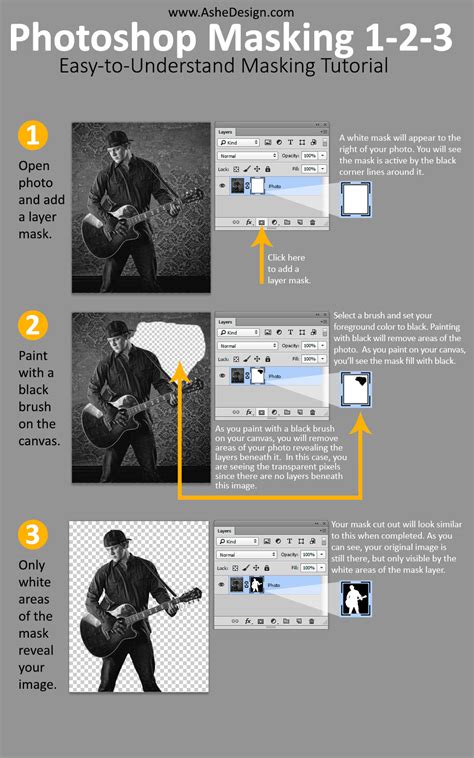
While generative AI tools are transforming image creation, the fundamental skills of selection and masking remain paramount for precise image manipulation. For those looking to deepen their expertise in these critical areas, resources like the Selections and Masking Mastery Course offer comprehensive training. This course provides in-depth, step-by-step lessons, structured modules, downloadable practice files, and custom Photoshop brushes, all designed to equip users with advanced techniques. Jesús Ramirez, a renowned digital graphics expert and founder of the Photoshop Training Channel, is a leading educator in this space, known for his extensive tutorials that demystify complex Photoshop functionalities.
Refinements in Image Quality and Workflow Efficiency
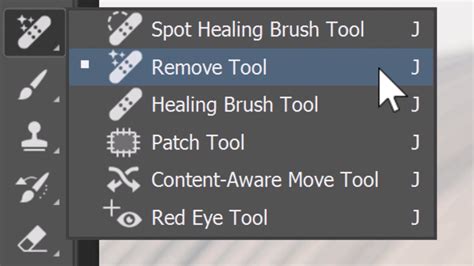
The pursuit of higher quality and greater workflow efficiency is a continuous endeavor for Adobe. The Remove Tool has been enhanced, moving beyond its initial functionality to offer more intelligent and automated removal capabilities. The introduction of features like "Wires and Cables" and "People" within the "Find Distractions" menu streamlines the process of cleaning up images, particularly those captured in busy environments. Previously, removing elements like power lines or background figures could be a time-consuming and intricate task, often requiring multiple manual edits. Now, these elements can be detected and removed with remarkable ease.
A significant pinch-point for creative professionals has historically been the limitation imposed by low-resolution source files. Many excellent images exist only as low-resolution files that do not support acceptable results or high-quality prints. To address this, Generative Upscale (beta) has been introduced. This feature allows for the increase of image resolution up to 8 megapixels while diligently preserving other characteristics of the image, such as color and detail. For example, a square image measuring 2000 x 2000 pixels (4 megapixels) can be increased to approximately 3464 x 3464 pixels. The ability to invoke this upscaling directly within Photoshop is a considerable advantage, saving users the time and effort of exporting to and from separate upscaling applications.
The Harmonize (beta) feature is another innovation aimed at improving the realism of composite images. It automatically adjusts color, lighting, shadows, and visual tone to render composites with true-to-life realism in just a few clicks. This addresses the challenge of seamlessly blending disparate image elements, ensuring that the final composite appears natural and cohesive.
The Projects (beta) feature is designed to enhance collaboration and organization. It allows collaborators to group assets, maintain organization, and work cohesively, all while keeping creative work accessible within a shared space. This is particularly beneficial for teams working on complex projects, ensuring that everyone is aligned and that assets are managed efficiently.
The Generative AI Model Picker (beta) provides users with greater flexibility when using Photoshop’s Generative Fill and Generative Expand tools. It allows them to choose between different Firefly Image Models, such as Firefly Image 1 and Firefly Image 3. This choice can influence the style, realism, and fidelity of the generated content, offering users more control over the AI's output.
Evolution of 3D and Workflow Integration

Photoshop's capabilities are expanding to encompass more than just 2D image manipulation. The return of the Substance 3D Viewer allows users to work with 3D objects directly within Photoshop’s 2D space. This means users can now place, scale, and rotate 3D models within their Photoshop projects. Furthermore, they can adjust lighting, shadows, and reflections to ensure that these 3D elements seamlessly integrate with the 2D scene. This integration bridges the gap between 2D and 3D workflows, offering new possibilities for designers and artists.
The evolution of Photoshop is also marked by features that streamline the overall creative process. The Artboards feature, previously exclusive to Adobe Illustrator, was introduced to Photoshop, providing designers with preset layouts to help streamline branding and design across different devices. This allows for the viewing and editing of multiple artboards side-by-side, facilitating easy comparison and iteration.
The Glyphs Panel, new in Adobe Creative Cloud 2015, provides designers with ready access to a wide array of characters, including currency symbols, Greek characters, grammatical marks, and more. This enhances typographic control and efficiency by making these specialized characters readily available without the need for external tools or complex input methods.
The Device Preview feature, also introduced in the 2015 release of Creative Cloud, allows users to instantaneously see how their work appears across various iOS devices. This is invaluable for web and app designers who need to ensure their designs are responsive and render correctly on different screen sizes and resolutions.
The development of Design Space, a new layer built on top of Photoshop using HTML5/CSS/JS, signifies Adobe's commitment to modern web design workflows. This allows for the creation of web-native content directly within the Photoshop environment.
The integration with Adobe Stock further enriches the Photoshop ecosystem. With access to over 40 million curated images, designers have a vast library of assets at their fingertips. The unique integration allows for edits made to a watermarked preview image to be transferred to the full licensed version upon purchase, a significant time-saver for those creating comps or proofs for client approval.
CreativeSync, a proprietary Adobe technology, is instrumental in storing all project-related files, photos, fonts, vector graphics, brushes, colors, settings, metadata, and Adobe Stock images. This ensures that all assets used in a particular workflow are synchronized and accessible across devices, maintaining consistency and efficiency.
Photoshop 2025, and indeed the ongoing development of Adobe Photoshop, represents a significant leap forward. By combining ease of use with groundbreaking AI-driven features and robust traditional editing tools, Adobe continues to provide designers, photographers, and artists with unparalleled control and creative freedom. The platform’s ability to adapt to new technologies, from advanced AI to integrated 3D workflows, ensures its continued relevance and indispensability in the creative industry.