Adobe Photoshop has long been the undisputed king of image editing and graphic design, so much so that "Photoshop" has become a verb in itself, describing the act of digitally altering images. For aspiring and established graphic designers, photographers, and creative professionals, a deep understanding of its advanced capabilities is not just beneficial, but essential for career advancement and success. This comprehensive guide to Adobe Photoshop delves into the powerful features of this industry-standard software, moving beyond basic editing to equip you with the skills to design impactful graphics, execute professional-grade retouching, and even monetize your design talents.
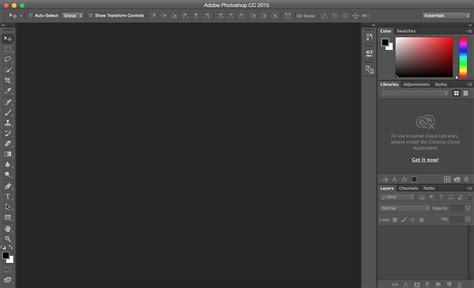
This professional Photoshop course is specifically curated for individuals who have already grasped the fundamentals of Adobe Photoshop. A prerequisite for enrollment is a foundational knowledge of basic Photoshop operations. If you are comfortable with concepts such as using layers and making simple selections, you are perfectly positioned to embark on this advanced training. This course is designed to elevate your existing skills, transforming intermediate or casual users into proficient Photoshop practitioners capable of harnessing the software's full potential.
Elevating Your Skills with Advanced Photoshop Techniques
The journey through this course begins with mastering advanced Photoshop techniques that are crucial for sophisticated image manipulation and graphic creation. You will learn to execute precise selections and create complex masks, enabling you to isolate and combine elements with unparalleled accuracy. This forms the bedrock for composite imagery, where disparate elements are seamlessly integrated to form a cohesive and believable final piece. A significant emphasis is placed on non-destructive editing workflows. This approach ensures that your original image data remains intact throughout the editing process, allowing for maximum flexibility and the ability to revisit and alter any step without compromising quality. This is a fundamental principle for professional work, ensuring retrievability and adaptability.
Harnessing the Power of Advanced Photoshop Tools
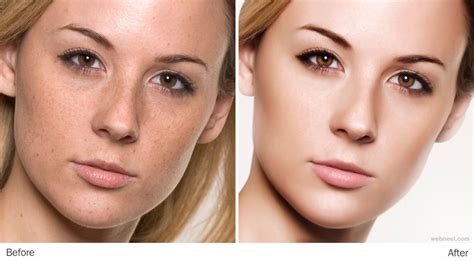
Beyond fundamental selection and masking, the course delves into the intricate functionalities of Photoshop's most powerful tools. You will uncover the nuanced applications of tools such as the Dodge and Burn tools, which allow for precise control over highlights and shadows to sculpt light and form. The Clone Stamp tool, a cornerstone of retouching, will be explored in depth for its ability to replicate and replace image areas with remarkable fidelity. Similarly, the Healing Brush and its variations will be taught for their ability to seamlessly blend textures and remove imperfections. Mastering these tools is paramount for achieving professional-grade retouching and complex image manipulation, enabling you to restore old photographs, remove blemishes, or completely alter the appearance of subjects.
Creating Professional Graphics for Diverse Applications
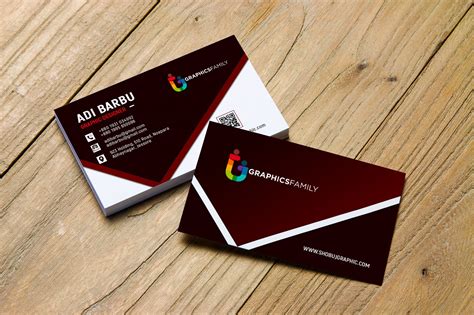
A significant portion of this advanced training is dedicated to the practical application of Photoshop for graphic design. You will learn to design impactful social media graphics that capture attention and convey messages effectively. This extends to advertisements, where visual appeal is paramount for driving engagement and conversions. The course will guide you through the creation of professional-looking brochures, a staple in marketing and informational collateral. Furthermore, you will gain the skills to design business cards, t-shirts, mugs, bottles, calendars, and covers, enabling you to create a wide array of branded merchandise and promotional materials. The ability to design these tangible assets not only showcases your creative prowess but also offers avenues for entrepreneurial endeavors.
Mastering 3D and Mockups for Realistic Presentations
In today's design landscape, the ability to present designs in a realistic context is highly valued. This course explores the exciting world of 3D modeling within Photoshop, allowing you to create and manipulate three-dimensional objects. More importantly, you will learn to create realistic mockups. These are essential for showcasing your graphic designs in a way that simulates their real-world application. Whether it’s a logo on a t-shirt, branding on a bottle, or a website design on a screen, mockups provide clients and stakeholders with a tangible understanding of the final product, significantly enhancing the presentation of your work.
Create A Custom Product Mockup In Photoshop (Fast & Easy Tutorial)
Enhancing Your Workflow for Maximum Productivity
Efficiency is a hallmark of professional design. This course emphasizes the development of efficient workflow techniques designed to optimize your time and boost your productivity without compromising the quality of your output. This includes learning keyboard shortcuts, customizing workspaces, utilizing smart guides and grids, and employing batch processing techniques. By streamlining your process, you can take on more projects, meet tighter deadlines, and ultimately increase your earning potential.
Course Requirements and Who Should Enroll
This comprehensive Photoshop course is meticulously designed for individuals who possess a foundational understanding of Adobe Photoshop. A working familiarity with the essential tools, the program's interface, and fundamental editing concepts is highly recommended. If you can confidently navigate layers and perform basic selections, you are an ideal candidate for this advanced training.
This course is particularly beneficial for:
- Graphic designers seeking to significantly enhance their Photoshop skills, expand their service offerings, and advance their careers.
- Photographers aiming to master advanced retouching and image editing techniques, elevating the quality and impact of their photographic work.
- Enthusiasts and intermediate users passionate about exploring the full, often untapped, potential of Adobe Photoshop and learning new, sophisticated techniques.
- Individuals interested in freelancing or starting a design business who need a robust skill set to compete in the market.
The Path to Adobe Certified Professional in Visual Design
For those aspiring to validate their expertise and gain industry recognition, this course serves as a significant stepping stone towards becoming an Adobe Certified Professional in Visual Design Using Adobe Photoshop. This certification is a testament to your proficiency in Adobe Photoshop, the world's most powerful imaging and design software.
Becoming an Adobe Certified Professional typically requires a substantial commitment of around 150 hours of hands-on experience and instruction. This course, with its in-depth curriculum and practical application focus, provides a strong foundation for achieving this esteemed credential. Adobe offers a wealth of learning resources to help you prepare, including exam guides that outline the specific objectives and skills tested.
Understanding the Exam Objectives
The Adobe Certified Professional exam for Visual Design Using Adobe Photoshop covers a broad spectrum of knowledge and practical skills. The exam objectives are structured into several key areas:
1. Working in the Design Industry
This section assesses your understanding of the professional design landscape. It covers critical concepts related to effective communication with colleagues and clients, crucial legal and technical knowledge, and fundamental design principles. Key areas include:
- Identifying purpose, audience, and audience needs: Determining the relevance of content for a specific purpose, target audience, and user experience across various devices. This involves understanding demographics, accessibility, and how content will be used in different contexts like video, print, and web.
- Communicating about design plans: Demonstrating knowledge of techniques for communicating design ideas through sketches, specifications, wireframes, prototypes, and feedback loops. Understanding basic project management concepts like scope and scope creep is also vital.
- Copyright, permissions, and licensing: Identifying legal and ethical considerations for using third-party content, including copyright, permissions, and licensing. This encompasses understanding terms like Creative Commons, public domain, intellectual property, and obtaining necessary releases for people and locations.
- Digital image terminology: Demonstrating knowledge of key terms related to digital images, such as image resolution, image size, file types, pixels, raster vs. vector, and color modes (CMYK, RGB, grayscale).
- Basic design principles and best practices: Communicating visually by using elements and principles of design (space, line, shape, color, texture, balance, etc.) and applying typographic adjustments for hierarchy and readability. Understanding photographic composition terms like aspect ratio and rule of thirds is also covered.
2. Project Setup and Interface
This objective focuses on the practical aspects of setting up projects and navigating the Photoshop interface efficiently.
- Creating documents: Setting appropriate document settings for web, print, and video, including width, height, resolution, and color mode. Creating custom document presets for repeated use is also covered.
- Navigating and customizing the workspace: Identifying and manipulating interface elements like the Options bar, menus, panels, and toolbar. Organizing and customizing workspaces, including saving custom layouts and utilizing shortcuts, is key. Configuring application preferences for optimal workflow is also addressed.
- Using non-printing design tools: Navigating documents with panning and zooming, using rulers to measure, and employing guides and grids for alignment and layout. Understanding snap and align options is crucial.
- Importing assets: Opening or importing images from various sources and placing them into Photoshop documents as embedded or linked files. Utilizing the Adobe Camera Raw interface for image import is also part of this objective.
- Managing colors, swatches, and gradients: Setting foreground and background colors, creating and customizing gradients, and organizing swatches for consistent color application.
- Working with brushes, styles, and patterns: Browsing, creating, editing, and organizing Photoshop brushes, layer styles, and patterns for efficient design application.
3. Organizing Documents
This section emphasizes the importance of document structure, particularly the effective use of layers and managing complex projects.
- Using layers: Managing visual content through the Layers panel, including adding, deleting, hiding, locking, and duplicating layers. Organizing layers in complex projects by renaming, grouping, and understanding the trade-offs between editability and file size is critical. Recognizing different layer types (pixel, adjustment, type, Smart Object, etc.) is also assessed.
- Modifying layer visibility: Adjusting layer opacity, blending modes, and fill opacity to control how layers interact. Creating and editing layer masks and clipping masks for precise control over visibility and effects.
- Differentiating destructive vs. nondestructive editing: Understanding the principles of nondestructive editing using Smart Objects, Smart Filters, and adjustment layers, versus destructive editing methods like painting, erasing, and rasterizing.
4. Creating and Modifying Visual Elements
This objective covers the core tools and functionalities used to create and manipulate visual content within Photoshop.
- Using core tools: Creating and editing raster images using tools like Crop, Pencil, Clone Stamp, and Eraser. Creating and editing vector shapes using tools like the Pen tool, Shape tools, and Line tool.
- Adding and manipulating text: Using type tools to add typography, adjusting character and paragraph settings for legibility and hierarchy, and understanding concepts like kerning, tracking, and leading. Converting text to graphics is also covered.
- Making, managing, and manipulating selections: Utilizing a variety of selection tools (Quick Selection, Lasso, Magic Wand, Object Selection, etc.) to isolate areas of an image. Modifying and refining selections using methods like feathering, expanding, contracting, and the Select and Mask workspace. Saving and loading selections as channels for reuse.
- Transforming digital graphics: Modifying canvas size, artboards, and transforming individual layers, objects, and selections using tools for scaling, rotating, skewing, and warping.
- Basic reconstructing and retouching: Applying auto-correction methods and using tools like the Healing Brush, Clone Stamp, and Content-Aware tools to repair and reconstruct images. Adjusting the appearance of objects using tools and adjustments, and applying photographic changes with tools like Burn, Dodge, and Desaturate.
- Modifying appearance with filters and styles: Applying filters destructively or non-destructively using Smart Filters. Creating, managing, and applying layer styles to enhance design elements.
5. Publishing Digital Media
This final section focuses on preparing and exporting your work for various platforms.
- Preparing images for export: Checking documents for errors and ensuring they meet project specifications regarding color space, resolution, and pixel dimensions.
- Exporting or saving to various file formats: Saving in the native Photoshop (.psd) format for editability, and exporting to appropriate image formats (JPEG, PNG, GIF, etc.) based on the intended purpose (web, print, video). Exporting project elements like layers and selections, and managing metadata.
Preparing for Certification
To prepare for the Adobe Certified Professional exam, several resources are available. CertPREP practice tests, powered by GMetrix, offer a realistic simulation of the exam experience, allowing you to gauge your readiness and identify areas for improvement. Adobe Press also provides comprehensive textbooks and eBooks with integrated videos and activities. Furthermore, free Adobe tutorials offer guidance on specific techniques and workflow enhancements.
Earning an Adobe Certified Professional certification demonstrates your mastery of Photoshop and can significantly enhance your professional portfolio and career prospects. The ability to combine this with other qualifying certifications can even lead to Specialty Credentials, highlighting cross-product expertise. Certification exams can be scheduled online or taken at an Adobe Authorized Testing Center, making it more accessible than ever to showcase your advanced Photoshop skills.
Monetizing Your Photoshop Expertise
Beyond technical proficiency, this course emphasizes how to leverage your advanced Photoshop skills to earn money. The ability to design logos, t-shirts, business cards, resumes, mugs, bottles, calendars, and covers directly translates into freelance opportunities and potential business ventures. You will learn about the business side of graphics design, including client communication, pricing, and project management, enabling you to confidently offer your services to clients. Retouching services are also in high demand, from professional photographers needing polished images to individuals seeking to restore old family photos. By mastering the advanced tools and techniques taught in this course, you can build a sustainable income stream from your graphics design work.
The flexibility and power of Adobe Photoshop, especially with the recent integration of advanced artificial intelligence (AI) features, ensure its continued relevance and dominance in the creative industry, even after decades of its existence. This course is your gateway to unlocking that power and transforming your passion for design into a professional success.