In the dynamic realm of digital content creation, Blackmagic Design's DaVinci Resolve 19 emerges as a pivotal force, offering a comprehensive and scalable platform for professionals. This advanced software suite, encompassing editing, color grading, visual effects (VFX), and audio post-production, caters to a diverse global user base of filmmakers, broadcasters, and content creators. This in-depth exploration delves into the technical nuances distinguishing the free and Studio versions of DaVinci Resolve 19, with a particular emphasis on the groundbreaking AI-driven enhancements introduced in version 19.0, and how these are amplified by NVIDIA's robust GPU technology. Whether you're an independent creator or part of a large production team, understanding these advancements is key to maximizing DaVinci Resolve's potential.
DaVinci Resolve 19: A High-Value Free Solution
Blackmagic Design's commitment to democratizing professional post-production tools is evident in the free version of DaVinci Resolve 19. While it mirrors the core processing capabilities of the Studio edition, specific limitations are in place to differentiate the paid offering.
Technical Capabilities of the Free Version
The free version of DaVinci Resolve 19 offers extensive support for media files at unlimited resolutions, ensuring that users can work with high-resolution footage without compromise during editing and grading. However, the software restricts final output to Ultra HD (3840 x 2160) or lower. In terms of hardware, the free version is limited to utilizing a single GPU on Windows and Linux platforms. On the latest Mac Pro models, support extends to up to 2 GPUs. This constraint on GPU utilization can impact performance scalability, particularly for workflows involving complex visual effects, high-resolution timelines, and intensive color grading. Despite these limitations, the free version provides a robust suite of tools for editing, color grading, VFX, and Fairlight audio post-production, making it a highly viable option for creating broadcast-quality content.
DaVinci Resolve 19 Studio: Unleashing Advanced Technical Capabilities
For professionals and production environments demanding peak performance and advanced feature sets, DaVinci Resolve 19 Studio presents a suite of enhancements that significantly elevate it beyond the free version. The Studio version represents a strategic investment in quality and efficiency, providing tools specifically designed for the complex demands of high-resolution, multi-layered projects.
Key Technical Enhancements in DaVinci Resolve 19 Studio
The Studio version unlocks the full potential of multi-GPU support, capable of leveraging up to 8 GPUs. This dramatically improves rendering speeds, real-time playback, and overall system performance, which is critical for handling 4K, 8K, and higher-resolution workflows, as well as projects with intensive effects processing. By removing the Ultra HD output limitation, the Studio version enables project mastering and delivery in resolutions up to 8K and beyond, a crucial capability for cinematic releases, large-format displays, and any project requiring the highest possible image fidelity.
The DaVinci Neural Engine, an exclusive feature of the Studio version, powers an advanced suite of AI-based tools. These include sophisticated facial recognition, object isolation, and automatic tracking, which significantly streamline complex editing and grading tasks. Furthermore, the Studio version extends beyond the basic toolset of the free edition, incorporating advanced features such as HDR grading, multi-layered grading workflows, and enhanced Fairlight audio tools.
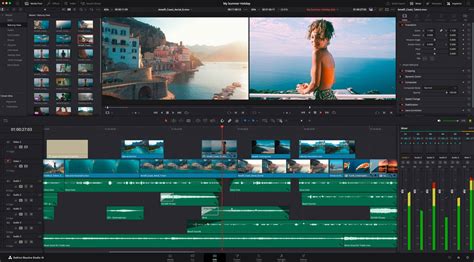
Significant Updates in DaVinci Resolve 19.0: AI at the Forefront
Version 19.0 of DaVinci Resolve introduces over 100 feature upgrades, with a strong emphasis on new AI tools powered by the DaVinci Neural Engine. These updates enhance the software's capabilities across editing, color grading, VFX, and audio post-production, solidifying its position as a more powerful tool for professionals.
DaVinci Neural Engine AI Tools
The integration of AI is a defining characteristic of DaVinci Resolve 19.0. AI-Driven Audio Transcription allows editors to directly work with transcribed audio, enabling more precise speaker identification and timeline clip editing. Voice Isolation, another AI-powered tool, excels at separating dialogue from background noise, yielding a cleaner audio track for mixing.
A particularly groundbreaking AI feature is the IntelliTrack AI Point Tracker. This advanced tool tracks objects or people across both 2D and 3D spaces, automating complex tasks like audio panning. With AI audio panning synced to video, editors can rapidly pan audio across the stereo field for multiple actors in a scene, precisely controlling their voice positions within the mix environment. This capability drastically reduces the manual effort previously required for such intricate audio work.
UltraNR represents a significant leap in noise reduction technology. It is an AI-accelerated denoise mode within Resolve’s spatial noise reduction palette. Editors can employ UltraNR to dramatically reduce digital noise-undesired fluctuations in color or luminance that obscure detail-from a frame while meticulously maintaining image clarity. This is a critical advancement for low-light footage or shots captured in challenging environments.
How to Use IntelliTrack AI in DaVinci Resolve 19 (2024)
Enhanced Cut Page Functionality
The Cut page has been further refined with new tools for live multi-camera broadcast editing, including real-time playout and replay with adjustable speed control. Multi-Source Viewing allows editors to simultaneously observe multiple live camera feeds or time-synced clips within a multiview screen, facilitating quick shot selection and comparison. The introduction of Auto Subtitles and Scene Cut Detection directly on the timeline enhances editing efficiency by automatically generating subtitles from speech-to-text transcription and identifying scene cuts.
Advanced Color Grading and VFX Tools
Color grading and VFX have also seen substantial upgrades. The ColorSlice Six Vector Palette provides granular control over color density, saturation, and hue, empowering colorists to achieve precise, film-like tones. The Film Look Creator feature simulates photometric film processes, enabling users to replicate the nuanced effects of halation, bloom, and grain. For VFX artists, the Fusion USD Integration introduces Universal Scene Description (USD) support, fostering improved collaboration within VFX pipelines. The MultiPoly Rotoscoping Tool streamlines the rotoscoping process by consolidating multiple masks into a single, manageable node.
Enhanced Collaboration and Cloud Integration
DaVinci Resolve 19's integration with Blackmagic Cloud marks a significant advancement in collaborative post-production, particularly for distributed teams working on large-scale projects.
Project Server Integration
The ability to host project libraries on the DaVinci Resolve Project Server within Blackmagic Cloud enables real-time collaboration among global teams. This feature is indispensable for large production houses and broadcasters that require simultaneous contributions from multiple editors, colorists, and VFX artists, eliminating the bottlenecks associated with traditional file-based workflows.
Organizations App
The Organizations App facilitates the management of teams and resources within Blackmagic Cloud. This includes the allocation and administration of DaVinci Resolve Studio licenses, as well as the creation of groups or teams for more efficient project sharing within an organization.
Blackmagic Proxy Generator
The new Proxy Generator App automates the creation and management of proxies, optimizing workflows for high-resolution footage, especially on systems with less powerful hardware. This ensures smoother editing experiences without sacrificing the ability to reference high-quality source material.
Intelligent Media Location Management
DaVinci Resolve 19 introduces intelligent media location management, which automatically links media to unique file paths when collaborating remotely. This feature significantly reduces the time editors spend on manual relinking and searching for assets, a common pain point in collaborative environments.
Advanced Fairlight Audio Improvements
Fairlight audio in DaVinci Resolve 19.0 has been significantly enhanced to support more sophisticated audio workflows, especially in immersive and complex sound environments.
Ambisonic Surround Sound Support
The software now provides full-sphere Ambisonic surround sound support, offering native operation for 1st to 5th order busses and tracks. This is crucial for creating truly immersive audio experiences for VR and other spatial audio applications.
Dialogue Separator FX
The Dialogue Separator FX is an AI-driven tool that precisely separates and rebalances dialogue against background sounds and room ambience. This allows for greater control in post-production to clean up noisy recordings or adjust the perceived acoustics of a space.
Dolby Atmos Binaural Output
The expanded Dolby Atmos toolset now includes the capability to render a binaural output from a complex Dolby Atmos mix. This allows for immersive audio experiences to be accurately previewed and delivered even through standard headphone playback.
NVIDIA RTX Acceleration: Amplifying DaVinci Resolve's AI Power
The synergy between DaVinci Resolve 19's AI features and NVIDIA's RTX GPUs is a critical factor in achieving optimal performance and speed. NVIDIA TensorRT, a software development kit for high-performance deep learning inference, plays a pivotal role in accelerating these AI effects.
TensorRT and RTX GPU Performance Boost
IntelliTrack AI and UltraNR, along with all other DaVinci Resolve AI effects, experience a significant performance boost when running on NVIDIA RTX PCs and workstations. For instance, TensorRT enables these features to run up to 3x faster on a GeForce RTX 4090 laptop compared to scenarios without this optimization. This acceleration translates directly into reduced render times, smoother playback, and a more responsive editing experience, allowing creators to iterate more rapidly and efficiently.
The NVIDIA Studio Driver, regularly updated to optimize creative applications, further enhances this performance. For artists exploring generative AI workflows, NVIDIA NIM microservices, such as Black Forest Labs’ FLUX.1-dev, leverage RTX-powered systems for efficient deployment and scaling of AI models. These microservices, supporting FP4 compute, deliver substantial performance gains and reduced memory requirements, making advanced AI accessible and practical.
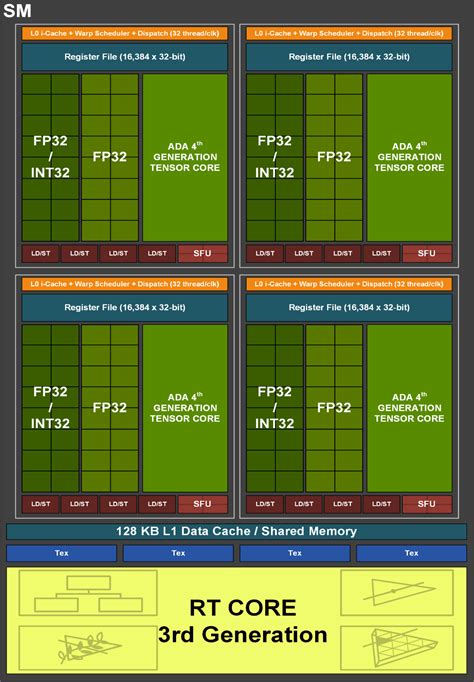
Hardware Acceleration for 4:2:2 Encoding/Decoding
DaVinci Resolve Studio 20 beta, in conjunction with GeForce RTX 50 Series and RTX PRO Blackwell GPUs, adds support for hardware-accelerated 4:2:2 encoding and decoding. This is particularly relevant as 4:2:2 video becomes more prevalent in consumer cameras. The additional hardware decoders found in GPUs like the RTX 5080 and 5090, and RTX PRO series, allow for seamless multi-camera editing and previewing of multiple high-resolution streams without stuttering. Furthermore, the ninth-generation NVIDIA video encoder found in GeForce RTX 50 Series GPUs offers improved video quality for HEVC and AV1 encoding, leading to higher-quality exports at the same bitrates. The introduction of three-way split-frame encoding further optimizes export processes by distributing the workload across multiple NVENC encoders.
The DaVinci Resolve Ecosystem: Hardware and Software Integration
DaVinci Resolve is not just software; it's an integrated ecosystem designed to streamline the entire post-production workflow. Blackmagic Design, primarily a hardware manufacturer, complements its powerful software with a range of peripherals.
Hardware Control Panels
Editing keyboards, such as the DaVinci Speed Editor and the DaVinci Resolve Editor Keyboard, are designed to accelerate editing by providing tactile controls and dedicated function keys, allowing users to perform edits much faster than with a mouse alone. Color grading panels, from the portable Micro Panel to the comprehensive Advanced Panel, offer precise control over color parameters, enabling colorists to create nuanced looks unattainable with a mouse. Fairlight hardware consoles act as natural extensions of the software, offering intuitive, task-based controls that streamline audio mixing and post-production.
Software Structure and Workflow
DaVinci Resolve is structured around task-specific workspaces known as "pages." This modular approach includes:
- Media and Deliver Pages: For importing, organizing, and exporting final projects.
- Cut Page: A streamlined interface for rapid editing, ideal for tight deadlines and live broadcast.
- Edit Page: A traditional, powerful non-linear editor for complex projects.
- Fusion Page: For creating sophisticated visual effects and motion graphics using a node-based workflow.
- Color Page: Hollywood's most advanced color corrector, offering tools for primary and secondary grading, HDR workflows, and more.
- Fairlight Page: A professional digital audio workstation integrated within Resolve, offering extensive tools for audio post-production.
This all-in-one approach eliminates the need to switch between multiple applications, ensuring that users can work with camera-original quality images throughout the entire process.
DaVinci Resolve Studio vs. Free Version: A Comparative Overview
The choice between the free and Studio versions of DaVinci Resolve 19 hinges on the specific needs and scale of a production.
| Feature | DaVinci Resolve 19 (Free Version) | DaVinci Resolve 19 Studio Version |
|---|---|---|
| Cost | Free | Paid (One-time purchase) |
| Resolution Support | Unlimited media, output limited to Ultra HD (3840 x 2160) | Unlimited media and output (4K, 8K, etc.) |
| GPU Support (Windows/Linux) | Single GPU | Multiple GPUs (up to 8 for high-end systems) |
| GPU Support (Latest Mac Pro) | Up to 2 GPUs | Up to 8 GPUs |
| Motion Blur Effects | Not Available | Available |
| Temporal and Spatial Noise Reduction | Not Available | Available (including AI UltraNR) |
| AI-Based Tools (e.g., facial recognition) | Not Available | Available (DaVinci Neural Engine) |
| HDR Grading Tools | Not Available | Available |
| Camera Tracker | Not Available | Available |
| Voice Isolation | Not Available | Available |
| Resolve FX (including advanced effects) | Limited availability | Full suite of advanced Resolve FX |
| 3D Stereoscopic Tools | Not Available | Available |
| Remote Rendering | Not Available | Available |
| Output to 4K and Beyond | Limited to Ultra HD (3840 x 2160) | 4K, 8K, and higher resolution outputs supported |
| Advanced Fairlight Audio Tools | Basic tools available | Advanced tools including AI-driven audio effects |
| Multi-User Collaboration | Basic collaboration via local project sharing | Full multi-user collaboration with project server |
| Dolby Vision HDR Support | Not Available | Available |
| Fusion Page Features | Basic VFX and motion graphics tools | Advanced tools including Multi Poly, OpenColorIO 2.3 support |
| Speed and Performance Enhancements | Limited | Enhanced with support for multiple GPUs and advanced rendering |
| Live Production and Replay Workflow | Limited or Not Available | Full integration with Blackmagic Cloud and ATEM multiview |
| Support for External Plugins | Limited | Extensive, including Open FX plugins |
| Advanced Media Management | Basic features | Advanced media management, including proxy handling and smart bin filtering |
The free version of DaVinci Resolve 19 is an exceptional starting point for individuals and smaller studios working on projects that do not necessitate advanced features like 4K+ output, multi-GPU support, or cutting-edge AI-driven tools. It stands as a robust, professional-grade application capable of handling most standard post-production tasks with remarkable ease. Conversely, DaVinci Resolve 19 Studio is meticulously crafted for professionals and larger studios that require advanced capabilities and high-performance solutions. The Studio version offers an expanded toolkit for color grading, audio post-production, VFX, and media management, making it the ideal choice for high-end production environments where quality and efficiency are paramount.
With the introduction of version 19.0, Blackmagic Design has significantly broadened the software's horizons, particularly through the integration of AI-driven tools, advanced color grading and VFX features, and enhanced collaboration and cloud integration options, all amplified by the power of NVIDIA RTX GPUs.