Adobe Photoshop, a name synonymous with digital image manipulation, has long held the title of industry standard. Its ubiquity is such that "Photoshop" has transcended its product name to become a verb, a testament to its deep integration into creative workflows. For decades, professionals and hobbyists alike have relied on its extensive features for everything from basic photo retouching to complex digital art creation. However, the subscription-based model can be a significant barrier for many, prompting a search for capable and cost-effective alternatives. This article delves into the landscape of free Photoshop alternatives, examining their strengths, weaknesses, and suitability for various creative tasks.
The journey to finding the right Photoshop alternative often begins with understanding what makes a photo editor truly exceptional. While basic adjustments like brightness, contrast, and cropping are standard, the best free options go further, offering advanced features that can rival those found in paid software. Key considerations include the presence of Artificial Intelligence (AI) features to accelerate workflows, an intuitive and user-friendly interface, the capacity for non-destructive editing through layers, and the ability to incorporate text and design elements for broader content creation needs. Crucially, for those seeking to escape the subscription model, the focus remains on tools that are entirely free, or at least offer a robust free tier.
The Evolution of Photo Editing Software: From CD-ROMs to Cloud
Reflecting on the history of photo editing software evokes memories of a time when purchasing Photoshop involved acquiring a CD-ROM from a physical store. This era, though distant for younger generations, highlights the significant evolution in software accessibility and distribution. Today, the digital realm offers a vast array of choices, with many powerful applications accessible instantly. The extensive research and hands-on testing of numerous applications, including 58 apps in a recent evaluation, have narrowed down the field to a select few that truly stand out as viable free Photoshop alternatives. These alternatives are judged not only on their core photo editing capabilities but also on their adaptability to modern creative demands, including graphic design, social media content creation, and digital illustration.
Top Free Photoshop Alternatives: A Feature-Rich Landscape
The quest for a free Photoshop alternative often leads to a diverse set of applications, each with its own strengths. Some excel in specific niches, such as social media graphics or digital painting, while others aim for a more comprehensive, all-in-one solution. The following are some of the most compelling free options available, evaluated for their unique offerings and suitability for different user needs.
Canva: The Social Media Savvy Graphic Design Tool
Canva has emerged as a dominant force in the realm of user-friendly design, particularly for social media-first graphics and basic photo editing. Its strength lies in its vast library of high-quality templates, catering to a wide range of content formats including graphics, videos, presentations, and documents. While not purely a photo editor in the traditional sense, Canva provides essential tools for adjusting color, contrast, highlights, shadows, and cropping. Its integration of AI features, such as generative AI for images and text-to-video content, further enhances its appeal for creating engaging social media assets without the need for stock photography or video.
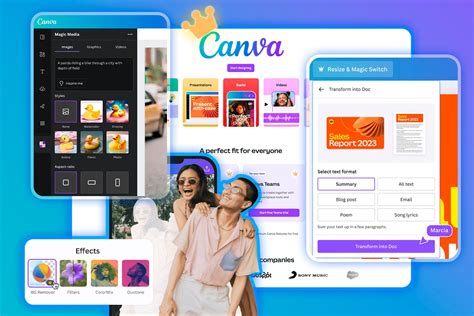
For marketing teams, especially remote ones, Canva's Brand Kit is an invaluable feature, allowing for the centralized storage of logos, fonts, and custom templates. This ensures brand consistency across all generated content, regardless of the user's skill level. The platform's collaborative features, including feedback comments within designs and custom workflows, facilitate efficient teamwork. Canva's web app is highly regarded for its performance, and its availability on mobile devices makes content creation accessible on the go. Furthermore, integration with services like Zapier allows for the automation of design workflows, streamlining processes such as automatically creating designs based on form submissions.
While Canva offers a generous free tier, a premium plan is available for individuals ($15/month) and teams ($20/month per user), providing access to additional features and assets. Despite past controversies regarding pricing increases for team plans, Canva remains a competitive and valuable option for its comprehensive suite of tools.
Fluer: Affordable Content Creation for Teams
Formerly known as Desygner, Fluer positions itself as an excellent, affordable solution for teams focused on content creation. Similar to Canva, it is primarily a web-based platform with accompanying mobile applications, offering tools for editing photos and designing logos, social media graphics, slide decks, videos, and printed materials. Fluer boasts a range of AI features, including image, video, and slide deck generation, with future plans to incorporate AI for lead generation and customer support.
6 FREE* AI Tools for Content Creation | 2025 Updated 🚀
Fluer's template library is extensive, and users often note a higher aesthetic quality compared to some competitors, with fewer lower-quality options to sift through. The platform also includes a comprehensive suite of PDF tools, enabling conversion, creation, compression, splitting, and editing of PDF documents. A standout feature for businesses is Fluer's "Brand Lock" capability. This allows teams to maintain brand consistency by locking specific elements within templates, ensuring that logos, colors, and other branding assets remain unchanged by template users. This feature is particularly beneficial for scaling content production while upholding brand integrity.
Fluer offers a free plan, with a Pro plan available for individuals at $9.95/month and for teams of up to 6 users at $29.95/month. Its focus on team collaboration and brand consistency at an accessible price point makes it a strong contender for businesses seeking efficient content creation tools.
Affinity: Professional Photo Retouching and Editing Reimagined
Affinity represents a significant entry into the free Photoshop alternative space, particularly for those seeking professional-grade photo retouching and editing capabilities. Previously a popular paid application, Affinity was acquired by Canva and is now offered entirely free as a desktop application for Windows and Mac, as well as a mobile app for iPad. The new unified Affinity app integrates its former separate products - Affinity Photo, Affinity Designer, and Affinity Publisher - into a single, powerful tool that handles photo editing, vector graphics, and publishing.
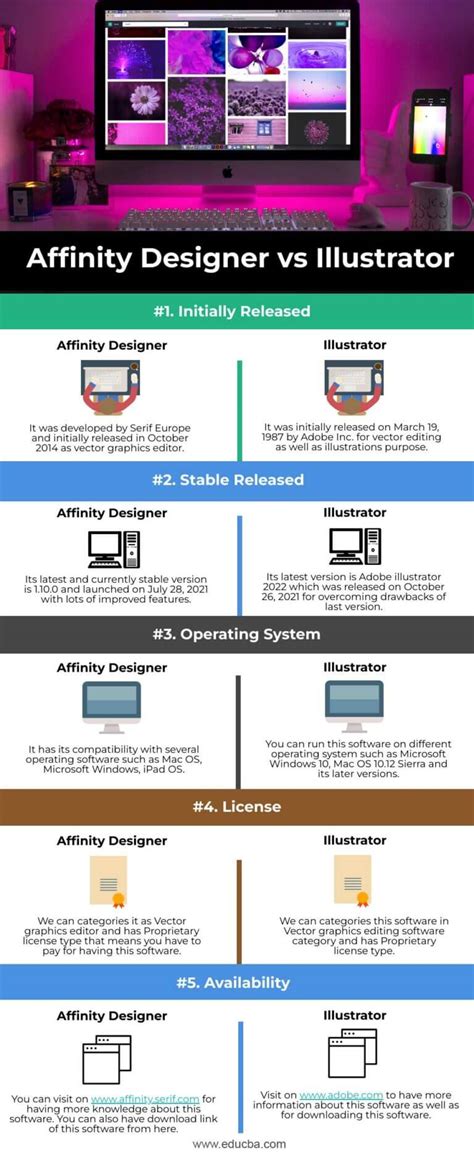
A key differentiator for Affinity is its ability to seamlessly switch between raster, vector, and publishing layout modes within the same file, referred to as "Studios." This rapid transition, facilitated by dedicated toolsets for each mode, offers a workflow that is significantly faster than the traditional process of exporting and importing between different Adobe applications like Photoshop and Illustrator. The application boasts a premium look and feel, with well-organized menus and an integrated video tutorial library. For users familiar with Photoshop, the interface will feel intuitive, and the ability to import PSD, AI, and other formats directly with layers and settings intact further simplifies the transition.
While the core Affinity application is free, accessing its advanced AI features requires a Canva Pro subscription. However, even with this add-on, the combined cost remains substantially lower than Adobe's Creative Cloud subscription, making it an attractive option for professionals and businesses. Affinity's unified approach and powerful feature set position it as a new standard for individuals and businesses alike, challenging Photoshop's long-held dominance.
Pixlr: Conversational AI Photo Editing
Pixlr offers a unique approach to photo editing with its conversational AI features, making it accessible for beginners while still providing advanced tools. The platform is split into two web-based applications: Pixlr E, geared towards experienced users, and Pixlr X, designed for beginners with an emphasis on AI capabilities.
Pixlr E provides an interface that closely mimics Photoshop, featuring familiar icons, menu layouts, and a right-side panel for editing history and layers. It supports advanced photo editing techniques such as color balance and curves adjustments, along with a wide array of filters and effects. AI noise reduction is available, though it utilizes AI credits. Digital painting tools, including brushes, paint buckets, pens, and masking tools, are also present.
Pixlr X simplifies the user experience, offering basic color correction and cropping tools. Its primary advantage lies in its advanced AI features, including generative fill and expand, allowing users to edit photos using text prompts for efficient and accurate results. New AI image and video generation capabilities, powered by Nano Banana, along with AI photo sharpening and object removal, further enhance Pixlr's AI offerings.
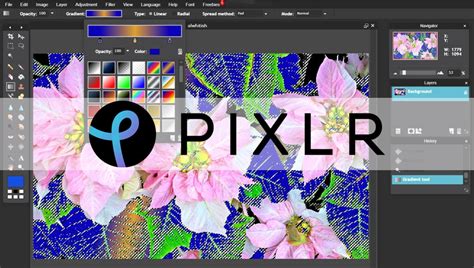
While the split interface can be somewhat confusing, Pixlr's robust layer support in its web application is notable. The platform offers a free tier, with premium plans available for individuals ($2.49/month) and teams ($16.99/month for up to 5 people) that provide additional AI credits and features. Pixlr strikes a balance between ease of use and powerful editing capabilities, making it a versatile choice for a range of users.
Fotor: Easy AI Tools and Content Creation
Fotor stands out for its user-friendly AI tools, simplifying content creation for a broad audience. Its strengths lie in features like easy object removal and generative AI capabilities, alongside e-commerce-specific templates that cater to online businesses. The platform's AI tools are designed for efficiency, allowing users to quickly enhance images and create marketing materials.
6 FREE* AI Tools for Content Creation | 2025 Updated 🚀
Fotor offers a free version that provides access to a good selection of editing tools and AI features. For users requiring more advanced functionalities, additional AI credits, or a wider range of templates, premium plans are available, ranging from $10.99 to $23.99 per month. The platform's emphasis on simplicity and effective AI integration makes it an appealing choice for those who need to produce professional-looking content without a steep learning curve.
Krita: The Digital Artist's Free Canvas
Krita is a powerful, open-source, and free alternative to Photoshop specifically tailored for artists and illustrators. Its core strength lies in its detailed digital reproduction of brushes, offering a highly customizable brush engine that emulates traditional painting tools with remarkable accuracy. This makes it an ideal choice for digital painting, sketching, concept art, anime, and illustration.
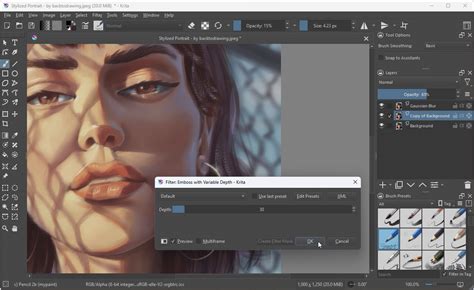
Krita supports almost all graphics tablets directly upon installation, ensuring a smooth drawing experience. Beyond its impressive brush system, it includes features like vector and text capabilities for comic strips, a wrap-around mode for seamless repeating images and patterns, and a robust resource manager for importing tools from other artists. The interface is designed to be intuitive and familiar, with helpful tooltips and convenient features like trackpad slider control.
While Krita is a formidable tool for digital art creation, its photo editing capabilities are less comprehensive than dedicated photo editors. Features such as automatic healing tools and a vast array of photo filters are either limited or absent. However, for artists and illustrators seeking a professional-grade digital painting application without cost, Krita is an exceptional choice.
MyEdit: Fast AI Photo and Video Editing for Occasional Users
MyEdit offers a streamlined approach to AI-powered photo and video editing, making it suitable for occasional users who need quick enhancements. The platform provides a daily allotment of free AI credits, which are useful for experimenting with generative AI features without a significant commitment. Its user-friendly interface ensures that even novice users can quickly apply a variety of AI effects to their images and videos.
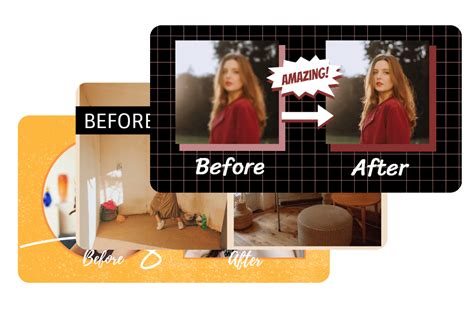
While the daily free credits allow for basic usage, premium plans are available for those who require more extensive access to AI features and additional credits. These plans range from $10 to $18 per month, offering a cost-effective solution for users who need occasional access to advanced AI editing capabilities. MyEdit's focus on speed and ease of use makes it a convenient option for quick edits and creative experimentation.
Darktable: Totally Free RAW Photo Editing for Photographers
Darktable is a completely free and open-source software dedicated to professional RAW photo editing and management. It operates on a workflow similar to that of a traditional darkroom, offering users a powerful environment for developing and processing film-like images. This approach, while requiring an adjustment for those new to darkroom concepts, provides immense control over image aesthetics and effects.
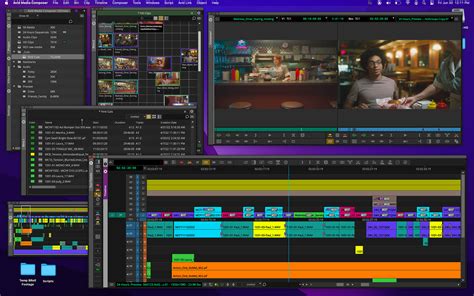
The software features dynamic adjustment filters and presets, making it surprisingly easy and enjoyable to sort through and enhance large batches of photos. For photographers who work extensively with RAW files, Darktable offers professional-grade tools for organization, tethering (connecting a camera directly to the computer for live shooting), and batch exporting. Its commitment to being entirely free, without any premium tiers or subscriptions, makes it a standout option for photographers seeking a powerful and cost-effective solution for their editing needs.
6 FREE* AI Tools for Content Creation | 2025 Updated 🚀
Evaluating the Best Free Photo Editors: A Framework for Selection
When selecting the best free Photoshop alternative, several criteria come into play, reflecting the diverse needs of creative professionals and hobbyists. The evaluation process, which involves extensive hands-on research and testing, focuses on key aspects that determine an application's effectiveness and user experience.
AI Features: The Future of Workflow Acceleration
Artificial Intelligence is rapidly becoming a standard in creative applications, and photo editing is no exception. The best free alternatives not only offer traditional editing tools but also incorporate advanced AI capabilities. These can range from intelligent object removal and background replacement to generative AI features that can create new image elements or expand existing ones based on text prompts. While Photoshop remains a leader in its integrated AI suite, many free alternatives are making significant strides in this area, offering powerful tools to speed up workflows and unlock new creative possibilities.
Ease of Use: Intuitive Design for All Skill Levels
The enduring success of Photoshop's interface, largely unchanged over decades, is a testament to its intuitive design. Similarly, the best free photo editors prioritize ease of use, ensuring that their basic layout and navigation are straightforward. This allows users, whether beginners or experienced professionals, to quickly find the tools they need and execute edits efficiently. A well-designed interface reduces the learning curve and enhances the overall user experience, making the creative process more enjoyable and productive.
Non-Destructive Editing: Preserving Creative Integrity
The ability to edit images without permanently altering the original data is crucial for professional workflows. Non-destructive editing, primarily achieved through the use of layers, allows users to make adjustments, add elements, and experiment with effects without compromising the source image. If a mistake is made or a change is desired later, layers can be easily modified or removed, providing a safety net for creative exploration. This feature is a hallmark of professional editing software and a key consideration when evaluating Photoshop alternatives.
Text and Design Elements: Beyond Pure Photo Manipulation
In today's content-driven digital landscape, photo editing tools are increasingly expected to offer more than just image manipulation. The ability to easily add text, incorporate trending fonts, and utilize pre-designed templates is essential for creating social media content, marketing materials, and other visual assets. The best free alternatives integrate these graphic design capabilities, providing a more comprehensive solution for a wider range of creative projects.
100% Free: Accessibility for All Budgets
The primary motivation for seeking a free Photoshop alternative is often to avoid the financial commitment of subscription-based software. Therefore, the focus remains on applications that are entirely free to use, or offer a highly functional free tier that meets most users' needs. While some paid alternatives offer advanced features, this roundup prioritizes options that provide professional-level capabilities without any cost, making them accessible to students, hobbyists, and professionals working on a tight budget.
The Ongoing Evolution of Creative Software
The landscape of creative software is in constant flux, with new technologies and user demands driving innovation. As AI continues to advance, we can expect to see even more sophisticated tools emerge in free photo editing applications. The competition between established players and emerging free alternatives fosters a dynamic environment where users benefit from an ever-expanding array of powerful and accessible creative tools. Whether you're a seasoned professional looking to cut costs or a beginner eager to explore digital art, the wealth of free Photoshop alternatives available today offers a compelling pathway to achieving your creative vision.
tags: #open #source #alternative #to #photoshop