For decades, Adobe Photoshop has reigned supreme as the market leader in image editing. However, a strong contender has been present for almost as long, offering a nearly identical feature set: Corel PaintShop Pro. This article delves into a detailed comparison of these two powerhouses, exploring their capabilities, user experience, pricing, and AI-driven features to help you determine which program best suits your needs.
Corel PaintShop Pro: An Overview
Corel PaintShop Pro is a comprehensive image-editing program that offers the vast majority of the features its rivals do, notably Adobe Photoshop. It represents excellent value for money with no subscription fee, making it an attractive option for budget-conscious users. While it boasts a robust set of tools, some of its "smart" tools, particularly those lacking generative AI capabilities, may not offer significant advancements over features Photoshop has had for years, and a few can feel a bit unpolished. The workflow and interface, while familiar in parts, can also present a learning curve.
The Corel PaintShop Pro 2023 Experience
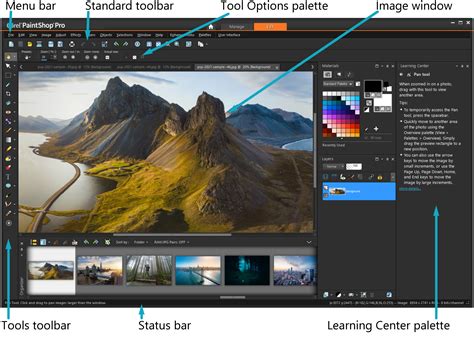
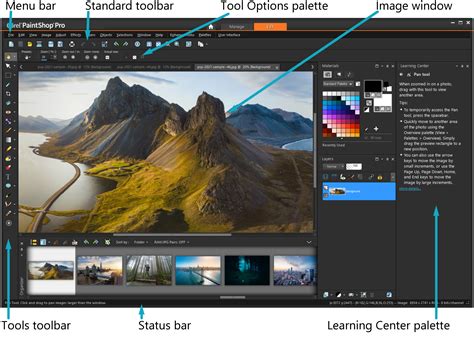
Corel PaintShop Pro 2023 aims to provide a versatile editing experience through its distinct workspaces. The main Complete workspace is designed to be a familiar environment for those seeking a Photoshop alternative. It presents a layout that will feel comfortable to users accustomed to industry-standard software, featuring a Tool palette, Layers panel, and Materials panel, along with a Filmstrip bar for quick image access. For beginners, a dedicated Learning panel offers explanations in easy-to-understand language. Within the Complete workspace, users can toggle between "Edit" and "Manage" modes. The "Manage" mode offers an experience akin to Adobe Bridge for organizing images, while the "Edit" workspace allows for customization of panels, including an optional Organizer panel that functions as a filmstrip bar. This workspace is equipped with essential tools for enthusiast image editors, including selection and masking tools, text and brush tools, and extensive effects menus. Layers can be manipulated with various opacity, masking, and blending options.
For a more streamlined experience, the Essentials workspace strips away many panels, focusing on a simplified Tools Panel and Materials Panel. This mode is suitable for basic image editing, with the option to add back advanced tools if needed.
The Photography workspace is specifically designed for touchscreen devices, featuring a minimalist design with large, clear icons and a simplified menu system, resembling a mobile application. It includes standard sliders for brightness, contrast, white balance, sharpening, fill light, and clarity. However, it lacks advanced features like histograms or individual color channel manipulation. This workspace also incorporates an "AI" button that applies Instant Effects. While these effects, such as Aged or Watercolour, are presented with visual cues of AI processing, they appear to be more algorithmic applications of effects rather than true AI-driven scene or object recognition, with results comparable to other software.
Interface and Workflow: A Tale of Two Workspaces
The interface of PaintShop Pro has evolved significantly since its origins with Jasc Software, initially resembling an advanced version of Microsoft Paint. As Photoshop rose to prominence, PaintShop Pro progressively integrated more of its features. Today, it stands as a primary competitor to Photoshop on Windows.
The initial loading screen prompts users to select a workspace: Complete, Essentials, or Photography. Each of these can have further sub-workspaces tailored to specific tasks. The Complete workspace is the most comprehensive, aiming for a Photoshop-like experience. Its color scheme, iconography, and panel layout (Tool palette, Layers panel, Materials panel, Filmstrip bar) are designed to be familiar to experienced users. Even beginners can find their way with the integrated Learning panel. The Edit and Manage sub-workspaces within the Complete mode offer distinct functionalities for editing and organizing images, respectively. Users can customize the workspace by turning panels on or off and rearranging them. While most essential tools are present, Photoshop users might need a brief period of exploration to locate them due to slightly different naming conventions or placements.
The Photography workspace, while offering a clean, app-like interface for touchscreens, presents a significant contrast to the Complete workspace. This jarring difference can be a point of frustration for users who switch between them. Its simplicity means a lack of advanced controls, such as histograms, which are standard in more professional software.
An Introduction to the PaintShop Pro Workspaces
Pricing and Value Proposition
A key differentiator between Corel PaintShop Pro and Adobe Photoshop is their pricing model. PaintShop Pro is available as standalone software with no subscription fee, offering excellent value for money. The Pro version is priced at $79.99 / £69.99 / AU$83, while the Ultimate version costs $99.99 / £89.99 / AU$104.
The Ultimate version includes additional software packages:
- Corel MultiCam Capture 2: For simultaneous screen and webcam recording.
- Highlight Reel: For creating short highlight videos.
- Sea-to-Sky workspace: Designed for underwater and drone image editing.
- PhotoMirage Express: For creating animated images.
- Corel Painter Essentials 8: A digital painting program.
- 50 Free Fonts: An assortment of fonts for creative projects.
- Corel Creative Collection: Includes new backgrounds, paintbrushes, and textures.
While most photographers and graphic artists will find the Pro version sufficient, the Ultimate version's Sea-to-Sky mode might appeal to those who regularly work with drone or underwater imagery. Upgrade pricing is available for existing users. Crucially, Corel offers a 30-day free trial, allowing users to test the software before committing to a purchase. This subscription-free model contrasts sharply with Adobe's subscription-based approach for Photoshop, making PaintShop Pro a more budget-friendly option.

Raw Photo Editing Capabilities
For photographers working with raw image files, PaintShop Pro offers three distinct approaches. The AfterShot Lab functions as a Camera Raw-style editor, but it lacks the advanced options for selective adjustments and masking found in competitors like Adobe Lightroom. It primarily serves as image-adjustment software, providing essential tools for noise reduction, sharpening, and lens correction.
The Camera RAW Lab streamlines this process further by operating within a floating window. However, this interface appears dated and even promotes Corel's separate AfterShot Pro 3 software, which is an additional purchase.
The third option allows PaintShop Pro to automatically apply a default decoding of the raw image and open it directly within the main editing environment for further manipulation. While these options provide basic raw editing functionality, they fall short of the more sophisticated and integrated raw processing capabilities offered by Adobe's ecosystem.
AI-Powered Features: A Mixed Bag
PaintShop Pro 2023 incorporates several AI-powered tools, though their effectiveness and sophistication are often compared unfavorably to Adobe's offerings.
AI Portrait Mode
The AI Portrait Mode is designed to be straightforward, located within the Adjust menu. Its primary function is to recognize subjects and create a selection, allowing for background blurring to simulate a shallow depth-of-field effect. However, it lacks more advanced facial adjustments, skin smoothing, or AI makeup features.
The AI in Portrait Mode is primarily image recognition. The software identifies potential subjects, presenting a cutout area. While the cutout is generally good, it's not always perfect, particularly with fine details like hair. Edges can sometimes show remnants of the background, and hair is consistently a challenge for automated selection tools. Photoshop's AI tools often produce a cleaner initial selection.
Users can manually refine the mask with standard tools for adding or removing areas, expanding borders, and feathering edges, which is particularly useful for complex hair textures. After the selection, the background can be blurred, with options to adjust blur strength and even the shape of the bokeh. The focus range can also be modified, affecting the blur strength, seemingly tied to the proximity of the face. However, there appears to be no AI depth map creation beyond edge detection.
Despite being advertised as "AI," the Portrait Mode often requires significant user input to achieve polished results. Compared to the highly automated and effective portrait modes found on premium smartphones, PaintShop Pro's implementation, while functional, demands more effort for comparable outcomes.
AI Background Replace
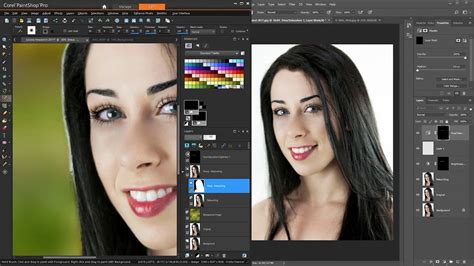
Leveraging the same cutout technology as AI Portrait Mode, the AI Background Replace tool allows users to substitute the original background with a new one. Users can choose from a selection of provided backgrounds or import their own images. The success of this tool is heavily dependent on the quality of the initial subject cutout.
The significant advantage here lies with Adobe Photoshop's Generative Fill tools, which can create entirely new backgrounds based on text prompts, offering unparalleled flexibility and creativity. PaintShop Pro's Background Replace, while capable of reasonably cutting out a portrait and changing the background, is fundamentally a layering process that lacks the generative power and finesse of Photoshop's AI capabilities.
AI Denoise and Artifact Removal
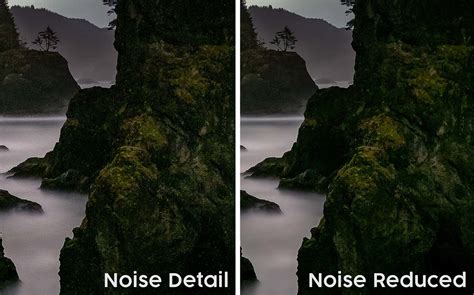
Within the AI menu, users will find AI Denoise and Artifact Removal. The Artifact Removal is a one-click function that automatically analyzes and reduces artifacts in an image. Its impact is subtle, primarily noticeable at high magnifications when dealing with JPEG compression artifacts. The lack of a preview option makes it difficult to assess changes before applying them.
AI Denoise, conversely, offers a preview window and three levels of severity. The highest setting effectively reduces both luminance and color noise, producing excellent results. However, users might want to reintroduce a touch of film grain for texture afterward. It's worth noting that PaintShop Pro also includes a separate "Digital Noise Removal Tool" (a one-click process) and options within the "Add/Remove Noise" menu, which can lead to confusion regarding the different noise reduction functionalities.
AI Upscaling
The Photography Editing workspace houses an AI-powered upscaling tool that can enlarge images up to 10,000 pixels along the longest edge. It offers "Photorealistic" or "Illustration" options to guide the rendering process. Users can simultaneously reduce noise while upscaling, with a slider controlling the strength. This feature can be compared to Adobe Camera Raw's "Enhance" feature, which offers a 100% resolution increase.
Photoshop: The Industry Standard
Adobe Photoshop remains the undisputed leader in professional image editing. Its comprehensive feature set, industry-standard tools, and continuous innovation, particularly with AI, set it apart.
Generative AI: The Game Changer
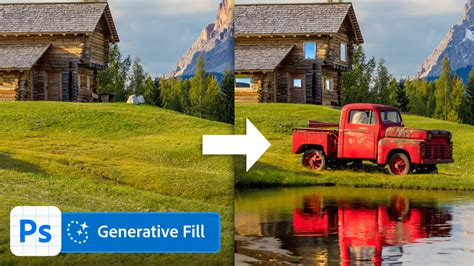
Photoshop's most significant advancement in recent years is its integration of Generative AI, most notably Generative Fill. This powerful tool allows users to select an area and describe what they want to add or change, with Photoshop generating new content seamlessly. This capability revolutionizes image manipulation, enabling users to create complex scenes, remove unwanted objects with astonishing realism, or expand image canvases effortlessly. The "real cherry on the Photoshop cake," as noted, is the sheer creative freedom and efficiency that Generative Fill provides, a feature notably absent in PaintShop Pro.
Workflow and Interface
Photoshop's interface, while complex, is highly customizable and has been refined over decades to cater to professional workflows. Its consistent design language across Adobe's Creative Cloud suite ensures a cohesive user experience. While it can be intimidating for beginners, its vast array of tutorials, online resources, and industry adoption make it a more accessible tool for those committed to mastering professional image editing.
AI Tools in Photoshop
Beyond Generative Fill, Photoshop's AI capabilities are deeply integrated across its features. Tools like Content-Aware Fill, Sky Replacement, and Object Selection are powered by sophisticated AI that understands image context, leading to more accurate and efficient results compared to many of PaintShop Pro's AI implementations. The AI-powered selection tools, in particular, often provide cleaner and more precise initial cutouts, significantly reducing manual refinement time.
Key Differences Summarized
| Feature | Corel PaintShop Pro 2023 | Adobe Photoshop |
|---|---|---|
| Pricing Model | One-time purchase (Pro/Ultimate) | Subscription-based (Creative Cloud) |
| Value for Money | Excellent, especially for non-subscribers | Higher cost due to subscription, but offers industry standard |
| Generative AI | Lacks generative fill capabilities | Advanced Generative Fill and other AI features |
| AI Tool Precision | Generally less precise than Photoshop | High precision and intelligence |
| Interface | Multiple workspaces, can be jarring between them | Consistent, professional, highly customizable |
| Raw Editing | Basic options (AfterShot Lab, Camera RAW Lab) | Advanced, integrated Camera Raw editor |
| Learning Curve | Can be tricky; multiple workspaces add complexity | Steep for beginners, but extensive resources available |
| Target Audience | Budget-conscious users, hobbyists, those avoiding subscriptions | Professionals, serious enthusiasts, those needing cutting-edge AI |
| Ultimate Version | Adds specialized software (e.g., Sea-to-Sky) | All features included in subscription |
Conclusion: Who Wins the Battle?
The choice between Corel PaintShop Pro and Adobe Photoshop ultimately depends on individual needs, budget, and desired level of professional output.
Corel PaintShop Pro stands out as an exceptional value proposition. Its one-time purchase model makes it highly accessible, and it offers a comprehensive suite of editing tools that will satisfy the vast majority of hobbyists and even many professional users who don't require the absolute bleeding edge of AI technology. Its familiar interface in the Complete workspace is a boon for those transitioning from other software, and its inclusion of specialized tools in the Ultimate version can be beneficial for niche applications like drone or underwater photography. However, its AI tools, while functional, often lag behind Photoshop in terms of precision and innovative capabilities, notably missing the transformative power of Generative Fill. The inconsistency between its different workspaces can also be a point of friction.
Adobe Photoshop, on the other hand, remains the industry benchmark for a reason. Its unparalleled feature set, robust AI integration (especially Generative Fill), and professional-grade tools make it the go-to choice for serious photographers, graphic designers, and digital artists. While its subscription model represents a higher ongoing cost, the continuous updates, advanced capabilities, and the sheer creative potential unlocked by its AI features justify the investment for many. The learning curve is steeper, but the vast ecosystem of resources and professional adoption means that mastering Photoshop opens more doors in the creative industry.
For users seeking a powerful, affordable, and subscription-free image editor, PaintShop Pro is a compelling option. For those who demand the absolute latest in AI-driven creative tools, industry-standard workflows, and are willing to invest in a subscription, Photoshop remains the undisputed champion. The "smart tools" in PaintShop Pro may not always be as cutting-edge as Photoshop's, and some can feel "rough around the edges," but the overall package offers a strong alternative, especially when considering its price point. The core functionality is present, and for anyone looking for a budget Photoshop alternative, PaintShop Pro is certainly worth considering.