In an era where digital convenience reigns supreme, the preservation of tangible memories captured on film slides and negatives often presents a nostalgic challenge. These delicate physical artifacts hold immeasurable sentimental value, yet their existence is perpetually threatened by the passage of time, environmental factors, and the inherent fragility of photographic materials. Fortunately, innovative solutions have emerged to bridge the gap between the analog past and the digital present. Photomyne, through its intuitive applications and thoughtfully designed accessories, offers a powerful and accessible pathway to transform these cherished remnants of yesteryear into vibrant, enduring digital photographs. This guide delves into the intricacies of using Photomyne's technology, focusing on the essential role of backlight sources and exploring a suite of accessories designed to elevate the digitization process from a daunting task to an enjoyable and highly effective endeavor.
The Foundation of Digitization: Mastering the Backlight
At the core of Photomyne's scanning technology, whether for slides or film negatives, lies the critical requirement for a backlight source. This illumination is not merely a passive element; it is the very engine that allows the app to "see" and capture the image embedded within the translucent medium. The principle is straightforward: the backlight penetrates the slide or negative, rendering the image visible and allowing the smartphone's camera to record it. Without adequate and appropriate lighting, the digitization process would be compromised, resulting in dark, indistinct, or unusable scans.
Creating an Effective Backlight Source
Photomyne provides users with flexible options for establishing this crucial backlight. The simplest method involves utilizing readily available digital devices. By opening a plain white screen on a tablet or computer, a functional backlight can be created. The app explicitly suggests navigating to photomyne.com/backlight for a dedicated backlight tool, which can be accessed via a web browser on various devices. The paramount instruction for any chosen backlight source is to ensure it is set to its absolute highest brightness setting. This maximizes the light penetration and, consequently, the clarity of the image being captured.
The Importance of Distance and Pixelation
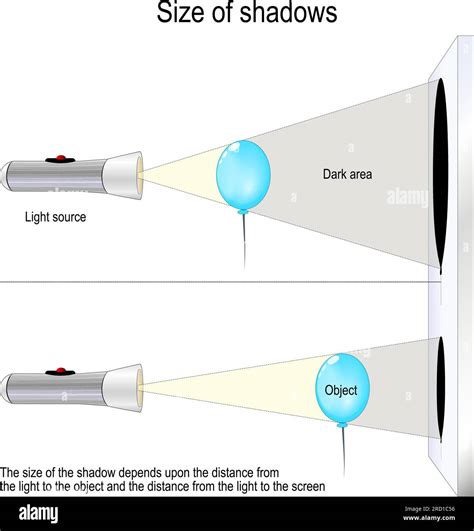
While a bright backlight is essential, its proximity to the slide or negative requires careful consideration. Holding the photographic medium too close to the light source can lead to an undesirable effect known as pixelation. This occurs when the individual pixels of the backlight source become discernible within the scanned image, compromising its overall sharpness and detail. Photomyne recommends a specific distance, generally around 3-5 centimeters (approximately 1.2-2 inches), to strike a balance between sufficient illumination and the avoidance of pixelation. This mindful spacing ensures that the captured image is a faithful representation of the original, free from digital artifacts.
Capturing the Image: The Scanning Process
Once the backlight is optimally configured, the next step involves the actual capture of the image. Photomyne’s applications are designed for user-friendliness, guiding individuals through this process with minimal complexity.
Manual Capture and Voice Control
For slide scanning, after positioning the slide steadily in front of the backlight, the user simply needs to tap the capture button within the app. This action initiates the phone's camera to record the illuminated image. Recognizing the desire for a more streamlined and hands-free experience, Photomyne has introduced a voice control option in version 2.0 and later. By activating this feature, users can simply say "Go" to trigger the scan. This hands-free capability is particularly beneficial for maintaining a steady hand during the capture, further contributing to image quality. It is important to note that this voice control functionality is currently available only for iOS devices.
For film negatives, the process is analogous. A film strip is held steady in front of the backlight. The app’s scanner then transforms the phone’s camera into a smart film reader. The captured image is automatically inverted from negative to positive, and the colors are enhanced, revealing the intended photograph. Similar to slide scanning, a capture button is available, alongside the voice control option for hands-free operation on iOS devices.
The Art of Holding Steady
Maintaining a steady hand is a recurring theme in achieving high-quality scans. Whether holding a slide or a film negative, any slight tremor can result in a blurred or out-of-focus final image. To mitigate this, Photomyne suggests various approaches. For slides, using a clip or a clothespin can aid in holding the slide steady in front of the backlight. For film negatives, holding the strip vertically is recommended, ensuring that the perforations (holes) along the edges are within the scanning frame.
The Magic of Photomyne's Processing
Where Photomyne truly distinguishes itself is in its intelligent post-capture processing. The app is engineered to perform a series of automatic enhancements that significantly improve the quality and presentation of the digitized images.
Automatic Detection, Rotation, and Cropping
Upon capturing an image, the app's sophisticated algorithms get to work. It automatically detects the actual image within the slide or negative, distinguishing it from the surrounding margins or borders. If the original capture was slightly askew, the app will rotate the image to ensure it is correctly oriented. Crucially, it then crops the image, isolating the photograph itself and removing any extraneous elements from the slide's or negative's frame. This automated cropping ensures that the final digital photo is presented cleanly and professionally.
Color Enhancement and Inversion
For film negatives, the process extends to color correction. The app inverts the negative colors into their positive counterparts, a fundamental step in revealing the true appearance of the captured scene. Furthermore, it applies enhancements to the colors, aiming to bring out the vibrancy and detail that may have faded over time or were not optimally rendered in the original film. This intelligent enhancement helps to breathe new life into old images, making them appear brighter and more beautiful.
Elevating Scan Quality with Photomyne Accessories
While the core functionality of Photomyne’s apps is impressive on its own, the company recognizes that achieving the absolute best possible scanning results often benefits from specialized tools. A range of accessories has been developed to address common challenges and further refine the digitization workflow.
The Light Pad: Uniform Illumination and Stability
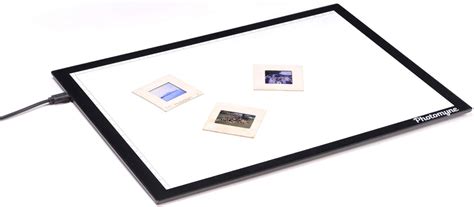
One of the most impactful accessories is the Light Pad. For users who find it challenging to maintain a steady hand while simultaneously holding a slide or negative between a device's screen and their phone, the Light Pad offers a superior solution. It provides a flat, evenly illuminated surface onto which slides or negatives can be placed. This allows the user to concentrate solely on positioning and operating their phone for scanning. The Light Pad’s consistent illumination eliminates hot spots and uneven lighting, ensuring a more uniform and high-quality scan. Moreover, its surface can often accommodate multiple slides or negative strips at once, significantly speeding up the scanning process.
Phone Stands and Tablet Holders: The Key to Steadiness
Maintaining a steady device is paramount for sharp, in-focus scans. Photomyne offers Phone Holders and Tablet Stands designed to provide a stable platform for your smartphone or tablet during the scanning process. These accessories often feature adjustable height and angle settings, allowing for precise positioning to capture images with optimal clarity. By eliminating the need to hold the device manually for extended periods, these stands not only ensure steadiness but also reduce user fatigue, making longer scanning sessions more manageable.
The Photo Shooting Tent: Eliminating Glare and Softening Shadows
For those seeking to achieve professional-grade results, the Photo Shooting Tent is an invaluable tool. This accessory is designed to diffuse light sources, effectively softening shadows and significantly reducing glare. Glare can be a persistent problem when scanning reflective surfaces or when ambient light interferes with the backlight. The tent creates a controlled environment that minimizes these unwanted effects, leading to beautiful, glare-free scans with minimal effort. Its lightweight and portable nature also makes it easy to set up and use in various conditions.
The Clicker: Hands-Free Convenience and Stability
Complementing the phone stands and holders, the Bluetooth Clicker offers an enhanced level of hands-free operation. This small, portable device connects wirelessly to your smartphone and allows you to trigger scans from a distance of up to 30 feet. This is particularly useful when using a phone stand, as it eliminates the need to reach for the device to initiate a scan, thereby preventing any accidental movement. The clicker ensures that your scans remain crystal clear and stable, contributing to the overall quality of the digitized images.
The Slide Viewer: Enhanced Inspection and Detail
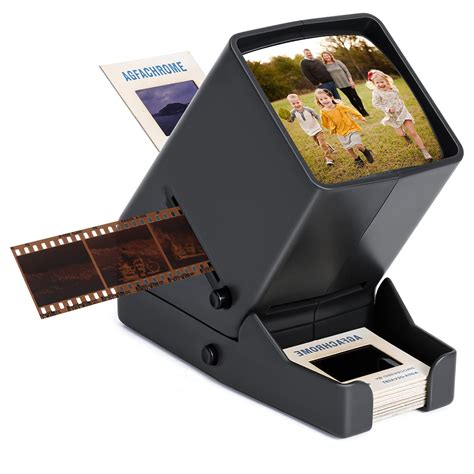
For a more intimate engagement with your slides and negatives before or during the scanning process, the Slide Viewer is an excellent addition. This device provides a high-quality way to view your slides and negatives up close, allowing you to appreciate the details and memories they hold. It typically features a built-in backlight and a zoom function, enabling you to magnify images and inspect them thoroughly. The Slide Viewer is not only portable but also serves as a perfect companion to the Photomyne app, facilitating a more informed and quality-focused scanning workflow.
Preserving the Originals: Protective Pages
Beyond the act of digitization, Photomyne also offers solutions for the ongoing preservation of your physical slides. The Protective Photo Slide Pages are designed to shield your slides from dust and dirt while keeping them organized and easily accessible. This ensures that your original slides remain in good condition, even as their digital counterparts are enjoyed and shared.
The Broader Context: Digitization in the Modern Age
The ability to digitize old photographs, slides, and negatives is more than just a technological convenience; it is a vital means of preserving personal and familial histories. In an age where physical media can degrade or be lost, transforming these memories into digital formats ensures their longevity and accessibility. Photomyne’s approach, combining user-friendly software with a comprehensive ecosystem of accessories, democratizes the process of photo preservation. It empowers individuals to take control of their photographic heritage, transforming dusty attics and forgotten boxes into vibrant digital albums that can be shared across generations and continents.
From film to pixels: The rise of digital photography
The journey from analog film to digital images is a testament to human ingenuity in preserving memories. Photomyne's photomyne.com/backlight and its associated apps, along with carefully crafted accessories, provide a robust and accessible solution for anyone looking to safeguard their past. By understanding and implementing the tips and tools discussed, users can ensure that their cherished slides and negatives are transformed into high-quality digital photographs, ready to be enjoyed for years to come. The process, once daunting, is now within reach, allowing every precious memory to be seen, shared, and preserved in the digital age. The very act of digitizing these remnants of the past is a profoundly meaningful endeavor, ensuring that stories, faces, and moments are not lost to time but are instead brought to life for future generations.