In the ever-evolving landscape of digital photography and image editing, the ability to meticulously remove unwanted objects from a photograph has become an indispensable skill. Whether it's a distracting photobomber, an unsightly power line marring a scenic vista, or a stray logo detracting from a carefully composed product shot, modern software empowers creators to achieve near-perfection with remarkable ease. This capability is largely driven by advancements in artificial intelligence, offering tools that can intelligently analyze an image and seamlessly fill in the removed areas, preserving the integrity and aesthetic appeal of the original scene.
The Power of Generative AI in Object Removal
At the forefront of this technological revolution is Adobe Firefly's Generative Remove feature. This AI-powered tool simplifies the process of eliminating distractions to a few intuitive steps. Users simply need to log in to Adobe Firefly, either by using an existing Adobe ID or creating a free account. Once an image is uploaded, the Generative Remove function allows for precise object selection. By painting over the unwanted object with a brush, users can then initiate the generation process. Firefly's AI then analyzes the surrounding pixels and intelligently synthesizes a natural-looking replacement for the removed area, effectively making the object disappear without leaving a trace. This technology is not limited to minor blemishes; it can effectively remove anything that pulls focus away from the subject, including power lines, wires, street signs, random logos, watermarks, or stray text. The process is remarkably quick, often completing the removal in mere seconds. Once the edit is satisfactory, users have the flexibility to download the modified image, copy it to their clipboard, or share it directly with others.
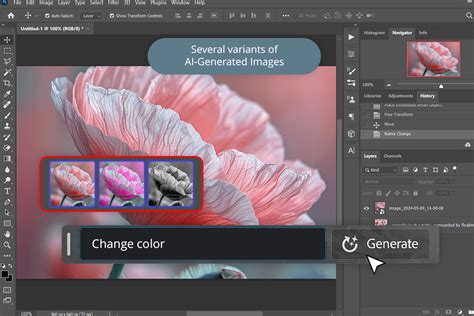
The underlying principle of Generative Remove is its sophisticated AI model. This model is trained on a vast dataset of licensed content, including Adobe Stock images and public domain works where copyright has expired. This ensures that the AI's generated content is not only visually plausible but also commercially safe. The primary benefit for creators is the ability to go from a raw, imperfect image to a polished final product rapidly, all while retaining a significant degree of creative control. For instance, removing a photobomber from a cherished vacation photo or eliminating a distracting trash can from a landscape shot becomes a straightforward task. Similarly, in the realm of food photography, unwanted background elements can be swiftly erased to keep the focus squarely on the culinary subject. The AI's ability to mimic human intelligence, though not replace it entirely, allows for nuanced edits that preserve the authentic details of the image.
Understanding the "Magic Eraser" Concept
Beyond Adobe Firefly, the concept of an AI-powered "magic eraser" has permeated various image editing platforms, with Canva's Magic Eraser being a prominent example. This tool is designed to make the often-complex process of removing unwanted objects from photos remarkably simple. Users select the Magic Eraser tool within Canva's photo editor, brush over the object they wish to remove, and the AI automatically removes it, ensuring the subject stands out. This approach eliminates the need for extensive manual editing, which can be time-consuming and require specialized skills.
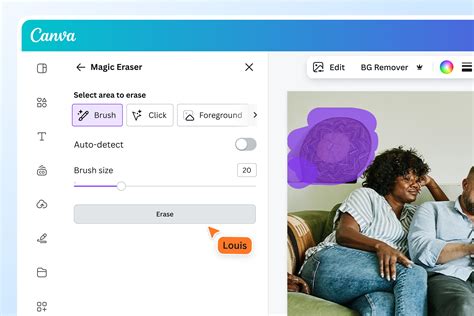
The practical applications of such tools are far-reaching. In real estate photography, for instance, removing unwanted furniture, cars, or even people from property photos can significantly enhance their appeal to potential buyers. For e-commerce businesses, cleaning up product photos by removing distracting backgrounds, props, or logos is crucial for creating professional and sales-driving visuals. Fashion and auto listings also benefit from the ability to present products in a clean, uncluttered environment. Social media content creators can effortlessly remove blemishes or unwanted elements to maintain a polished online presence. Even in the creation of comics or graphic novels, the ability to remove extraneous elements can streamline the artistic process.
What makes these "magic eraser" tools particularly special is their blend of simplicity and power. They require no prior design skills, allowing users to employ them as freely as a child would use a physical eraser. Yet, they offer a degree of accuracy that is sufficient for professional designers and photographers, allowing for precise control through zoom features and brush size adjustments. The AI assistance ensures that these stunning edits are achieved in seconds, a stark contrast to the hours that traditional manual editing might require.
Photoroom: AI-Powered Object Removal for E-commerce
Photoroom presents a compelling solution specifically tailored for e-commerce businesses, emphasizing speed and efficiency in product photography retouching. Their AI photo eraser allows sellers to remove unwanted objects from product images in just a few swipes. The AI then intelligently fills in the background, creating a natural and realistic finish. This capability is a significant time and cost saver, as traditional photo editing can be slow, expensive, and inconsistent. Photoroom's AI object remover enables batch editing of product images, allowing businesses to retouch hundreds of photos simultaneously and launch new products much faster.

The tool is versatile, capable of erasing unwanted objects from virtually any type of product photo, including clothing, furniture, beauty products, and food items. This means that whether a seller needs to remove people, props, or background clutter, Photoroom can help create polished, sales-driving visuals for online stores and marketplaces. Beyond object removal, Photoroom offers a suite of AI product photography tools, including AI Backgrounds, Virtual Models, and Product Staging, enabling businesses to produce studio-quality visuals at scale. Businesses that have adopted Photoroom report significant improvements, including substantial boosts in sales, dramatic reductions in photo editing costs, and increased sell-through rates, alongside achieving high levels of visual branding compliance.
The process with Photoroom is as follows: first, an image is selected and uploaded to the photo editor. Then, the user employs a brush tool to highlight the unwanted object, adjusting the brush size as needed. Finally, the AI processes the selection and removes the object, filling in the background. Photoroom also supports batch editing, allowing users to apply the same edits to multiple images simultaneously, and offers collaborative features for teams to share feedback and designs in real-time.
The Mechanics of Object Removal: From Brush Strokes to AI Generation
Regardless of the specific application or platform, the core principle behind AI-driven object removal involves a combination of user input and intelligent algorithmic processing. When a user "paints" over an object, they are essentially providing a mask that identifies the area to be removed. The AI then analyzes this masked area in conjunction with the surrounding context of the image. This analysis involves understanding textures, patterns, colors, and lighting to generate a plausible replacement.
For instance, if a power line is to be removed from a sky background, the AI will analyze the color and gradient of the sky in the vicinity of the power line and generate pixels that seamlessly blend with it. If an object is removed from a textured surface, like a brick wall, the AI will attempt to replicate the pattern and texture of the wall in the newly generated area. The effectiveness of this process relies heavily on the sophistication of the AI model and the quality of the training data.
The Future of Object Removal: VFX + AI Workflow
While AI excels at filling in predictable backgrounds, more complex scenarios, such as removing an object that casts a shadow or is partially obscured by another element, can still present challenges. In such cases, users may need to employ manual editing tools in conjunction with AI. Many platforms offer a "manual eraser" that can be used to fine-tune the results of the AI's work, allowing for precise adjustments and ensuring that no unnatural artifacts remain.
The process often involves an iterative approach. If the initial result is not satisfactory, users are encouraged to try the removal process again. AI models can learn and improve with subsequent attempts, or users can adjust their brush strokes and selection areas for better outcomes. The ability to undo changes and re-select areas is crucial for achieving the desired perfection.
Expanding Creative Possibilities: Beyond Simple Erasure
The technology behind object removal is not limited to simply erasing unwanted elements. Advanced AI tools are also enabling users to add or replace objects within an image. Canva's Magic Edit, for example, allows users to brush over an area and then describe what they want to see in its place. This could range from adding a palm tree to a beach photo to replacing a picture on a wall with something else. The AI then generates the requested object, making it appear as if it were always part of the original scene.
This generative capability opens up a new realm of creative possibilities. Users can not only clean up their photos but also creatively enhance them by adding elements that were not present in the original shot. This extends the utility of these tools beyond mere retouching into the domain of digital art and creative composition.
Furthermore, the integration of object removal tools within broader editing suites means that users can perform a multitude of edits on a single image without needing to switch between different applications. This includes cropping, rotating, resizing, adjusting color and texture, and applying filters and effects. The ability to perform all these actions within a single, intuitive interface streamlines the entire editing workflow, empowering users to create perfect pictures efficiently.
Accessibility and Future of Object Removal
A significant aspect of modern object removal tools is their accessibility. Many platforms, like Adobe Firefly and Canva, offer free tiers or trials, allowing individuals to experiment with these powerful features without significant financial commitment. This democratization of advanced editing capabilities means that anyone with an internet connection can now achieve professional-looking results.
The availability of mobile applications for these tools further enhances their accessibility. Users can download apps on their iOS or Android devices and edit photos anytime, anywhere. This is particularly beneficial for social media users and content creators who need to make quick edits on the go.
Looking ahead, the integration of AI into image editing is only set to deepen. We can anticipate even more sophisticated object removal capabilities, perhaps with AI that can predict and remove unwanted elements even before the user explicitly identifies them. The development of APIs, such as those offered by Photoroom's Magic Studio, also suggests a future where AI-powered image editing features are seamlessly integrated into a wide range of applications, further empowering creators and businesses. The continuous evolution of AI promises to make image manipulation more intuitive, efficient, and creatively liberating than ever before.