Photoshop, a titan in the realm of digital image manipulation, offers photographers an unparalleled toolkit to transform their captured moments into compelling visual narratives. For those looking to elevate their craft beyond the initial click of the shutter, understanding and utilizing Photoshop's powerful features is no longer an option, but a necessity. This article delves into the core concepts and practical applications of Photoshop specifically tailored for photographers, exploring how to achieve precise edits, enhance visual storytelling, and ultimately, bring your artistic vision to life.
The Foundation: Understanding Layers and Masks
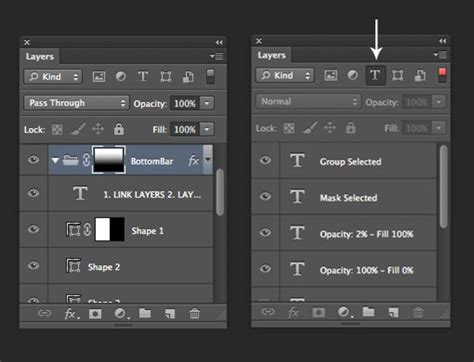
At the heart of Photoshop's power lies the concept of layers. Imagine them as transparent sheets stacked on top of each other, each containing a different element of your image. This fundamental principle allows for nondestructive editing, meaning you can make changes to one layer without permanently altering the underlying image data. This offers immense flexibility, enabling you to experiment with adjustments, corrections, and creative additions without fear of irreversibility.
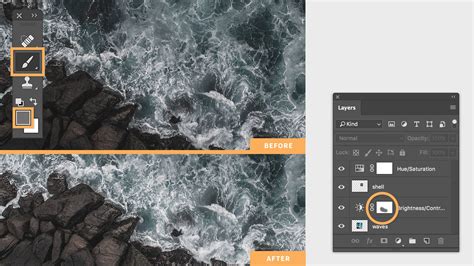
Closely intertwined with layers are layer masks. A layer mask acts like a stencil, controlling the visibility of a layer. By painting with black, white, or shades of gray on a mask, you can selectively reveal or conceal parts of a layer. This is an incredibly powerful technique for isolating areas of an image for specific adjustments, seamlessly blending elements, or creating sophisticated visual effects. For instance, if you want to adjust the color of only the sky in a landscape photograph, you would use a layer mask to ensure your adjustments only affect that specific area, leaving the rest of the image untouched.
Adobe Camera Raw (ACR) is another critical tool for photographers, especially those shooting in RAW format. ACR serves as a powerful processing engine that allows you to make fundamental adjustments to your images before they even enter Photoshop. This includes correcting exposure, white balance, highlights, shadows, and sharpening. By leveraging ACR, you can establish a solid foundation for your edits, ensuring you're working with the best possible starting point. Learning to effectively use ACR in conjunction with Photoshop's layers and masks unlocks a significant portion of the software's potential for photographers.
Precision Adjustments: Leveraging Adjustment Layers
Adjustment layers are a cornerstone of efficient and professional Photoshop workflows. Unlike direct image adjustments that permanently alter pixels, adjustment layers apply changes to the layers below them non-destructively. This means you can modify or even remove the adjustment at any time without degrading the image quality.
These layers offer a comprehensive suite of tools for refining the color and tonal qualities of your photographs. Hue/Saturation allows you to alter the color balance and intensity of specific colors. Color Balance lets you shift the overall color cast of your image towards warmer or cooler tones. Brightness/Contrast provides straightforward control over the overall lightness and darkness of your image. Levels and Curves are more advanced tools that offer granular control over the tonal range of your image, allowing you to recover detail in highlights and shadows, and to precisely shape the overall contrast and mood.
Mastering adjustment layers is crucial for photographers aiming for a polished and professional look. They enable you to fine-tune every aspect of your image's appearance, from subtle color corrections to dramatic tonal transformations, all while maintaining the flexibility to revisit and refine your edits as needed. This non-destructive approach is a key differentiator between amateur and professional post-processing.
Isolating and Combining: Selections and Compositing
Selections are the building blocks for targeted editing in Photoshop. They allow you to isolate specific parts of an image so that any subsequent adjustments or edits only affect the selected area. Photoshop offers a variety of selection tools, each suited for different scenarios. The Marquee tools are ideal for geometric selections, while the Lasso tools provide freehand selection capabilities. The Magic Wand and Quick Selection tools are adept at selecting areas based on color and texture, and the powerful Pen Tool allows for precise, path-based selections, essential for complex shapes and edges.
Once an area is selected, you can apply adjustments, filters, or other edits exclusively to that region. This is invaluable for tasks such as brightening a subject's face without overexposing the background, or changing the color of a specific object.
Image compositing takes the concept of selections a step further by enabling you to combine elements from multiple photographs into a single, cohesive image. This technique is used extensively in advertising, conceptual photography, and fantasy art. By carefully selecting and masking elements from different sources, and then adjusting their lighting, color, and perspective to match, you can create entirely new realities. For example, you might composite a person into a different background, or combine multiple images of a product to showcase it from various angles. This skill allows for immense creative freedom and the ability to tell stories that go beyond the limitations of a single photograph.
8-Step GUIDE: Blend Images and Create Composites Like a Pro with Photoshop ✅🔥
Workflow Enhancements: Actions and Automation
For photographers who perform repetitive tasks or apply similar creative styles across multiple images, Photoshop Actions are an indispensable tool. An action is essentially a recorded sequence of commands and edits that can be played back with a single click. This can dramatically speed up your workflow, ensuring consistency and efficiency.
For instance, you could record an action that applies a specific set of adjustments to your RAW files upon import, such as sharpening, noise reduction, and basic color correction. Or, you might create an action for applying a particular stylistic look, like a vintage or cinematic effect, to a batch of images. Actions can also be shared among other photographers, fostering a collaborative environment for developing and distributing creative presets.
Beyond individual actions, Photoshop offers further automation capabilities. Batch processing allows you to apply an action to an entire folder of images simultaneously. This is a lifesaver for wedding photographers, event photographers, or anyone dealing with large volumes of images that require consistent processing. By understanding and implementing Photoshop Actions and batch processing, photographers can reclaim significant time, allowing them to focus more on the creative aspects of their work and less on tedious, repetitive tasks.
Specialized Techniques for Photographers
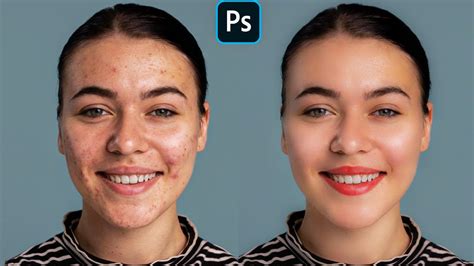
Photoshop offers a plethora of specialized techniques that can significantly enhance photographic output. Retouching skin, for example, is a common requirement for portrait photographers. This involves smoothing skin texture, reducing blemishes, and evening out skin tones in a way that appears natural and not overly airbrushed. Techniques like frequency separation and careful use of healing brushes and clone stamps are crucial here.
HDR (High Dynamic Range) photography aims to capture a greater range of luminosity than is possible with standard camera settings. Photoshop allows you to merge multiple bracketed exposures (photos taken at different exposure levels) into a single image that retains detail in both the brightest highlights and the darkest shadows. This is particularly useful for landscape photography where scenes often have a wide tonal range.
Color popping and selective color are popular techniques that draw attention to specific elements within an image. Color popping involves desaturating the entire image except for a single, chosen color, making that color stand out dramatically. Selective color, a more nuanced approach, allows you to isolate and adjust specific color ranges within the image, adding emphasis or artistic flair.
Double exposures and composites (as mentioned earlier) are creative techniques that merge two or more images to create a single, often surreal or artistic, image. This can be used to tell a story, evoke an emotion, or simply create a visually striking piece of art.
Photoshop vs. Lightroom: Understanding the Synergy
While both Photoshop and Lightroom are powerful tools from Adobe designed for photographers, they serve distinct but complementary purposes. Lightroom is primarily a photo management and raw processing application. It excels at importing, organizing, keywording, and making global adjustments to large libraries of images. For many photographers, especially those focused on events, portraits, or general photography, Lightroom's editing capabilitiesâwhich include global adjustments to exposure, color, contrast, and sharpeningâare often sufficient for achieving a polished look.
Photoshop, on the other hand, is a pixel-level editor offering unparalleled control for detailed manipulation. It's the go-to software for complex tasks such as intricate retouching, compositing, digital painting, and advanced graphic design. When a photographer needs to perform edits that go beyond global adjustmentsâlike removing distracting elements, combining multiple images, or performing highly specific color corrections on a small areaâPhotoshop becomes indispensable.
It is common and highly beneficial for professional photographers to use both applications in tandem. The typical workflow involves importing and making initial global adjustments in Lightroom, and then sending specific images to Photoshop for more detailed or creative editing. After completing the work in Photoshop, the edited image can be seamlessly returned to Lightroom for final touches, cataloging, and export. Understanding this synergy allows photographers to leverage the strengths of each program for maximum efficiency and creative output.
The Importance of Practice and Continuous Learning
The journey to mastering Photoshop is one of continuous learning and dedicated practice. The software is vast, with new features and updates introduced regularly. Resources for learning are abundant, ranging from official Adobe tutorials and online courses to specialized workshops and community forums.
Online platforms like Udemy and Phlearn offer a wealth of Photoshop courses specifically tailored for photographers, catering to all skill levels, from absolute beginners to advanced users. Many of these courses provide hands-on practice files, allowing learners to follow along with the instructor and apply the techniques directly. The School of Photography, for instance, offers structured courses with a focus on practical application and clear explanations, often including downloadable assets like RAW files for practice.
For those who prefer structured, in-person learning, workshops like those sometimes offered in locations like Princeton, New Jersey, provide a focused environment with direct interaction with instructors. These sessions, often held in small groups, allow for ample opportunity for questions and personalized guidance. Instructors like Alan Kesselhaut are noted for their patient and thorough approach, ensuring students grasp complex concepts like layers and masks. Gary, a past student, highlights the value of these classes, stating, "With Alan's help I now get it. Alan makes sure you understand the concepts. Because remembering the step by step can be difficult Alan a) will provide a video for each technique upon request so you can review later on your own and b) answer questions and help solve problems well after the your class is done. That extra service makes the cost of the class a bargain.â
The key to success lies in consistent effort. Regularly engaging with the software, experimenting with different tools and techniques, and seeking out new knowledge will not only build proficiency but also unlock new creative possibilities. As Natalie, another student, attests, Alan is "a wonderful, patient and thorough instructor and really takes the time to ensure that everyone leaves happy and more knowledgeable. Highly recommended!" This sentiment underscores the transformative impact that dedicated learning and expert guidance can have on a photographer's journey with Photoshop.
Embracing the Creative Potential
Photoshop is more than just a tool for fixing imperfections; it's a powerful medium for creative expression. While some may hold reservations about image editing, particularly concerning the portrayal of reality, it's important to recognize that photo editing, when used thoughtfully, is an integral part of the photographic process. It allows photographers to refine their vision, enhance the emotional impact of their images, and communicate their unique perspective to the world.
The ability to precisely edit an image to match your vision is a skill that can be cultivated through dedicated learning and practice. By understanding Photoshop's sophisticated toolsâfrom the foundational concepts of layers and masks to advanced techniques like compositing and selective color adjustmentsâphotographers can transform their images from mere snapshots into captivating works of art. Whether you're looking to correct minor flaws, create dramatic visual effects, or simply ensure your photos accurately reflect your creative intent, Photoshop offers the means to achieve extraordinary results. The investment in learning these skills is an investment in the ultimate expression of your photographic artistry.
tags: #photoshop #classes #for #photographers