The landscape of digital image editing has long been dominated by Adobe Photoshop, a powerful suite of tools that has evolved significantly over the years. For users navigating the versions released around the CS6 era, a common point of inquiry arises: what precisely distinguishes Photoshop CS6 from its more advanced counterpart, Photoshop CS6 Extended? While the core functionalities for standard photo manipulation remain consistent, the Extended version unlocks a realm of specialized capabilities, particularly in the domain of three-dimensional imagery and technical analysis, at a notably different price point.
User Interface Enhancements in CS6
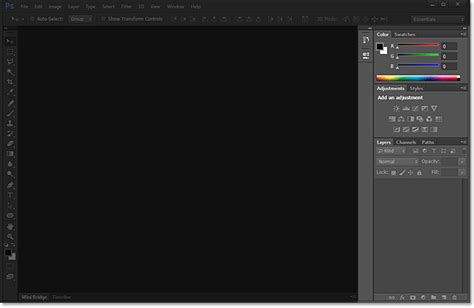
One of the most immediate and impactful changes in Photoshop CS6 was the complete overhaul of its user interface. This redesign offered a dramatically improved user experience, moving towards a darker, more modern aesthetic that defaulted to a dark gray, a choice that mirrored the user-friendly interface of Adobe Lightroom. This shift was not merely cosmetic; the interface was also customizable, allowing users to tailor their workspace to their preferences. Accompanying this visual refresh were entirely new, redesigned icons, contributing to a cleaner and more contemporary look and feel across the entire application.
Innovative Tools: Content-Aware Move and Patch
Building upon the groundbreaking "content-aware" technology first introduced in CS4, Photoshop CS6 brought forth powerful new tools that significantly enhanced editing workflows. The Content-Aware Move tool allowed for the seamless relocation of objects within an image, with Photoshop intelligently filling the vacated space. Similarly, the Content-Aware Patch tool integrated this intelligent filling capability directly into the patching process. This meant that when users patched an area of an image, they could leverage content-aware algorithms to blend the patched section naturally with its surroundings, achieving more realistic and often miraculous results.
The New Crop Tool: Intuitive Precision
A standout improvement in Photoshop CS6, and a personal favorite for many users, was the completely overhauled Crop Tool. This new iteration was designed to be far more intuitive and user-friendly. Upon selecting the crop tool, the entire image would be immediately selected, providing a clear canvas for adjustment. This fundamental change simplified the initial step of cropping, allowing users to focus on refining their composition with greater ease and precision. The tool offered more responsive controls and a more visual feedback mechanism, making the often-tedious process of cropping a more streamlined experience.
Refined Auto-Correction Tools
Photoshop CS6 also saw significant improvements in its automated correction tools. The Auto Curves, Auto Levels, and Auto Brightness/Contrast controls were all refined to deliver more sophisticated and accurate results. These enhancements meant that users could achieve better foundational adjustments to their images with just a single click, saving time and providing a stronger starting point for more detailed manual editing. These improved auto-correction features aimed to provide more intelligent analysis of image data, leading to more pleasing and natural-looking automatic adjustments.
The Core Distinction: Photoshop CS6 Extended's Advanced Capabilities
The fundamental difference between Photoshop CS6 and Photoshop CS6 Extended lies in the inclusion of powerful, specialized tools within the Extended version. At its heart, Photoshop CS6 Extended contains everything that the standard version offers, but it goes significantly further by incorporating features designed for 3D image creation and manipulation, as well as technical image analysis and measurement.
3D Imagery and Extrusions
For creative professionals working with three-dimensional content, Photoshop CS6 Extended offered a robust set of tools. It allowed users to enhance and manipulate 3D content with a fluidity that approached the ease of working with 2D elements. This opened up new avenues for creative exploration, enabling the quick creation of 3D logos, type, and artwork. The controls for these 3D operations were vastly improved since previous versions, offering a more intuitive and efficient workflow for generating and refining 3D elements directly within Photoshop.

Advanced 3D Editing and Painting
Pushing the boundaries of creative expression, the advanced 3D editing capabilities in Photoshop CS6 Extended empowered users to experiment with complex 3D scenes. A particularly innovative feature was the ability to paint directly onto 3D objects. This meant that users could apply textures, colors, and details to their 3D models and see the results instantaneously, fostering a more direct and responsive creative process. Furthermore, users could easily add 3D objects and layers to their existing 2D designs, facilitating the creation of sophisticated and compelling composites that blended real-world photography with digital 3D elements.
Image Analysis and Measurement
Beyond its creative applications, Photoshop CS6 Extended also provided powerful tools for technical image analysis. It included advanced measurement and counting tools that enabled users to extract quantitative information directly from images. This was invaluable for scientific, engineering, and industrial applications where precise data extraction from visual information was crucial. The ability to record and export this data for further analysis made Photoshop CS6 Extended a versatile tool not just for artists, but also for researchers and technicians.
3D Tutorial for Photoshop CS6 Extended
Licensing and Educational Editions
The distinction between the two versions also extended to licensing and educational offerings. The Student & Teacher Edition of Photoshop, when purchased as a standalone product, was consistently the Extended version. It was not possible to acquire an educational version of the standard Photoshop as a standalone purchase. Within the CS6 suite offerings, three out of the four major packages-Master Collection, Design & Web Premium, and Production Premium-included Photoshop CS6 Extended. This indicated Adobe's strategic positioning of the Extended version as the more comprehensive and feature-rich offering, often bundled into higher-tier creative suites.
Understanding "Portable" Versions
In discussions surrounding Photoshop CS6, the term "portable version" sometimes surfaces. It's important to clarify that these are not officially supported by Adobe. A portable version is typically created by a third party who has installed Photoshop on their computer and then used specific software to package it in a way that it can run without a formal installation or registration with the Adobe activation servers. These versions do not integrate with the system registry and therefore cannot receive official updates. While they can function as full working programs and can be stored on USB drives or hard drives, they are not supported by Adobe and may be considered a form of software modification or "hack."
Price and Value Proposition
A substantial difference between Photoshop CS6 and Photoshop CS6 Extended was, and often still is, the price. The Extended version commanded a higher upgrade price and retail cost due to its advanced 3D and analytical features. For users whose work primarily involved standard photo retouching, compositing, and graphic design, the added expense of the Extended version might not have been justified. However, for those who regularly incorporated 3D elements into their work or required precise image analysis capabilities, the investment in Photoshop CS6 Extended provided access to a unique and powerful set of tools that were not available in the standard edition. The decision between the two ultimately hinged on the specific needs and intended applications of the user.