Navigating the world of photo editing software can be a complex undertaking, especially when faced with the powerful offerings from Adobe. Two prominent contenders, Adobe Photoshop Elements (PSE) and Adobe Lightroom Classic (LR), often spark debate among photographers regarding their respective strengths and ideal use cases. While both programs are designed to enhance and manage digital images, they cater to different needs and skill levels, leading many users to find them complementary rather than mutually exclusive. This article delves into the core functionalities of each, highlighting their distinct approaches to raw conversion, organization, editing, and special effects, ultimately guiding you toward the best choice for your photographic workflow.
Understanding the Core Philosophies: Pixel Editing vs. Parametric Editing
At the heart of the distinction between Photoshop Elements and Lightroom Classic lies their fundamental editing approach. Photoshop Elements, much like its more powerful sibling Photoshop, operates primarily as a pixel-based editor. This means that when you make an adjustment, you are directly altering the pixels of the image. While this offers immense flexibility, especially in the Expert mode which mimics Photoshop's layer-based system, it can also lead to a less streamlined workflow for batch processing and can be more destructive if not managed carefully with non-destructive techniques like layers and smart objects.
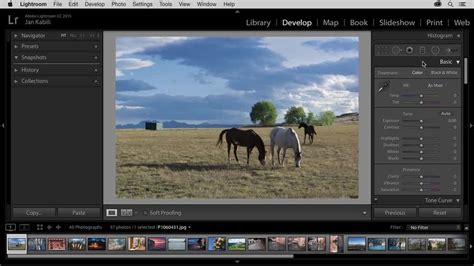
Lightroom Classic, on the other hand, is a parametric editor. This means that instead of directly changing the pixels, Lightroom records the adjustments you make as a set of instructions or parameters. These instructions are stored separately from the original image file, allowing for a completely non-destructive workflow. You can revisit any edit at any time, tweak sliders, or even revert to the original image without any loss of quality. This parametric approach is a cornerstone of Lightroom's efficiency, particularly for handling large volumes of images and for its powerful raw conversion capabilities.
Raw Photo Conversion: Lightroom's Dominance and Elements' Capable Alternative
For photographers who shoot in RAW format, the ability to effectively convert and process these files is paramount. Lightroom Classic is widely considered the "king" of RAW conversion. Its sophisticated algorithms and dedicated Develop module are designed to extract the maximum detail, dynamic range, and color information from RAW files, offering unparalleled control over exposure, highlights, shadows, white balance, and more. The ability to apply these adjustments to hundreds of shots with just a few clicks, through features like presets and batch processing, makes Lightroom an indispensable tool for professionals and serious amateurs alike.
Photoshop Elements, while not as comprehensively featured as Lightroom in this regard, offers a reduced version of Adobe Camera Raw (ACR) within its editing environment. This ACR integration enables approximately 90% of the needs for RAW conversion, providing access to essential adjustments for exposure, color, and detail. For users who primarily engage in basic to intermediate RAW processing and don't require the absolute cutting edge of RAW manipulation, PSE's capabilities are more than sufficient. However, when it comes to the depth and efficiency of RAW handling for large projects, Lightroom Classic retains a significant advantage.
Photo Organizing: Databases, Flexibility, and Metadata Power
Effective photo organization is crucial for managing any growing image library. Both Lightroom Classic and Photoshop Elements utilize a database system, typically based on SQLite, to catalog and manage your photos. While both systems are robust, Lightroom's organizational features are generally considered more powerful and flexible.
Lightroom's Library module offers an extraordinary level of information input through its metadata options. You can extensively tag images with keywords, add ratings, flags, and color codes, and even utilize a Map module to organize photos based on their geotagged location. Its search capacities are exceptionally in-depth, allowing you to quickly find specific images based on a multitude of criteria. Furthermore, Lightroom provides flexible options for organizing images into folders and collections, facilitating efficient project management.
The Organizer in Photoshop Elements also offers a capable system for managing your media. It employs AI to group photos by people, places, and events, and includes an auto-curate function for grouping similar images. A particularly useful command within Elements' Organizer is its backup function, which can back up not only catalogs but also your actual media files, providing an extra layer of security. While Elements' AI-driven organization can be intuitive for casual users, Lightroom's granular control over metadata and search functionality often appeals more to photographers who need to manage vast and complex archives.
Editing Tools: Layers, Masks, and Precision Control
The true strength and originality of Lightroom lie in its parametric, non-destructive editing. This means you are not obliged to create copies of your edited files; instead, you are saving the steps of your changes. This approach is incredibly efficient and ensures that your original files remain untouched. Although the newer versions of Lightroom have introduced local editing tools, they are not as powerful or as extensive as those found in Photoshop Elements.
Photoshop Elements, particularly in its Expert editing mode, offers a suite of powerful tools that resemble those found in Photoshop. This includes robust support for layers and layer masks, a smart healing brush for object removal, advanced text options, and a powerful refine-edge tool. For tasks requiring intricate pixel-level manipulation, such as detailed retouching, compositing, or precise selection work, PSE's layer-based editing provides a level of control that Lightroom, despite its advancements, does not fully replicate. Many Lightroom users find that PSE serves as an excellent companion for these more demanding editing tasks, often being a more accessible and cost-effective alternative to the full Photoshop suite.
Special Effects and Creative Touches: Elements' Advantage for Enthusiasts
For users who enjoy experimenting with special effects and appreciate one-click editing options, Photoshop Elements comes well-equipped. It offers a plethora of presets for various effects, and its superior black and white conversion capabilities are noteworthy. Elements also excels in providing creative options like textures and shape overlays, which are not directly available within Lightroom's core editing environment.
While Lightroom also offers presets that can dramatically alter the look of an image with a single click, its focus is more on global and local adjustments to enhance existing imagery rather than applying distinct artistic effects. Elements' Guided Edits are also a standout feature, walking users step-by-step through complex pixel manipulations, making advanced techniques accessible to those with less editing experience. These guided, often one-click, options for creating collages, slideshows, and even basic video creations provide a more consumer-oriented creative output compared to Lightroom's emphasis on refined image processing.
Cloud Integration and Workflow: Subscription Models and Local Storage
A significant difference between the two programs lies in their integration with cloud services and their pricing models. Lightroom Classic is part of Adobe's Creative Cloud subscription model, typically bundled within the Photography Plan. This plan often includes Lightroom CC (for mobile and cloud-based workflows), Photoshop CC, and a generous amount of cloud storage. This subscription model ensures users always have access to the latest versions and updates. While Lightroom Classic itself is a desktop-based program with files stored locally, the accompanying cloud services offer benefits like seamless synchronization across devices and easier sharing.
Photoshop Elements, on the other hand, is a stand-alone, perpetual license software. This means you purchase it once and own it indefinitely, with the option to upgrade to newer versions at a reduced upgrade price. When you buy Photoshop Elements, you are responsible for storing and backing up your images on local devices. There is no mandatory cloud storage included, which can be a significant draw for users who prefer to maintain full control over their data and avoid recurring subscription fees. However, this also means that any cloud-based convenience or cross-device synchronization offered by Lightroom is absent from a standalone Elements purchase.
Ease of Use and Target Audience: Novice vs. Professional
Adobe has recently focused on making Photoshop Elements as user-friendly as possible, aiming it at novice and casual photographers. The program offers three distinct editing modes: Quick Edit, Guided Edits, and Expert mode. Quick Edit provides a simplified interface with essential tools for basic adjustments, requiring minimal prior knowledge of photo editing. Guided Edits offer step-by-step tutorials for achieving specific looks, while Expert mode provides more manual control, akin to a simplified Photoshop.
Lightroom Classic, conversely, is designed with professional photographers and serious amateurs in mind. It assumes a greater understanding of photographic principles and editing techniques. While its interface is streamlined for efficiency, its complexity and the sheer number of features can be daunting for beginners. Its strength lies in its powerful, albeit more complex, tools for managing and processing large volumes of images efficiently and non-destructively.
The Complementary Nature: Working with Both
The reality for many photographers is that Photoshop Elements and Lightroom Classic are not mutually exclusive. Instead, they can work together synergistically to create a powerful and versatile workflow. Many users start with Lightroom Classic to import, organize, and perform initial RAW conversions and global adjustments on their entire shoot. From there, they can send specific images to Photoshop Elements for more detailed pixel-level retouching, creative effects, or complex manipulations that are better suited to Elements' toolset.
The advantage of starting with PSE is that it can handle many of the core tasks now, and it can be an excellent companion if you later decide to transition to Lightroom. Importantly, Lightroom can easily convert PSE catalogs, ensuring that your organizational efforts are not lost if you decide to integrate PSE into a Lightroom-centric workflow.
Pricing and Upgrade Policies
Understanding the pricing structures is vital. Lightroom Classic is primarily available through Adobe's Creative Cloud subscription, most notably the Photography Plan, which often includes Photoshop CC for a competitive monthly fee. This subscription model means continuous access to the latest features and updates but involves ongoing costs.
Photoshop Elements is a one-time purchase. While there are annual releases, owners of previous versions are typically offered an upgrade price, making it a more budget-friendly long-term solution for those who don't require the absolute latest features with every release. For individuals transitioning from free software like Photoshop Express, both Elements and Lightroom represent a significant step up in capability, with Elements offering a one-off cost and Lightroom providing a subscription-based, continuous service.
Conclusion: Choosing the Right Tool for Your Needs
Ultimately, the choice between Photoshop Elements and Lightroom Classic hinges on your individual needs, skill level, and photographic goals.
- Choose Photoshop Elements if: You are a hobbyist or casual photographer looking for an accessible yet powerful editing tool for personal photos. You appreciate one-click effects, guided edits, and a one-time purchase model. You prioritize creative enhancements and don't regularly shoot a high volume of RAW files.
- Choose Lightroom Classic if: You are a professional or serious amateur photographer who shoots extensively in RAW format. You need robust tools for organizing large photo libraries, efficient batch processing, and a non-destructive, parametric editing workflow. You are comfortable with a subscription-based model and value the integration with other Adobe Creative Cloud applications.
Many photographers find that the most effective approach is to leverage the strengths of both. Use Lightroom Classic for its unparalleled cataloging and RAW processing power, and then utilize Photoshop Elements for its intuitive, creative editing tools and layer-based manipulations. This combined approach ensures you have the best of both worlds, empowering you to manage, refine, and creatively express your photographic vision.