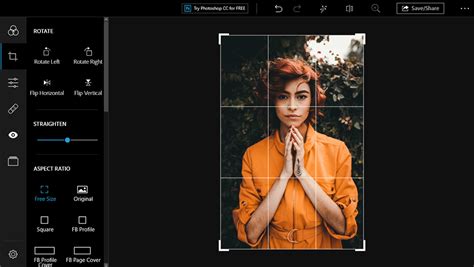
Adobe Photoshop Express for Windows 10 presents itself as a free and remarkably lightweight photo editing application, meticulously designed with beginners and casual users in mind. The primary aim of this software is to empower individuals to enhance their images efficiently, bypassing the steep learning curves often associated with more professional-grade editing suites. Its interface is intentionally straightforward, populated with accessible tools that facilitate quick edits, allowing users to readily apply a variety of effects and adjustments with minimal effort. This focus on streamlined editing makes it an attractive option for those who need to polish their photos without delving into complex functionalities.
Streamlined Editing Made Easy with Preset Looks
One of the standout features of Photoshop Express is its collection of preset filters, aptly named "Looks." These Looks are designed to provide instant stylistic enhancements to photos, enabling users to achieve a desired aesthetic with a single click. The organization of these Looks into distinct categories such as Black and White, Portrait, Nature, Pop Color, and Duo Tones further simplifies the selection process. This categorization helps users quickly identify and apply the most suitable effect for different styles, moods, and subject matter, ensuring a more intuitive and efficient workflow.
The "Looks" feature is a testament to Photoshop Express's commitment to ease of use. Instead of navigating through complex adjustment layers or manual sliders for every minor change, users can leverage these pre-defined styles. For instance, a nature photographer might quickly select a "Nature" Look to bring out the vibrant greens and blues in a landscape, while a portrait artist could opt for a "Portrait" Look to soften skin tones and add a subtle warmth. The ability to preview these effects before committing to them adds another layer of user-friendliness, allowing for experimentation without the fear of making irreversible changes. This approach democratizes photo editing, making professional-looking results accessible to a wider audience.
Impressive Functionality Without Unnecessary Complexity
Adobe Photoshop Express truly excels in providing essential editing functionalities while deliberately maintaining a lightweight and uncluttered design. This design philosophy translates into quick performance, allowing users to make adjustments and apply effects smoothly without experiencing significant lag, even on less powerful hardware. Beyond the one-click "Looks," the application offers robust customization options. Users can further refine the intensity of applied filters using intuitive sliders. This granular control ensures that while the initial application of an effect is simple, the final result can be precisely tailored to individual preferences.
The breadth of creative options available is also noteworthy. The app boasts an impressive library of over 90 filters, offering a diverse range of stylistic possibilities. Complementing these filters are more than 30 borders and frames, providing users with creative avenues to personalize their images and give them a distinct finishing touch. These elements are not merely decorative; they can be used strategically to enhance the composition of a photograph, draw attention to the subject, or simply add a professional polish.
Master Filters - Photoshop for Beginners | Lesson 9
Focused and Effective for Casual Users
In essence, Adobe Photoshop Express for Windows 10 serves as a highly practical and straightforward photo editing tool, particularly well-suited for beginners and casual users. Its core strength lies in its ease of use, coupled with reliable performance that facilitates quick adjustments and effortless sharing. The application is not designed to replace the intricate capabilities of professional software like Adobe Photoshop CC, but rather to fill a specific niche: providing accessible and effective tools for everyday photo enhancement.
The user experience is crafted to be intuitive. For example, common adjustments like contrast, exposure, vibrance, and tint can be modified with simple slider controls. This accessibility means that users can quickly improve the overall look and feel of their photos without needing extensive knowledge of photographic principles. The inclusion of red-eye correction, noise reduction, and cropping tools further equips users with the means to address common photographic imperfections. When it comes to exporting, the program allows for images to be saved in standard formats, making them ready for social media, printing, or further use.
Understanding the Difference: Photoshop Express vs. Adobe Photoshop
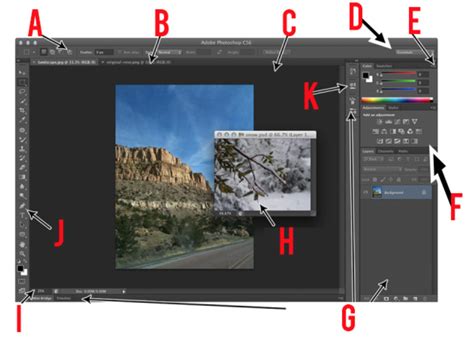
It is crucial to distinguish Photoshop Express from its professional sibling, Adobe Photoshop. While they share the esteemed "Photoshop" name, the programs are fundamentally different in their scope and target audience. Adobe Photoshop is a comprehensive, industry-standard image-editing program renowned for its extensive feature list, deep customization controls, and powerful capabilities that cater to professionals in graphic design, photography, and digital art. In stark contrast, Photoshop Express offers a streamlined experience with a more limited, yet highly effective, set of features focused on beginner-friendly photo enhancement.
Key Features and Limitations
No Layers Support: Photoshop Express is a streamlined image-editing program that prioritizes photo enhancement and ease of use. Consequently, it does not incorporate advanced features such as layers. Layers are fundamental to complex image manipulation in professional software, allowing for non-destructive editing and intricate compositing. For users who require layer functionality, alternative Adobe products or free open-source software would be more appropriate.
Resizing and Resolution: The desktop edition of Photoshop Express does not possess the capability to change an image's resolution. This means it cannot resample an image by increasing or reducing the number of pixels. However, users can achieve changes in aspect ratio through the cropping tool. By manually cropping or selecting from preset dimensions, users can effectively alter the visible area and proportions of their image.
File Format Compatibility: Photoshop Express cannot directly open PSD (Photoshop Document) files. These files are proprietary to Adobe Photoshop and contain layered information. To use a PSD file within Photoshop Express, it must first be exported or saved in a more common image format that Photoshop Express recognizes, such as JPEG or PNG.
Raw File Support: The desktop version of Photoshop Express does not currently support camera raw files. Raw files are unprocessed image data from a digital camera sensor, offering maximum flexibility for editing. Users who wish to edit raw files will need to utilize the mobile version of Photoshop Express or opt for other software that specifically supports raw formats.
Printing Capabilities: Yes, users can print directly from Photoshop Express. After completing their edits, they can access the options menu, select "Print," choose their printer, and initiate the printing process.
Drawing Functionality: Photoshop Express does not include tools for freehand drawing. Its editing capabilities are primarily centered around image adjustments via sliders, applying presets, and utilizing retouching tools.
Where to Download Photoshop Express for PC
Adobe Photoshop Express for Windows 10 is readily available as an app on the Microsoft Store. This provides a convenient and official channel for users to download and install the application directly onto their Windows 10 computers. The process is typically straightforward, involving a simple search and click to download and install.
For users seeking to download Photoshop Express, the Microsoft Store is the primary and recommended source. This ensures that users are obtaining the legitimate software, free from potential malware or unwanted bundled applications that might be present on unofficial download sites. The availability on the Microsoft Store also means that the application is designed to be compatible with Windows 10, offering a smooth installation and user experience.
Exploring Alternatives and Related Software
While Photoshop Express offers a compelling solution for basic photo editing, several other applications provide similar or complementary functionalities.
Other Free Photo Editing Software for Windows
- Vectr: This free tool serves as a smooth starting point for everyday design tasks, offering vector graphics editing capabilities.
- gPhotoShow Pro (Trial Version): Allows users to create their own photo slideshow screen savers.
- Fotolia Desktop (Free): A free photography software option for Windows.
- Adobe Photoshop 7.0.1 Update (Free): Provides an easy way to update older versions of Adobe Photoshop.
- StereoPhoto Maker (Free): A utility for converting stereo pairs into watchable 3D images.
- Image To PDF (Free): Free software designed to convert images into PDF documents.
- Best Free Image Converter (Free): A tool for quickly converting image formats.
- Greeting Card Maker Software (Free): A free utility for designing greeting cards.
Related Adobe Products and Software
- Pixlr-o-matic: Known for transforming photos with creative magic, offering a range of filters and effects.
- Adobe Photoshop CC: The professional, industry-standard photo editing software, offering an extensive suite of tools for advanced manipulation.
- Windows 10: The operating system on which Photoshop Express for PC is designed to run, providing a reliable and familiar platform.
- Adobe Photoshop CS6 Update (Free): A free update for users of Photoshop CS6.
- AnyDesk: Software that allows for remote access to another computer.
- PhotoScape: An intuitive image editing tool that offers a good balance of features and ease of use.
Other Photo Editing and Viewing Tools
- Easy Photo Print (Free): A free software solution for printing photos.
- Camera (Free): A free camera app for Windows.
- Canon IJ Scan Utility (Free): A tool for scanning using Canon devices.
- ImageJ (Free): A scriptable Java application often used for scientific image processing.
- ibis Paint (Free): An app that provides a comprehensive drawing solution.
- JPEGView (Free): A free image viewer and editor that is lightweight and fast.
- Autodesk ReCap Pro (Free): Software for transforming real-world objects into 3D models.
- PHOSIMP (Paid): An experimental photo editor program.
- Image Viewer (Free): A simple program for viewing images in a folder or playing slideshows.
- MDI2PDF Converter (Free): Facilitates effortless file conversion.
- ACDSee Fotoslate Photo Print Studio (Free): Offers effortless photo printing capabilities.
- Zoner Studio (Subscription): A comprehensive photography program.
Photoshop Express: A Practical Choice for Everyday Editing
Adobe Photoshop Express is a free application that, while not as feature-rich as its professional counterpart, provides a robust set of tools for casual users. Its availability on the Microsoft Store for Windows 10 PCs makes it easily accessible. The emphasis on a user-friendly interface, combined with powerful preset filters and basic adjustment tools, ensures that users can achieve satisfactory results quickly and efficiently. Whether you need to touch up a selfie, enhance a landscape photo for social media, or simply apply a stylistic filter, Photoshop Express offers a practical and enjoyable editing experience. Its integration with Adobe's cloud ecosystem also allows for seamless workflow across devices, further enhancing its utility for modern users.