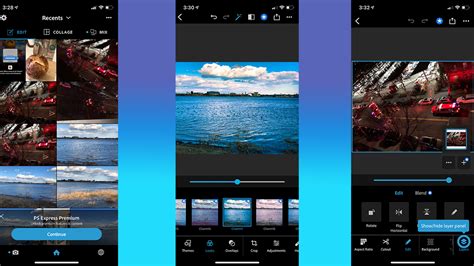
Photoshop Express, a streamlined mobile and web application powered by Adobe, offers a robust set of tools designed to transform ideas into unique, high-quality images. This application simplifies the powerful features that Adobe Photoshop is renowned for, presenting them as quick actions suitable for a wide range of users, from casual social media enthusiasts to professional content creators. It provides the tools to create anything imaginable, from aesthetic edits to multi-layer collages, and to clean up any photo.
What is Adobe Photoshop Express?
At its core, Photoshop Express provides a fast and straightforward way to edit photos, making it an ideal solution for social media content creation. It is particularly well-suited for mobile photographers, social media influencers, bloggers, and anyone looking to enhance their pictures before sharing them online. The application is a direct evolution of Adobe Spark, now upgraded with numerous new features, offering a simple and fun web and mobile tool that can be used for free to design great-looking visual content that stands out. It is available for both individual and enterprise users.
For users on the Windows platform, Photoshop Express offers the convenience of capturing screenshots using the PrtSc (Print Screen) key or through in-app capture options. Downloading the application is free of charge, with certain premium features accessible through a subscription plan. Existing Creative Cloud members can enjoy the full benefits of the premium version of Photoshop Express.
Navigating the Photoshop Express Interface
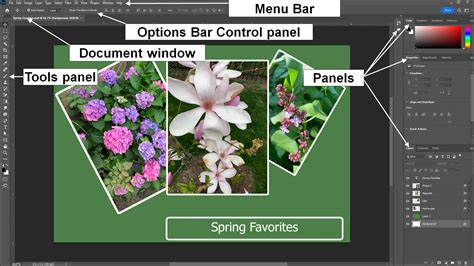
The user interface of Adobe Express is meticulously designed to be clean and user-friendly, ensuring a smooth editing experience. The workspace provides convenient access to recently used files and facilitates efficient photo editing. The menu bar is intuitively organized, offering options for opening, saving, and exporting files, alongside other essential editing functionalities.
The tools panel is where users will find a variety of tools for image manipulation, including options for cropping, resizing, and adjusting brightness and contrast. The main editing area, the workspace, is centrally located on the screen, offering a generous canvas for users to work on their images. Upon selecting an image, a properties panel conveniently pops up on the left side of the screen. This panel grants access to the various properties of the selected image or tool, allowing for fine-tuned adjustments to settings.
Core Features and Functionality
Adobe Express is packed with a variety of tools and features that contribute to its overall utility and appeal, making it a go-to solution for creating and editing compelling visuals with ease.
Extensive Template Library
One of the standout features of Adobe Express is its vast collection of professionally designed and unique templates. With thousands of these templates available, users can easily create and personalize beautiful social posts, videos, carousels, flyers, presentations, and much more, catering to all their social media and marketing needs. This extensive library ensures that users are never starting from a blank canvas, providing a wealth of inspiration and a significant head start on any project. Inspiration can be found by searching for templates based on platform, task, aesthetic, mood, or color.
AI-Powered Enhancements
Adobe Express leverages the power of artificial intelligence (AI) to significantly enhance the creative process. Its AI-driven features empower users to easily create professional-quality designs and videos, even without extensive design experience. A prime example is the "Text to Image" AI, which can transform simple text descriptions into stunning, unique images, opening up a world of creative possibilities and enabling users to visualize their ideas effectively.
Furthermore, the application boasts unique text editing capabilities that allow for the creation of distinctive designs in just a few clicks, such as filling text with captivating textures or layouts. The AI also extends to powerful background manipulation tools, enabling users to remove backgrounds from any image or video with a single click.
A significant AI-powered feature is Generative Fill, a capability also found in Photoshop, which is powered by Adobe Firefly. This feature allows users to insert, remove, or replace objects, people, and backgrounds within images using simple text prompts. Additionally, users can generate customizable templates from basic text descriptions, further streamlining the design process.
How To Generate AI Images in Adobe Express (Step By Step)
Font and Stock Asset Integration
Adobe Express provides access to Adobe Fonts, a vast library comprising over 25,000 fonts, allowing users to select the perfect typeface for their projects. Complementing this is Adobe Stock Images, a comprehensive collection of millions of high-quality images, graphics, and videos that users can seamlessly integrate into their designs. This integration makes it easier than ever to find the ideal visual assets to enhance any project.
On-the-Go Design and Editing
The application offers robust design and editing tools that are accessible anywhere, anytime. Its intuitive interface and streamlined workflows are specifically engineered to make it easy to create professional-quality content while on the move. This accessibility is crucial in today's fast-paced digital landscape where creative work often extends beyond a traditional desktop setup.
Collaboration and Version Control
Adobe Express fosters a collaborative environment with a range of features that allow users to work together on projects in real time. The "Version History" feature is particularly valuable, enabling users to keep track of all changes made to a project, review the history of edits, and revert to previous versions if necessary. Once invited, collaborators can view and edit the project simultaneously, facilitating seamless teamwork.
Users can also create and easily navigate through branded assets within Adobe Express. This allows for consistent branding across multiple projects by saving and reusing specific color palettes, fonts, and logos. The ability to instantly share libraries of graphics further enhances team collaboration and workflow efficiency.
Brand Kit Functionality
To maintain brand consistency, users can create their first brand within Adobe Express, saving their established look and feel for repeated use. This feature is invaluable for businesses and individuals who need to maintain a cohesive visual identity across their various marketing materials and social media presence. Sharing the most up-to-date assets using Creative Cloud Libraries is possible without leaving Adobe Express, further streamlining brand management.
Smart Resize and Content Adaptation
A significant time-saver within Adobe Express is its "auto-magical resize" feature. Gone are the days of needing to memorize specific image dimensions for every social media platform. Once a design is finalized, users can easily modify it for any social network by duplicating the project, selecting the resize option, and choosing the desired platform. The AI then automatically adapts the design to fit the new dimensions, ensuring optimal presentation across all channels.
Premium Features and Benefits
Adobe Express offers two distinct pricing plans: Free and Premium. While the Free plan includes all core features essential for basic editing, the Premium plan unlocks a wealth of additional capabilities that significantly enhance the creative workflow and output quality.
What the Premium Plan Offers:
- Generative Credits for AI Features: The Premium plan provides generative credits for advanced AI-powered features, including Text to Image and Text Effects, all powered by Adobe Firefly. These credits allow for extensive use of generative AI tools to create unique imagery and effects.
- Drag-and-Drop Video Creation: Users gain access to intuitive drag-and-drop functionality for creating videos, making video editing more accessible and efficient.
- Advanced Photo Effects: Premium users benefit from powerful photo effects, such as the ability to remove backgrounds from images with a single click.
- PDF Import and Enhancement: The Premium plan allows users to import and enhance PDF files directly within the Adobe Express editor, expanding its utility for document-based design work.
- Thousands of Premium Templates and Assets: Subscribers gain access to an even larger collection of professional-designed static and video templates, as well as exclusive design elements, providing a richer selection of resources for their projects.
Benefits of the Premium Subscription:
The premium subscription transforms Adobe Express into an even more potent creative suite. It empowers users to:
- Accelerate Content Creation: With access to premium templates, AI tools, and streamlined workflows, users can produce high-quality content much faster.
- Elevate Visual Quality: Advanced editing tools and AI-powered enhancements allow for the creation of more polished and professional-looking visuals.
- Expand Creative Possibilities: Generative AI features and a wider array of assets unlock new avenues for creativity and design experimentation.
- Enhance Brand Consistency: Features like Brand Kits and collaborative tools ensure that all created content aligns with a specific brand identity.
- Streamline Workflow: The integration of various Adobe services and the focus on user-friendly design reduce friction in the creative process.
Photoshop Express vs. Competitors
In the competitive landscape of design software, Adobe Express stands out, though it faces competition from several other platforms, each with its own strengths.
Adobe Express vs. Canva
Both Adobe Express and Canva are online design tools aimed at creating eye-catching visuals. Canva is widely recognized for its beginner-friendly interface and extensive template library. Adobe Express, on the other hand, is often considered more powerful and better suited for professionals, offering advanced features like layering. While Canva excels in simplicity, Adobe Express provides a slightly steeper learning curve but unlocks more sophisticated design capabilities.
Adobe Express vs. Pixlr
Pixlr and Adobe Express are both online photo editors offering a comprehensive suite of editing features. Pixlr operates as a standalone product, whereas Adobe Express is integrated into the broader Adobe Creative Cloud ecosystem. Both offer standard editing functions such as cropping, resizing, and adjusting brightness and contrast. Pixlr distinguishes itself with advanced features like AI-powered background removal and a wide array of filters and effects. Adobe Express counters with its clean, user-friendly interface, seamless integration with Adobe Fonts and Adobe Stock, and a remarkable collection of templates that simplify the creation of ready-made graphic designs.
Adobe Express vs. Gravit Designer
Gravit Designer and Adobe Express are both online graphic design tools that provide a variety of features for creating visual content. Gravit Designer is a standalone application, while Adobe Express is part of the Adobe Creative Cloud. Both tools offer essential design features like layers, drawing tools, shapes, text, and effects. Gravit Designer tends to offer more advanced capabilities for creating custom vectors, logos, and detailed graphics for social networks. However, Adobe Express shines with its intuitive interface, integration with Adobe Fonts and Adobe Stock, and its extensive library of templates, which enable users to quickly produce polished graphic designs.
Ultimately, both Gravit Designer and Adobe Express are excellent options for meeting basic graphic design needs. Adobe Express is particularly favored for its ease of use in creating and editing compelling visuals without unnecessary complexity.
The All-in-One Solution for Creative Expression
Adobe Express is positioned as an all-in-one tool for making professional designs and videos without the usual fuss. Its simple drag-and-drop features and abundant templates allow users to explore creative possibilities without getting bogged down in technical details, enabling them to focus on expressing their ideas. Users can easily tweak pictures, apply impressive effects, and benefit from intelligent AI suggestions. For video projects, the ability to trim, add text, and incorporate graphics makes them exceptionally engaging.
The application is designed to empower users to create a variety of designs for marketing themselves or their businesses, including social media posts, animated graphics, videos, PDFs, and more. By simplifying complex design processes and offering a rich set of tools and resources, Adobe Express makes professional-quality content creation accessible to a broad audience.
For those seeking even more advanced AI image generation capabilities, exploring lists of top AI image generators and Text-to-Image tools can provide further options. These resources, alongside Adobe Express, offer everything needed for creating outstanding social media posts, effective marketing materials, and captivating videos.