In the ever-evolving landscape of digital image editing, Adobe offers a spectrum of tools designed to cater to a wide range of users, from casual social media enthusiasts to seasoned professionals. Among these, the names "Photoshop" and "Photoshop Express" often lead to confusion. While they share a lineage and a common goal of image manipulation, their functionalities, target audiences, and intended use cases are markedly different. This exploration aims to dissect these differences, unraveling their interfaces, functionalities, and suitability across diverse user needs, and determining whether these software can be considered mutually replaceable.
Interface and User Experience: Simplicity Versus Sophistication
The user interface is the initial gateway to any editing software, and in the realm of Photoshop vs. Photoshop Express, it plays a pivotal role in shaping the editing experience. These two photo editors present markedly distinct interfaces, catering to diverse user preferences and editing requirements.
Adobe Photoshop: The Professional's Canvas
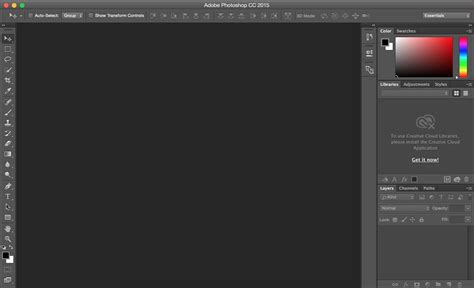
Photoshop, Adobe’s flagship tool, is designed for professional use and boasts a sophisticated, feature-rich interface. Its numerous tools, panels, and options provide users with unprecedented control over every aspect of their edits. This complexity, while empowering for experienced users, can present a steep learning curve for beginners. The interface is highly customizable, allowing users to configure the environment to their liking, a feature largely absent in its express counterpart. This level of personalization is crucial for professional workflows, where efficiency and tailored tool placement can significantly impact productivity. The sheer depth of functionality means that mastering Photoshop requires time, patience, and dedication. Seasoned pros thrive on its depth and versatility, while beginners may find it overwhelming.
Photoshop Express: Streamlined for Speed
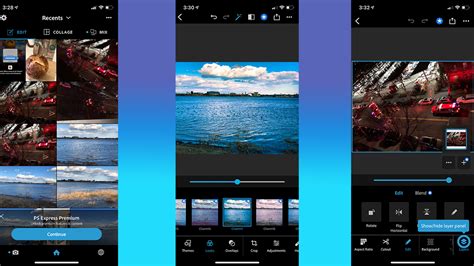
In stark contrast, Photoshop Express prioritizes ease of use with a simplified touch interface. It is designed for quick editing and is optimized for mobile devices, making it perfect for casual users who need basic improvements for social media. While its functionality is limited by comparison, it offers essential tools for enhancing images, cropping, adjusting brightness, and applying filters. The interface reminds one of picture collage apps, where quick actions and importing device photos are emphasized. Users can easily scroll down to see everything they can do in the app, or even type into a search bar for a specific tool or feature. The editing tools are reminiscent of early 2010s mobile editing, with a clear focus on touch and adjusting effects with sliders. This makes it easy to get results without a steep learning curve, providing simplicity and accessibility.
Winner for Ease of Use and Simplicity: Photoshop Express
Photoshop Express wins thanks to its accessibility and user-friendly design, making it perfect for users who want quick results without complicated edits.
Features and Capabilities: Depth vs. Breadth
When comparing Photoshop vs. Photoshop Express, the difference in features and capabilities is perhaps the most significant distinguishing factor. One is built for granular control and complex manipulation, while the other focuses on essential, rapid enhancements.
Adobe Photoshop: The Gold Standard
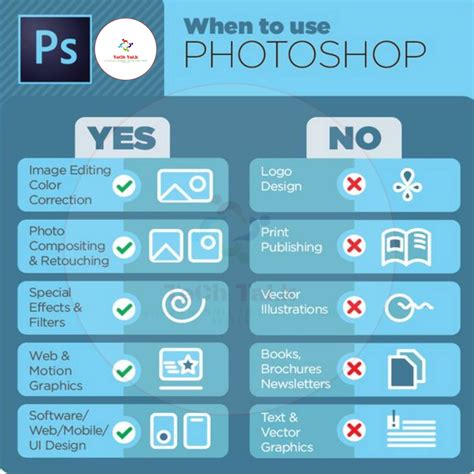
Photoshop is considered the gold standard in terms of functionality, offering an unmatched set of tools catering to professionals and enthusiasts. Users get precise layering capabilities, sophisticated selection tools, AI image masks, versatile filters, and robust retouching features. It gives you complete control over the image editing process, from intricate compositing to detailed retouching. The desktop version allows for extensive manipulation of RAW files through Camera Raw, a powerful tool for photographers. Furthermore, the extended versions of Photoshop have historically offered capabilities in 3D, video editing, and other advanced creative pursuits, although some of these functionalities are now integrated into other Adobe products. Its versatility extends to unique graphic design and professional photo enhancement, allowing professionals to tailor workflows to a project's specific needs.
Photoshop Express: Essential Enhancements
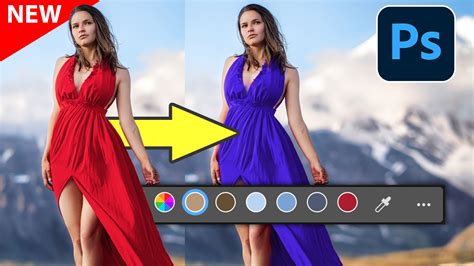
Conversely, Photoshop Express focuses on providing basic editing tools in a streamlined, mobile-friendly package. Users get basic features like cropping, brightness adjustments, filters, and basic retouching. It is great for quick fixes and editing, offering features like denoising, adding makeup, smoothing skin, and more. For instance, if you're taking pictures outside, Photoshop Express can detect the sky, allowing for isolated edits. It also provides themed collages with beautifully designed borders and backgrounds. While it has drawing capabilities, the range and sophistication of its brush library are limited compared to Photoshop. The Android version of the app notably lacks layers, with this functionality only available in the "Combine Photos" feature.
Winner for Advanced Functionality: Adobe Photoshop
When comparing features and capabilities, Adobe Photoshop is the clear winner, offering unmatched power and versatility for professional-level editing.
Pricing and Accessibility: Investment vs. Affordability
The cost and accessibility of software are critical considerations for any user. Adobe employs different models for its flagship products, reflecting their intended market and feature sets.
Adobe Photoshop: The Professional Investment
Adobe Photoshop is primarily available through Adobe’s Creative Cloud subscription model. The company offers various plans, including individual subscriptions, student discounts, and business packages. The pricing is tailored for those who value its advanced features and are willing to invest in a long-term editing solution. For beginners or hobbyists, the price tag can seem high. However, Adobe has also historically offered older versions of Photoshop for purchase, and student discounts can make it more accessible. The introduction of the Creative Cloud in early 2012 shifted the model to a subscription service, ensuring users always have access to the latest version.
Photoshop Express: Budget-Friendly and Free
The Express version offers a more budget-friendly alternative. It features a free basic version, making it attractive to casual users. While it includes additional in-app purchases and subscription plans for advanced tools and cloud storage, it is often considered a Photoshop free alternative. Photoshop Express is available under a freemium model, with premium features denoted by a crown icon. It can be purchased separately through app stores for a monthly fee or as part of a bundle with Adobe Express.
Winner for Affordability and Casual Use: Photoshop Express
Photoshop Express wins in terms of accessibility and price, making it a better option for casual users and those on a budget.
Versatility and Customization: Tailoring Workflows
The ability to adapt software to specific needs is crucial. Both Photoshop and Photoshop Express offer different levels of versatility and customization.
Adobe Photoshop: Unmatched Adaptability
Photoshop is a highly versatile and customizable software, allowing for complex and highly personalized edits. Professionals can tailor workflows to a project's specific needs, enabling both unique graphic design and professional photo enhancement. This adaptability is a cornerstone of its professional appeal. For users who have a clear vision and know how to achieve the results they want, Photoshop for iPad, with its more custom options and detailed editing tools, often wins. Anything unfinished on the iPad can be picked up on the desktop version, making it great for everyone from DSLR users to photography pros and hobbyists.
Photoshop Express: Focused Simplicity
Photoshop Express prioritizes simplicity over complexity. It provides fast and efficient editing tools but limits the depth of available customization. Its streamlined interface is designed for users who want quick results rather than detailed, professional-level settings. While it offers drawing tools, the brush library is not as sophisticated as in Photoshop.
Winner for Versatility and Customization: Adobe Photoshop
Adobe Photoshop easily beats the Express version, offering unmatched adaptability and customization for intricate workflows.
Support and Community: A Robust Ecosystem
The availability of support and the presence of an active community can significantly enhance the user experience and learning process.
Adobe Photoshop: Extensive Resources
Users of Adobe Photoshop benefit from Adobe’s extensive ecosystem. This includes robust support through a detailed knowledge base, step-by-step guides, active forums, and live customer support channels. Furthermore, a huge global community of Photoshop professionals and enthusiasts creates a rich environment for learning, collaboration, and problem-solving. This ensures that users, from beginners to experts, have access to the help they need to master the software and troubleshoot effectively.
Photoshop Express: Streamlined Assistance
Photoshop Express, designed for mobile and everyday use, provides more streamlined support options, including FAQs, user guides, and basic troubleshooting resources. While these resources are accessible and sufficient for most everyday users, they lack the depth and breadth of support available with the full version of Photoshop. The community around Photoshop Express is also smaller, limiting access to peer advice and expertise.
Winner for Comprehensive Support and Community: Adobe Photoshop
For users who need advanced support and access to a large, active community, Adobe Photoshop is the clear winner, offering unparalleled guidance and learning resources.
Mobile Editing: Photoshop for iPad vs. Photoshop Express
Adobe offers distinct applications for mobile editing, each catering to different needs.
Photoshop for iPad: Desktop Power on the Go
The Adobe Photoshop for iPad app reimagines the Photoshop experience for mobile, taking interface cues from its legacy desktop program. It features a traditional layout, making it easy to find tools if you are familiar with the desktop version. An in-app tour helps users navigate. The tools are located in rows on the left and right, with a small toolbar that transforms based on tool selection. It was designed with the Apple Pencil in mind for precision, but also includes touch features. Photoshop for iPad closely mimics the desktop program with its detail-oriented tools and features. You can edit, mask, and import raw image files. The layer system is traditional, facilitating organized and non-destructive edits. Many of the AI features from the desktop program have been introduced, such as the Remove Tool, Generative Expand, and Remove Background, to speed up workflows. However, it is primarily for when you have more time to spend editing details. It also boasts a beautiful brush library for illustrations.
Photoshop Express: Quick Edits and Social Sharing
Photoshop Express is designed for quick actions optimized for mobile editing and social sharing. It allows users to start with popular editing capabilities directly from the homescreen, such as denoising, adding makeup, and smoothing skin. If you're short on time or unsure where to start, you can search for the type of edit you want. It offers popular editing capabilities right from the homescreen, like denoising, adding makeup, smoothing skin, and more. It also offers templates for quick creation of collages and social media posts. Its editing tools remind one of mobile editing from the early 2010s, with a clear focus on touch and sliders for effects, making it easy to achieve results without a steep learning curve. If you want to save time with templates, Photoshop Express offers many options.
Winner for Mobile Editing Power and Control: Photoshop for iPad
Photoshop for iPad wins this round due to its more comprehensive toolset, traditional layer system, and greater control over detailed edits, offering a more professional mobile editing experience.
File Management and Export Options: Organization and Output
How software handles files and exports them is a critical aspect of workflow efficiency.
Photoshop for iPad: Organized and Versatile Exports
Photoshop for iPad offers a traditional file organization system with folders on its Home Screen. Through Creative Cloud, users have access to cloud storage, alleviating concerns about local space limitations. It provides a number of export options that allow control over file size, including PNG, JPEG, PSD, and TIFF formats. PNG exports allow for choosing file size from small to large, while JPEG exports offer quality settings from 0 to 12. It also includes a collaboration option through the Share icon, allowing feedback from others even without an Adobe ID. Quick Export options allow opening projects in Lightroom and Photoshop Express.
Photoshop Express: Streamlined Sharing and Limited Organization
Photoshop Express's home screen emphasizes app usage rather than file organization. While you can access project files under "All Projects," there are no folders for conventional file organizing, which can make managing numerous projects chaotic. However, you can change your view by project type (Video, Collages, Photo Editor & Retouch, Combine Photos). Photoshop Express can export to JPEG, PDF, and MP4 (for animation presets). Its JPEG exports have a quality slider, similar to Photoshop for iPad. It offers easier export to social media with built-in integrations and the ability to launch social posts directly. It also allows adding a Photoshop Express watermark and resizing images from the Export menu.
Winner for File Organization and Advanced Exports: Photoshop for iPad
Photoshop for iPad wins for its superior file organization capabilities and more versatile export options, including PSD and TIFF formats, which are crucial for professional workflows.
Key Differentiators and Considerations
Lag Time and Local Processing
A significant difference lies in how the software processes data. Photoshop, being a desktop application, performs all operations locally. This results in a faster and more stable user experience, free from the lag time associated with working with a server/browser for online versions. Photoshop Express, especially its online variant, can experience lag time working with the server/browser, as opposed to doing everything locally.
PSD File Compatibility
The ability to save and work with layered PSD files is a hallmark of professional editing. It is highly probable that the online version of Photoshop Express will not save PSD files that can be easily manipulated later, a limitation that the desktop Photoshop does not have.
Creative Suite Integration
When considering the desktop version of Photoshop, it's important to remember it often comes as part of a larger Creative Suite. Programs like Adobe Bridge are excellent for managing files, and Lightroom is specifically built for images. Camera Raw is another very powerful tool for photos, not just RAW formats. These integrated tools enhance the overall workflow for professionals.
Future of Adobe Software: Creative Cloud
Adobe's launch of the Creative Cloud signifies a shift towards cloud-based services and subscription models, ensuring users always have the latest versions of their software, including Photoshop, readily available on their desktops.
Conclusion: Choosing the Right Tool for the Job
Both Photoshop and Photoshop Express excel in different areas, catering to unique user needs.
Choose Adobe Photoshop if:
- You require advanced editing tools for professional work.
- You need complete control over every detail of your images.
- You are involved in high-quality, complex projects, graphic design, or photo manipulation.
- You value a robust support system and a large, active community.
- You need to work with layered PSD files and complex workflows.
Choose Photoshop Express if:
- You want a user-friendly, mobile-friendly editor for quick edits.
- You are a beginner or a casual user on a budget.
- Your primary need is for basic enhancements, filters, and social media-ready images.
- You prioritize affordability and ease of use over extensive features.
The "winner" ultimately depends on your specific needs. Photoshop is for professionals and those who require in-depth creative control, while Photoshop Express is for casual editing on the go. If you are working with one or two files every now and again and just want some simple effects, the online version will work. If it were me and I just didn't want to spend the money, I would get GIMP.