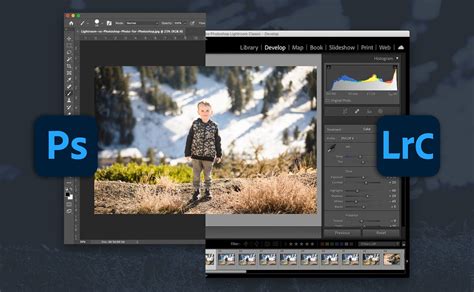
Photoshop and Lightroom are indispensable tools for photographers, forming the backbone of countless creative workflows. Their immense power in image manipulation and editing is undeniable, yet their capabilities can be further amplified through the strategic use of plugins. These add-ons extend the functionality of the base software, offering specialized tools, streamlined processes, and entirely new creative avenues. While many third-party options exist, understanding which plugins best serve your needs can significantly enhance your photographic output and efficiency. This article delves into a curated selection of the best Photoshop and Lightroom plugins, categorized by their primary function, to help you elevate your image editing to new heights.
The Power of Plugins in Photography
Plugins, at their core, are third-party software extensions designed to integrate with and enhance existing applications. In the context of Adobe Photoshop and Lightroom, they act as specialized tools that can automate repetitive tasks, introduce advanced creative effects, and refine specific aspects of image processing. For professional photographers, where time is a critical asset, plugins can automate tedious tasks like culling large batches of images, applying consistent edits across hundreds of photos, or performing complex adjustments that would otherwise require extensive manual effort. They also offer enhanced creative control, providing tools that go beyond Lightroom's native capabilities, such as sophisticated sharpening algorithms, unique special effects, or advanced black and white conversion options. Furthermore, plugins can streamline workflows by integrating with other services like online galleries or printing labs, ensuring consistency and efficiency at scale.
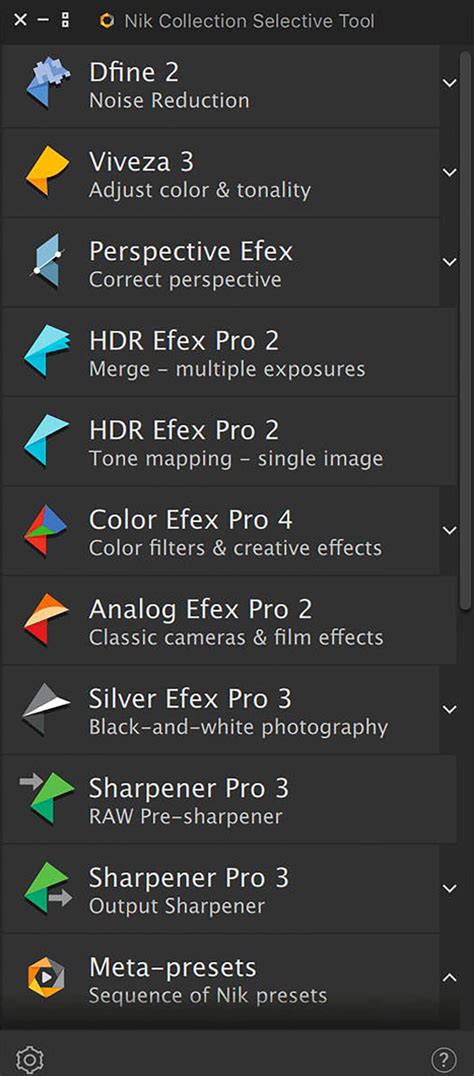
Comprehensive Collections: The Nik Collection 4
When exploring the vast landscape of Photoshop and Lightroom plugins, the Nik Collection 4 stands out as a particularly compelling option. While many plugins focus on a single task, the Nik Collection offers a suite of eight powerful tools, each addressing a distinct aspect of image editing. This comprehensive approach means that for a single purchase price, photographers gain access to a wide array of functionalities that could otherwise require multiple individual plugin purchases. The collection's history and consistent excellence, now under the stewardship of DxO, lend it a trusted reputation among photographers. Nik Collection 4 represents a streamlined and efficient update, designed to work seamlessly with Adobe programs.
The Nik Collection 4 includes:
- Analog Efex Pro 2: For achieving stunning film emulation, capturing the aesthetic of classic film stocks.
- Color Efex Pro 4: A versatile tool offering a vast library of presets for color correction and creative effects.
- Dfine 2: Dedicated to sophisticated noise reduction, helping to clean up images without sacrificing detail.
- HDR Efex Pro 2: Simplifies the creation of high dynamic range images, blending exposures to capture a wider tonal range.
- Sharpener Pro 3: This plugin offers pre-sharpening for RAW data and secondary sharpening post-debayering, ensuring optimal sharpness.
- Viveza 3: Allows for precise adjustments to color, light, and tonality within specific areas of an image.
The value proposition of the Nik Collection 4 is significant. Even before considering current discounts, the price of the entire collection is often less than purchasing just two individual plugins from other reputable sources. This makes it an attractive investment for photographers seeking a broad spectrum of editing capabilities within a single, trusted package. The recent updates have further enhanced its performance and integration with Adobe software, solidifying its position as a best-in-class option.
Enhancing Image Resolution: Topaz Gigapixel AI
In an era where digital images are used across a multitude of platforms, from social media to large-format prints, maintaining image quality is paramount. Artificial intelligence has emerged as a transformative force in image editing, and its application in upscaling photos for maximum clarity is particularly impactful. Topaz Gigapixel AI is a leading plugin that leverages AI to enlarge images by up to 600% without compromising quality. In many cases, the AI can utilize the additional pixels to enhance the final image, producing results that exceed initial expectations.
The benefits of upscaling are manifold. For photographers who frequently crop images, the increased detail provided by Gigapixel AI is invaluable. It also enables the production of larger-sized prints without noticeable degradation. Restoring older photographs to modern resolution standards is another key application. While numerous upscaling tools are available, many fall short of their ambitious claims, and free options often yield disappointing results.
Adobe's own Super Resolution feature within Adobe Camera RAW offers a comparable, and often faster, solution for basic upscaling. However, Topaz Gigapixel AI distinguishes itself through its superior noise reduction on upscaled images and its greater flexibility. The plugin provides users with extensive options to fine-tune the results, allowing for precise control over the final output and achieving optimum quality. For photographers who rely on upscaling as a critical part of their workflow, Topaz Gigapixel AI represents a worthwhile investment. For those who only occasionally need to upscale images, Adobe's Super Resolution is a highly capable and convenient alternative.
AI Upscaling That's Better than Gigapixel and Can Be Used Within Photoshop - It's True.
Superior Noise Reduction: DxO PureRAW
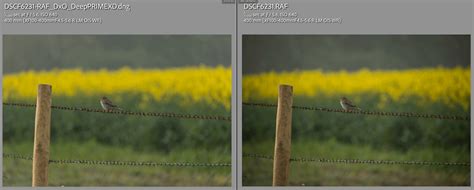
Noise reduction is a critical aspect of image processing, especially when working with images shot in low light or at high ISO sensitivities. While many editing programs offer noise reduction tools, they often come at the cost of image sharpness and detail. DxO PureRAW, available as an add-on for Photoshop and Lightroom, addresses this challenge with its AI-driven approach. This pre-processing application draws upon an extensive database of nearly 60,000 lens and camera combinations and millions of photographs to correct noise, chromatic aberration, vignetting, and other anomalies during the RAW photo demosaicing process. This is a key differentiator, as PureRAW applies these adjustments before demosaicing is complete, unlike many other RAW processors, including Adobe Camera RAW, which apply them afterward.
The results from DxO PureRAW are consistently impressive. Images emerge surprisingly crisp, with vastly improved RAW files straight out of the camera. Unlike traditional denoising methods that can sacrifice sharpness and color fidelity, PureRAW maintains these crucial elements. A potential downside is the increased file size of the DNG files created by PureRAW, which can be up to three times larger than the original. Additionally, users who prefer granular control over sharpening may find PureRAW's automatic sharpening, with its limited modulation capabilities, to be a concern. However, for photographers prioritizing the cleanest possible RAW images with minimal post-processing time, DxO PureRAW is an exceptional tool.
Achieving Flawless Portraits: Imagenomic Portraiture 3 and Retouch4Me
Retouching portraits is a common task for photographers, but achieving natural-looking results without sacrificing detail can be challenging. Two plugins, Imagenomic Portraiture 3 and Retouch4Me, offer distinct yet effective solutions for portrait retouching.
Imagenomic Portraiture 3
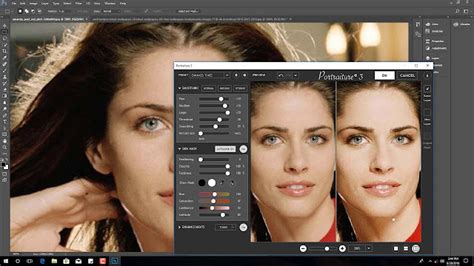
Portraiture 3 from Imagenomic has long been a respected name in portrait retouching plugins. It provides a nondestructive method for smoothing skin while preserving crucial high-frequency detail, preventing the "plastic" look often seen in over-retouched images. The plugin is adaptable to various skill levels, offering both one-click enhancements for quick results and a reasonable depth of fine-tuning options for more control. Its auto-masking works well in natural lighting, and it supports layering and intuitive controls. While achieving similar results manually in Photoshop is possible, Portraiture 3 offers a significant time-saving advantage and a more consistent outcome for many users.
Retouch4Me
Retouch4Me offers a suite of AI-based retouching plugins designed to significantly reduce the time spent on post-production. These tools are particularly effective for fashion, beauty, portrait, and headshot images, providing great results with minimal effort. The plugins can be purchased individually or as a suite, covering functions like healing, dodging and burning, skin tone blending, backdrop cleaning, and eye/teeth enhancements. While the AI's results are generally excellent, occasionally the healing or cleanup might be too aggressive, requiring minor manual adjustments or opacity reduction in Photoshop. A key strength of Retouch4Me is its ability to maintain skin tone and textures, ensuring realistic results that serve as a strong baseline for further refinement. However, it's worth noting that these plugins are priced individually between $120 and $150.
AI Upscaling That's Better than Gigapixel and Can Be Used Within Photoshop - It's True.
General AI-Powered Editing: Skylum Luminar AI and Neo
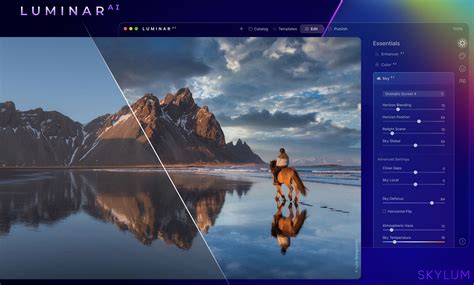
Artificial intelligence is revolutionizing image editing, and Skylum's Luminar AI has emerged as a frontrunner in this domain. Marketed as the world's first AI-fully powered image editor, Luminar AI can function as a standalone application or as a plugin for Photoshop and Lightroom, bringing its advanced computational power into familiar workflows. It is particularly beneficial for casual photographers seeking to align their final output with their initial vision. Luminar AI's "Templates" feature analyzes each photo and suggests optimal edits, offering a sophisticated one-click solution.
Seasoned photographers also find value in Luminar AI's intelligent automation for rapid tweaks. Key features like sky replacement, fog addition, and AI-powered skin beautification can significantly enhance images before further editing in Lightroom. A common point of discussion with Luminar is the company's rapid release cycle of new versions, such as the upcoming Luminar Neo. While this can lead to a feeling of constant upgrade pressure, it also reflects the rapid advancement in the AI market. The continuous development ensures that features like sky replacement become increasingly sophisticated, accurately handling elements like reflections. Despite any quibbles about versioning, the core power of Luminar AI remains a significant asset.
High Dynamic Range Imagery: Skylum Aurora HDR
Creating High Dynamic Range (HDR) images is essential for capturing scenes with extreme variations in light and shadow, a common requirement in fields like visual effects and architectural photography. While Photoshop can produce HDR images, dedicated software often offers a more streamlined and powerful approach. Skylum's Aurora HDR is a prime example, providing an intuitive interface and advanced tools for blending multiple exposures into a single, stunning image.
Aurora HDR allows photographers to retain detail in both the brightest highlights and the deepest shadows, resulting in images with a natural yet expansive tonal range. The plugin offers a range of presets and editing controls to fine-tune the HDR effect, catering to various aesthetic preferences. For professionals requiring high-quality HDR captures for demanding applications, Aurora HDR provides a robust and efficient solution, simplifying a process that can otherwise be complex and time-consuming.
Specialized Tools for Specific Needs
Beyond the broad categories of plugins, a host of specialized tools cater to niche requirements within a photographer's workflow.
Upscaling and Sharpening for the Web: Web Sharpener
Preparing images for online display involves more than just resizing. A specialized resize and sharpening method is crucial for optimal web presentation. The Web Sharpener extension, for instance, simplifies this process by bundling knowledge about preparing photos for the web into an easy-to-use interface. It offers options for quick or standard sharpening, allowing users to control the final size and save presets for different platforms.
Luminosity Masks and Targeted Edits: Lumenzia
For photographers who delve deep into Photoshop's editing capabilities, Lumenzia by Greg Benz is an invaluable tool. Initially focused on simplifying the creation of luminosity masks, its functionality has expanded to offer extensive control over selections and targeted edits. Luminosity masks allow for precise adjustments based on the brightness values within an image, enabling complex retouching and creative effects that are impossible with standard selection tools. Lumenzia's affordable price and continuous updates make it a powerful asset for advanced Photoshop users.
Advanced Focus Stacking: Helicon Focus
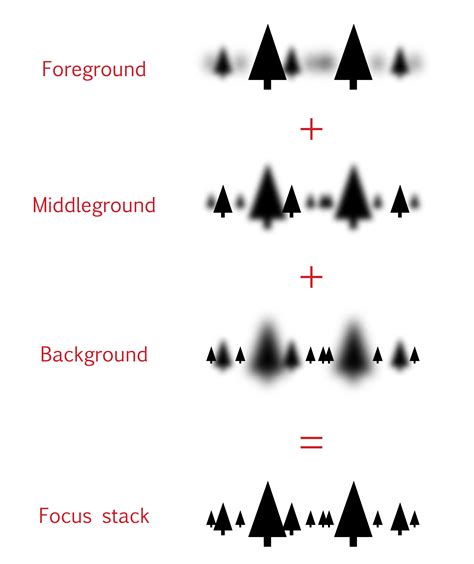
Achieving complete sharpness from foreground to background in landscape and architecture photography can be challenging. While Photoshop offers focus stacking capabilities, manual methods or specialized software often yield superior results. Helicon Focus is a standout application that provides advanced algorithms for combining multiple images with varying focal planes into a single, perfectly sharp image. Although not a direct Photoshop extension, it integrates with Lightroom via the "Export - Helicon Focus" option and supports a DNG workflow, making it a natural complement to plugins like DxO PureRAW.
Intelligent Culling and Editing: Imagen
For professional photographers, particularly those working with high-volume events like weddings, culling thousands of images can be a daunting and time-consuming task. Imagen offers a comprehensive, AI-powered platform that integrates with Lightroom Classic, Lightroom, Photoshop, and Bridge. This cloud-based solution handles the heavy lifting of culling and editing, freeing up photographers' time.
Imagen's AI analyzes photos for technical quality (focus, exposure) and content (faces, duplicates, closed eyes), presenting a culled gallery for review. Its unique "Cull Edited Previews" feature allows users to see how their edits will appear during the culling process. The platform's "Personal AI Profile" is a groundbreaking feature, allowing users to train the AI on their past edits, ensuring that the automated results reflect their unique style. This AI learns from thousands of your edited photos, adapting to your specific adjustments across exposure, white balance, HSL sliders, and tone curves. For those without a large catalog of edited images, "Lite Personal AI Profiles" or "Talent AI Profiles" created by professional photographers are available.
Imagen also offers additional AI tools for tasks like cropping and skin smoothing, and it integrates cloud storage and delivery options, completing the workflow loop. By handling the most labor-intensive aspects of post-production, Imagen empowers photographers to focus on creativity and client service, making it a significant investment in a more sustainable and profitable business.
AI Upscaling That's Better than Gigapixel and Can Be Used Within Photoshop - It's True.
Workflow Enhancements: Photo Mechanic, LR/Mogrify 2, AlbumStomp, and ProSelect
Several other plugins and companion applications significantly enhance specific stages of the photographic workflow:
- Photo Mechanic: While not a traditional plugin, Photo Mechanic is an essential tool for professionals, especially sports and news photographers, who need to cull and keyword photos at extreme speeds. Its legendary speed is achieved by previewing embedded JPEGs in RAW files.
- LR/Mogrify 2: This powerful export plugin for Lightroom provides extensive control over exported files, including watermarking, borders, text annotations, and advanced resizing and sharpening options beyond Lightroom's native export dialog.
- AlbumStomp: For wedding and portrait photographers, AlbumStomp streamlines album design. It integrates with Lightroom, allowing users to export selected images and design layouts with an intuitive drag-and-drop interface before sending files to the lab.
- ProSelect: This tool is designed for in-person sales, integrating with Lightroom to assist photographers in presenting and selling prints, albums, and wall art to clients.
The ON1 Suite: A Comprehensive Plugin Ecosystem
The ON1 suite of plugins offers a wide range of tools that integrate seamlessly with Photoshop, Lightroom, and other editing software, or function as standalone applications. These plugins are designed to enhance various aspects of the editing process, from noise reduction and sharpening to sky replacement and portrait retouching.
- ON1 Effects 2026: This plugin provides a vast collection of trendy looks and styles, along with popular one-click presets. It features powerful filters like Weather, Sun Flare, and Color Balance, which can be combined and blended. Unique features include Super Select AI for effortless region editing and AI-powered Adaptive Presets that adjust to different subjects and scenes.
- ON1 NoNoise AI 2024: Utilizes AI-based noise reduction and demosaicing to remove image noise while intelligently recovering and enhancing details. It also incorporates Tack Sharp AI for state-of-the-art sharpening and deblurring, capable of correcting motion blur and out-of-focus shots.
- ON1 Sky Swap AI 2023: Simplifies the process of replacing or enhancing skies. It automatically detects the sky and creates a mask, allowing users to choose from a library of skies or import their own. The generated masks are easily adjustable, and skies can be flipped or rotated to match lighting conditions.
- ON1 Resize AI 2023: A next-generation photo enlargement software that uses super-resolution technology to enlarge photos while maintaining and recovering detail and sharpness. It includes features like Gallery Wrap for canvas prints and batch processing for multiple images.
- ON1 Portrait AI 2023: Offers flawless retouching with AI that finds and enhances faces automatically. It analyzes skin, eyes, and mouths to apply professional-level retouching with minimal effort.
- ON1 HDR 2023: Enables the creation of natural-looking HDR photos by blending highlight and shadow details from multiple exposures. It offers control over movement and powerful tools for perfecting HDR images.
The ON1 plugins can be purchased individually or as part of the ON1 Photo RAW MAX bundle, which includes all ON1 applications and plugins in a single installation. This bundle can be owned outright or accessed through a subscription service.
Conclusion: Investing in Your Workflow
The world of Photoshop and Lightroom plugins is vast and continually evolving. From comprehensive suites like the Nik Collection to specialized AI-powered tools like Imagen and Topaz Gigapixel AI, these add-ons offer photographers the ability to automate tasks, unlock new creative possibilities, and significantly enhance the quality and efficiency of their work. By strategically integrating the right plugins into your workflow, you're not just saving time on your next shoot; you're investing in a more streamlined, scalable, and ultimately, more profitable photography business. The key is to identify the tools that best address your specific needs and shooting style, ensuring that your editing process complements, rather than hinders, your creative vision.