Adobe has significantly advanced Photoshop's capabilities by integrating artificial intelligence, particularly with enhancements to Generative Fill and the introduction of new workflows designed to drastically reduce manual retouching time. The latest Photoshop updates are heavily invested in AI, transforming tasks that once consumed hours into processes that can be tested and refined in mere seconds. This evolution is especially impactful for users in the United States already subscribed to Creative Cloud, as these powerful new features are seamlessly integrated into their existing software.
For those who may have found Photoshop intimidating in the past due to its perceived slowness, complexity, or extensive menu systems, the new AI-driven tools, such as Generative Fill and object-aware selections, offer a more intuitive and responsive user experience. Recent desktop updates, as reported by prominent tech outlets like The Verge, Engadget, and CNET, prioritize making these AI features faster, more accurate, and better embedded within everyday creative processes, moving beyond mere demonstration capabilities.
A key takeaway for US-based users is the accessibility of these advancements. The improvements are being rolled out within the standard Creative Cloud subscription builds, meaning individuals on the Photography plan or the comprehensive All Apps bundle will find the headline AI tools present in their current Photoshop installations, rather than as separate, add-on products.
The current iteration of Photoshop offers a meaningfully different experience compared to its predecessors, primarily driven by these core AI-powered enhancements:
Generative Fill and Expand: Intuitive Content Creation
Generative Fill and Generative Expand represent a paradigm shift in how users can manipulate and extend images. By simply selecting an area of an image and providing a short, plain-English text prompt, Photoshop can now fill, remove, or replace content with remarkable realism, leveraging the power of Adobe Firefly AI. These tools have seen substantial improvements, particularly in edge handling and the generation of more convincing textures, surpassing the capabilities seen in earlier beta versions.
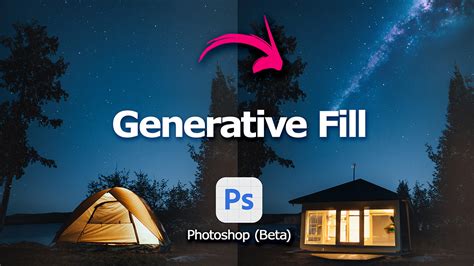
Generative Expand, in particular, empowers users to extend the canvas of an existing image and have Photoshop intelligently fill the newly created space while maintaining the original scene's style and coherence. This is invaluable for reframing photographs for various digital formats, such as vertical Reels, YouTube thumbnails, or even print layouts, without the need for re-shooting.
Object Selection and Remove Tool: Precision at Your Fingertips
Photoshop's ability to understand and isolate foreground and background elements has been significantly enhanced, making tasks that previously required meticulous manual effort now achievable with just a few clicks. Users on platforms like Reddit and YouTube have noted that these upgrades to the Object Selection and Remove Tool are dramatically reducing the time spent on quick edits and routine image clean-up. The improved accuracy means that identifying and removing unwanted objects, power lines, or even crowds can be accomplished with unprecedented ease, often negating the need for painstaking clone stamping.
Streamlining Workflows with Non-Destructive Editing
A crucial aspect of modern Photoshop workflows is the emphasis on non-destructive editing. The newer generative features are designed to operate on layers and masks, ensuring that all edits remain reversible. This approach not only provides flexibility for experimentation but also significantly enhances client-friendly revision processes, as original image data is preserved throughout the editing journey.
Cloud-Assisted Performance: Unleashing Power
While local hardware, particularly the Graphics Processing Unit (GPU), still plays a role in Photoshop's performance, the heavy lifting for AI computations is increasingly offloaded to Adobe's servers. This cloud-assisted approach means that even users with mid-range laptops in the US can access and utilize the new AI features, provided they have a stable internet connection. This democratization of powerful editing capabilities ensures that a broader range of users can benefit from Photoshop's advanced features.
The Enduring Foundation: Core Photoshop Capabilities
Beyond the groundbreaking AI advancements, Photoshop continues to offer its robust suite of traditional tools and features. These include its powerful layer-based editing system, the flexibility of Smart Objects, a wide array of blend modes, precise masking capabilities, comprehensive CMYK and RGB workflow support, and seamless integration with other Adobe applications like Lightroom, Illustrator, and After Effects. This enduring foundation ensures that Photoshop remains a versatile and indispensable tool for a wide spectrum of creative professionals.
Photoshop's EPIC AI Update: All New Features Explained
Key Tools and Features at a Glance
To provide a clear understanding of Photoshop's current capabilities, here is a structured overview based on recent reviews and Adobe's product information, with a focus on the US market:
| Feature | What it does for you | Why it matters now |
|---|---|---|
| Generative Fill | Uses text prompts to add, remove, or replace objects and backgrounds in an image. | Significantly cuts retouching time, enables non-experts to create complex composites, and is continuously refined for more realistic results. |
| Generative Expand | Allows you to extend the canvas and automatically fill the new area, preserving the scene's style. | Perfect for reframing shots for vertical Reels, YouTube thumbnails, or print layouts without needing to reshoot. |
| Object Selection / Remove Tool | Automatically detects subjects and unwanted elements, allowing for their removal with minimal manual intervention. | Improved accuracy in current builds makes everyday clean-up work nearly a one-click process for many images. |
| Neural Filters | AI-powered effects for skin smoothing, colorization, style transfer, depth blur, and more. | Streamlines portrait retouching and stylization, making it a popular choice for social media creators and portrait photographers. |
| Smart Objects & Layer Masks | Enables non-destructive editing, keeping original data intact while allowing for experimentation. | Remains the backbone of professional workflows, particularly vital in agencies and US-based print shops. |
| Cloud Documents & Libraries | Syncs files and brand assets across devices and collaborators through Adobe Creative Cloud. | Essential for remote US teams and freelancers collaborating with agencies across different states. |
| Lightroom & Camera Raw Integration | Facilitates round-tripping RAW images for advanced color grading and local adjustments. | The standard workflow in US wedding, commercial, and editorial photography studios. |
| Third-Party Plugins & Panels | Extends Photoshop's functionality with automation, LUT packs, retouching panels, and specialized export tools. | The extensive plugin ecosystem continues to be one of Photoshop's most significant advantages over newer, less feature-rich competitors. |
Availability and US Pricing Context
Photoshop's distribution model in the US is firmly subscription-based, a point that frequently surfaces in discussions on Reddit and in YouTube comments, where it's often compared to one-time purchase alternatives like Affinity Photo. Adobe does not offer a perpetual license for direct purchase. Instead, US customers typically choose from various Creative Cloud subscription plans that include Photoshop.
Based on the latest publicly available Adobe US pricing information, Photoshop is offered through monthly or annual subscription tiers, priced in USD. Promotional offers, student discounts, and business bundles can influence these prices, so it is always advisable to verify current rates directly on Adobe's website before subscribing.
The value proposition of Photoshop for US users is often seen as more significant than the precise dollar amount. Adobe positions Photoshop strategically within its subscription offerings:
- Photography Plan: This is the most common entry point for individuals who primarily require Photoshop and Lightroom for photo editing and social media content creation.
- Photoshop Single App: A focused subscription tailored for designers and retouchers who do not need the full suite of Creative Cloud applications.
- All Apps Plan: A comprehensive and higher-priced bundle aimed at creative professionals, agencies, and US students who require access to multiple Adobe tools, such as Premiere Pro, Illustrator, and After Effects, alongside Photoshop.
Across the tech press, a consistent observation is that despite growing "subscription fatigue," most professionals in the US still regard Photoshop as a necessary business expense rather than a discretionary application. This is largely due to its industry-standard file formats and established layer structures, which are often client requirements.
Real-World Usage: The AI Impact
Recent hands-on reviews and YouTube demonstrations of the latest Photoshop builds highlight a consensus: while AI doesn't magically perfect every image, it frequently achieves 70-80% of the desired result in seconds. This dramatic speed improvement fundamentally alters the user's approach to image editing.
Creators are showcasing the rapid execution of tasks such as:
- Seamlessly extending horizontal photos into vertical canvases for social media formats, with Generative Expand convincingly filling in skies, ground, or background details.
- Effortlessly removing distracting elements like crowds, power lines, or stray objects using the enhanced Remove Tool and content-aware fill, significantly reducing the need for manual cloning.
- Rapidly mocking up client ideas by typing prompts into Generative Fill, then manually refining the most promising results with traditional selection and masking tools.
Discussions on Reddit reveal a discernible split between long-time Photoshop veterans and newer users. Experienced retouchers express cautious optimism, appreciating the speed gains but still relying on manual fine-tuning, especially for critical areas like skin tones and product details where subtle imperfections can be detrimental. Conversely, newer users, often transitioning from mobile-first editing applications, are frequently impressed by the extent to which they can push edits without needing a deep understanding of layers or channels.
A recurring critique, particularly on social media, points to occasional over-smoothness or an "uncanny valley" effect in AI-generated results. Prompts can sometimes be misinterpreted if not sufficiently specific, leading to unintended outcomes. Furthermore, ongoing ethical discussions surrounding generative AI persist. Adobe, however, emphasizes that its Firefly AI is trained on licensed and public-domain content, explicitly avoiding broad internet scraping, a distinction that many US reviewers highlight as crucial for legal compliance and brand safety.
Performance and Hardware Considerations
The distributed nature of AI processing, with heavy computations occurring on Adobe's servers, means that even mainstream Windows laptops and Apple's M-series MacBooks in the US can leverage the new AI features without pushing their hardware to its limits. Nevertheless, local hardware remains a significant factor for traditional Photoshop tasks, such as working with large PSD files, extensive layer stacks, or high-bit-depth print documents.
Expert reviews generally recommend the following hardware considerations for a smooth Photoshop experience for US buyers:
- RAM: A practical baseline of 16 GB is recommended for multi-layer work, with 32 GB or more being ideal for users handling exceptionally large composite files.
- Storage: Fast Solid State Drive (SSD) storage is crucial, with ample space for scratch disks, as Photoshop can consume substantial temporary storage on large projects.
- GPU: While modern integrated graphics suffice for many tasks, a competent discrete GPU can enhance performance for specific accelerated filters and improve preview fluidity.
For professionals working with high-resolution marketing campaigns or oversized print materials, hardware upgrades may offer more tangible day-to-day benefits than the AI features themselves, which are primarily latency-sensitive rather than GPU-bound.
Photoshop's Evolving Role in the US Creative Ecosystem
Photoshop continues to hold its position as the de facto image editor across much of the US creative industry. However, its role is increasingly evolving from a standalone destination to a central hub within a broader digital ecosystem. It complements, rather than entirely replaces, traditional skills, acting as a potent accelerator for ideas and a significant time-saver, thereby reshaping how creative professionals operate.
Strengths Highlighted by Reviewers:
- Massive Time Savings: Generative Fill and the improved selection tools consistently reduce iteration cycles for creating composites, performing retouching, and fixing layout issues.
- Industry Standard Status: For agencies, print shops, and numerous brands in the US, .PSD file formats and established Photoshop workflows are the prevailing language of digital imagery, solidifying the software's entrenched position.
- Deep Feature Set: Beneath the surface of AI innovations, Photoshop retains unparalleled depth in masking, color management, and layer-based editing, which are indispensable for professional-level work.
- Regular Updates: Adobe's commitment to consistent refinement, rather than relying on infrequent major releases, ensures that bugs and unexpected AI behaviors are often addressed relatively quickly.
Common Criticisms and Trade-offs:
- Subscription Fatigue: A significant portion of US users express dissatisfaction with mandatory monthly payments, particularly hobbyists or creators managing side businesses who do not bill clients on a regular basis.
- Learning Curve: Despite the availability of tooltips and tutorials, Photoshop can still present a daunting challenge for beginners when compared to simpler, mobile-centric editing applications.
- AI Inconsistency: While impressive, the results from generative AI can be unpredictable, sometimes requiring multiple prompts or manual post-generation cleanup to meet professional standards.
- Performance Overhead: Handling very large files, expansive canvases, and high-bit-depth projects still necessitates robust hardware and substantial disk space.
For US-based creators evaluating their software choices this year, the expert consensus is pragmatic: if visual work forms the basis of your income, Photoshop's subscription model and AI-powered features are increasingly justifiable due to their direct translation into billable time savings. For casual editors, more affordable or simpler tools might suffice. However, opting for these alternatives means foregoing the depth, breadth, and future-proofing offered by Adobe's aggressive AI development roadmap.
In essence, Photoshop is no longer merely a tool for correcting minor photographic flaws; it is rapidly becoming an indispensable AI-powered creative partner.
Recent Feature Updates in Photoshop
Adobe continually refines Photoshop, introducing new functionalities and improvements to enhance user experience and creative potential. Recent updates have focused on streamlining organization, collaboration, and the refinement of AI-generated content.
- Projects Feature: This allows users to organize, share, and collaborate on creative projects more effectively within Photoshop.
- Refined Firefly Generations: Enhancements to Adobe Firefly's integration mean that users can now refine AI-generated outputs directly within Photoshop with greater control and precision.
- Enhanced Typing for CJK Languages: Improvements have been made to the typing experience for Chinese, Japanese, and Korean (CJK) languages, ensuring better text rendering and handling within designs.
Addressed Issues in Recent Builds:
- Font Search Bar Input: The initial input on the font search bar was sometimes ignored; this has been corrected.
- Info Panel Display: The Info panel previously did not show "before" values, only "after" values, which has been rectified for clearer comparison.
- Create Droplet Command: Issues where droplets could not complete the "Create Droplet" command due to a missing file have been resolved.
Further Enhancements and Fixes
Adobe's commitment to iterative improvement is evident in a series of targeted updates aimed at refining existing tools and addressing user-reported issues.
Feature Updates:
- Star Shape Tool: A new feature allows for the creation of perfect star shapes, offering greater control and customization for design elements.
- Improved Selections: Selections of people and their attributes have been enhanced, leading to more accurate and efficient masking and manipulation of human subjects.
- On-Canvas Color Adjustments: Users can now make color adjustments with improved on-canvas controls, offering a more intuitive and direct editing experience.
- Consistent Content Variations: Tools have been updated to generate more consistent variations of content, aiding in the exploration of different creative directions.
- Cloud Processing Options: Users now have the option to utilize cloud processing for features like "Select Subject" and "Remove Background," potentially speeding up these operations.
Resolved Issues:
- Color Settings Persistence: Changes made to color settings that were not sticking upon restart have been fixed.
- Prominent Color Preset: Hue ranges are now correctly updated when selecting the prominent color preset from the Properties panel.
- Windows File Name Length: The "Photoshop does not recognize this type of file" error, often triggered by long Windows file names, has been addressed for improved compatibility.
- Tool Reset Crash: Photoshop crashes that occurred when selecting "Reset All Tools" for any tool have been resolved.
- Black Document Window: The issue where the document window would appear solid black after updating to version 26.6 has been fixed.
- Gradient Layer Crashes: Crashes related to working with certain gradient layers have been resolved.
- Object Selection Tool Functionality: The issue where clicking to select with the Object Selection tool was not working has been corrected.
- Info Panel Bit Depth: Color sampler bit depth values in the Info panel, which were previously grayed out, are now correctly displayed.
- Path Stroke Application: The incorrect tool application when stroking a path has been fixed.
- File Info Dialog Preferences: The File Info dialog now correctly retains width and height preferences.
The Future of Photoshop: AI-Powered Innovation on the Horizon
Adobe is continuously pushing the boundaries of what's possible in image editing, with a strong focus on leveraging its Firefly AI models to introduce even more powerful features. The company has previewed several groundbreaking tools that promise to further revolutionize creative workflows.
Generative Upscale and Project Perfect Blend: Enhancing Detail and Cohesion
The Generative Upscale feature aims to enhance image resolution up to 8 megapixels, proving invaluable for restoring detail in vintage photographs, preparing images for high-quality prints, or adapting assets for diverse platforms. Looking ahead to 2024, Adobe teased "Project Perfect Blend," a feature designed to harmonize colors, shadows, and lighting when new objects are integrated into existing images, ensuring a more natural and cohesive composite. Alongside these, an improved object-removal tool is being rolled out. Earlier versions of generative fill for object removal sometimes resulted in unwanted artifacts because the tool considered the entire scene to fill the void left by the removed object. Demos have shown how early versions could produce undesirable results, such as a green blob appearing where an object was removed.
Future Sneak Peeks: Re-lighting, Surface Swapping, and Advanced Compositing
During Adobe Max 2025, a glimpse into the future of Photoshop was provided through a series of "Sneaks"âpromising projects under development. These included tools that could fundamentally alter how photographers and designers approach image manipulation:
Project Light Touch: This AI-powered tool offers unprecedented control over lighting in photographs. Users can reposition light sources, turn lamps on and off, and alter the color and 3D placement of lights within a scene. It can even correct uneven lighting caused by elements like hats blocking light on a subject's face. The "Spatial Lighting Mode" allows for a 3D workspace where light can be manipulated dynamically.
Project New Depths: Aimed at enhancing compositing, this project creates 3D elements from images by fusing multiple photos taken at different angles. This allows for realistic layering of foreground and background elements, even enabling the AI to adjust the angle of the background image itself. While potentially geared towards AR/VR applications, the underlying concept offers significant potential for traditional compositing.
Project TurnStyle: Another significant advancement for compositing, Project TurnStyle uses AI to generate a 3D layer from a flat image. This enables users to rotate and position objects realistically within a background image. The tool even demonstrated the ability to generate and refine human figures within a scene, addressing common AI artifacts like distorted faces with an up-resolution feature.
Project Trace Erase: Representing the next generation of object removal, this tool goes beyond simply removing an object. It can eliminate shadows and reflections with a simple swipe, even without requiring the selection of the entire subject. A key improvement is its ability to remove reflections while preserving the water source, such as a puddle.
Project Surface Swap: As the name suggests, this tool allows users to replace one surface with another. It can also select and manipulate reflective surfaces like cars. A compelling demonstration showed artwork being seamlessly applied to a textured wall, appearing as if it were naturally integrated, with the tool intelligently masking around existing elements like vines.
While not all "Sneaks" become integrated products, many pave the way for future features. The Harmonize tool, for instance, was a 2024 Sneak that has since become a part of Photoshop.
Practical Updates: Non-Destructive Adjustments and Refined AI
Beyond the speculative future features, recent Photoshop updates have introduced highly practical enhancements focused on refining existing workflows and improving the reliability of AI tools.
Non-Destructive Clarity, Dehaze, and Grain
The most significant recent change is the integration of Clarity, Dehaze, and Grain as fully non-destructive, maskable adjustment layers. Previously, these controls were somewhat awkwardly integrated, often requiring commitment to edits earlier than desired or the use of Smart Objects. Their new status as first-class adjustment layers means they can be edited, masked, and blended like any other, offering greater flexibility and easier experimentation. This allows for adding texture with Grain, recovering atmosphere with Dehaze, or enhancing detail with Clarity without compromising the original image data or limiting future options.
Upgraded Generative AI Tools
Adobe has also significantly upgraded its Firefly-powered tools, including Generative Fill, Generative Expand, and the Remove tool, with a noticeable increase in output quality. These AI tools, now daily aids for many artists and designers, offer quick solutions for previously time-consuming tasks. The promise of up to 2K resolution output means sharper details, reduced noise and artifacts, and more convincing lighting. Prompt adherence has also been improved, leading to less post-generation cleanup. In practice, this translates to fewer visible seams, less smeared texture, and edits that integrate more naturally into images. Generative Expand is more dependable for extending compositions, and the Remove tool excels at reconstructing backgrounds without leaving obvious traces. While still requiring user oversight, these tools are becoming increasingly reliable for production work.
Enhanced Reference Image Support
A quieter but crucial update to Generative Fill is the more reliable support for reference images. Photoshop can now better preserve the identity of a reference object when generating new content, matching scale, rotation, lighting, color, and perspective more accurately to the surrounding scene. This improved geometry awareness ensures that generated objects are oriented correctly and feel visually integrated, making generative tools far more dependable for projects involving recurring elements like products or branded assets.
Dynamic Text Beta for Curved Typography
Currently in beta, Dynamic Text offers a streamlined way to create curved typography. With a single click, designers can transform text into circular, arched, or bowed shapes, eliminating the need for manual path drawing or complex anchor point manipulation. This feature is particularly beneficial for logo design, posters, badges, and social graphics where curved text is frequently used.
These updates, while perhaps not as overtly dramatic as some AI "Sneaks," collectively serve to reduce friction points in creative workflows, enabling greater artistic momentum and flexibility. They open new use cases while empowering seasoned professionals to work more efficiently and intuitively.