Photoshop offers an unparalleled playground for artists and designers looking to elevate portrait photography. This extensive collection of tutorials and actions caters to a vast range of skill levels, from absolute beginners to seasoned professionals. By delving into these resources, users can expect to acquire a broad spectrum of techniques applicable to future design projects involving portrait editing. Beyond mere technical proficiency, these tutorials provide invaluable insights into the broader realms of graphic design and image manipulation, fostering a solid foundation upon which users can expand their Photoshop knowledge and create increasingly captivating visual narratives. Furthermore, access to a vast library of design resources, encompassing everything from Photoshop brushes to vector elements, empowers users to explore and implement a multitude of creative possibilities.
Transforming Reality: Surreal and Artistic Portrait Effects
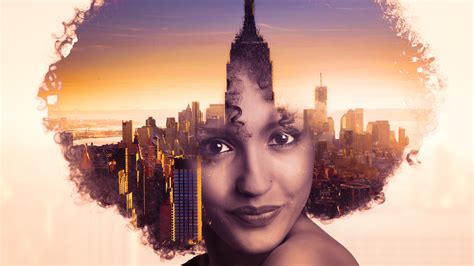
The world of digital art is replete with techniques that allow for the transformation of ordinary photographs into extraordinary visual statements. One such captivating effect, often seen on music album covers, in contemporary magazines, and across advertising campaigns, involves the artful layering and blending of two or more images. This creates a sense of depth and intrigue, merging disparate elements into a cohesive and compelling whole.
For those seeking to imbue their portraits with a touch of the fantastical, tutorials exist to transform images into frozen winter scenes, reminiscent of the iconic White Walkers from the popular "Game of Thrones" television series. This effect often involves careful color grading, the addition of frost and ice textures, and strategic blurring to achieve a chillingly realistic aesthetic.
Another avenue for creative expression lies in the realm of caricature. Step-by-step tutorials guide users through the process of transforming themselves, family members, or colleagues into exaggerated, bobblehead-style caricatures. This requires an understanding of facial anatomy and the ability to manipulate proportions and features in a playful yet recognizable manner.
The vibrancy of the 1980s and the allure of neon aesthetics are also readily accessible through Photoshop. Tutorials are available to help users create neon rainbow portrait effects, bathing subjects in intense, saturated hues. This trend has become particularly popular for converting modern photographs into oversaturated, fluorescent-style images, yielding intense and sensual portraits.
Beyond bold stylistic choices, Photoshop offers subtle yet powerful lighting effects that can dramatically alter the mood and impact of an image. These effects can add a new dimension to otherwise straightforward photographs, making them an indispensable tool for designers and illustrators.
Crafting Unique Looks: From Porcelain Skin to Grungy Allure
The pursuit of flawless skin in portraiture has led to the development of specialized techniques. Creating a stunning porcelain skin effect, for instance, is more accessible than one might initially assume. This often involves smoothing skin textures, reducing blemishes, and subtly enhancing luminosity without sacrificing a natural appearance.
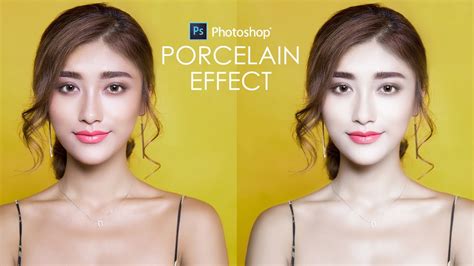
Photo manipulations, photo art, and photo composites represent broader categories of creative image editing where artists utilize photography as a medium to construct entirely new and imaginative realities. These techniques often involve combining multiple images, painting over them, and employing advanced blending modes to achieve seamless and often surreal results.
The appeal of photo effects is undeniable, especially those that are both easy to implement and profoundly transformative. Photoshop actions, in particular, provide a one-click solution for applying complex special effects to images, democratizing advanced editing techniques for a wider audience.
For those who enjoy the playful and expressive nature of filters, akin to those found on social media platforms like Snapchat, Photoshop offers tutorials to replicate such effects. This includes creating fun heart crown photo effects, a popular trend that adds a whimsical touch to selfies and portraits.
Embracing the Macabre and the Mystical: Zombie and Winter Effects
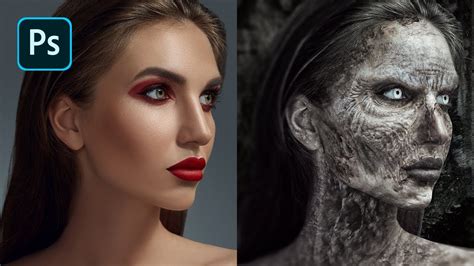
For those with a taste for the darker side of aesthetics, Photoshop provides the means to create creepy and compelling zombie photo effects. This often involves desaturating colors, adding textures of decay, and employing digital painting techniques to simulate wounds and pallor.
The ability to add a field of stars to night skies is another testament to Photoshop's versatility. This tutorial allows users to transform ordinary nighttime photographs into celestial panoramas, adding a sense of wonder and cosmic grandeur.
Blending text seamlessly into clouds offers a poetic and ethereal visual effect. This technique, often achieved through careful masking and blending modes, creates the illusion of text floating serenely in the sky, adding a layer of artistic depth to designs.
Vintage Vibes and Artistic Renditions: Timeless and Expressive Portraits
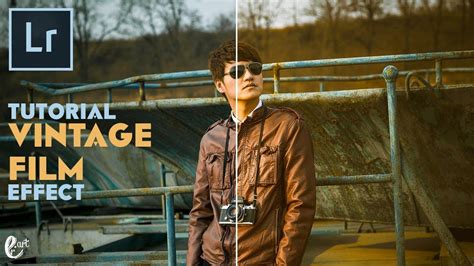
The allure of the past is often captured through vintage photo effects. While Photoshop is a powerful tool for this, Adobe Lightroom also offers effective ways to transform modern photographs into aged, nostalgic images. This typically involves adjusting color tones, contrast, and adding subtle imperfections like grain and light leaks.
For a truly unique and eye-catching portrait, consider the "Rainbow Eye Color Effect." This tutorial demonstrates how to imbue a subject's eyes with a spectrum of colors, moving beyond single hues to create a vibrant and surreal focal point. This technique is particularly effective for adding an artistic and magical quality to portraits.
Unleashing the Power of Photoshop Actions for Portraits
Photoshop actions are pre-recorded sets of commands that can be played back to automate complex editing processes. For portrait photography, a vast array of actions are available, designed to achieve specific looks and enhance images with efficiency and style.
The "Fury 3" Photoshop action is lauded for its ability to impart both movement and intensity to portraits, offering a dynamic visual flair. Not everyone is drawn to fiery aesthetics, and for those who prefer a more subdued yet impactful look, a comprehensive collection of Photoshop actions offers vintage-inspired and modern-day black and white portrait effects. These actions can evoke a sense of timelessness and classic elegance.
For those looking to add a layer of animation to their static images, a set of Photoshop portrait actions can generate video sequences of animated vintage effects, bringing portraits to life in a subtle yet captivating way.
The "Double Exposure" effect, a classic technique that layers two images together, is readily achievable with dedicated Photoshop actions. While these actions are optimized for portraits, they can also be experimented with on landscapes and animal photography for unique composite imagery.
Fire-themed Photoshop filters remain a popular choice, and specific actions are available to achieve this dramatic and energetic look. Beyond the intensity of fire, a broad category of "lifestyle" Photoshop actions aims to enhance portraits with vibrant and attractive color effects, designed to make images more appealing and engaging.
A "cinematic look" can be effortlessly achieved with film noir-inspired Photoshop actions. These actions, often numbering in the dozens, can instantly transform photographs, making them appear as if they were captured on a professional film set, exuding a sense of drama and sophistication.
Subtlety in editing can often yield the most profound results. A phenomenal series of Photoshop portrait actions focuses on high-quality, subtle effects that can significantly enhance the overall impact of an image without overpowering the subject.
Specific color treatments can also define a unique aesthetic. The "Caramel" Photoshop portrait action, for instance, introduces a warm, rich color tone, offering a distinctive look and speeding up post-processing for rapid, impressive results.
The "double light effect," a trendy visual style, can be replicated with specialized Photoshop actions. These actions streamline the process, allowing users to define an area for the effect and apply it with a single click, saving considerable manual painting time.
The "duotone portrait" is another highly sought-after effect. Actions are available to elevate portraits to this next level, creating striking two-color images that are both modern and impactful.
For a futuristic and visually arresting presentation, consider actions that create a "3D anaglyph" look, inspired by classic 3D film technology. These actions provide a cool, stereoscopic effect that adds significant visual interest.
Geometry plays a crucial role in contemporary design. Photoshop actions can incorporate geometric shapes, lines, and dots, bestowing images with a futuristic and organized aesthetic.
"Tonal" Photoshop portrait actions are designed to make photography stand out. The "Cinnamon" action, for example, simplifies the process of achieving gorgeous tonal results in less time, providing a warm and inviting color palette.
For artistic expression, the "Rainy Day" Photoshop action offers a realistic rainy window effect, complete with water droplets and fog. This action is specifically designed for artists and photographers seeking to add a touch of atmospheric realism to their portraits.
The "Gypsy" Photoshop action enables the creation of expressive, cinematic portraits with rich toning and a potential for a simple, faded matte effect, adding a touch of vintage charm.
A massive pack of Photoshop actions provides a staggering 80 double exposures, offering professional visual effects for a wide range of creative possibilities.
Transforming photographs into quick, cool sketches is another popular application of Photoshop actions. These actions can mimic the look of hand-drawn artwork, offering a distinct artistic rendition of the original image.
The iconic "Obama Hope" poster by Shepard Fairey can be recreated in seconds using specialized Photoshop actions. These actions allow for customization with favorite colors and textures, enabling users to create their own versions of this influential artwork.
Selfies can be transformed into "awesome comic art" with Photoshop presets that add epic bright colors and retro textures, giving them a vibrant and graphic novel-inspired appearance.
For a dynamic display, a fun action can create a "huge collage" from portrait photography, delivering wild and varied collage styles. Alternatively, a "dramatic blood art" Photoshop action can add colorful splashes of liquid to images, ideal for high-resolution portraits and more.
"Typographic portraits," where text is integrated into the image of a person, can be easily created with specific Photoshop actions. This allows for the inscription of inspiring passages or favorite words onto the subject's face, adding a literary dimension to the visual.
The sophisticated look of "HDR photography" can be reproduced with an exquisite HDR portrait action, enhancing detail and contrast for a professional finish.
Pencil sketch effects are also achievable, with actions that utilize smart object replacement to convert pictures into realistic pencil drawings.
"Grunge portraits" offer a distinctive allure, particularly for social media feeds like Instagram, adding a raw and edgy aesthetic.
Even beloved pet portraits can benefit from specialized Photoshop actions. A set designed for animal lovers contains multipurpose actions that provide a wide range of lighting conditions, enhancing the charm and character of animal photography.
Advanced Photoshop Retouching Techniques | Portrait Perfection
The sheer breadth of these Photoshop portrait effects underscores the software's capacity for creative transformation. Whether aiming for subtle enhancements, dramatic artistic statements, or playful stylistic explorations, the available tutorials and actions provide a robust toolkit for anyone looking to push the boundaries of portrait photography and digital art. These resources not only teach specific techniques but also foster a deeper understanding of image manipulation, encouraging experimentation and the development of a unique artistic voice.