Adobe, a titan in the digital creative landscape, extends a significant opportunity for students and educators to access its industry-standard software at a reduced cost. This special offer, known as the Adobe Photoshop Student Discount, is designed to empower those actively engaged in the educational process, providing them with powerful tools for their creative endeavors without the prohibitive expense of full-price subscriptions. Understanding how to obtain and utilize these discounts can be a game-changer for individuals honing their skills in graphic design, photography, digital art, and beyond.
Understanding the Adobe Creative Cloud for Education
The cornerstone of Adobe's educational offering is its Creative Cloud suite, a comprehensive collection of applications that includes Photoshop, Illustrator, Premiere Pro, and many others. While the regular pricing for these powerful tools can be substantial, Adobe recognizes the financial constraints often faced by students and teachers. Consequently, they have implemented a tiered discount structure specifically for the academic community.
The primary pathway to these savings is through the Creative Cloud "All Apps" subscription. This bundle grants access to every application within the Creative Cloud ecosystem. Crucially, Adobe offers an education discount exclusively on this comprehensive package. This means that while individual app subscriptions exist, they typically do not carry an academic discount, making the "All Apps" bundle the most economically sensible choice for students and teachers looking to maximize their investment. The academic editions function identically to their standard counterparts, offering the full spectrum of tools and services without compromise.
Eligibility and Verification: Proving Your Academic Status
To qualify for the Adobe Photoshop student discount and the broader Creative Cloud education pricing, a clear demonstration of academic affiliation is required. This is typically managed through a verification process, often involving a third-party service like SheerID. The core principle is to confirm genuine participation in the educational process.
Who Qualifies?
Eligibility extends to a wide range of individuals and institutions:
- Students: This includes those enrolled in accredited public or private universities, colleges, community colleges, junior colleges, and vocational colleges. The requirement is generally for programs granting degrees equivalent to at least two years of full-time study. Additionally, students in accredited public or private primary and secondary schools, as well as registered homeschoolers defined by state regulations, can also qualify. Even part-time students or those enrolling in a single class at a local community college are often eligible. Online colleges are also recognized by Adobe.
- Teachers and Educators: Faculty and staff members at eligible educational institutions are also entitled to the discount.
- Institutions: Educational institutions themselves may be eligible for specific licensing agreements.
What Proof is Needed?
The verification process necessitates submitting documentation that unequivocally confirms your academic status. Documents must be current, typically dated within the last six months. Acceptable forms of proof often include:
- Unexpired Student or Teacher School ID: A valid identification card issued by your educational institution.
- Acceptance Letter or Employment Offer: For new students or newly hired educators, these documents can serve as proof of upcoming or current affiliation.
- Class Schedule: A document outlining your current courses, confirming active enrollment.
- Transcript: An official academic record that includes your full name, the full name of your school, and the current term.
- Tuition Bill or Statement: Proof of payment or enrollment for current academic terms.
The submitted documents must clearly display your full name, the issue date, the full name of your school, and, for students, the current term. All verification checks are conducted online and generally take between one to two days to process.
Navigating the Discount Application Process
Obtaining the Photoshop student discount involves a structured approach, ensuring that Adobe can accurately verify eligibility. The process typically guides users through several key steps:
Step 1: Selecting Your Discounted Plan
The initial step involves navigating to the Adobe Education Store or a designated educational pricing page. Here, you will choose the Creative Cloud "All Apps" plan, as this is the primary offering for academic discounts.
Step 2: Initiating the Purchase
Once the desired plan is selected, you will proceed to the purchase or checkout menu. This is where you will initiate the process of acquiring the discounted software. You will typically encounter a blue "Buy now" button to proceed.
Step 3: Entering Payment Details
Following the selection of your plan, you will be directed to enter your payment information. It is at this stage that the system will apply the educational discount to the total cost.
Step 4: Providing Educational Data
This is a critical step where you must accurately input your educational credentials. This information will be securely transferred to the verification database (e.g., SheerID). Providing only actual and current information is paramount for successful verification.
Step 5: Submitting Proof of Status
As outlined in the eligibility section, you will be prompted to upload a document that serves as proof of your student or teacher status. Ensure the document meets all the specified requirements regarding content and recency.
Step 6: Confirmation and Access
Upon successful verification, you will receive confirmation. You can then proceed with downloading and installing the full-featured versions of Adobe software. While the verification is in progress, you can often download and install free trial versions of the products to begin learning and exploring immediately.
Understanding the Cost Savings
The financial benefits of the Adobe student discount can be substantial, significantly reducing the barrier to entry for professional creative software.
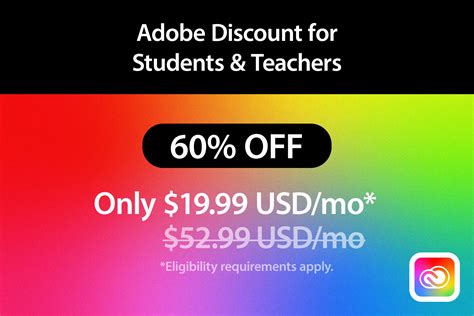
- Monthly Pricing: Without a discount, the Creative Cloud All Apps plan can cost around $59.99 per month. With the student discount, this price can be reduced to approximately $19.99 per month. This represents a saving of roughly 60% on the regular monthly rate.
- Yearly Pricing: For those who prefer an annual commitment, the cost without a discount is approximately $659.88 per year. The discounted academic price can bring this down to around $239.88 per year. This offers even greater savings when calculated on an annual basis.
It's important to note that while some sources mention a 40% discount, leading to a price of $29.99 per month, Adobe's offerings can fluctuate, and the $19.99 per month figure is frequently cited for the "All Apps" bundle. The exact discount percentage can vary, but it is consistently significant, often reaching up to 60% or even 75% off regular prices during certain promotional periods.
Beyond the Discount: Additional Benefits and Considerations
The Adobe student discount is not merely about a reduced price; it also encompasses several other advantages and important points to be aware of.
What's Included in the Discounted Package?
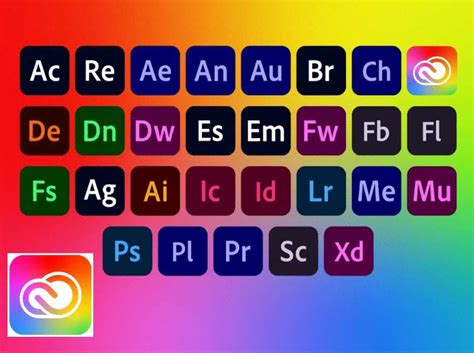
The discounted Creative Cloud All Apps subscription provides access to the complete suite of Adobe's creative software. This includes not only Photoshop but also applications like Illustrator, InDesign, Premiere Pro, After Effects, Lightroom, and many more. This comprehensive access allows students and educators to explore a vast array of creative disciplines.
Free Trial and Learning Resources
Adobe understands that users may want to evaluate the software before committing to a purchase, even with a discount. Therefore, free trial versions are readily available. These trials offer full access to all features and functionalities, allowing users to thoroughly assess the software's capabilities, compatibility with their systems, and overall performance. During the trial period, users can also begin learning using free tutorials provided by Adobe and its extensive community.
Photoshop For Beginners: Easy Guide to Get Started!
Photoshop Express and Browser-Based Options
For individuals who may not require the full power of Photoshop CC or are new to photo editing, Adobe offers simpler alternatives. Photoshop Express is a simplified, free version of the image editor that can be used directly in a web browser without installation or registration. It features a streamlined interface and essential editing tools, making it ideal for beginners, students, or those needing quick edits on the go, provided they have a stable internet connection.
Seasonal Sales and Special Offers
Beyond the standard educational discount, Adobe frequently introduces seasonal sales and special promotions. Events such as Black Friday, Cyber Monday, and other holiday periods are prime times when Adobe offers exclusive deals on Photoshop and its other software. Keeping an eye on Adobe's official announcements and the Education Store can lead to even greater savings.
Free Credit for First-Time Users
In a move to encourage new users, Adobe has sometimes offered incentives like a small credit (e.g., $12) for the first photo editing order. While not directly tied to the student discount, these offers can provide an additional benefit for those starting out.
Community Support and Training
A significant, often overlooked, benefit of using Adobe software is the robust community support. This includes access to professional training materials, forums, and assistance with technical or work-related difficulties. This extensive support network is invaluable for students and educators navigating complex software.
Important Usage Guidelines and Warnings
While the student discount offers immense value, there are specific guidelines and a few critical warnings to ensure compliance and avoid potential issues.
Software Usage Restrictions
- Private Computers Only: The student edition of Adobe software is generally licensed for use on private computers. It cannot legally be installed or run on business-owned or school-owned machines.
- Multiple Installations: The student license typically permits installation on up to two computers, such as a desktop and a laptop, allowing for flexibility in usage.
- Non-Transferable: The software license is personal and cannot be transferred or sold to another individual.
- Single Copy Purchase: Students are generally limited to purchasing one copy of the student edition of Adobe software. This measure is in place to prevent undue profit from the educational discount.
- Commercial Use Allowed: A significant advantage is that images and projects created using the student edition can be used for commercial purposes, even before graduation.
The Perils of Piracy and Illegitimate Software
Adobe strongly warns against downloading its software from unofficial sources, such as torrent sites or unauthorized resellers. The risks associated with pirated software are substantial and multifaceted:
- Malware and Viruses: Illegitimate downloads are frequently embedded with malware, including viruses, worms, and trojans. These malicious programs can compromise your computer's security, steal sensitive data (like login credentials and financial information), and cause significant system damage.
- Lack of Updates: Pirated software does not receive official updates, meaning you will miss out on the latest features, security patches, and performance improvements.
- Legal Ramifications: Using pirated software is illegal and can lead to legal consequences.
- Inauthentic Offers: Be wary of deals that seem too good to be true, especially on platforms like eBay, Reddit, or Craigslist, or from unknown sellers. Authentic-looking counterfeit software is prevalent.

Return and Exchange Policy
Generally, Adobe's academic software purchases, especially perpetual licenses from the past or discounted subscriptions, are non-returnable or exchangeable. It is crucial to be certain of your needs before completing the purchase.
The Evolution of Software Licensing and Student Budgets
In the past, purchasing software like Photoshop involved significant upfront costs. The last perpetual license version, Creative Suite 6 (released in 2012), had prices ranging from $399 for individual applications like Dreamweaver to $999 for Photoshop Extended and up to $2,599 for the Master Collection. Adobe has since transitioned to a subscription-based model with Creative Cloud. While this shift initially caused concern among some users regarding ongoing costs, the introduction and enhancement of educational discounts have made accessing these powerful tools more feasible for students than ever before. The move to a subscription model, coupled with substantial academic discounts, has effectively lowered the financial barrier, enabling a wider audience to utilize professional-grade creative software.
The academic editions of Adobe software function identically to their regular versions. This means students and educators gain access to the exact same tools, features, and services. Furthermore, the benefits of the academic license often extend beyond graduation or a change in academic status, allowing for continued use for a limited period. This ensures that the investment in learning and creative development is not lost upon leaving an educational institution.
In conclusion, Adobe's commitment to fostering creative talent through its student discount program provides an invaluable resource for individuals pursuing education in creative fields. By understanding the eligibility criteria, the application process, and the associated benefits and warnings, students and educators can effectively leverage these offers to unlock their full creative potential at a significantly reduced cost.