Photoshop, a powerhouse in digital image editing, offers photographers an unparalleled suite of tools to transform their captured moments into compelling visual narratives. For those who love to capture amazing views and moments but constantly feel something could be improved in their images, whether they’re landscapes, cityscapes, portraits, or fashion images, Photoshop training is not just beneficial; it's essential. This comprehensive guide delves into the core aspects of Photoshop training for photographers, drawing upon expert insights and structured learning approaches to elevate your post-processing skills.

The Foundation: Understanding Photoshop's Core Concepts
At its heart, mastering Photoshop for photography involves understanding its fundamental building blocks. This includes a deep dive into essential concepts like layers and layer masks. Layers are akin to transparent sheets stacked on top of each other, allowing for non-destructive editing. Each layer can contain different elements of an image, such as adjustments, retouching, or composite elements, enabling immense flexibility. Layer masks, on the other hand, control the visibility of a layer, allowing for precise control over which parts of an image are affected by edits. Learning to use these tools effectively is the gateway to professional-level retouching and manipulation.
A crucial aspect of modern photography workflows is the initial processing of raw image files. Adobe Camera Raw (ACR), often the first point of interaction for photographers shooting in RAW format, is a powerful plugin that allows for fundamental adjustments before even opening an image in Photoshop. Training in Photoshop for photographers must cover ACR, focusing on how to process your photos to achieve optimal exposure, white balance, and tonal range. This initial step sets the stage for all subsequent edits and can significantly impact the final image quality.
Essential Techniques for Image Enhancement
Beyond the foundational elements, Photoshop training for photographers equips individuals with a range of essential techniques to refine their images. This includes:
Precise Selections and Masking
Nailing precise subject selections is paramount. Whether it's isolating a person for a portrait retouch, a product for a commercial shot, or a specific element in a landscape, accurate selections are the bedrock of targeted editing. This involves mastering tools like the Quick Selection Tool, Magic Wand, Pen Tool, and the advanced Select Subject and Object Selection tools, which leverage AI to simplify complex selections. Coupled with layer masks, these selections allow for non-destructive adjustments applied only to specific areas of an image. Discovering the power of Masking & Coloring across all Photoshop applications is key to unlocking precise control over your edits.
Balancing Complex Light and Tones
Photographers often grapple with challenging lighting conditions. Photoshop training focuses on techniques to balance complex light. This includes understanding and expertly manipulating shadows and highlights, often through adjustment layers like Curves and Levels. Learning to adjust and master contrasts helps to create depth and visual interest. By understanding how light behaves and how Photoshop can be used to control it, photographers can rescue underexposed or overexposed areas, recover detail in shadows, and manage blown-out highlights, ultimately creating a more balanced and aesthetically pleasing image.
Professional Color Grading and Harmony
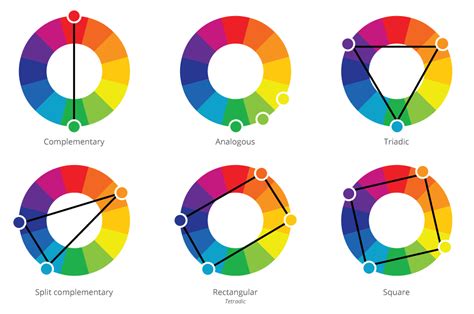
Applying professional color grades that actually tell a story is a hallmark of advanced photography. Photoshop training delves into the basics of color harmony and how to apply it to your work. This involves understanding color theory, such as complementary colors, analogous colors, and color temperature. You'll learn how to color grade your image and how to work selectively with each color using tools like Hue/Saturation, Color Balance, and Selective Color adjustment layers. This allows for the creation of specific moods, styles, and emotional resonance within your photographs, transforming an average shot into a compelling piece of art.
Optimizing Images for Different Outputs
Training also covers the practical aspects of preparing images for various platforms. Optimizing images for web use, print, or specific social media channels involves understanding resolution, file formats, and compression. This ensures that your images look their best regardless of where they are displayed.
Sharpening and Retouching
Sharpening is a critical step to bring out detail and clarity in your images, especially after resizing or when working with lower-resolution files. Training will cover various sharpening techniques, including Unsharp Mask, Smart Sharpen, and high-pass sharpening, explaining when and how to apply them effectively without introducing artifacts.
Retouching is another vital skill, encompassing everything from removing blemishes and distractions to smoothing skin and cleaning up backgrounds. This includes learning to clean backgrounds, signs, skin, and hair. Techniques like the Clone Stamp Tool, Healing Brush, Patch Tool, and Content-Aware Fill are essential for achieving seamless retouching. For portraits, specific techniques for working with curves, details, and adjusting colors are taught to enhance features subtly and naturally.
Black and White Conversion
The art of black and white conversion is more than simply desaturating an image. Effective black and white photography relies on understanding how tonal values and contrast translate when color is removed. Training will guide photographers on how to create impactful black and white images by mastering the nuances of contrast, dodging, and burning, and using tools like the Black & White adjustment layer to control the conversion of individual color channels.
Advanced Techniques and Creative Compositing
Beyond basic enhancements, Photoshop training opens doors to more creative and complex manipulations.
Directing the Viewer's Eye
A key aspect of compelling photography is guiding the viewer's attention. Training will focus on directing the viewer's eye through techniques like vignette effects, strategic use of contrast, and selective sharpening or blurring to emphasize the main subject and create a more impactful composition.
Image Compositing and Creating Outstanding Images
Photoshop excels at image compositing, the art of combining elements from multiple photographs into one cohesive image. You'll learn how to combine two average images into one outstanding image. This involves mastering advanced masking, blending modes, color matching, and perspective adjustments to ensure a natural and believable result. This skill is invaluable for creating surreal art, composite portraits, or even enhancing landscapes by adding elements that weren't present in the original scene.
Panoramic Image Creation
Creating breathtaking panoramic images can be achieved even without wide lenses by skillfully combining and adjusting multiple images. Training will cover the techniques for stitching photos together, aligning them perfectly, and blending the seams seamlessly to produce immersive wide-angle views. This process often involves significant tonal and color adjustments to ensure consistency across the merged images.
Photoshop Tutorial | Merging and stitching photos to create a Panoramic photo
Structured Learning Paths for Photographers
Effective Photoshop training for photographers is often delivered through structured courses designed for progressive learning. Welcome to our new 30 Days of Photoshop series! This collection of 30 tutorials is designed to help you master the most essential tools and techniques in a way that is easy to follow and fun to learn. Don’t miss a beat!
Alternatively, intensive, multi-day courses offer an in-depth understanding. For instance, a three-day course can provide an in-depth understanding of the Photoshop skills every photographer should know. Award-winning photographers and experienced educators, like Ben Willmore or Marcin, have taught hundreds of thousands of photographers worldwide how to harness the power of Photoshop. They are ready to share their unique insights and style.
These courses often take a practical approach, pulling back the curtain on the logic behind the tools. You’ll learn how to nail precise subject selections, balance complex light, and apply professional color grades that actually tell a story.
The Educator's Approach: Simplifying Complexity
Experienced Photoshop educators understand that the software can be overwhelming. They design courses as if explaining Photoshop to a friend who just wants to start an adventure with Photoshop and become a pro. This means delivering all you need to know to become one, providing tips and techniques that are genuinely useful, and crucially, saving your time by removing useless tools and techniques that could only teach you wrong habits. The focus is on efficiency and building a strong, correct foundation.
Hands-On Practice and Application
A critical component of any successful Photoshop training is practice. After learning the concepts, you will practice together on a lot of images, starting from landscape editing on a few different image examples. Then, you will be working on few different portraits which you can follow along. This hands-on approach solidifies learning and builds confidence.
Small Group Learning and Personalized Support
Learning in a small group setting, with lots of opportunity for questions and discussion, can be highly beneficial. Instructors like Alan Kesselhaut emphasize a patient and thorough approach, ensuring that everyone leaves happy and more knowledgeable. This personalized support is invaluable, especially when tackling complex topics like layers. Instructors may provide video resources for each technique upon request for later review and offer ongoing support to help solve problems well after the class is done. This extra service can make the cost of the class a true bargain.
What to Expect from Comprehensive Photoshop Training
A comprehensive Photoshop training program for photographers will cover:
- Camera Raw Processing: Understanding how to optimize RAW files for editing.
- Layers and Layer Masks: Mastering non-destructive editing and precise control.
- Selections: Techniques for isolating specific areas of an image.
- Adjustment Layers: Applying tonal and color corrections without altering original pixels.
- Retouching Tools: Cleaning up distractions, skin, hair, and backgrounds.
- Color Grading: Applying stylistic color treatments and understanding color harmony.
- Compositing: Combining elements from multiple images.
- Sharpening and Noise Reduction: Enhancing detail and managing image quality.
- Black and White Conversion: Creating impactful monochrome images.
- Composing Fundamentals: Improving the overall structure and impact of an image.
By the end of such training, you'll have added incredibly useful tools to your post-processing toolbox, enabling you to make precise edits and create images that truly match your vision. The goal is to empower photographers to move beyond basic edits and unlock the full creative potential of their images, making them always impressive.
Essential Requirements for Training
To fully benefit from most Photoshop training courses, you will typically require a computer with the most recent Photoshop release installed. This ensures compatibility with the software versions and tools being taught. The ability to follow step-by-step instructions and engage with practical exercises is also key to success.
Ultimately, Photoshop training for photographers is about more than just learning software; it's about developing a critical eye, understanding the technical nuances of image manipulation, and cultivating the creative vision to produce stunning, impactful photographs.
tags: #photoshop #training #for #photographers