For photographers and digital artists alike, the desire to refine images, bring creative visions to life, and enhance visual content is a constant. For years, Adobe Photoshop has stood as the undisputed industry standard, a powerful and versatile tool that has defined digital image manipulation. However, the pervasive shift towards subscription-based software models has left many users, particularly hobbyists and those on a budget, seeking alternatives that offer robust functionality without the commitment of ongoing payments. This exploration delves into a range of Photoshop alternatives, focusing on options that provide a one-time purchase or are entirely free, catering to a spectrum of user needs from basic enhancements to more advanced creative endeavors.
The landscape of photo editing software is vast and varied. While Photoshop's dominance is undeniable, its subscription model, often bundled in the Adobe Creative Cloud, can become a significant financial burden over time. Many users find themselves paying for a wealth of features they rarely, if ever, utilize. This has fueled a demand for alternatives that offer a more accessible pricing structure, often through a perpetual license, or a completely free, open-source model. The goal is to equip users with the tools they need to crop, adjust lighting and contrast, increase and decrease saturation, and perform a myriad of other edits without the continuous drain on their finances.
The Allure of One-Time Purchases and Free Software
The appeal of a one-time purchase for software is significant. It provides a sense of ownership and predictability, eliminating the anxiety of escalating monthly or annual fees. For hobbyists, this model is particularly attractive, as it allows for a substantial initial investment in a powerful tool that can be used for years without further cost. Free and open-source software, on the other hand, offers the ultimate in accessibility, democratizing powerful editing capabilities for everyone. These options often foster vibrant communities that contribute to ongoing development and provide extensive support through forums and tutorials.
Affinity Photo: A Close Contender to the Crown
Among the most frequently lauded alternatives to Photoshop, Affinity Photo, developed by Serif, consistently emerges as a top contender. It is designed with professional photographers and designers in mind, offering a comprehensive suite of tools that closely mirrors Photoshop's capabilities. Affinity Photo supports layers, adjustment layers, masks, and filters, enabling complex and non-destructive editing workflows. Its strength lies in more involved photo edits, such as compositing, creating intricate cut-outs, applying sophisticated effects, and exposure blending - tasks that were once exclusively the domain of Photoshop. A significant advantage is its availability across Windows, macOS, and iPadOS, all for a single, one-time purchase. This model directly addresses the user's desire to avoid subscriptions, offering exceptional value.
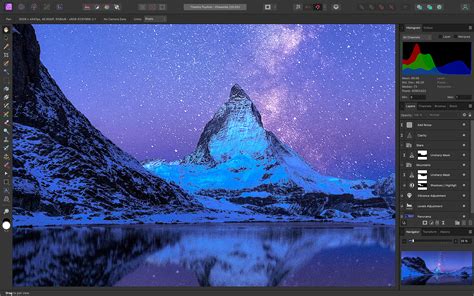
The interface of Affinity Photo, while packed with professional features, is designed to be intuitive, especially for those familiar with Photoshop's layout. Users can expect features like RAW file support, advanced retouching tools, and a full set of 16-bit filters. The sheer breadth of its toolkit is impressive, capable of rivaling Photoshop's professional feature set. However, for absolute beginners, the extensive options might initially seem overwhelming. Despite this, the absence of recurring subscription fees makes it an exceptionally compelling choice for anyone seeking a powerful, long-term solution.
GIMP: The Powerhouse of Free and Open Source
For those who prioritize entirely free solutions, the GNU Image Manipulation Program, or GIMP, stands as a formidable option. This open-source software has been a staple in the free editing community for years, offering a vast array of professional-grade tools for image editing, drawing, and graphic design. GIMP is compatible with Linux, Windows, and macOS, making it widely accessible. Its feature set includes essential Photoshop functionalities such as layers, masking, and a wide range of selection tools.
GIMP - Tutorial for Beginners in 13 MINUTES! [ COMPLETE & UPDATED ]
While GIMP boasts a rich toolset, its interface can present a steeper learning curve compared to some paid alternatives. For users accustomed to Photoshop's specific layout and naming conventions, there might be an initial period of adjustment as they navigate GIMP's distinct organization of tools. However, the open-source nature of GIMP means it benefits from a dedicated global community of developers and artists. This community actively contributes to its development, creating a vast ecosystem of plugins and add-ons that can extend its functionality considerably. If a specific feature is missing, there's a good chance a plugin exists to bridge the gap. GIMP also offers robust RAW compatibility and supports various file formats, ensuring a high degree of flexibility for photographers.
Luminar Neo: AI-Powered Editing with a Flexible Model
Skylum's Luminar Neo has emerged as a strong contender, particularly for photographers seeking AI-powered enhancements and a more streamlined workflow. While Luminar Neo does offer subscription options, it also provides a "lifetime license" or perpetual purchase, catering to users who wish to avoid ongoing payments. This model allows users to acquire the software outright and receive updates for a certain period.
Luminar Neo is designed to be more beginner-friendly than a full-fledged Photoshop, often described as a feature-rich Camera RAW equivalent. Its strength lies in its AI tools, which can automate complex edits, such as sky replacement, portrait enhancement, background removal, and even generative AI features for expanding images. These AI capabilities can significantly speed up the editing process, making it an excellent choice for those who want to achieve professional-looking results with less manual effort.
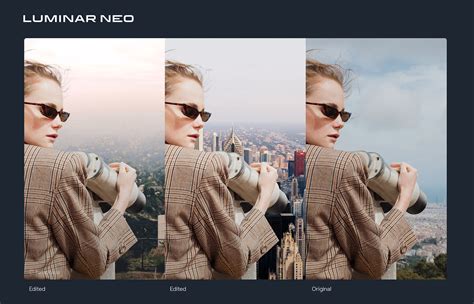
The software's interface is generally considered intuitive, with a focus on sliders and one-click adjustments that can radically alter an image. While the AI tools are powerful, their results can sometimes be inconsistent, and for highly advanced, professional-level manipulation, it might still fall short of Photoshop's depth. However, for amateur photographers or prolific editors who value speed and ease of use, Luminar Neo presents a compelling, non-subscription-friendly option.
Capture One Pro: Professional RAW Processing and Workflow
For photographers who prioritize exceptional RAW processing and a highly efficient workflow, Capture One Pro is a standout choice. This software is a one-time purchase and is renowned for its superior RAW conversion capabilities, offering a level of control over image data that often surpasses that of other editors. It is particularly favored by studio photographers due to its excellent tethering options, allowing direct camera control and image capture within the software.
Capture One Pro's interface, while professional and highly customizable with its moveable panels, can appear somewhat daunting to newcomers. However, for those willing to invest the time in learning its intricacies, it offers an unparalleled experience in image management and manipulation. Its color editing tools are considered among the best in the industry, and its cataloging system rivals that of Adobe Lightroom, making it easier to manage large volumes of images.
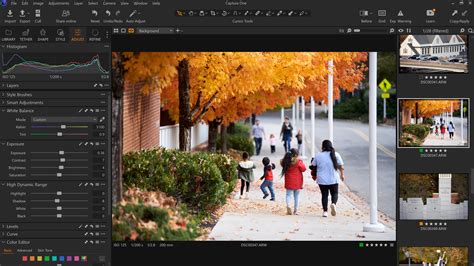
While Capture One Pro is a premium, one-time purchase option, its cost reflects its professional-grade features and performance. It's a powerful alternative for photographers who demand the highest quality in RAW processing and require a robust workflow management system without the commitment to a subscription. Though it offers some layer-based editing capabilities, it's generally considered more of a Lightroom alternative with advanced editing features rather than a direct Photoshop replacement for complex graphic design tasks.
ACDSee Photo Studio Ultimate: A Versatile Middle Ground
ACDSee Photo Studio Ultimate offers a compelling balance between advanced editing capabilities and a more accessible price point, available as a perpetual license. It positions itself as an ideal middle-ground solution for users who have outgrown basic editors but are not yet ready for the complexity or cost of professional-grade software like Photoshop.
GIMP - Tutorial for Beginners in 13 MINUTES! [ COMPLETE & UPDATED ]
This software integrates image management with powerful editing tools, including layers and RAW file editing. Its develop engine has seen significant improvements, making it a strong competitor for those looking to refine their photographic images. ACDSee also provides a well-featured digital asset manager, offering robust cataloging functionality with tagging, searching, and storage management features. For users seeking a comprehensive, non-subscription solution that covers both organization and editing, ACDSee Photo Studio Ultimate presents a highly capable option.
FastStone Image Viewer: A Lightweight and Capable Free Option
For users who require fundamental editing capabilities without a steep learning curve or significant cost, FastStone Image Viewer is an excellent free choice. While it might not possess the depth of features found in Photoshop or Affinity Photo, it excels at essential tasks such as cropping, resizing, adjusting lighting and contrast, and color correction. The user interface is straightforward and intuitive, making it easy for beginners to get started immediately.
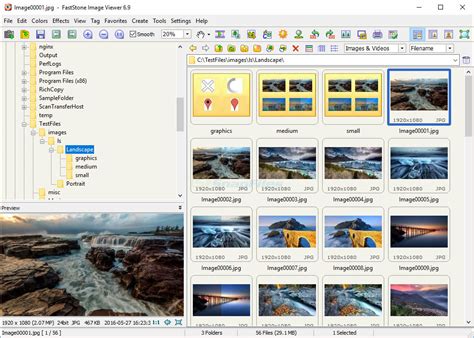
The program's speed and efficiency are notable, especially when dealing with large numbers of images. It also offers batch processing capabilities, which can be a significant time-saver for repetitive editing tasks. For hobbyists who primarily need to perform basic enhancements and organize their photo libraries, FastStone provides a surprisingly capable and completely free solution.
Other Notable Alternatives
The market for Photoshop alternatives is dynamic, with several other noteworthy options available:
Corel PaintShop Pro: A long-standing competitor, PaintShop Pro offers a comprehensive set of photo editing and graphic design tools with a perpetual license option. It's known for its robust feature set and user-friendly interface, making it suitable for both beginners and intermediate users.
Krita: Primarily designed for digital painting and illustration, Krita is a free and open-source software that also offers robust image manipulation capabilities. Its strength lies in its extensive brush engine and customization options, making it a favorite among artists. While it may lack some of Photoshop's advanced photo-specific features, it's an excellent free alternative for creative work.
Photopea: This is a unique, browser-based photo editor that impressively mimics Photoshop's interface and functionality. It's free to use (with ads) and supports a wide range of file formats, including PSD. For quick edits or users who prefer not to install software, Photopea is a remarkably powerful online solution.
DxO PhotoLab: While more focused on RAW processing and image enhancement, DxO PhotoLab offers advanced tools for noise reduction and detail recovery, particularly with its DeepPRIME and DeepPRIME XD technologies. It's a one-time purchase and an excellent choice for photographers who want to maximize the quality of their RAW files.
Pixelmator Pro: Exclusive to macOS, Pixelmator Pro is a powerful image editor that combines photo editing, illustration, and painting tools. It offers a sleek interface, non-destructive editing, and AI-powered features, available as a standalone purchase.
Making the Right Choice
The decision of which Photoshop alternative to choose ultimately depends on individual needs and priorities. For those seeking a direct, feature-rich replacement with a one-time purchase, Affinity Photo is often the top recommendation. If a completely free and open-source solution is paramount, GIMP offers unparalleled power and flexibility, albeit with a steeper learning curve. For users who value AI-driven enhancements and a streamlined workflow, Luminar Neo provides a compelling option with its perpetual license. For professional photographers focused on RAW processing and workflow, Capture One Pro stands out. And for those needing a solid, free solution for basic edits, FastStone Image Viewer is an excellent starting point.
The increasing cost and subscription-only nature of industry-standard software have opened the door for a diverse and capable array of alternatives. By understanding the strengths and weaknesses of each, photographers and digital artists can find a powerful, cost-effective solution that aligns perfectly with their creative aspirations and budget.
tags: #photoshop #without #a #subscription