PicWish is an AI-powered platform that aims to redefine the landscape of photo enhancement and editing. This innovative service offers a suite of tools designed to streamline creative workflows for a diverse user base, encompassing photographers, graphic designers, small business owners, and individuals seeking to elevate their visual content. Its core AI capabilities include sophisticated background removal, background generation, portrait enhancement, general photo enhancement, photo colorization, and text-to-image generation. PicWish caters to those who wish to enhance their photo editing experience, making professional-grade results accessible to both seasoned professionals and enthusiastic amateurs due to its intuitive interface and impressive output.
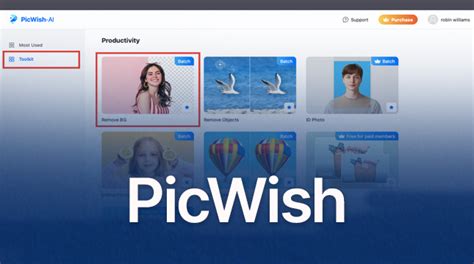
The platform's accessibility and flexible pricing structure are key to its widespread adoption. PicWish provides an absolutely free version, offering access to essential photo enhancement features, allowing users to experience its capabilities without an initial financial commitment. For users who prefer a more flexible approach, a pay-as-you-go option is available. This allows individuals to purchase credits, with 300 credits costing $14.99, equating to approximately $0.05 per credit. This model is particularly suited for occasional users who may not require a recurring subscription.
For those with more consistent photo enhancement needs, PicWish offers several monthly subscription plans:
- 50 credits per month for $5.99
- 500 credits per month for $14.99
- 1,000 credits per month for $29.95
- 5,000 credits per month for $49.95
These plans are designed to accommodate varying levels of usage, ensuring that users can select a subscription that aligns with their project demands.
PicWish's accessibility extends across multiple platforms, ensuring users can engage with the service regardless of their preferred device. It is available as a web-based application, accessible through any modern browser, offering immediate use without the need for downloads. For mobile users, dedicated apps are available for both iOS and Android devices, providing a seamless editing experience on the go. Furthermore, Windows users can benefit from a desktop application that integrates smoothly into their existing workflow, offering enhanced performance and offline capabilities.
Mastering Background Removal with PicWish
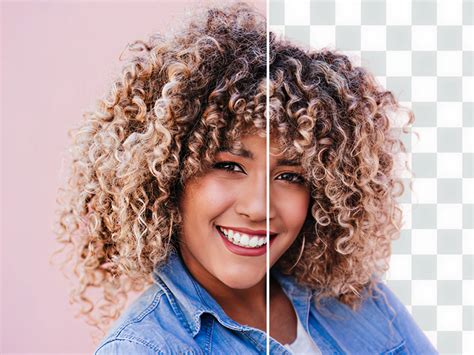
The flagship feature of PicWish is its advanced background removal capability, powered by intelligent AI technology. This tool is designed to automatically identify subjects within an image, such as people, products, or graphics, and cleanly separate them from their backgrounds in mere seconds. The process is remarkably efficient, even handling intricate details like hair with impressive precision, thereby retaining the original resolution of the subject. This makes it an invaluable asset for e-commerce sellers who need to create professional product photos for online stores, designers requiring clean assets for various projects, and personal users looking to enhance social media posts or profile pictures.
Step-by-Step Guide to Background Removal
Getting started with PicWish's background remover is a straightforward process. The platform is designed for ease of use, allowing users to achieve professional results with minimal effort.
- Access PicWish: Begin by accessing the PicWish platform through its web version.
- Create or Log In to Your Account: If you are a new user, sign up for a PicWish account. Alternatively, existing users can log in using their Google credentials or their established PicWish login details.
- Explore Tools and Upload Image: Navigate to the "Explore all tools" section and select the "Remove Background" option. You will then be prompted to upload the image you wish to process. This can be done by clicking the upload button or by dragging and dropping the file directly onto the workspace.
- AI Processing and Preview: Once uploaded, the AI will automatically process the image, identifying the subject and removing the background. PicWish often displays a before-and-after view, sometimes with a sliding line, allowing you to visually assess the enhancement.
- Manual Refinement (Optional): For images with particularly complex details or if the automatic removal is not perfectly satisfactory, PicWish offers manual editing tools. These include a Lasso tool for more precise edge selection and the ability to refine specific areas, providing greater control and freedom over the final output.
- Adjust Canvas and Add New Background: After the background is removed, you have several options. You can adjust the canvas size to your specific requirements. Furthermore, you can choose to apply a solid color background from a palette of options or upload a custom image to serve as the new backdrop, creating a desired aesthetic for your product or portrait.
- Download Your Enhanced Image: Once you are satisfied with the result, click the "Download image" button. Free users will typically use one of their complimentary credits to save the picture, often at a standard resolution. Paid users can download at higher resolutions, including HD and 4K.
Advanced Features for Background Removal
PicWish goes beyond basic background removal by offering a suite of complementary features designed to refine the final output and enhance workflow efficiency.
- Smart Refine Tool: This tool is crucial for achieving perfect cutouts, especially with challenging elements like hair, fur, or intricate patterns. It allows for quick selection and meticulous perfection of complex areas, significantly reducing the time spent on manual adjustments.
- Light Up Tool: After background removal, the lighting of the subject might need adjustment. The "Light Up" tool helps in optimizing the lighting conditions of the image, ensuring a cohesive and professional look.
- Batch Processing: For users dealing with a large volume of images, PicWish's batch processing capability is a significant time-saver. The online version allows for processing up to 30 photos simultaneously, while the desktop software can handle up to 10,000 photos in a single session. This feature is particularly beneficial for e-commerce sellers and designers who frequently work with extensive image libraries.
- Background Changing: PicWish offers the ability to not only remove backgrounds but also to replace them seamlessly. Users can choose from a variety of pre-set colors or upload their own custom images to create entirely new visual contexts for their subjects.
- Resize and Crop: The platform includes tools for resizing and cropping images, allowing users to adjust dimensions according to specific platform requirements or creative needs, with options to lock aspect ratios for consistency.
Beyond Background Removal: PicWish's Multifaceted AI Capabilities
While background removal is a standout feature, PicWish's AI-powered engine offers a broader range of tools designed to enhance and transform images in various ways. These capabilities cater to a wide spectrum of editing needs, from restoring old photographs to creating entirely new visuals.
Photo Enhancement and Restoration
PicWish's AI is adept at improving the overall quality of images. Its photo enhancement function employs a variety of optimization methods to sharpen blurry pictures, reduce noise, and enhance clarity with a single click. This is particularly useful for improving the quality of objects, icons, and animations.
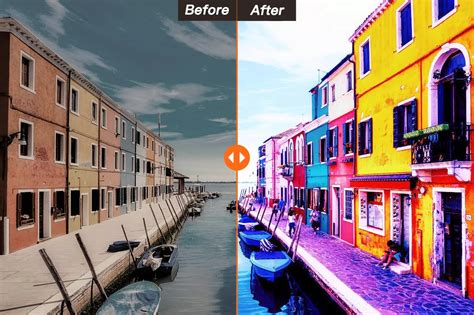
For older, cherished photographs, the colorize photos feature breathes new life into black and white images by naturally adding color. This process restores a sense of realism and vibrancy to historical photos, making them more engaging and emotionally resonant.
Image Correction and Manipulation
The blur to clear function is a specialized enhancement tool that specifically targets blurred images. It includes portrait enhancement, which automatically identifies blurred faces and sharpens facial details in high definition. This is invaluable for photographers and individuals looking to salvage portraits that may have suffered from slight motion blur or focus issues.
PicWish also provides tools for more direct image manipulation:
- Remove Objects: This feature allows users to effortlessly remove unwanted elements from an image, such as logos, stains, or distracting bystanders. The AI intelligently fills the removed area by analyzing the surrounding context, eliminating the need for complex manual editing.
- ID Photo Function: For official purposes, the ID photo function allows users to easily switch the background color and adjust the size of their photos to meet specific requirements, streamlining the process of creating compliant identification images.
- Compress Images: PicWish offers a compression tool that reduces image file sizes without a noticeable loss in quality. It supports various common formats like JPG, JPEG, PNG, and BMP, making it ideal for optimizing images for web use or storage.
- Add Watermark: Users can protect their intellectual property by adding custom watermarks to their images. The process is straightforward, allowing for the addition of text or logo watermarks.
- Bulk Resize and Crop: Similar to batch background removal, PicWish enables batch resizing and cropping of multiple images simultaneously. This ensures consistency in image dimensions across large sets of photos, saving significant time for professionals.
- Screenshot OCR: This utility allows for one-click screenshots of any screen area, with the added capability of quickly and accurately extracting text from the captured image.
- Image Converter: PicWish facilitates easy conversion between various image formats, including converting Webp, PNG, and HEIC files into JPG.
Accessibility, User Base, and Future Potential
PicWish has successfully positioned itself as a versatile tool for a broad audience. Marketing professionals leverage its background removal to create impactful product imagery, often paired with AI-generated backgrounds that enhance brand appeal. Photographers utilize its enhancement and unblurring capabilities to refine portraits and capture sharper details. Social media influencers rely on PicWish to present polished, engaging visual content that resonates with their followers.
The platform's ease of use, coupled with its powerful AI-driven features, makes it a popular choice for both personal and professional use. Whether the goal is to retouch portraits, design compelling marketing materials, or simply elevate social media posts, PicWish offers a comprehensive solution.
For developers and businesses seeking to integrate advanced image processing into their own applications, PicWish offers a documented API. This API supports batch submissions and asynchronous processing, allowing for seamless integration of background removal and other features into custom workflows.
Addressing User Needs and Common Questions
PicWish anticipates user needs through a comprehensive FAQ section and responsive support channels, including live chat and a feedback system.
- Who is PicWish's background remover for? It's designed for a wide range of users, including e-commerce sellers for product photos, designers for asset preparation, and personal users for social media and profile pictures.
- What are the advantages? Its proprietary AI technology delivers accurate cutouts, complemented by tools like Smart Refine, Light Up, and options for background replacement.
- How does it handle difficult images? The AI is trained to manage complex details like hair and intricate edges, with manual refinement tools available for further precision.
- Is it a good free option? PicWish is considered one of the best free background removers, offering a generous free tier for personal use with up to 50 downloads per day without watermarks. However, for professional output, upgrading is recommended due to resolution limitations on the free plan.
- How to get a transparent background? Simply use the background remover tool; it automatically outputs a transparent PNG by default.
The platform's commitment to continuous improvement is evident in its regular updates and feature expansions. The introduction of bulk background removal, for instance, significantly enhances efficiency for users processing numerous images. This feature allows for simultaneous editing of multiple files, leading to substantial time and effort savings without compromising on the quality of the results. This efficiency is particularly beneficial in professional settings where productivity is paramount.
In conclusion, PicWish stands out as a powerful, AI-driven platform that democratizes advanced photo editing. Its comprehensive suite of tools, user-friendly interface, flexible pricing, and multi-platform accessibility make it an indispensable resource for anyone looking to enhance their images, streamline their workflow, and unlock new creative possibilities.
tags: #picwish #background #remover