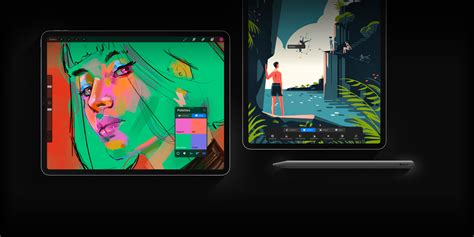
Procreate Dreams, the much-anticipated animation application from Savage Interactive, has landed, promising to bring pro-grade animation capabilities to the iPad. Building on the legacy of its immensely popular drawing counterpart, Procreate, this new app aims to democratize animation, making it accessible to artists of all skill levels. While its initial release was met with some critiques regarding missing features, the subsequent Procreate Dreams 2 update has significantly addressed these concerns, transforming the app into a more robust and user-friendly creative powerhouse.
The Genesis of Procreate Dreams: An Unexpected Arrival
The release of Procreate Dreams, particularly the significant Procreate Dreams 2 update, caught many by surprise. Unlike typical software development cycles where betas are previewed months in advance, the arrival of these updates was swift and relatively unexpected. This rapid deployment, however, has been a positive development for users, with many noting an immediate improvement in the app's usability and overall experience. The initial impression has been overwhelmingly positive, with users quickly discovering a more intuitive and streamlined workflow.
A Refined User Experience: Navigating the New Interface
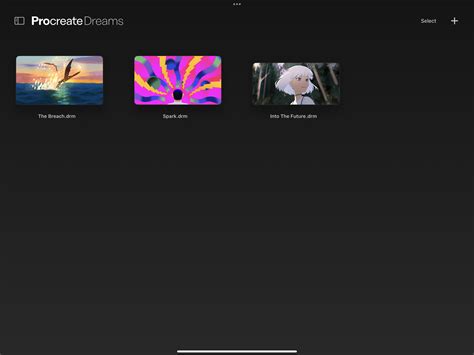
One of the most lauded aspects of the Procreate Dreams update is its enhanced user-friendliness. The app now feels significantly easier to navigate, with a cleaner and more organized layout. A key improvement highlighted by users is the separation of "flipbook" and "drawing" modes, which provides a clearer distinction between different animation workflows. The reworked system for adjusting video duration and frame size is a game-changer. Previously, these adjustments required delving into settings, a process that was often frustrating. Now, these crucial controls are conveniently located at the end of the timeline, allowing for much quicker and more intuitive modifications.
The introduction of three distinct timeline modes - Perform, Compose, and Keyframe - offers advanced control, though it does present a slight learning curve. Some users have found themselves inadvertently adjusting image sizes within the Keyframe mode, making these adjustments part of the animation itself. Additionally, the timeline cursor has become more sensitive, sometimes requiring precise manipulation to avoid unintended actions like moving frames or highlighting selections. Despite these minor adjustments, the overall consensus is that the app is far more user-friendly, with a workflow that has been substantially improved.
Enhanced Tools for Seamless Animation
The Procreate Dreams 2 update has introduced a suite of powerful tools that significantly streamline the animation process. The selection tools have been a particular point of praise, making it remarkably easier to select, move, and group frames. This, along with the addition of effects like blur directly within the flipbook and drawing modes, has been described as a life-saver by many animators.
The ability to resize the timeline is another significant enhancement. The previous method was often frustrating, leading some users to abandon the app for extended periods. The new system allows for much easier zooming in and out, enabling users to focus on specific sections of their animation or to view the entire timeline at a glance. The option to resize the video display itself, allowing users to shrink the timeline to focus on the video output, further enhances the viewing and review process.
Transforming Media into Animation
A particularly exciting new feature is the ability to transform videos and photos into flipbook frames. This functionality simplifies the process of adding effects to existing media and makes it more understandable for users. While some users have noted that this process can sometimes erase audio from the imported media, the creative possibilities it unlocks are substantial. This feature opens up new avenues for remixing and reinterpreting existing visual content within an animation context.
Brushes and Fonts: A Streamlined Ecosystem
The management of brushes and fonts has also seen a significant overhaul. The new system, which leverages iCloud for storing, copying, and moving these assets, is described as "genius." This integration ensures that brushes and fonts are easily accessible across devices and projects. However, a point of concern for some users is that many of the new animation brushes introduced with Procreate Dreams 2 do not appear to work in the original Procreate application, suggesting a potential compatibility issue or a missed step in the import process.
Addressing User Feedback: A Commitment to Improvement
Savage Interactive has demonstrated a strong commitment to responding to user feedback, as evidenced by their developer responses to reviews. Feature requests, such as the addition of rigging options for 2D characters and full-color onion skinning, have been noted and are being considered for future development. The developer's proactive approach to gathering and acting upon suggestions indicates a dedication to continuously improving Procreate Dreams.
Overcoming Initial Hurdles: From Frustration to Delight
For some users, the initial experience with Procreate Dreams was met with dissatisfaction, primarily due to its differences from the familiar Procreate interface. However, upon revisiting the app, especially after the Procreate Dreams 2 update, many have been "delightfully surprised." The app has evolved to become more intuitive, with a workflow that feels more aligned with what Procreate users expect. This evolution has turned initial hesitations into genuine enthusiasm.
Affordability and Accessibility: A One-Time Investment
A significant advantage of Procreate Dreams is its one-time payment model, a stark contrast to the subscription-based services offered by many other animation applications. This affordable pricing, coupled with its powerful features, offers exceptional value for money. The app is compatible with iPads running iPadOS 16.3 or later, and while it can function on older iPads, performance may be optimized on newer models. This accessibility ensures that a wide range of artists can engage with professional-grade animation tools.
Bridging the Gap: Animation for Beginners and Professionals
Procreate Dreams is designed to cater to a broad spectrum of users. For beginners, the app offers a gentle introduction to animation with features like the "Performing" function, which allows for intuitive, puppet-like manipulation of animated assets. The flipbook method, a digitized version of traditional cel animation, is also incredibly easy to grasp. The app's resistance to hiding features in complex menus ensures that most tools are accessible with just a few taps or gestures, reducing the intimidation factor often associated with animation software.
For professional animators, Procreate Dreams offers a deep and experimental playground. The comprehensive toolset, the ability to drag and drop artwork directly from Procreate, real-time rendering, and the potential for massive canvas sizes (up to 1M x 1M pixels) provide ample room for complex projects. The continuous auto-save and extensive undo history further contribute to a stable and reliable creative environment.
Areas for Continued Development: Towards a More Complete Experience
Despite the significant improvements, there are still areas where Procreate Dreams could evolve. The absence of certain features, such as quick shapes, custom easings, and advanced brush customization, has been noted. For artists with shaky hands, the lack of stabilization in frame-by-frame animation can increase the time required for linework. Some users have also encountered issues with the fill tool producing white artifacts and inconsistent rendering times, alongside occasional app crashes.
The current UI, while generally improved, presents some niggly aspects, particularly concerning frame manipulation. Looping specific segments of frames, for instance, requires a multi-step process of selecting, grouping, copying, and pasting. Onion skinning, a crucial tool for traditional animation, is also somewhat hidden within the interface. Furthermore, the inability to adjust playback speed in "Performance" mode limits granular control for more nuanced movements.
The Future of 2D Animation: Procreate Dreams' Potential Impact
Procreate Dreams is poised to play a significant role in the resurgence of 2D animation. In an era where visually dynamic 2D films like "Spider-Man: Into the Spider-Verse" and "Teenage Mutant Ninja Turtles: Mutant Mayhem" are captivating audiences, Procreate Dreams offers a powerful and accessible platform for artists to contribute to this evolving landscape. The app's dedication to traditional animation principles, digitized for the modern era, positions it as a potential catalyst for a new wave of 2D animators.
While the initial launch of Procreate Dreams presented some challenges, the ongoing development and the robust Procreate Dreams 2 update have transformed it into an indispensable tool for animators. The app embodies the ethos of its predecessor: powerful, accessible, and a joy to use. As Savage Interactive continues to refine and expand its capabilities, Procreate Dreams is set to remain at the forefront of digital animation for years to come. The journey from its initial unveiling to its current iteration showcases a remarkable commitment to artistic innovation and user satisfaction, making it a truly remarkable addition to the creative software ecosystem.