The architectural industry, historically a bastion of traditional tools and methodologies, has undergone a significant digital transformation. Among the vanguard of this revolution is Procreate, a powerful and intuitive digital art application for the iPad. For architects and architectural renderers, Procreate, coupled with the Apple Pencil, has become an indispensable tool, bridging the gap between traditional artistic sensibilities and the demands of modern digital workflows. This article explores how Procreate is reshaping architectural design, rendering, and education, drawing insights from pioneers like James Akers, a registered architect, full-time architectural renderer, and professor of iPad Drawing.
The Evolution of Architectural Visualization
For decades, architectural visualization relied on meticulous hand-drawing techniques, employing pencils, watercolors, and ink. While these methods produced renderings with a unique artisanal charm, they were often time-consuming and cumbersome when revisions were necessary. As James Akers recounts from his early career in the 1980s, making changes to a hand-rendered drawing involved physically cutting and pasting paper or scanning and digitally manipulating the image in Photoshop. This process, while effective, was far from fluid, hindering rapid iteration and client feedback loops.
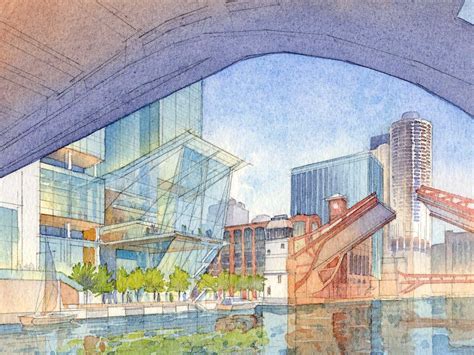
The late 1990s and early 2000s saw the rise of 3D modeling and rendering software, which offered unprecedented control and the ability to generate photorealistic images. However, even these advanced digital tools couldn't fully replicate the immediate, tactile feel of drawing by hand. The architectural industry was one of the earliest adopters of Procreate professionally. A significant milestone was the collaboration between Narinder Sagoo, Senior Partner and Art Director at Fosters + Partners, and Procreate, leading to the creation of the Narinder brush for Procreate 4 in 2017. This early integration signaled the app's potential for professional architectural applications.
The Game Changer: Procreate and Apple Pencil
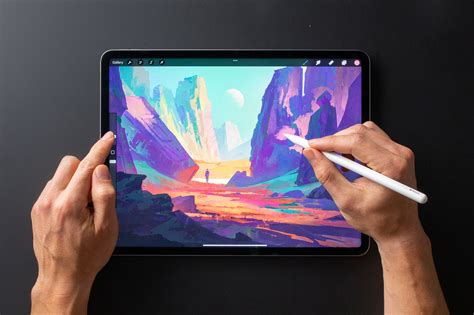
The advent of the Apple Pencil in 2005 marked a pivotal moment for digital art and, consequently, for architectural visualization. James Akers describes it as a "game changer," leading him to seek out a digital drawing application that could best suit his needs. Procreate emerged as the clear winner, offering a seamless and intuitive drawing experience that closely mimicked working on paper. "It's the directness of it. It's the closest thing to drawing on paper. It really unlocks that other part of your brain that is sometimes dulled by technology," Akers explains.
This combination of Procreate on iPad and Apple Pencil provided architects with a powerful tool that retained the soul of hand-drawing while embracing the efficiency of digital technology. The ability to draw directly on the screen with a pressure-sensitive stylus allowed for a level of expressiveness and control that was previously unattainable with a mouse or a standard graphics tablet.
Speed, Iteration, and Artistic Expression
One of Procreate's most significant advantages for architects is its capacity for rapid iteration and on-the-fly changes. A skillful renderer can now create multiple compelling views of an imaginary building in a single afternoon, a feat that would have been nearly impossible with traditional methods. This speed is not just about efficiency; it's about enhancing the design process itself. Architects can quickly explore different design options, test various material palettes, and refine complex details without the significant time investment previously required.
Beyond speed, Procreate allows artists to tap into a primal human connection with artisanal objects and stories. Hand-drawn elements, with their visible traces of the creative process, possess a unique magic that photorealistic 3D renders often struggle to replicate. "There is something in the lizard brain that knows this, and responds to it," Akers notes, highlighting how hand-drawn visuals can resonate more deeply with clients. The ability to spontaneously sketch in front of a client, a feat impossible with a keyboard and mouse, further strengthens the connection and communication during the design presentation.
Architecture Client Presentation
Procreate as a Professional Tool: Beyond Basic Sketching
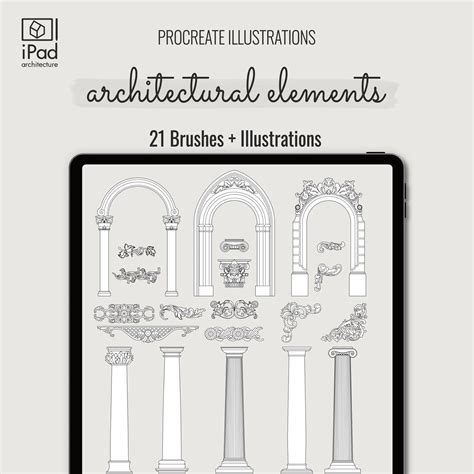
Procreate's capabilities extend far beyond simple sketching. Its advanced features, such as layers, blending modes, custom brushes, and selection tools, empower architects to produce polished, professional-grade renderings. James Akers has been instrumental in demonstrating these advanced applications, even developing custom brushes and stencils to streamline architectural workflows. He realized the potential of Procreate brushes not just for drawing but as stencils, enabling users to instantly tap out elements like scale rulers, entourage (people, trees, cars), and other essential components at actual scale. This "hacking" of Procreate, as he describes it, transforms the app into a highly customized tool tailored to the specific needs of architects.
Custom Brushes and Workflow Optimization
The development of custom brushes has been a key area of innovation for architects using Procreate. James Akers, for example, created brushes for specific architectural needs, including dotted and property line brushes. More significantly, he pioneered the use of brushes as stencils for elements like scale rulers, entourage, and vegetation. This approach allows for the rapid populating of scenes with contextually appropriate elements, saving hours of manual work.
Other platforms and artists have also contributed to this ecosystem. 30X40's Procreate brushes, grids, colors, and canvases are designed to establish a foundation for digital sketching habits, helping users create unique architectural styles. These packages often include custom brushes, grids, guides, canvases, and color palettes, along with PDF guides for recommended settings. Ehab, an architect, designer, and digital artist, offers courses focusing on creating seamless architectural illustrations in Procreate, covering digital sketching, perspectives, dynamic compositions, light, and shadow. His approach emphasizes transferring final sketches into Procreate, creating color palettes, and adding texture.
Hybrid Workflows and Integration with CAD
Procreate is not intended to replace traditional CAD software but rather to complement it. The app excels in the early stages of design, from conceptualization to schematic development, and can seamlessly transition into 2D or 3D CAD workflows. James Akers' courses, such as "Procreate for iPad Architects" and the "Procreate Accelerator," focus on this hybrid approach, teaching architects how to use Procreate for everything from initial idea hatching to developing designs to a point where they can be handed off to CAD software.
The "Procreate Accelerator" course, for instance, is designed as a comprehensive walkthrough for architects, explaining every tool and feature within the context of real design tasks. It aims to transform the iPad into a professional sketchbook that can "pay the bills" by teaching essential techniques like drawing to scale, quick schematic sketching, polished plan, elevation, and perspective renderings, and hybrid workflows that move seamlessly into programs like SketchUp or CAD. This emphasis on practical application and professional-grade output distinguishes it from generic art tutorials.
Educational Impact and Accessibility
Procreate's intuitive interface and the tactile experience of drawing with Apple Pencil have made it a powerful educational tool. James Akers' journey to becoming a UCLAx professor is a testament to this. His YouTube channel, "iPad for Architects," born from the accidental discovery of Procreate's time-lapse feature, gained traction and eventually led to his teaching position. The time-lapse videos provided a visual record of his creative process, demonstrating the app's capabilities to a wider audience.
Akers' online courses and YouTube channel have democratized access to advanced visualization techniques. Students and professionals alike can learn to harness Procreate's power, often finding it more accessible and engaging than traditional methods or even some other digital art software. Testimonials from users highlight the transformative impact of these courses, with many expressing how Procreate and the accompanying instruction have saved them time, improved their work, and even opened up new career opportunities.
One student shares, "I started using the rendering tactics in your Rendering with Procreate course which are massively time-saving and optimize my work. Long story short, Iâm now doing these quick, 2-to 5-hour color renderingsâsimilar to what I learned in your courseâfor upcoming broadcast commercials and shows. My new clients love my Procreate hand renderings! So you were actually not BS-ing when you said this stuff could change your life."
The clarity and directness of Procreate are often contrasted with other popular architectural sketching apps. While some platforms like Morpholio Trace market themselves directly to the profession, Procreate is often lauded for its cleaner interface, greater flexibility, and inherent support for creative fluency. The focus is on professional-grade drawings and speed, rather than abstract art theory.
Bridging the Digital Divide
For architects accustomed to traditional methods or feeling overwhelmed by complex software, Procreate offers a gentler learning curve. James Akers' teaching style is praised for making complex processes appear easy and for maintaining an incredible pace that keeps learners engaged. The emphasis is on practical skills, from navigating the app's gallery to mastering rendering techniques. Even experienced professionals who have "been using computers forever" find that Procreate classes "made it click," making them feel more confident and capable with digital tools.
The appeal of Procreate lies in its ability to combine the timeless interface of the pencil with modern digital editing tools. It empowers users to turn their iPads into professional sketchbooks that can generate income. The "Procreate Accelerator" course, for example, promises to take users from a blank canvas to polished design renderings rapidly, covering everyday concept design tasks like sketching floor plans, testing layouts, adding entourage, and producing client-ready visuals.
Procreate in Practice: From Conceptualization to Client Engagement
The application of Procreate in architectural practice is diverse and impactful. It's used for:
- Conceptual Design: Quickly sketching initial ideas, exploring massing, and developing spatial concepts.
- Schematic Design: Refining floor plans, elevations, and perspectives, and testing different layout options.
- Detailing: Adding intricate details, hatching, and material textures.
- Rendering: Producing high-quality, artistic renderings that communicate design intent effectively.
- Client Presentations: Creating engaging visuals for presentations, allowing for real-time modifications and client feedback.
- Site Analysis and Sketching: Documenting and analyzing existing conditions or urban contexts with a focus on proportional analysis and key design features, as demonstrated by Akers' study of Villa Savoye.

Akers' experience in Paris, where he used Procreate to perform a "proportional analysis" of Corbusier's Villa Savoye, illustrates a sophisticated application of the tool. Instead of a naturalistic sketch, he used Procreate's tools, like the rectangular selection tool and Drawing Assist, to deconstruct and understand the building's proportions. This approach, while using digital tools, still engages with the core principles of architectural study and design appreciation. "That's what drawing used to be for anyway, trying to learn proportions from these artists and these masters. But here I was doing it directly and it really was fun," he reflects.
The Future of Architectural Design with Procreate
Procreate has firmly established itself as a vital tool in the modern architect's arsenal. Its blend of artistic expression, digital efficiency, and user-friendly interface empowers designers to innovate, communicate, and engage with clients more effectively than ever before. As technology continues to evolve, Procreate, with its ongoing development and a vibrant community of users and educators, is poised to remain at the forefront of architectural visualization, enabling the creation of compelling designs that resonate on both an intellectual and an emotional level. The ability to combine traditional artistic intent with cutting-edge digital tools ensures that the future of architectural design is both visually stunning and deeply human.
tags: #procreate #for #architects