In the realm of digital communication and content creation, the visual presentation of a webcam feed plays a pivotal role. Whether for professional meetings, educational tutorials, engaging live streams, or dynamic video content, a clean and controlled background significantly contributes to the overall quality and impact of the message. Historically, achieving a polished webcam presence often necessitated the use of a green screen, a method that involved additional setup and expense. However, contemporary technology has introduced sophisticated solutions that liberate users from the constraints of physical backdrops, offering intuitive and powerful tools for webcam background removal.
The Evolution of Background Manipulation
The concept of altering or removing a webcam's background has evolved considerably. Initially, the only viable method for achieving a professional, distraction-free visual was through a technique known as "chroma keying," commonly referred to as using a green screen. This process relies on a uniformly colored backdrop, typically green or blue, which is then digitally replaced with another image or video. While effective, this approach demands specific lighting conditions and the purchase of a physical green screen, adding to the cost and complexity of video production.

More advanced techniques have emerged, leveraging the power of machine learning and artificial intelligence. These AI-driven methods can identify and isolate the foreground subject - usually a person - from the background in real-time, without the need for a physical colored screen. This technological leap has democratized high-quality video production, making it accessible to a much wider audience.
Key Features and Functionalities of Background Removal Tools
Modern software solutions offer a suite of features designed to provide users with unparalleled control over their webcam's background. These functionalities can be broadly categorized as background removal, background replacement, and background blurring.
Instant Background Removal
The core functionality of many webcam background tools is the ability to instantly remove the existing background. This is akin to having a virtual green screen, where the area behind the user is rendered transparent, allowing for the seamless integration of other visual elements. This feature is particularly useful when recording both the screen and the webcam feed simultaneously, as it ensures that only the presenter is visible, eliminating any clutter or distractions. For instance, XSplit VCam's "Remove Background" feature offers this capability, making the background disappear as if a chroma key had been applied. VEED.IO also provides a one-click background removal tool that allows users to easily edit out the background of their webcam recordings.
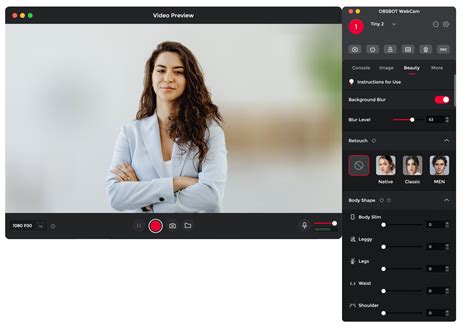
It's important to note that the implementation of background removal can vary slightly across platforms. For example, XSplit VCam on macOS might render the removed background as black instead of fully transparent.
Background Replacement: Unleashing Creativity
Beyond simple removal, these tools empower users to replace their original background with a variety of custom content. This opens up a world of creative possibilities, allowing individuals to tailor their visual environment to suit any occasion or brand.
- Image Replacement: Users can upload their own images to serve as a new background. This enables the creation of professional-looking virtual environments, whether it's a clean office space, a branded backdrop, or a visually appealing scene. Many applications offer a selection of preset images, or allow users to import their own. For example, SparkoCam supports various image formats like JPEG, PNG, BMP, and TIFF. Visla also allows customization with colors, preset images, or user-uploaded images.
- Video Replacement: For a more dynamic and engaging presence, some tools support replacing the background with video files. This can be particularly effective for presentations or promotional content. SparkoCam, for instance, supports video formats such as MP4, AVI, MOV, and MPEG.
- Dynamic Web Content: More advanced options include using YouTube video URLs or entire webpages as backgrounds. This allows for interactive and constantly updated visual elements. XSplit VCam offers the ability to use YouTube Video URLs or Webpages as backgrounds, providing a unique way to engage viewers.
- Stock Media Integration: To further simplify content creation, many platforms integrate with stock media libraries. This provides easy access to a vast collection of royalty-free images and videos that can be used as backgrounds. VEED.IO, for example, offers a library of royalty-free audio and video clips. Unsplash is another source for high-quality stock photos, accessible directly through tools like XSplit VCam.
The ability to "easily customize, update, and repurpose your content for any audience, event, and season" is a significant advantage. By simply changing the background, content creators can adapt their recordings for different purposes without re-recording. This is particularly valuable for re-using recordings in a video editor, where the background can be swapped out as needed.
Background Blurring: Simplicity and Focus
For situations where a full background replacement isn't desired but a cleaner look is still needed, the background blur feature is invaluable. This technique softens the background, reducing visual noise and distractions while keeping the focus squarely on the presenter. It creates a subtle depth-of-field effect, often described as a DSLR-style video using a regular webcam.
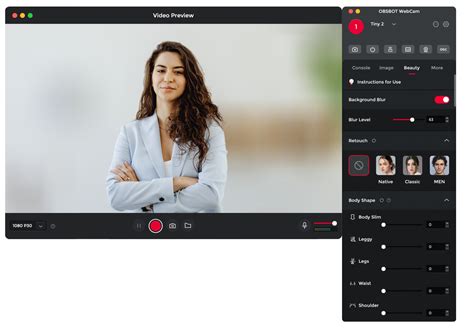
Tools like SparkoCam allow users to control the strength of the blur effect, adjusting it to their preferences. A low-intensity setting provides a gentle blur, retaining some background details, while a higher intensity creates a more pronounced separation. This feature is ideal for increasing privacy, hiding a cluttered environment, or simply ensuring a more professional appearance during video calls and presentations.
Practical Applications and Benefits
The advantages of effective webcam background manipulation extend across various use cases:
- Professionalism: In business and educational settings, a clean, controlled background conveys professionalism and seriousness. Removing or blurring distracting elements ensures that the audience's attention remains on the speaker and the presented material. VEED.IO highlights this benefit, stating that the instant webcam background remover is perfect for work, business, and educational videos, helping users look more professional.
- Privacy and Security: For individuals working from home or in shared spaces, background removal or blurring can be a crucial tool for maintaining privacy. It prevents sensitive or personal information from being inadvertently displayed to other meeting participants.
- Enhanced Engagement: Creative use of virtual backgrounds can make videos more engaging and memorable. Whether it's showcasing personality with a fun environment or reinforcing a brand with a custom graphic, virtual backgrounds add a layer of visual interest.
- Content Repurposing: The ability to easily change backgrounds in existing video recordings is a powerful feature for content creators. It allows for the efficient repurposing of footage for different platforms, campaigns, or seasonal promotions, saving significant time and resources.
- Accessibility: For those without access to dedicated studio spaces or green screen equipment, these tools provide an accessible pathway to achieving high-quality video output.
Software Spotlight: XSplit VCam, SparkoCam, VEED.IO, and Visla
Several software solutions stand out for their robust background removal capabilities:
XSplit VCam
XSplit VCam is renowned for its core feature: removing, replacing, or blurring webcam backgrounds without the need for a green screen. It offers a straightforward interface where users can select "Original Background," "Remove Background," or "Add Background." The "Add Background" option is particularly versatile, accepting image files, YouTube video URLs, webpages, and Unsplash photos. Users can also add their own images, animated GIFs, or video files, with the software automatically scaling them to match the camera's aspect ratio.
SparkoCam
SparkoCam provides a comprehensive suite of background effects, including blurring, replacing with images, or making the background transparent. Its "Make Transparent background" mode is useful for scenarios where the desktop is intended to be the background, requiring a specific setup involving a "Picture-in-picture" feature. SparkoCam also offers parameters like "Shrink Contour" and "Smooth Contour" to fine-tune the detected object's edges, leading to more refined results. It supports a wide range of image and video formats for background replacement.
VEED.IO
VEED.IO positions itself as an all-in-one online video editor that includes a powerful, one-click webcam background remover. Users can upload or record videos directly within the browser and then toggle the "Remove Background" option. The platform allows for easy replacement with images or videos from its stock media library. VEED.IO emphasizes its ease of use, speed, and accessibility, noting that no software installation or credit card is required for its basic features. Its effectiveness has garnered praise from organizations like NBCUniversal, Carlsberg Importers, and Cloud Software Group.
How To Remove Video Background In Veed Io (2026 Guide)
Visla
Visla offers an effortless solution for removing camera backgrounds, emphasizing a polished, distraction-free look without a green screen. Its "Add Background Effect" option quickly replaces the background, and users can customize it with colors, presets, or their own images. For those who do have a green screen, Visla provides an option to fine-tune the effect by selecting the exact color to remove, ensuring even sharper results. Visla offers various pricing plans, including a free tier.
Technical Considerations and Best Practices
While these tools are designed for user-friendliness, understanding some technical aspects can lead to optimal results. The quality of background removal often depends on the lighting conditions, the contrast between the subject and the background, and the clarity of the subject's edges.
- Lighting: Consistent and adequate lighting on the subject is crucial. Avoid harsh shadows or overexposure, as these can interfere with the software's ability to accurately distinguish the foreground from the background.
- Subject Contrast: A background that has significantly different colors and patterns from the subject generally yields better results. Busy or complex backgrounds can be more challenging for the AI to process accurately.
- Camera Resolution and Frame Rate: Higher resolution cameras and smoother frame rates can contribute to more precise background detection and removal.
- Movement: Rapid or jerky movements can sometimes cause temporary glitches in background removal. Smooth, deliberate movements tend to produce cleaner results.
- Fine-Tuning: Most advanced tools offer parameters to fine-tune the removal process. Experimenting with these settings, such as edge smoothing or contour shrinking, can significantly improve the final output, especially for hair or intricate details.
The webcam background makes a significant impact on the overall quality of live streams. Backgrounds with a lot of visual elements, patterns, or colors can introduce visual noise that can be distracting for viewers. A clean and well-organized background guarantees a more polished and professional look, contributing to a more enjoyable experience for the viewer, whether it's during a video tutorial, webinar, or video call.
The Future of Virtual Backgrounds
As AI technology continues to advance, we can expect even more sophisticated and seamless background manipulation capabilities. Real-time background generation, more intelligent subject-background separation, and dynamic virtual environments that respond to user interaction are all potential future developments. The ability to "remove background webcam" is no longer a niche feature but a fundamental tool for anyone looking to create high-quality, engaging video content in an increasingly digital world. These advancements promise to further democratize video production, empowering individuals and businesses to communicate more effectively and creatively.
tags: #remove #background #webcam