The world of digital art has been revolutionized by the advent of display drawing tablets, offering artists an intuitive and seamless way to translate their creative visions from mind to screen. Among the many contenders in this burgeoning market, XP-Pen has carved out a significant niche, consistently delivering tools that balance innovation with affordability. The XP-Pen Artist 12 Pro, a 11.6-inch pen display, stands as a testament to this philosophy, promising a compelling blend of professional features and user-friendly design. This review delves deep into the Artist 12 Pro, examining its capabilities, performance, and overall value for artists at various stages of their digital journey.
First Impressions and Design Philosophy
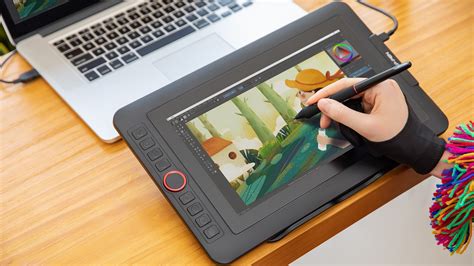
Upon unboxing, the XP-Pen Artist 12 Pro immediately impresses with its sleek and modern aesthetic. The tablet is remarkably thin, contributing to its portability and ease of use. The build quality feels robust, instilling confidence in its durability for both studio and on-the-go use. A key highlight is the fully laminated, textured screen, which not only enhances the visual experience but also provides a satisfying tactile feedback reminiscent of drawing on traditional paper. This commitment to quality extends to the inclusion of multiple programmable express keys, allowing for personalized workflows and increased efficiency. The integration of a single USB Type-C port for connectivity is a forward-thinking design choice, aligning with modern technological standards and simplifying cable management.
The accompanying battery-free pen is another significant advantage, eliminating the common hassle of charging or replacing batteries. This ensures that the creative flow remains uninterrupted. The pen holder, thoughtfully designed to also house eight extra pen nibs and a tip replacement mechanism, further contributes to the product’s thoughtful consideration of user needs. The overall impression is that XP-Pen has meticulously considered the practicalities of digital art creation, ensuring that essential accessories are readily available, negating the need for additional purchases.
XP-Pen's broader company philosophy, as evidenced by their commitment to "endless innovation" and adapting tools to individual artist needs, resonates with the design of the Artist 12 Pro. Their core proprietary electromagnetic handwriting input technology underpins a range of application products, showcasing a deep understanding of the digital art landscape. With an established sales network, XP-Pen positions itself as a reliable provider of digital art tools tailored for the modern artist.
Specifications and Technical Prowess
The technical specifications of the XP-Pen Artist 12 Pro position it as a capable device for a wide range of digital art tasks.
- Dimensions: 364 x 218 x 10mm
- Active Area: 256 x 144mm (11.6 inches diagonal)
- Screen Resolution: 1920 x 1080 Full HD
- Display Type: IPS LCD
- Color Gamut: 72% NTSC (approximately 100% sRGB)
- Contrast Ratio: 700:1
- Video Interface: Type-C
- Viewing Angle: 178°
- Response Time: 14ms
- Handwriting Resolution: 5080 LPI
- Report Rate: 266 RPS
- Pen Type: Battery-less Electromagnetic Resonance
- Pen Buttons: 2 side buttons, with an eraser function on the top
- Pen Pressure Sensitivity: 8192 levels
- Reading Height: 12mm
- Pen Tilt Sensitivity: Not explicitly stated as a primary feature, but tilt functionality is often present in higher-end models.
- Multi-touch: No
- OS Compatibility: macOS 10.8 or above, Windows 7 or above
These specifications highlight a device designed for precision and visual fidelity. The 1920x1080 resolution on an 11.6-inch screen results in a high pixel density, leading to a sharp and detailed display. The 72% NTSC color gamut ensures that colors are rendered accurately, making it suitable for color-critical work, approximating 100% sRGB coverage. The 8192 levels of pressure sensitivity are industry-leading, allowing for incredibly nuanced line variations and stroke control, mimicking the feel of traditional media. The 266 RPS report rate ensures that pen movements are translated to the screen with minimal lag, contributing to a fluid drawing experience.
The absence of multi-touch functionality is a common trade-off for display tablets in this price range, and it is important for users to be aware of this limitation. However, the focus on pen performance and display quality remains paramount for most digital illustrators.
Unboxing and Included Accessories
The unboxing experience for the XP-Pen Artist 12 Pro is designed to be a premium affair, starting with a sturdy, white box that proudly displays the product. The packaging itself conveys a sense of quality and attention to detail.
Inside, the tablet is protected by a transparent sheet, offering an immediate visual confirmation of its sleek design. Beneath this, a well-organized array of accessories awaits:
- Digital Pen P06: The battery-free stylus.
- 3-in-1 Cable: A crucial component for connecting the tablet to a computer (HDMI, USB for data, and USB for power).
- HDMI to Mac Adapter Cable: An essential inclusion for Mac users.
- Adjustable Tablet Stand: A practical accessory to position the tablet at an ergonomic angle.
- Pen Holder: A stylish holder that also stores extra nibs.
- Pen Nibs (x8): Replacements for when nibs eventually wear down.
- Nib Clip: A tool for easily removing and replacing pen nibs.
- Cleaning Cloth: For maintaining screen clarity.
- Drawing Glove: To reduce friction and prevent smudging on the screen.
- Quick Start Guide: Essential for initial setup and driver installation.
The quality of these accessories is noteworthy. XP-Pen has clearly invested in ensuring that even the bundled items are made from good quality materials, enhancing the overall value proposition. The pre-installed screen protector is a thoughtful touch, though it should be removed before use to ensure optimal touch responsiveness. The inclusion of all necessary cables and a stand means that users can begin their digital art journey immediately without further investment.
Design and Build Quality
The XP-Pen Artist 12 Pro excels in its physical design, presenting a product that is both aesthetically pleasing and functionally sound. Its slim profile, measuring approximately 14.3 x 8.6 x 0.4 inches and weighing around 0.8KG, makes it exceptionally portable. This compact size allows it to fit comfortably into most standard laptop bags, a significant advantage for artists who work in various locations.
The tablet features a smooth plastic construction for both the front and rear panels, which contributes to its durability and resilience against accidental drops or impacts. The front of the device is dominated by the display, complemented by six programmable express keys and a touch bar, strategically placed for easy access.
On the rear, four round rubber feet provide stability when the tablet is placed directly on a desk without the stand. These feet effectively prevent the tablet from sliding during intensive drawing sessions.
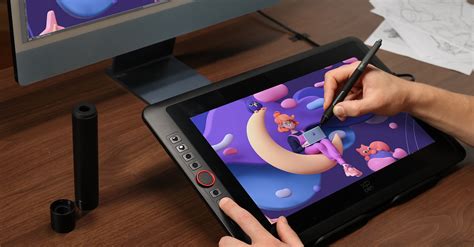
The six programmable keys offer a customizable shortcut system, allowing users to assign frequently used functions to specific buttons. These keys provide a satisfying tactile click, ensuring clear feedback when pressed. The touch bar, while not programmable in the same way as the express keys, offers dynamic functionality, adapting to different modes such as brush size adjustment, zooming, and scrolling, enhancing workflow efficiency.
Display Quality: Clarity and Color Accuracy
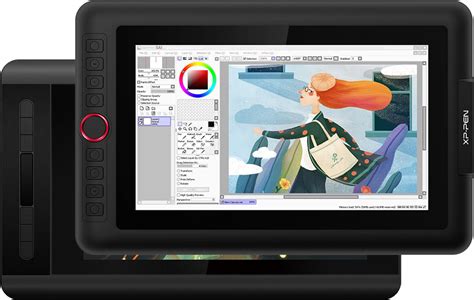
The presence of a display on a drawing tablet fundamentally transforms the drawing experience, allowing for direct hand-eye coordination that closely mimics traditional art methods. The XP-Pen Artist 12 Pro's 11.6-inch IPS LCD display is a significant asset.
The Full HD resolution (1920 x 1080) on this screen size results in a high pixel density, rendering images with exceptional sharpness and clarity. Fine details are rendered with precision, and text remains crisp, which is beneficial for both artistic work and general computer use. The viewing angles are broad at 178°, meaning the image quality remains consistent even when viewed from oblique angles. While there might be a slight darkening when viewed from extreme angles, this is rarely an issue during typical drawing sessions.
Crucially, the display covers approximately 72% of the NTSC color gamut, which translates to roughly 100% sRGB coverage. This level of color accuracy is vital for digital artists, ensuring that the colors they see on their screen are representative of the final output, whether for print or web. The out-of-the-box color calibration is generally pleasing, and for those who require further customization, the On-Screen Display (OSD) options allow for manual tweaking of color settings. It is important to note that this display does not support touch input for fingers; its interaction is solely through the stylus.
Color Gamut Explained 🔥 | sRGB, NTSC, Adobe RGB 🔥 | How Many Colors? 🔥
Key Features: Enhancing the Artist's Workflow
The XP-Pen Artist 12 Pro is packed with features designed to streamline the creative process and enhance the overall drawing experience.
Battery-Free Pen Technology
The included P06 stylus is a prime example of XP-Pen's focus on user convenience. Its battery-free operation means no downtime for charging or the need to purchase replacement batteries. This technology, based on electromagnetic resonance, provides a reliable and consistent drawing experience. The pen's plastic body offers a comfortable grip, and the textured surface of the screen ensures that the pen nib does not easily slip.
The pen features two side buttons that can be customized for various functions, such as undo, zoom, or specific tool selections. Additionally, the top of the pen incorporates a digital eraser function. This is activated by simply rotating the pen, allowing for quick and intuitive corrections without needing to switch tools. While personal preference plays a role in how often an eraser function is utilized, its presence adds a layer of versatility. The grip material has also been noted for its resistance to slipperiness, even after hand cream application, and its ease of cleaning, further adding to the practicality of the pen.
High-Performance Configuration
The Artist 12 Pro boasts impressive technical specifications that contribute to its high performance:
- 8192 Levels of Pressure Sensitivity: This allows for an incredibly nuanced range of line weights and opacity, mimicking the natural feel of traditional media like brushes and pencils.
- 266 RPS Report Rate: Ensures that the tablet captures every pen movement with exceptional speed and accuracy, resulting in smooth and responsive lines.
- 5080 LPI Handwriting Resolution: This high resolution contributes to the precision of the pen input, allowing for fine detail work.
- 10mm Sensor Height: Refers to the distance from the pen tip to the sensing surface, contributing to the responsiveness and accuracy of the pen input.
- 178° Full Viewing Angles: As mentioned earlier, this ensures consistent image quality from various perspectives.
- 14ms Response Time: A relatively low response time for an LCD display, minimizing motion blur.
- 14g Initial Activation Force: This refers to the minimal pressure required to register a stroke. A lower initial activation force means that even very light strokes will be detected, which is crucial for artists who utilize delicate linework.
These specifications collectively aim to provide an experience akin to drawing on real paper, enabling artists to bring their creations to life with remarkable fidelity.
Customizable Express Keys and Touch Bar
The six programmable express keys located on the bezel of the Artist 12 Pro are a significant productivity booster. Through the XP-Pen driver software, users can assign a wide array of functions to these keys, ranging from keyboard shortcuts and mouse clicks to specific application commands. This customization allows artists to tailor the tablet to their individual workflow, reducing the need to constantly reach for their keyboard.
The touch bar, positioned alongside the express keys, offers an additional layer of control. While its functionality is preset, it dynamically adjusts based on the active application or mode. It can be used for tasks such as adjusting brush size, zooming in and out of the canvas, or scrolling through documents. The ability to toggle between these functions, often controlled by a dedicated shortcut key, adds another dimension to interactive control. While the touch bar is not as directly customizable as the express keys, its presence provides a convenient way to access common adjustments without disrupting the drawing flow.
Compatibility and Driver Software
The XP-Pen Artist 12 Pro demonstrates broad operating system compatibility, supporting Windows 7 and above, as well as macOS 10.8 and above. This ensures that a vast majority of digital artists can integrate the tablet into their existing setup.
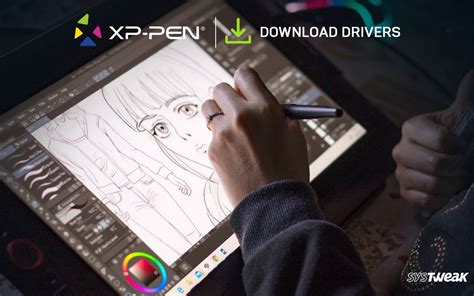
The driver installation process is designed to be straightforward. Users are advised to download the latest drivers from the XP-Pen website and to uninstall any pre-existing tablet drivers from other manufacturers before installation to avoid conflicts. A system restart after installation is recommended for optimal driver performance.
The XP-Pen driver software provides a centralized hub for customizing the tablet's features:
- Express Keys: The "Press Keys" tab allows for detailed configuration of the shortcut keys. Users can map keyboard shortcuts, pen clicks, and other functions. While the software offers a comprehensive list of keyboard keys, the absence of a direct "double-click" function is a minor omission, though easily compensated for by a quick pen tap.
- Touch Bar: The driver software includes an "Enable Touch" option, which specifically refers to the touch bar's functionality, not finger touch. The touch bar's preset functions include brush size adjustment, zoom, and scrolling. XP-Pen has indicated a willingness to explore making the touch bar more customizable in future updates, acknowledging user feedback.
- Digital Pen Settings: This section allows for the customization of the pen buttons and the pen pressure curve. The pen buttons can be assigned functions similar to the express keys. A critical setting within this tab is the "Enable Windows Ink" option. It is often necessary to uncheck this option to prevent interference with drawing applications, though some programs like Photoshop may function better with it enabled, requiring user experimentation.
- Work Area Settings: This tab enables users to define the mapping of the tablet's active area to their monitor(s). It also allows for pen calibration and orientation adjustments, crucial for setting up the tablet for left-handed use or specific display configurations. For left-handed users, this involves adjusting display orientation in Windows settings and selecting a corresponding rotation in the XP-Pen driver.
A notable limitation in the current driver software is the lack of automatic profile switching based on the active application. Users must manually switch profiles when moving between different programs, which can be a minor inconvenience for those who use multiple applications with distinct shortcut requirements. It is also important to note that the tablet does not support finger touch input; all interaction is facilitated by the stylus. For Windows 10 users, adjusting the display scaling from the default 150% to 72% in Windows Display Settings is often recommended for optimal driver and application scaling.
Setting Up the Artist 12 Pro
Connecting the XP-Pen Artist 12 Pro is a streamlined process, primarily utilizing a single USB Type-C port on the tablet. This modern connection standard not only simplifies the physical setup but also allows the L-shaped cable to be flipped for convenient left-handed use, as USB Type-C ports are symmetrical.
The included 3-in-1 cable consolidates HDMI (for video signal), USB (for data transfer), and a power connection into one point at the computer end. A separate, longer cable then connects to a power outlet. It is essential to plug the tablet into a power source for it to turn on; it does not draw sufficient power solely from the USB connection for display operation.
After connecting all cables and powering on the tablet, the computer's desktop will be mirrored onto the Artist 12 Pro's screen. The display quality is immediately noticeable, offering a clear and vibrant visual experience. The driver installation, as previously detailed, should be completed before or immediately after the physical setup. Once the drivers are installed and the tablet is recognized, users can begin calibrating and customizing their settings to suit their preferences. The setup process is designed to be intuitive, allowing artists to transition from unboxing to active use with minimal delay.
Color Gamut Explained 🔥 | sRGB, NTSC, Adobe RGB 🔥 | How Many Colors? 🔥
The Drawing Experience
The drawing experience on the XP-Pen Artist 12 Pro is where its strengths truly shine. The direct interaction with the screen, combined with the high-fidelity pen input, creates a natural and responsive artistic workflow.
The 8192 levels of pressure sensitivity are immediately apparent. As the battery-free pen touches the textured screen, the responsiveness to varying pressure is exceptional. This allows for precise control over line thickness and opacity, enabling artists to achieve a wide range of expressive strokes, from fine, delicate lines to bold, sweeping gestures. This level of control closely approximates the feel of drawing with traditional media like pencils, charcoal, or brushes on paper.
The fully laminated screen minimizes parallax - the perceived distance between the pen tip and the cursor on the screen. While some minimal parallax may still exist, it is generally negligible on the Artist 12 Pro, especially when using different brushes and sizes in software like Photoshop. This reduction in parallax is crucial for accuracy, as it ensures that the artist's strokes are precisely where they intend them to be.
The textured surface of the screen provides a subtle friction, offering a satisfying resistance that enhances the drawing sensation. This texture, combined with the smooth performance of the pen nib, prevents the pen from feeling like it's sliding uncontrollably on glass. Even after extensive use, the pen nib shows minimal wear, and the screen remains free of scratches, indicating good build quality and material resilience.
The included drawing glove further enhances comfort by reducing friction between the artist's hand and the screen surface, preventing smudging and allowing for smoother movements. The pen's ergonomic design and comfortable grip contribute to extended drawing sessions without fatigue.
While the tablet is compact, which is ideal for portability, some artists accustomed to larger screen real estate might find the 11.6-inch display a bit restrictive for very large projects or detailed work that requires extensive canvas navigation. However, for many artists, particularly those who travel or have limited desk space, this size is a significant advantage. The ability to easily pack and set up the tablet makes it a highly practical tool for artists on the move.
The transition from a non-display tablet like the XP-Pen Star 03 to a display tablet like the Artist 12 Pro represents a substantial leap in usability and intuitive control. The direct drawing experience eliminates the disconnect inherent in screenless tablets, making the learning curve gentler and the overall creative process more fluid and enjoyable. The initial adjustment to the express keys and the eraser function (which is on the top of the pen, requiring a rotation to use) may take some time, but these become second nature with practice. The overall consensus is that the Artist 12 Pro delivers a high-quality drawing experience that punches above its weight class in terms of features and performance.
Conclusion: A Worthy Investment for Aspiring and Professional Artists
The XP-Pen Artist 12 Pro stands as a compelling option in the competitive landscape of display drawing tablets. Its combination of a high-resolution, color-accurate display, a precise and responsive battery-free pen with 8192 levels of pressure sensitivity, and a suite of user-friendly features makes it an attractive proposition for a wide range of digital artists. The compact and durable design, coupled with thoughtful inclusions like an adjustable stand and essential accessories, further enhances its value.
While the absence of multi-touch and the current limitations in driver software's automatic profile switching are points to consider, they do not detract significantly from the tablet's core functionality. The Artist 12 Pro offers an unparalleled freedom and flawless hand-eye coordination that is fundamental to digital art creation. It provides an intuitive and enjoyable drawing experience that bridges the gap between traditional and digital mediums. Whether you are a beginner looking to make the leap into display tablets or a seasoned professional seeking a portable and reliable tool, the XP-Pen Artist 12 Pro presents itself as an undeniable deal, offering top-tier features at a competitive price point, embodying XP-Pen's commitment to bringing every artist into the digital age with tools that suit their individual needs.