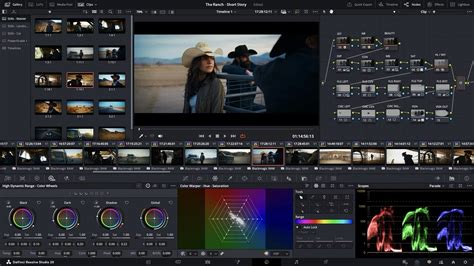
Blackmagic Design has unveiled DaVinci Resolve 20, a significant update to its industry-standard video editing, visual effects, motion graphics, color correction, and audio post-production software. This latest iteration introduces over 100 new features, with a strong emphasis on powerful AI tools designed to streamline and enhance every stage of the post-production workflow. DaVinci Resolve 20 continues its tradition of offering a robust free version, while the professional DaVinci Resolve Studio 20 is available for a one-time purchase, with existing Studio 19 users eligible for a free upgrade.
Revolutionizing Workflows with Artificial Intelligence
The hallmark of DaVinci Resolve 20 is its extensive integration of artificial intelligence. These AI-powered tools are not merely superficial additions; they are designed to tackle complex and time-consuming tasks, allowing creators to focus on the artistic aspects of their projects.
AI-Assisted Timeline Creation and Editing
One of the most groundbreaking AI features is AI IntelliScript. This tool allows users to create entire timelines simply by inputting a text-based script. The software analyzes the script and automatically organizes footage, even generating alternative takes on separate tracks, significantly accelerating the initial assembly process. Complementing this, AI Animated Subtitles brings text to life by animating words as they are spoken, adding a dynamic visual element to dialogue.
For multi-camera productions, AI Multicam SmartSwitch offers a substantial time-saving solution. By detecting the active speaker in a scene, it automatically switches between camera angles, simplifying the complex task of synchronizing and editing multi-cam footage. This feature can be activated by clicking "SmartSwitch" in the multi-cam viewer after creating a multi-cam clip.
Advanced Audio and Dialogue Tools
The audio post-production capabilities have been significantly bolstered by AI. AI Audio Assistant analyzes audio tracks and intelligently crafts a professional audio mix, ensuring a polished soundscape with minimal manual intervention. For dialogue editing, AI Dialogue Matcher is a powerful tool that automatically synchronizes the tone, level, and room environment of dialogue from different clips, ensuring sonic consistency across varied recording conditions.
The Voice Convert tool leverages AI to improve existing voice recordings or generate automated dialogue replacement (ADR). Crucially, it preserves the original inflection, pitch variation, and emotional nuances of the performance, making it ideal for situations where field audio is compromised. Furthermore, AI IntelliCut offers powerful clip-based audio processing, automating tasks like removing silences, separating individual speaker dialogue into distinct tracks, and generating ADR cues.
Music and Beat Synchronization
DaVinci Resolve 20 addresses the often-tedious task of fitting music to video. The AI Music Editor automatically adjusts the length of a music track to perfectly match the desired duration of the footage, offering four versions to choose from, along with visual edit indicators and the ability to decompose sections. For projects where precise beat synchronization is crucial, AI Detect Music Beats analyzes music clips and automatically places markers on the timeline to indicate beats, providing visual cues for cut points or allowing clips to snap precisely to the rhythm.
Enhanced Visual AI Tools
Beyond audio and timeline assembly, AI enhances visual elements. AI Resolve FX Depth Map has been upgraded to version two, offering faster scene analysis and more practical mattes for quickly isolating foreground elements or applying background effects like lens blur. The AI Set Extender is a novel tool that generates scene extensions to fill an entire frame based on a simple text prompt, automatically filling in missing regions caused by limited camera angles or cropping.
The renowned Magic Mask feature, also upgraded to version two, uses the DaVinci Neural Engine to detect people and track their movement with a single stroke, producing clean traveling mattes for secondary grades or effects. Similarly, Smart Reframe intelligently repurposes footage to different aspect ratios by recognizing the action within a scene and panning accordingly. Tools like Object Removal and Patch Replacer allow for the effortless removal of unwanted objects from a scene with just a few clicks.
Streamlined Editing and Cut Page Enhancements
The Cut and Edit pages have received significant attention, with new tools and workflows designed for speed and efficiency. A dedicated keyframe editor is now available, allowing for finer parameter animation with intuitive curve and parameter modes for customizing animation shapes. The voiceover palette on the Cut page provides direct recording capabilities during timeline playback, complete with cue, record, and stop controls, plus quick access to voice isolation and dialogue leveling tools, automatically creating a dedicated track.
The Cut page now features a dedicated keyframe editor and voiceover palettes. The AI Audio Assistant analyzes your audio and intelligently creates a professional audio mix.
Master the Basics: The Secret to Becoming a Better Video Editor
For live editing and multi-cam workflows, the Multi Source feature provides a multiview screen showing all live cameras or clips with common timecode, allowing for quick scrubbing, playback, and selection of shots to add to the timeline or play to air. The ability to capture significant events with a POI marker and utilize clear, quick replay controls is invaluable for live production environments. Stingers - moving graphics and sound transitions - are now integrated to signal scene changes or replays.
The Cut page also introduces a safe trimming mode to prevent accidental overwriting of crucial edits, and users can now drag trim points to quickly fill gaps. A pause feature at cut points ensures precision. The Cut page now boasts a full audio mixer with professional loudness metering and comprehensive channel strip controls, including EQ, Dynamics, and FX. On the Edit page, the voiceover tool allows direct recording into the timeline with quick controls for file name, audio input, and destination track.
Advanced Color Grading and Fusion Workflows
Colorists and VFX artists will find a wealth of new tools and improvements. The Color page now features Chroma Color Warper for intuitive color and saturation adjustments with a single motion, offering controls to move colors in a direction or isolate regions for precise hue correction. UltraNR, a new DaVinci AI Neural Engine driven denoise mode, dramatically reduces digital noise while preserving image clarity. The Film Look Creator allows for the addition of cinematic properties like halation, bloom, grain, flicker, gate weave, and vignetting, while the ColorSlice palette uses subtractive color processes to produce rich, filmic colors. Marker overlays and annotations are now supported directly in the Color page viewer, allowing for visual feedback and written notes. Corrector nodes in the node editor now include composite modes, enabling blend adjustments without a layer mixer.
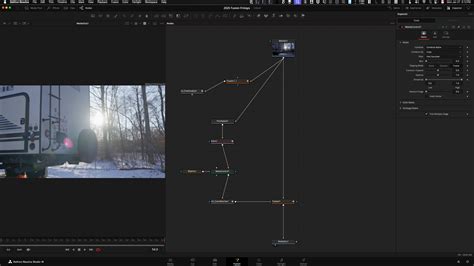
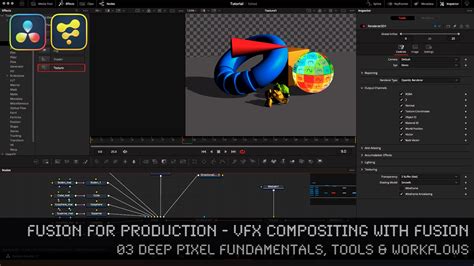
The new depth map effect instantly generates a 3D depth matte for grading foreground and background separately. In Fusion, advanced deep image compositing tools allow access to depth data from deep image EXR files, with new nodes for merging, transforming, resizing, cropping, recoloring, and generating holdouts. Fusion now supports multi-layer images across all nodes, including multi-layer EXRs and Photoshop files, allowing preview and manipulation of individual layers within any node. New vector warp, vector transform, and vector denoise optical flow tools enable intricate temporal effects using motion vectors. Fusion's 3D VR tools have been updated to support 180-degree angle of view for immersive content creation, and the enhanced Dome light simulates natural ambient lighting using 360 HDRI images. Users can now preview Color page clip grades directly in the Fusion page viewer via the MediaOut node. uVolume allows direct import of volumetric VDB files, and the MultiPoly tool streamlines rotoscoping by displaying all masks in a single list.
Enhanced Fairlight Audio Capabilities
Fairlight sees substantial upgrades, including a Clip EQ with 6 bands on the Cut, Edit, and Fairlight pages, matching the track EQ in the mixer for greater tonal control at the clip level. EQ and Level Matcher processes dynamically adjust a target clip’s audio to match a reference clip’s level or tonal spectrum. Chain FX allows users to create and save custom chains of frequently used plugins. Fairlight now features per-channel automation mode selection for increased flexibility. The IntelliTrack AI point tracker automatically generates precision audio panning by tracking subjects in 2D and 3D spaces, ideal for immersive audio experiences. The AI-based dialogue separator FX rebalances dialogue against background sound, with controls for voice, background, and ambience. The ducker track FX enables automatic level adjustment between tracks without complex sidechain setups. Fairlight also supports full-sphere Ambisonic surround soundtrack recording, mixing, monitoring, and delivery, along with high-resolution 3D audio for spatial formats and support for IAB and ADM files.
Collaboration and Cloud Integration
DaVinci Resolve 20 enhances collaboration through Blackmagic Cloud. Project libraries can be hosted, and media can be synced. Cloud folders facilitate easy sharing of clips, images, and graphics with collaborators. All cloud content appears as virtual clips until used, after which it is synced locally. Presentations now allow clients without a Blackmagic Cloud account to review projects by generating a shareable URL link. The Organizations web app enables larger companies to define single organizations, create groups, and share projects efficiently. It also simplifies the rental and management of DaVinci Resolve Studio licenses within large teams.
Proxy Generation and Media Management
The Blackmagic Proxy Generator App automates the creation and management of proxies from camera originals. By setting up a watch folder, new media is automatically converted into H.264, H.265, or ProRes proxies to accelerate editing. Switching between camera originals and proxies is a single-click operation, with DaVinci Resolve automatically linking proxies to their originals in the media pool. Blackmagic URSA Cine and PYXIS cameras can now upload proxy files and camera originals to Blackmagic Cloud for immediate editing and grading using proxies.
Expanded Format and Performance Support
DaVinci Resolve 20 continues to support cutting-edge technologies. The DaVinci AI Neural Engine powers many of the software's advanced tools and is fully supported on Apple M-series and Snapdragon X Elite processors. The inclusion of the latest version of Dolby Vision allows for HDR viewing on supported monitors. The DaVinci Wide Gamut and Intermediate log grading environment provides a universal internal working color space, larger than BT.2020, ARRI Wide Gamut, and ACES AP1, enabling work with media from any source and delivery to all current standards. SRT streaming ensures high-quality, low-latency video for remote monitoring via Blackmagic Cloud.
The software supports 8K digital negative debayering, editing, and grading in real-time. SuperScale now features enhanced 3x and 4x upscaling for superior visual quality. Magic Mask and Magic Mask have been updated for even more accurate tracking. The Depth Map effect has been updated for faster scene analysis and more practical mattes.
DaVinci Resolve Studio 20: The Professional Edge
While the free version of DaVinci Resolve is incredibly feature-rich, DaVinci Resolve Studio 20 offers advanced capabilities for professional workflows. This includes support for up to 120fps at 32K resolution, multiple GPU support for real-time playback of professional 10-bit formats, and accelerated H.264 and H.265 hardware decoding and encoding. Studio includes a full suite of immersive audio tools, AI voice isolation, music remixer, and dialogue separator. It also offers Dolby Vision and HDR10+ grading and rendering, and over 40 additional Resolve FX, including AI UltraNR noise reduction, SuperScale, and de-interlacing. Workflow and media asset management integration, remote scripting API, and rendering and encoder plug-in support are also exclusive to the Studio version.
DaVinci Resolve Studio 20 boasts some of the most powerful noise reduction algorithms available. Its lens correction feature analyzes clips to correct for spherical lens distortion and other aberrations. The HDR scopes provide detailed information about ST.2084 and HLG images. For 3D projects, Studio offers a complete set of tools for editing and grading stereoscopic 3D. Remote monitoring provides clients with a real-time feed via computer, iPad, or iPhone. DaVinci color transformation scripts, GPU accelerated bits of code, offer advanced image manipulation beyond LUTs. Support for Python and LUA scripting, along with developer APIs, allows for custom workflow integrations and encoding options.
The Studio version includes over 40 additional GPU and CPU accelerated Resolve FX for effects like lens flares, reflections, analog damage, and sharpening, as well as face and beauty tools for retouching, and image restoration tools for dirt removal and de-flickering. The Film Look Creator provides cinematic color looks, film stocks, halation, grain, gate weave, and split toning. Patch replacer and object removal plugins are invaluable for visual effects work. The DaVinci AI Neural Engine in Studio powers features like facial recognition for bin population, Super Scale uprezzing, speed warp retiming with advanced optical flow, high-quality de-interlacing, magic mask, smart reframe, object removal, and scene cut detection.
Immersive audio capabilities in Studio extend to high-resolution 3D audio support for spatial formats, and import/export of the latest IAB and ADM files. Object-based formats like Dolby Atmos and MPEG-H are supported for realistic aural experiences. Ambisonics are fully supported up to 5th order, with Dolby Atmos master production import and support for adding audio to video via IMF containers with multiple simultaneous audio deliverables. In addition to all 8-bit formats, DaVinci Resolve Studio 20 supports professional formats, advanced AVCHD, AVC-Intra, and popular H.264 camera formats with "all-I" intraframe encoding, and 10-bit encoding. Dolby Vision support includes a GPU accelerated Dolby Vision CMU and free Dolby Vision grading controls. Creation of SMPTE ST.2067 compliant IMF files and native support for unencrypted DCP files are also included.
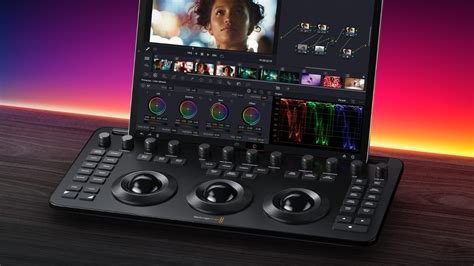
DaVinci Resolve 20 represents a significant evolution in post-production software, empowering creators with unprecedented AI capabilities, streamlined editing workflows, and advanced tools for color grading, VFX, and audio mixing. Whether you are a seasoned professional or just beginning your journey in video editing, DaVinci Resolve 20 offers a comprehensive and powerful solution to elevate your projects.