Adobe Photoshop has long been the undisputed titan in the realm of digital image manipulation, so much so that its name has transcended its product identity to become a verb in everyday language. It empowers users with unparalleled capabilities to create and refine photographs, illustrations, and a vast array of other digital media. Within this powerful ecosystem, Photoshop Elements emerges as a distinct offering, catering to a different segment of the creative community. This article delves into the nuances between these two Adobe powerhouses, exploring their functionalities, target audiences, and pricing structures, with a particular focus on comparing Photoshop Elements 2021 with the latest iteration of Photoshop (version 22.3.0) to illuminate their respective strengths and weaknesses.
The Genesis and Evolution of Photoshop Elements
Photoshop Elements first graced the digital landscape in 2001, arriving long after the initial debut of its more robust sibling. Its inception was driven by a clear objective: to provide a simplified, accessible pathway into the world of photo editing. This program was meticulously crafted with the everyday photographer and the enthusiastic consumer in mind, those who desired a quick, intuitive, and straightforward method for enhancing and managing their image collections. While the Adobe catalog boasts numerous versions of both Photoshop and Photoshop Elements, this exploration centers on the capabilities offered by Photoshop Elements 2021 in contrast to the professional-grade Photoshop version 22.3.0.
Licensing and Cost: A Tale of Two Models
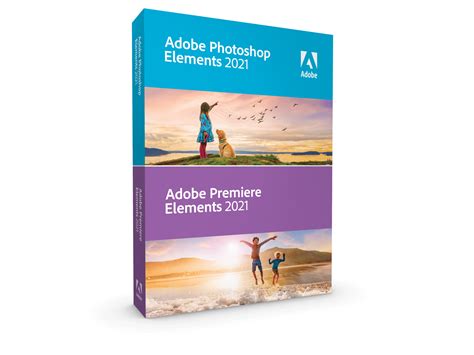
A significant divergence between Photoshop Elements and Photoshop lies in their acquisition models. Adobe Photoshop Elements 2021 is offered as a one-time purchase, with a price point hovering around $100 USD. This perpetual license model appeals to users who prefer to own their software outright. Furthermore, Photoshop Elements can be conveniently bundled with Premiere Elements 2021, a streamlined video editing application, offering a more comprehensive media editing solution for consumers. For existing Elements customers, Adobe often extends upgrade pricing, providing a cost-effective path to newer versions.
In stark contrast, Adobe Photoshop operates exclusively on a subscription basis. The most economically advantageous option currently available is the Creative Cloud Photography Plan. This subscription not only grants access to the full power of Photoshop but also includes Adobe Lightroom, Lightroom Classic, and a generous 20 GB of cloud storage, all for a monthly fee of $9.99 USD. This subscription model ensures users always have access to the latest features and updates, a crucial aspect for professionals who rely on cutting-edge tools.
User Experience and Interface Design: Simplicity vs. Sophistication
While both Photoshop and Photoshop Elements share a common lineage and many overlapping features, their user interfaces and overall design philosophies are tailored to distinct user needs. Elements is intentionally engineered to be a newcomer-friendly editing application, prioritizing ease of use and streamlined workflows. Photoshop, while the industry standard, can present a steeper learning curve for those new to digital image editing.
Navigating the Elements Interface
Photoshop Elements offers a multi-faceted approach to its interface, designed to accommodate users of varying skill levels.
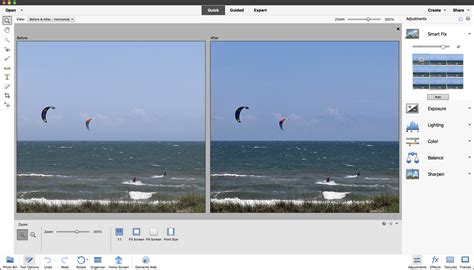
- Quick Mode: This simplified interface presents a curated selection of essential adjustments and tools. The toolbar in Quick Mode features a pared-down set of user-friendly tools specifically designed for rapid edits. The Quick Actions Panel provides one-click enhancements, enabling instant improvements such as blurring, skin smoothing, dehazing, and colorization. This mode allows users to quickly perform common editing tasks with basic photo editing tools neatly organized within the workspace.
- Guided Mode: This innovative workspace guides users through editing processes with step-by-step instructions. It’s an invaluable resource for learning new techniques and applying complex effects with ease. With options to introduce effects like Tilt-Shift, Black and White, Orton, and Lomo, Guided mode offers an intuitive interface for applying relatively customizable effects. Elements provides over 50 step-by-step Guided Edits for fixing color and lighting, improving composition, and adding unique effects.
- Expert Mode: For users who possess a greater degree of experience with image editing, Expert mode unlocks a more comprehensive array of tools. This mode offers an expanded range of editing options compared to Quick mode, granting users more control over their projects and enabling the application of complex editing effects. In Advanced mode, the toolbar is populated with more tools than in Quick mode, providing access to a wider range of editing options for greater precision.
The Powerhouse of Photoshop
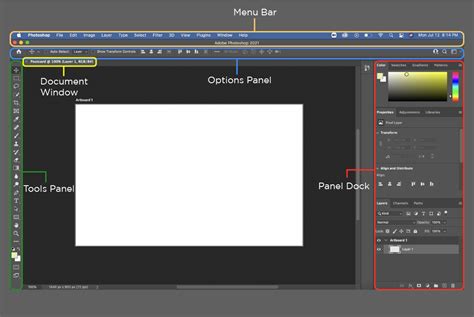
Photoshop, on the other hand, is built for in-depth, manual editing operations. It provides a more extensive and granular level of control. The program is equipped with six pre-made workspaces, each optimized for different creative requirements: 3D, Essentials, Graphic and Web, Motion, Painting, and Photography. This modular approach allows users to tailor their workspace to the specific demands of their project, whether it's intricate graphic design, detailed photo retouching, or digital painting.
Feature Set: Where Elements Shines and Photoshop Excels
While Photoshop Elements is a remarkably capable application, certain advanced tools and functionalities remain exclusive to its professional counterpart, Photoshop. Understanding these distinctions is crucial for users to select the software that best aligns with their creative ambitions.
Elements Exclusives and Limitations
A notable limitation in Photoshop Elements is the absence of certain sophisticated correction tools. For instance, chromatic aberration correction, a vital feature for fixing unwanted color fringing around high-contrast edges in images, is a Photoshop-exclusive. Elements also does not support vector formats, meaning the powerful Pen tool, which is instrumental in creating precise paths and advanced shapes, is not available in Elements.
Further distinctions arise in image bit depth support. Elements lacks support for 16-bit and 32-bit image files, which are essential for professionals who require the highest level of detail and flexibility in color grading and manipulation. Similarly, lens geometry profiles, which allow for automatic lens distortion correction, are not included in Elements or its accompanying Camera Raw utility.
However, Elements 2021 introduced the AI-powered Moving Photos feature, a novel function that transforms static pictures into animated GIFs. While Photoshop can also create GIFs, the process in Elements is generally more streamlined, though Photoshop offers greater flexibility in GIF creation.
Create an Animated GIF in Photoshop Elements
Photoshop's Comprehensive Arsenal
Photoshop boasts a significantly more extensive toolkit, catering to the demands of professional workflows. This includes advanced features such as the Content-Aware Patch tool, which allows for seamless object removal and image repair, and the Channel Mixer, a powerful tool for manipulating individual color channels. The lack of 16-bit and 32-bit image support in Elements means that professionals working with RAW files or requiring extensive post-processing will find Photoshop indispensable.
Print Production and Color Management: A Professional Divide
For users involved in professional print production, the differences between Elements and Photoshop become particularly pronounced. Photoshop Elements falls short in several key areas crucial for high-quality print output.
Elements' Print Limitations
A significant drawback is Elements' inability to export files in CMYK color mode. CMYK (Cyan, Magenta, Yellow, and Key/Black) is the standard color model for professional printing, and its absence in Elements limits its suitability for professional print jobs. Additionally, Elements lacks in-depth soft-proofing capabilities, which allow designers to simulate how colors will appear on different output devices before printing. The color management system in Elements is also simplified compared to Photoshop. While Elements supports RGB, Grayscale, Bitmap, and Indexed Color modes, Photoshop extends this by also offering Duotone, CMYK, Lab, and Multi-Channel color modes. This expanded range in Photoshop provides significantly greater control over color accuracy and consistency during the printing process.
Photoshop's Print Prowess
Photoshop's comprehensive color management features, including robust CMYK support and advanced soft-proofing, make it the preferred choice for professionals who demand precise color reproduction for print. The ability to work with a wider array of color modes ensures that designs translate accurately from screen to print, minimizing costly errors and ensuring client satisfaction.
Organization and Workflow: Streamlining Your Digital Assets
Beyond editing capabilities, efficient organization of digital assets is paramount. Photoshop Elements includes a dedicated organizer, designed to simplify the management of photos and videos.
Elements Organizer: A Centralized Hub
The Elements Organizer is an integrated component of Photoshop Elements and Premiere Elements, serving as a central repository for importing, organizing, tagging, searching, and sharing photos and videos. It's designed to be intuitive for both beginners and seasoned creators, offering quick access to memories without the need to navigate through complex folder structures. Users can import from popular cloud services, benefit from automatic sorting and backup, and find photos rapidly through automatic tagging, curation, and face recognition. This feature significantly reduces the time spent on administrative tasks, allowing users to focus more on creative endeavors.

Photoshop's Integrated Workflow
While Photoshop itself doesn't include a dedicated organizer in the same vein as Elements, it integrates seamlessly with Adobe Lightroom and Lightroom Classic, which are powerful tools for photo management and organization. This integration allows users to leverage the strengths of both applications - the organizational prowess of Lightroom and the advanced editing capabilities of Photoshop - within a cohesive workflow.
AI-Powered Features: The Future of Editing
Both Photoshop and Photoshop Elements are increasingly incorporating Artificial Intelligence (AI) to enhance editing capabilities and automate complex tasks.
Elements' AI Innovations
As mentioned, the AI-powered Moving Photos feature in Elements 2021 exemplifies its commitment to leveraging AI for creative effects. Additionally, Elements often includes AI-driven enhancements within its Quick Actions and Guided Edits, simplifying tasks like object selection, background generation, and image restoration. The goal is to make sophisticated editing accessible to a wider audience.
Photoshop's Advanced AI
Photoshop also heavily utilizes AI, most notably through its Sensei AI technology. Features like Content-Aware Fill, Neural Filters, and Sky Replacement are powered by AI, offering advanced capabilities that were once considered extremely difficult or impossible to achieve manually. These AI tools in Photoshop are often more sophisticated and offer greater control than their counterparts in Elements, catering to the demands of professional-level manipulation.
Target Audience and Practical Application: Who Should Use What?
The fundamental difference between Photoshop Elements and Photoshop boils down to their intended users and the complexity of tasks they are designed to handle.
Photoshop Elements: For the Everyday Creator
Photoshop Elements is primarily aimed at beginner to intermediate users who are looking to edit and enhance their photographs. It is an excellent choice for individuals who want to improve their personal photos, create social media content, or explore creative effects without a steep learning curve. Its user-friendly interface, guided edits, and automated features empower users to achieve impressive results quickly and easily. Whether you're enhancing everyday photos, exploring artistic effects, or creating stunning projects, Photoshop Elements provides the necessary tools. It excels at generating new backgrounds and images, adding elements to photos, restoring damaged pictures, and erasing distractions.
Photoshop: The Professional's Choice
Professional photographers, graphic designers, and digital artists who require in-depth control, advanced features, and precise manipulation capabilities will find Photoshop to be the indispensable tool. Its comprehensive feature set, extensive color management options, and support for professional workflows make it the industry standard for demanding creative tasks. If your work involves professional print production, intricate compositing, detailed retouching, or complex digital art creation, Photoshop is the clear choice.
Conclusion: Making the Right Choice for Your Creative Journey
In essence, Photoshop Elements is a simplified, more accessible version of Photoshop, designed to democratize photo editing. It offers a user-friendly experience with powerful automated and guided features, making it ideal for beginners and hobbyists. Photoshop, conversely, is the industry-leading professional software, providing unparalleled creative control, advanced tools, and comprehensive features for demanding workflows.
The decision between Photoshop Elements and Photoshop hinges on your individual needs, skill level, and creative aspirations. If you're looking for a straightforward program to enhance your personal photos or create engaging social media content, Photoshop Elements is an excellent and cost-effective solution. However, if you aspire to professional-level work, require granular control over every aspect of your images, or need to meet the rigorous demands of print production, investing in the subscription-based Adobe Photoshop is the more appropriate path. Both programs, in their own right, offer powerful tools to bring your creative visions to life, but they serve distinct purposes within the vast landscape of digital imaging.