The Elgato Stream Deck has emerged as a powerful tool for photographers looking to streamline their post-production workflow. Initially conceived as a device for streamers, its unparalleled customizability has been tapped by professionals across various creative fields, including photo editing in Adobe Lightroom. This article delves into how integrating a Stream Deck with Lightroom can revolutionize your editing process, offering a more intuitive, efficient, and comfortable experience.
The Stream Deck: A Programmable Keypad for Creative Control
At its core, the Stream Deck is a simple concept: a small keypad filled with programmable buttons. However, Elgato's implementation of button programming unlocks a vast array of possibilities for simplifying complex tasks. The primary benefit lies in its ability to consolidate frequently used commands, shortcuts, and even custom macros into a single, accessible interface. This not only speeds up the editing process but can also significantly alleviate repetitive strain injuries associated with prolonged mouse and keyboard use. For individuals experiencing discomfort in their right arm, the Stream Deck offers a way to introduce different movements into computer interaction, allowing users to sit back and reduce their reliance on traditional input devices.
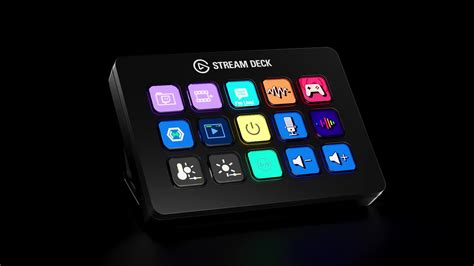
Streamlining Lightroom Workflows: Beyond Basic Shortcuts
The integration of Stream Deck with Lightroom goes far beyond simply assigning single keyboard shortcuts. The true power emerges when leveraging its capacity for complex macros, custom actions, and dedicated profiles. For instance, a photographer might create a macro to delete rejected photos during the culling process. By pressing a designated button on the Stream Deck, a photo marked with the "x" key in Lightroom can be instantly set as rejected. Similarly, buttons can be programmed to launch favorite plugins with a single tap. If a plugin supports Smart Objects in Photoshop, a macro can be set up to duplicate the current layer, convert it to a Smart Object, and then launch the plugin, all automatically. This level of automation drastically reduces the number of clicks and menu navigations required for routine tasks.
Dedicated Profiles for Enhanced Productivity
The Stream Deck's "Smart Profiles" feature is a game-changer for multi-application users. As you jump between different software, the Stream Deck automatically switches its button assignments to match the active application. This ensures that the right tools are always at your fingertips, eliminating the need to manually reconfigure your setup. For Lightroom users, this means having a dedicated set of controls optimized for specific workspaces, such as the Library or Develop modules.
The Library Workspace: Efficient Image Ingestion and Management
When starting a new project, the Library Workspace profile on the Stream Deck can significantly streamline the process of ingesting and managing images. This dedicated setup is designed to simplify the initial stages of your workflow, ensuring that your photos are organized and ready for editing from the outset. By having quick access to functions like rating, flagging, and keyword assignment, you can establish a robust organizational system without interrupting your creative flow.
Color Grading Workspace: Precision Adjustments with Rotary Dials
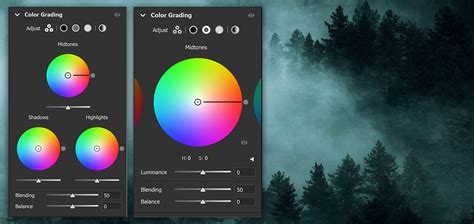
The true potential for advanced control is realized with the Stream Deck Plus, which introduces dedicated rotary dials. These dials offer a tactile and precise way to adjust various parameters within Lightroom's Color Grading panel. Instead of relying solely on sliders, you can use the dials to fine-tune shadows, midtones, and highlights with exceptional speed and accuracy. This profile can group controls by hue, saturation, and luminance, allowing for intuitive manipulation of color characteristics. The recent introduction of SideshowFX proprietary Lightroom plugins further enhances this capability, offering plug-and-play functionality for dial controls without requiring complex setup.
Unleashing Creative Superpowers: Customization and Plugins
The Stream Deck's appeal lies in its almost unlimited customization. The Marketplace offers a vast library of plugins, providing access to hundreds of pre-built functionalities and thousands of digital assets. Beyond official plugins, the active community provides a wealth of knowledge and shared configurations. Users can go further by customizing the physical appearance of their Stream Deck, swapping faceplates, adding custom caps to dials, and even furnishing the touch strip with personalized backgrounds. This level of personalization transforms the device from a generic controller into a truly bespoke editing tool.
Beyond Lightroom: A Universal Controller
While this tutorial focuses on Lightroom, it's crucial to understand that the Stream Deck's versatility extends to other Adobe applications and beyond. Whether you're cutting videos in Premiere Pro, designing graphics in Illustrator, or performing other creative tasks, the Stream Deck can be configured to control your chosen tools. This makes it a valuable investment for any digital creative who utilizes multiple software applications.
DIY Approaches: The Lightroom Macropad and the Spirit of Customization
The desire for personalized control has also inspired DIY projects, such as Adam Iannazzone's "Lightroom Macropad." This project, built using an Arduino microcontroller, simulates keyboard input to trigger specific actions in Lightroom. Such DIY consoles demonstrate a deep engagement with the creative process, allowing individuals to design solutions tailored precisely to their needs. These projects often involve 3D printing, an Arduino with HID support (like the Arduino Pro Micro clone based on the 32u4 processor), MX key switches, keycaps, rotary encoders, and LEDs.
DIY Macro Pad Keyboard Build from Scratch with Custom PCB and Mechanical Switches
While the computer sees these devices simply as USB keyboards, their internal logic is entirely user-defined. This approach offers valuable insights into how creators think and innovate. For those who already possess dedicated editing consoles like the Loupedeck CT, DIY projects offer a fascinating glimpse into the advanced customization possibilities available to the maker community. Adam Iannazzone has generously made his Lightroom Macropad project available on GitHub, empowering others to replicate or adapt his design.
The Future of Editing: Intuitive Control and Enhanced Creativity
The integration of devices like the Stream Deck into photo editing workflows signifies a shift towards more intuitive and tactile control. By reducing reliance on complex menu systems and repetitive mouse movements, photographers can dedicate more mental energy to the creative aspects of their work. The ability to trigger custom actions, manage layers, control brushes, and execute content-aware fills with a simple tap or twist transforms the editing experience from a series of technical steps into a more fluid and natural dance. This evolution in human-computer interaction in creative software promises to unlock new levels of speed, efficiency, and artistic expression. The constant development of new plugins and hardware, coupled with a vibrant community, ensures that the Stream Deck will continue to be a valuable asset for photographers seeking to optimize their post-production process. The recent release of version 3.1.2 for Windows, with its specific fixes, highlights the ongoing commitment to refining the user experience and expanding the capabilities of this innovative tool.