The landscape of video editing, particularly for documentary filmmaking and content creation heavy on dialogue, has been dramatically reshaped by the integration of advanced transcription services directly into powerful editing software. Blackmagic Design's DaVinci Resolve, a leading Non-Linear Editor (NLE), has emerged as a frontrunner in this evolution, offering robust, built-in speech-to-text capabilities that streamline the post-production process. This article delves into the intricacies of DaVinci Resolve's transcription features, exploring its functionality, benefits, and the impact it has on editing workflows, from initial import to final delivery.
The Evolution of Transcription in Editing
For years, editors have grappled with the time-consuming task of transcribing audio. In the early days of digital editing, this often meant manually playing back footage, pausing, typing, and meticulously noting timecodes and speaker attributions. This process, as recounted by occasional documentary editors, could take an astonishing 5-7 minutes of work for every minute of footage. For a half-hour interview, this could translate to three hours of transcription before any actual editing could begin, a figure that balloons with multiple speakers.
The market responded with various solutions. Paid transcription services offered accuracy but at a significant cost. Early iterations of speech-to-text software, while promising, often required extensive user training and were primarily designed for dictation rather than processing raw audio files. Some editors even resorted to elaborate workarounds, such as using dictation software like Dragon NaturallySpeaking, which, ironically, required the user to repeat the spoken words aloud into a microphone to be recognized, leading to peculiar solitary performances in shared living spaces. These historical struggles highlight the persistent need for an efficient, integrated transcription solution.
DaVinci Resolve's Native Transcription: A Game Changer
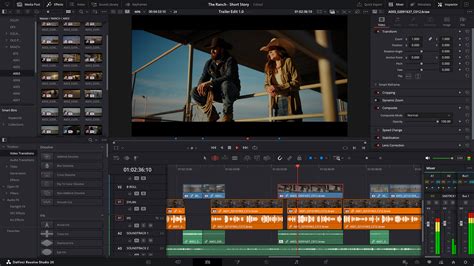
The introduction of built-in speech recognition and transcription in DaVinci Resolve, particularly noted in its 18.5 beta update and subsequent releases like 18.6.4, marks a significant leap forward. This feature allows users to transcribe audio directly within the software, eliminating the need for external plugins or separate applications. This native integration means clips can be processed, and transcripts generated, becoming immediately accessible as ranged markers, color-coded by speaker, within the editing environment.
Accessibility and Integration
The Simon Says transcription extension for DaVinci Resolve exemplifies this native integration. Accessible on both macOS and Windows, it supports various versions of Resolve, including v16, v17, and v18. This allows users to send clips for transcription and receive the results directly as ranged markers. Post-editing, the workflow extends to captioning timelines and even aligning translated subtitles, all achievable with a few clicks from within Resolve itself. Download links for Mac and Windows users further underscore the commitment to making these tools readily available.
The Transcription Process in Resolve
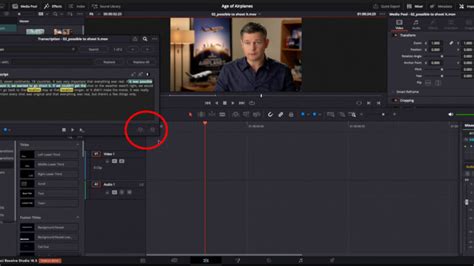
The process of transcribing audio in DaVinci Resolve is designed for simplicity. Within either the Edit or Cut panels, users can right-click on a clip and select "Audio Transcription > Transcribe." The time required for this process is variable, dependent on the computer's processing power, the length of the clip, and the audio quality. However, even for lengthy clips, the wait is generally minimal. For instance, a 102-minute clip on an M1 Pro MacBook Pro took approximately 7 minutes to transcribe - a duration often equivalent to a brief break.
Upon completion, Resolve presents a remarkably accurate transcript. A key area of improvement over previous technologies is the accuracy of punctuation. Resolve demonstrates an impressive ability to insert commas, periods, and even quotation marks where appropriate, a task that previously necessitated manual correction. Furthermore, the software adeptly handles common speech impediments like "ums" and "ahs," as well as false starts, and can even recognize and note applause.
While the software is not infallible, particularly with technical jargon or proper nouns, corrections are straightforward. Misspellings can be fixed using a simple find-and-replace function. Individual transcript sections can be edited or deleted, including the identification and removal of silence, represented by ellipses. The user interface for managing these transcripts, while somewhat utilitarian, is clear and navigable.
Leveraging Transcripts for Enhanced Editing
DaVinci Resolve offers a wealth of features that leverage transcribed text to accelerate and refine the editing process. Users can search for specific words or phrases within the transcript, and clicking on any point in the text automatically repositions the playhead to that exact moment in the viewer. This allows for precise marker placement directly from the transcript window, the creation of sub-clips from selected portions of text, and even the insertion or appending of selected text directly onto the timeline as clips.
The ability to construct a rough cut of an interview using solely text is a significant time-saver. Beyond mere efficiency, this textual approach can foster a different editing mindset. For some editors, particularly those accustomed to a more traditional, text-based approach to structuring narrative, working with interview transcripts as a primary editing tool can facilitate a clearer focus on information delivery before diving into the visual elements. This method also inherently simplifies the subsequent generation of subtitles and captions.
New Transcription Workflow Improvements in DaVinci Resolve 19
Areas for Improvement and Future Development
Despite the impressive advancements, there remain opportunities for further refinement within DaVinci Resolve's transcription capabilities. A primary area for development is enhanced support for multiple speakers. Currently, Resolve does not inherently distinguish between different speakers in the transcript, making it challenging to identify who is speaking when. This is a crucial piece of information, especially in interviews or discussions involving more than a few participants, and manually adding these distinctions can be time-consuming. This is a particularly surprising omission given Resolve's existing face recognition capabilities, which suggest the potential for identifying individuals on screen and associating them with their spoken dialogue.
Another avenue for improvement lies in export options. While Resolve allows for the export of transcripts, the current options are limited to plain text files without timecode. For professional workflows involving clients or for archival purposes, timecode support is often essential. While workarounds exist, such as embedding transcripts as subtitles and exporting subtitle tracks, a direct timecode export option would significantly simplify this process. Furthermore, once multi-speaker recognition is implemented, incorporating speaker identification into export options would be a valuable addition.
As DaVinci Resolve's transcription features are still relatively new and in active development (as evidenced by their presence in beta versions), it is highly anticipated that Blackmagic Design will address these areas in future updates. These ongoing improvements, coupled with the software's already robust feature set and frequent free updates, solidify DaVinci Resolve's position as a leading NLE offering exceptional value.
Third-Party Solutions: Simon Says and Beyond
While Resolve's native transcription is powerful, third-party solutions continue to offer specialized features and cater to specific workflows. Simon Says, for instance, provides a comprehensive platform that integrates seamlessly with DaVinci Resolve. It not only transcribes but also offers sophisticated captioning and translation services. The ability to send clips from Resolve, receive transcripts as ranged markers, and then use these to generate captions and translations directly within the NLE highlights the synergy between specialized tools and the editing environment.
The value proposition of such integrations lies in their ability to extend the functionality of the NLE. For projects requiring highly accurate transcriptions, complex multi-language subtitles, or advanced collaboration features, third-party plugins can offer a more tailored solution. However, the increasing power and accessibility of native Resolve transcription are steadily reducing the necessity for external services for many common tasks.
Impact on Documentary and Content Creation
The implications of accurate and integrated transcription for documentary filmmaking are profound. The ability to quickly search through hours of footage by keyword dramatically speeds up the process of identifying key moments, soundbites, and narrative threads. This is particularly impactful for projects with extensive interview logs, where sifting through raw material was historically a major bottleneck. The feature in Resolve 18.6.4, which allows for transcription controls within media bins, enables this process to begin even earlier, unlocking further efficiencies.
Beyond documentaries, content creators across various platforms-from YouTubers to corporate video producers-benefit immensely. The ease of generating captions not only improves accessibility but also enhances SEO and viewer engagement. The potential to search for specific phrases or topics within a large library of video assets opens up new possibilities for content repurposing and archival management.
Collaboration and Workflow Enhancements
The evolution of DaVinci Resolve also includes a focus on collaboration. Updates like the one in version 18.6.4 introduce features that facilitate teamwork. A new column in the media pool indicates which user has uploaded shared clips, a valuable perk for teams working on the same project. On the Color page, new lightbox features allow for sorting clips by color flags and offer different viewing formats, such as grid thumbnails. In Fairlight, updates ensure that automation displays are retained for each clip when adding new clips, a much-requested feature that streamlines audio post-production.
These collaborative enhancements, combined with the transcription capabilities, create a more cohesive and efficient post-production pipeline. Editors, colorists, and sound designers can work more harmoniously, with shared access to information and tools that accelerate their respective tasks.
Conclusion: A New Era of Editing Efficiency
DaVinci Resolve's commitment to integrating advanced transcription technology directly into its NLE represents a significant advancement in video post-production. By offering accurate, fast, and user-friendly speech-to-text capabilities, Resolve empowers editors to bypass cumbersome manual transcription, accelerate rough cuts, enhance accessibility through captions, and unlock new avenues for content analysis and organization. While there is always room for growth, particularly in multi-speaker identification and export options, the current features already provide a substantial leap forward. For documentary filmmakers, content creators, and editors of all kinds, DaVinci Resolve's native transcription is not just a convenience; it's a fundamental shift towards a more efficient and intelligent editing future.
tags: #transcribe #davinci #resolve