Vector design has long been a cornerstone of graphic design and logo creation. With the advent of modern web techniques like responsive design, its importance has only grown, yet CorelDRAW, a powerful tool in this domain, is often overlooked. This guide aims to demystify CorelDRAW for aspiring and seasoned designers alike, providing a structured approach to learning its interface and capabilities, primarily through a curated selection of YouTube tutorials.
Understanding the CorelDRAW Interface and Fundamentals
Embarking on the journey of learning CorelDRAW can initially present a challenge due to its extensive interface. However, with dedicated resources, mastering its functionalities becomes an achievable goal.
For a comprehensive introduction to the entire software package, a video tutorial totaling just over 15 minutes is an excellent starting point. This video, published on a prominent YouTube channel renowned for digital design tutorials, offers a broad overview.
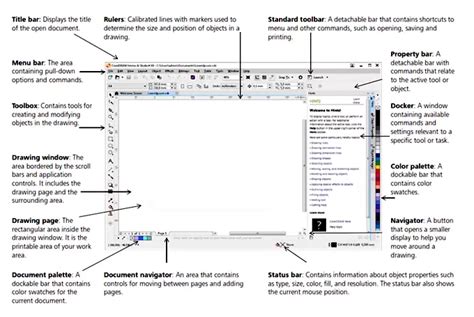
For those seeking a deeper dive, a more extensive video tutorial, exceeding an hour in length, is available. This resource meticulously covers all the fundamentals of the program, alongside its major tools and interface elements, providing a robust foundation for your design endeavors.
Project Ideas and Initial Steps
If you're new to vector design, generating project ideas might be a hurdle. Fortunately, there are resources designed to spark your creativity and guide your initial steps. A short video, wrapping up around the 10-minute mark, can provide initial project inspiration. While this particular video might lack a voiceover, its simplicity makes it easy for designers to follow along and pick up the pace.
Another valuable resource is an 8-minute guide that effectively demonstrates precise movements within the software. This video supports full 720p, allowing you to watch every detail in HD and replicate the steps for a clean walkthrough. The absence of a voiceover in this instance is not a significant drawback, as the visual clarity allows for easy comprehension.
Photo Manipulation Ep 2 | CorelDraw Tutorial | Glow Effect in coreldraw
For those who prefer written content, a comprehensive guide on TutsPlus offers an alternative learning path.
Exploring Specialized Tutorials and Techniques
Beyond the foundational understanding, CorelDRAW offers a plethora of specialized tutorials catering to specific design needs and effects. One such channel is dedicated exclusively to CorelDRAW software, providing clean and exceptionally detailed content. A minor drawback of this channel's content can be the audio voiceover, which is sometimes too quiet, requiring the viewer to adjust their audio settings.
Crafting Unique Text Effects and Logos
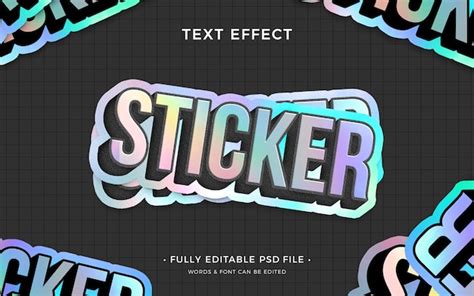
CorelDRAW excels in creating custom text effects, making it a favored tool for logo designers. A specific tutorial is highly recommended for designing a sticker text effect within the software. This tutorial should feel incredibly simple to follow, even for absolute beginners. Logo designers frequently utilize CorelDRAW for custom text effects and mascots, aiming to create unique branding that stands out.
Diving into 3D Design and Effects
For those interested in 3D design, a tutorial focusing on crafting a perfect 3D letter effect is available. While CorelDRAW might be perceived solely as a vector suite for icons and text effects, its capabilities extend to creating more complex 3D elements. These can be effectively used in promotional flyers or banner ads. The principle of learning to design a bottle, for instance, can translate into learning to design almost any 3D shape with practice.
Mastering Seamless Patterns and Mockups
The creation of seamless patterns is another area where CorelDRAW shines. A seamless pattern is an image that can be tiled infinitely without visible seams, ideal for unique backgrounds, text effects, or brand elements. Furthermore, CorelDRAW can be used to create mockups, which are essential for showcasing work professionally. Tutorials on creating mockups without the need for a distortion tool are particularly valuable.
Exploring Vector Art and Drawing Capabilities
CorelDRAW is not just for graphic design; it's also capable of creating intricate drawings. A video tutorial demonstrates how to create drawings within the software, a process that takes approximately 20 minutes. While it's beneficial to have some artistic background, this tutorial is designed to be accessible.
A common technique in vector design is matching text into a shape. Tutorials are available that guide users through this process, often featuring music and on-screen instructions rather than voiceovers.
Line Art and Tracing Drawings
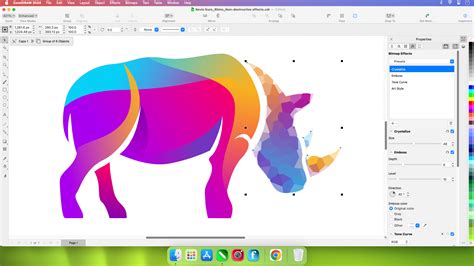
For those interested in detailed line art, CorelDRAW offers tutorials that delve into creating custom line art from scratch and tracing existing drawings. These videos often go in-depth, with one such tutorial lasting just over 17 minutes. This process is crucial for artists looking to digitize their hand-drawn sketches or create entirely new vector-based line art.
Understanding Vector Files and Corel Vector
It's essential to understand what constitutes a vector file and the advantages of using vector graphics. Corel Vector, a related product, offers an overview video for new users, covering basic tools and design principles. This resource also explains what is (and what is not) a vector file, when and why to use vectors, and compares them to other image and file types.
Key features within Corel Vector include:
- Pages: Defining multiple canvas areas within the same document and formatting properties for each page.
- Color Management: Working with colors, applying, and editing various fills such as gradients, textures, and background fills.
- Pen Tool: Creating custom shapes and illustrations with precision.
- Effects: Applying filters, shadows, blur, vignettes, and using color grading tools to alter images.
Advanced Techniques and Shortcuts
To enhance your workflow, CorelDRAW and Corel Vector offer numerous advanced techniques and shortcuts. Learning these can significantly speed up the design process and make your workflow more fluid and intuitive.
- Duotone Cutout Poster: Creating visually striking posters using duotones and bold colors.
- Neon Sign Effect: Adding a pop-culture vibe or experimental flair with a neon sign effect.
- Business Card Design: A practical application for creating professional business cards.
- Laser Cutting and Etching: Understanding the precise methods used in laser cutting and etching.
- Pointer Tool Tips: Utilizing modifier keys to enhance the functionality of the Pointer tool.
- Slice Tool: Discovering unexpected ways to use the Slice tool in your designs.
CorelDRAW for Logo and Icon Design
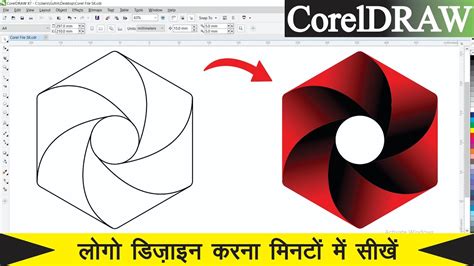
Designing a logo can be a challenging task, but CorelDRAW simplifies the process. Corel Vector, in particular, is a multipurpose tool suitable for creating screen designs, vector illustrations, presentations, print designs, and logo designs. Designing an icon, while seemingly simple, can present common pitfalls that CorelDRAW's tools can help overcome, ensuring sharp, precise, and pixel-perfect results.
Bridging Traditional Art with Digital Vectorization
The question often arises whether traditional art forms like drawing and painting have a place in the world of vector art. The answer is a resounding yes. While vector art is often associated with simple shapes and flat design, vector software can be used to create highly detailed digital drawings and paintings.
Vector Art and Digital Drawings
Vector art is made up of points, lines, and shapes that can be organized in layers. These elements, or objects, can be manipulated to create intricate designs. The most basic vector shapes are referred to as "geometric primitives," which serve as the foundation for more complex designs. While geometric primitives can create stunning designs, they can sometimes lead to a similar stylistic outcome. Realistic vector art was a popular trend, but many illustrations from that period share a similar aesthetic.
Vector Drawing and Painting
Vector drawing involves creating points, lines, and shapes in vector software using a mouse or drawing tablet. This process can also refer to rendering existing vector art. CorelDRAW offers several ways to create vector drawings:
- Layering and Combining Shapes: Building designs by layering and combining vector lines, curves, and shapes.
- Geometric Tools: Utilizing tools like the rectangle and ellipse tools to form basic shapes.
- PowerTRACE: Converting raster art into a vector format, useful for digitizing existing artwork.
- LiveSketch: An AI-powered tool that transforms freehand sketching into real-time vector lines and Bézier curves, ideal for artists transitioning from traditional drawing. LiveSketch works with a mouse or a digital drawing tablet.
Photo Manipulation Ep 2 | CorelDraw Tutorial | Glow Effect in coreldraw
Vector painting is also possible. By selecting the brush tool and painting with a mouse or drawing tablet, CorelDRAW transforms the work into editable vector brush strokes. The software provides a variety of brush styles and shapes to achieve realistic textures and natural looks.
The Technical Aspects of Vector Design
Understanding the technical underpinnings of vector graphics is crucial for any designer.
What is a Vector File?
Vector graphics are made up of a series of points and mathematical equations. These equations define the lines and shapes that form the image. This mathematical basis allows for lossless scalability, meaning the image can be scaled up or down without any loss of quality. Vector files are stored as data files containing these points and equations.
Raster vs. Vector Images
The key difference between raster and vector images lies in how their data is stored. Raster images are composed of pixels, and scaling them up can lead to a loss of quality. Vector images, on the other hand, are resolution-independent due to their mathematical definition.
Vector Tracing (Vectorizing)
Vector tracing, or vectorizing, is a feature in most design programs, including CorelDRAW, that converts raster images into vectors. This is a primary method for transforming traditional drawings or photographs into scalable vector graphics.
Career Paths and Inspiration in Vector Design
The journey of a vector illustrator can be diverse, with some artists transitioning from traditional mediums and others embracing digital tools from the outset. Creative skills and natural talent are transferable across mediums. Vector art can be a profitable career, offering both full-time employment and freelance opportunities.
Finding Creative Inspiration
Creative inspiration can be found anywhere. Artists often draw from mundane tasks of everyday life or explore various art forms for new ideas. The blank canvas can be intimidating, but with a wealth of resources and a keen eye, inspiration is always within reach.
Essential Tools and Software
Creating vector art requires digital tools. At a minimum, a Windows-based PC or Mac is needed. Peripherals like touchscreens and drawing styluses can augment the creative process, offering more flexibility. Choosing the right graphic design software is a critical decision. Key factors to consider include:
- Operating System Compatibility: Ensuring the software runs on your preferred OS (e.g., Windows, Mac).
- Pricing Model: Whether the software is a one-time purchase or subscription-based.
- Features and User Interface: Design options, tool integrations, and the ease of use vary significantly between programs.
- File Export Options: The formats available for exporting your designs.
- Built-in Tools: Features that simplify the design process, such as quick perspective drawings or one-click color replacements.
CorelDRAW is widely recognized for its intuitive and easy-to-learn interface, often requiring fewer steps to accomplish tasks compared to some alternatives.
Advanced Vector Design Concepts
As you progress in your vector design journey, understanding more advanced concepts will be beneficial.
Layers in Vector Design
Layers allow graphic elements to be placed on different levels within a single design file. This feature is invaluable for organizing complex designs and managing individual elements effectively.
Typography Fundamentals
Text is a crucial element in many designs, especially for marketing and branding. Understanding typography, including typefaces, font spacing, kerning, and color, is essential for creating professional and impactful designs.
Styles and Style Sets
Modern design software often includes features like styles and style sets, which can streamline the design process by allowing for the reuse of design elements and formatting.
The Enduring Relevance of Print Design
While some argue that print is dead, print design continues to evolve and remain relevant in various forms for decades to come. CorelDRAW's ability to produce high-quality print-ready files makes it an indispensable tool for this sector. Projects like designing cereal boxes, snack wrappers, and other food containers highlight the ongoing demand for print design.
Realistic Designs and Brand Identity
The creation of realistic designs, such as a realistic cupcake brand from scratch, demonstrates the versatility of CorelDRAW. The concept of brand identity is paramount, and effective visual representation through vector design plays a significant role in establishing it.
Conclusion: Your Vector Design Journey Begins
Vector design is an exciting digital medium that offers limitless possibilities for illustrators and graphic designers. By leveraging resources like the tutorials discussed, and by understanding the fundamental principles and advanced techniques of CorelDRAW, you can embark on a successful and rewarding journey in vector art creation. The combination of artistic skill and technical proficiency, coupled with the right tools, will enable you to create stunning, scalable, and impactful designs.