The allure of analog film, with its unique texture and nostalgic aesthetic, has experienced a significant resurgence in recent years. As more individuals discover the magic of the film experience and the beautiful vintage look it imparts, a growing desire has emerged to replicate this aesthetic in the digital realm. While film photography offers a truly unique experience that every serious photographer should explore, its inherent costs can be prohibitive. Fortunately, numerous techniques and tools exist to bring digital images closer to the authentic look of film. At the forefront of this digital emulation is VSCO, a platform that has dedicated considerable effort to helping users achieve this coveted film-like quality. A cornerstone of this emulation is VSCO's Grain filter, a powerful tool designed to meticulously recreate the nuanced textures of real film.
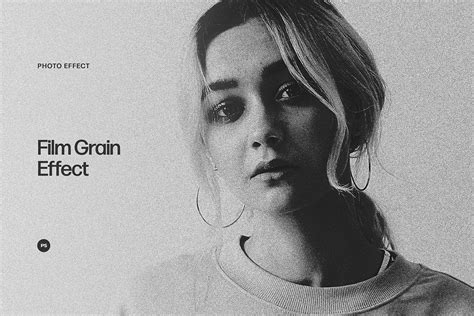
Understanding the Essence of Film Grain
At its core, film grain refers to the fine, textured speckles that are an intrinsic characteristic of analog film photography. These speckles are not an artifact of digital manipulation but rather the physical manifestation of metallic silver or dye clouds that form the image on the film. This inherent texture gives photographs a natural, organic feel and contributes to a timeless, grainy effect that is difficult to replicate with purely digital means. VSCO's Grain filter is engineered to simulate this organic texture with remarkable fidelity, allowing digital creators to imbue their images with the authentic character of film.
The scientific basis for film grain lies in the composition of photographic film itself. Analog film is constructed with millions of microscopic silver-halide crystals suspended in a gelatin layer. When exposed to light, these crystals undergo a chemical reaction. During the development process, the unexposed crystals are chemically removed, leaving behind the remaining particles that form the visible image. In black and white films, there is a single layer of these crystals. Color films, however, possess three distinct layers, each sensitive to different colors of light, which further contributes to the complexity of their grain structure.
The sensitivity of a film, measured by its ISO rating, directly influences the size of these silver-halide crystals. Films with higher ISO ratings, designed for low-light conditions, contain larger crystals. This results in a more pronounced, coarser grain appearance in the final image. Conversely, films with lower ISO ratings, intended for brighter conditions, utilize smaller crystals, leading to finer and more subtle grain. This relationship between ISO and grain size is a crucial aspect that VSCO's Grain filter aims to replicate, allowing users to simulate the grain characteristics of various film stocks. A general observation in film photography is that brighter scenes often exhibit less grain, while darker scenes tend to show more, a phenomenon directly linked to the exposure levels and the resulting crystal formations.
The VSCO Grain Filter: A Tool for Authentic Emulation
VSCO's Grain filter is not merely a superficial overlay; it's a sophisticated tool that allows for dynamic control over the texture of digital images, bringing them closer than ever to the look and feel of real film. This is achieved through a suite of adjustable parameters, including Strength, Size, and Color sliders. These controls enable users to precisely dial in the desired vintage effect, ranging from a subtle, almost imperceptible texture to a bold, overtly grainy aesthetic.

The Strength slider dictates the intensity of the grain effect. By adjusting this parameter, users can control how pronounced the grain appears within their image. The Size slider offers granular control over the texture itself, allowing for the simulation of fine, subtle grain characteristic of low-ISO films, or larger, more prominent grain associated with high-ISO stocks. The Color slider is particularly innovative, introducing color into the film grain simulation for color images. This feature is optimized to mimic the subtle color shifts that can occur within the grain structure of real color film without altering the overall tonal balance of the photograph, adding another layer of authenticity to the emulation.
VSCO Members have access to an even more extensive creative palette through the integration of the Grain tool with over 40 Film X preset filters. These presets are meticulously inspired by iconic film stocks that have defined decades of photographic history, from the golden age of Kodak and Fuji to the distinct character of Agfa. By combining the Grain texture tool with these film-inspired presets, users can achieve unparalleled authenticity in their digital creations. Furthermore, VSCO allows users to save their personalized combinations of filters and grain settings as "Recipes," enabling them to easily recall and apply their signature looks to future projects or even to batch edit multiple images.
Mastering the Grain: Controls and Applications
The process of adding and refining grain in VSCO is designed to be intuitive yet powerful. Within the VSCO mobile app or desktop photo editor, users can import their image and navigate to the 'Edit' section. The Grain tool is readily accessible within the tools tray, where its editor can be opened.
How to Make Your Photos Look Like Film — Textures & Effects
Once the Grain editor is open, the primary controls come into play:
- Strength: This slider determines the overall intensity of the grain effect. A subtle increase can add a touch of texture, while a higher setting can create a more pronounced, gritty appearance.
- Size: This control governs the scale of the individual grain particles. Smaller sizes simulate the fine grain of low-ISO films, while larger sizes mimic the coarser grain of high-ISO films.
- Color: For color images, this slider allows for the introduction of subtle color into the grain itself. This is crucial for accurately simulating the nuanced grain structure of real color film stocks, preventing a flat, monochromatic grain from appearing where it shouldn't.
Beyond the core Grain tool, VSCO offers "Film FX" which provides pre-made film grain filters and other film-inspired overlays. These can be combined with the manual Grain adjustments for a comprehensive film emulation. This includes elements like film frame overlays, which can flawlessly mimic the look of real scanned film, complete with imperfections like light leaks and sprocket holes.
For those seeking the classic aesthetic of black and white photography, adding a Grain overlay is particularly effective. To recreate the look and feel of high-sensitivity black and white film, users are encouraged to turn up the Strength and Size sliders, achieving a more authentic and impactful film grain effect.
Film Grain vs. Digital Noise: A Crucial Distinction
A common point of confusion for newcomers to digital image manipulation is the difference between film grain and digital noise. While both manifest as speckling or texture within an image, their origins and artistic implications are vastly different.
Film grain is an organic byproduct of the analog photographic process. It arises from the physical and chemical properties of the silver-halide crystals on the film. This inherent characteristic lends a unique character, a certain warmth, and a perceived depth to images. Many photographers find that film grain adds a desirable artistic quality, a tangible texture that digital noise often lacks.
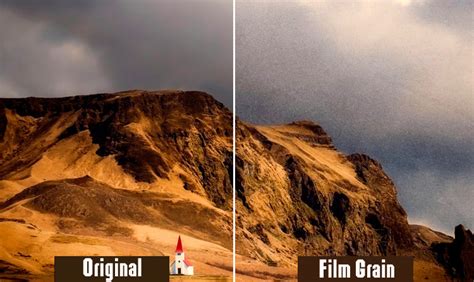
Digital noise, on the other hand, is typically an unwanted artifact generated by the camera's sensor, especially under conditions of low light or high ISO settings. It often appears as random, irregular speckles that can detract from image clarity and aesthetic appeal. Modern digital cameras and editing software often employ algorithms to reduce or eliminate digital noise.
VSCO's Grain effect deliberately mimics the organic, characteristic texture of film grain, rather than the random, often jarring patterns of digital noise. This distinction is key to achieving an authentic film look. While digital noise is something to be mitigated, film grain is an embraced element that adds artistic value. Many creators actively reduce digital noise in their images only to then add simulated film grain for a desired gritty, artistic effect.
Achieving the "Best" Grain: Subjectivity and Guidance
The question of "what is the best amount of grain to use?" is inherently subjective, as it depends entirely on the desired artistic outcome. VSCO's robust controls empower users to experiment and find their ideal balance. However, the platform offers guidance based on the perceived intensity of the grain effect:
- Subtle Texture: For a delicate, almost imperceptible grain, lower strength levels, typically around +3.0 or lower, are recommended. This adds a hint of texture without being overtly noticeable.
- Strong Grain Effect: To achieve a more pronounced grain, medium settings ranging from +3.0 to +6.0 on the Strength slider can be employed. This range starts to introduce a more significant textural element.
- Bold and Artistic: For those seeking a dramatic, artistic statement, higher values, generally +6.0 and above, can be utilized. These settings create a bold, gritty effect that is characteristic of certain high-speed film stocks or deliberate aesthetic choices.
Crucially, these strength levels are to be used in conjunction with the adjustable Size and Color sliders, allowing for a highly personalized and nuanced grain experience.
Grain's Impact on Image Quality and Aesthetics
A common concern is whether adding film grain reduces image quality. The answer is nuanced: grain adds texture but does not inherently lower the image's resolution. In fact, in certain scenarios, it can enhance the perceived quality. For images that might be slightly out of focus or exhibit overly sharp, digital-looking details, the introduction of grain can soften these areas, creating a more cinematic and pleasing film-like feel. It can also add visual interest to areas of flat color, such as expansive skies or plain walls, by introducing subtle variations.
Grain in Color vs. Black and White
VSCO's grainy filter is remarkably versatile, proving effective for both color and black and white photography.
- Black and White: In monochrome images, grain can evoke a classic, gritty documentary look, reminiscent of iconic photojournalism from the film era. It adds a tactile quality and a sense of timelessness.
- Color: For color photographs, grain can introduce a subtle, nostalgic texture. It can lend a vintage feel, enhancing the mood and depth of the image without overpowering the colors.
Experimentation is key. Combining a grain overlay with a specific film filter or color grading preset can unlock unique aesthetic possibilities, leading to results that are both familiar and distinctively your own.
Beyond Grain: A Holistic Approach to Film Emulation
While grain is a critical component of the film look, it is often just one piece of a larger puzzle. The complete emulation of analog film involves a combination of color tonality, texture, and subtle imperfections. VSCO's platform encourages a holistic approach, integrating grain with a range of other editing tools and effects.
Film Emulation with VSCO: A Deeper Dive
The journey to emulating film with VSCO extends beyond just grain. The platform offers a comprehensive suite of tools that, when used in conjunction, can create remarkably authentic film looks. This includes:
- Film X Presets: These are the cornerstone of VSCO's film emulation. Inspired by iconic film stocks, they offer a starting point for color tonality. Understanding the naming convention, such as "AU5" representing Agfa Ultra 50, provides insight into the film stock being emulated.
- Strength, Character, and Warmth: Within the Film X presets, these sliders allow for fine-tuning.
- Strength: Controls the blend of the preset with the original image.
- Character: Mimics film exposure, allowing for simulated over or underexposure for a more realistic look.
- Warmth: Simulates scanner white balance adjustments, adding realistic color temperature shifts.
- Film FX Effects: These encompass a broader range of filmic elements:
- Texture Overlays: Including dust, scratches, and additional grain types derived from real film scans.
- Film Frames: Simulating the borders of scanned film, including various aspect ratios and types (e.g., 8mm, 16mm, 35mm).
- Light Leaks and Lens Flares: Recreating the imperfections of older cameras and lens characteristics.
- Distressed Photo Effects: Mimicking the look of aged, expired, or physically damaged film.
- Post-Processing Adjustments: Further refining the look with tools like:
- Blur: Subtly softening digital sharpness to match film's characteristic rendering.
- Vignette: Adding darkening to the edges of the frame, a common lens characteristic.
- HSL (Hue, Saturation, Lightness): Fine-tuning individual color channels for precise color grading.
- Dodge & Burn: Simulating darkroom printing techniques to selectively lighten or darken areas.
- Bloom and Halation: Adding subtle glow effects that can enhance a cinematic feel.
Practical Application: Film Recipes and Tips
VSCO provides "Film Recipes" as quick-start guides for achieving specific film looks. For example:
Clean and Colorful Film Recipe:
- Film Filter: VSCO Preset AU5
- Strength: +12.0
- Character: 0.0
- Warmth: +1.5
- Grain Strength: +6.0
- Size: 0.0
- Color: +2.5
- Vignette Strength: +4.0
Subtle and Warm Film Recipe:
- Film Filter: VSCO Preset KE1
- Strength: +12.0
- Character: +3.0
- Warmth: +3.0
- Grain Strength: +6.0
- Size: 0.0
- Color: +2.5
- Vignette Strength: +4.0
These recipes, along with the ability to save custom "VSCO Recipes," allow for consistent and efficient editing. The platform also emphasizes the "less is more" philosophy, advocating for subtle adjustments that enhance the original image rather than drastically altering it, while still providing the tools to "pop" an image with a desired aesthetic.
Conclusion: Embracing the Analog Aesthetic Digitally
VSCO's Grain filter and its accompanying suite of film emulation tools offer a powerful and accessible pathway for digital creators to capture the timeless aesthetic of analog film. By understanding the fundamental nature of film grain, mastering the available controls, and integrating these tools with other editing techniques, users can imbue their photographs and videos with a unique character, a nostalgic warmth, and a tangible texture that resonates with the magic of the film experience. Whether aiming for a subtle enhancement or a bold artistic statement, VSCO provides the means to recreate the charisma of analog film in the digital age.