WebP, a modern image format developed by Google, has been touted as a revolutionary solution for optimizing website speed and performance. It promises numerous advantages over traditional formats like JPEG and PNG, primarily through its ability to deliver smaller file sizes without compromising image quality. This reduction in data transfer translates directly to faster page loading times, a factor that Google itself has indicated plays a role in its search ranking algorithm. However, beneath this veneer of efficiency lies a complex reality, with criticisms and limitations that challenge its universal applicability and user-friendliness.
The Promise of Smaller File Sizes and Enhanced Performance
One of the most significant selling points of WebP is its inherent design for efficiency. WebP images are engineered to be smaller in file size compared to their JPEG and PNG counterparts, while striving to maintain a comparable level of visual fidelity. This is achieved through a combination of lossy and lossless compression techniques that are more advanced than those found in older formats.
The impact of these smaller file sizes is substantial for website performance. With smaller file sizes, WebP images require less data to be transferred between the server and the user’s browser. This directly contributes to a reduction in page load times. In an era where user attention spans are fleeting and milliseconds can make a difference in engagement, faster-loading websites are a critical advantage. Google’s emphasis on page loading speed as a ranking factor further underscores the importance of adopting efficient image formats. For businesses and content creators alike, this means potentially improved search engine rankings, lower bounce rates, and a more positive user experience.
Consider a scenario where a website features numerous high-resolution images. Without optimization, these images can significantly increase the overall page weight, leading to sluggish loading. By converting these images to WebP, the same visual content can be delivered with a considerably smaller footprint. This not only speeds up the initial load but also improves the experience on slower or mobile connections, where data usage and bandwidth can be a constraint. The underlying technology of WebP, which utilizes predictive coding techniques, allows it to achieve these smaller file sizes by predicting pixel values and encoding only the differences. This is a fundamental departure from the more straightforward compression methods of JPEG and PNG.
Browser Compatibility: A Persistent Hurdle
Despite its technical merits, a significant drawback of WebP adoption has been its browser compatibility. While major modern browsers like Chrome, Firefox, and Microsoft Edge offer robust support for WebP, a considerable segment of users still rely on older browsers, such as Internet Explorer, which do not natively support the format. This creates a dilemma for web developers: either serve WebP images and risk them not displaying for a portion of their audience, or stick to traditional formats and forgo the performance benefits.
This incompatibility necessitates the implementation of fallback mechanisms. Developers often need to provide alternative image formats (like JPEG or PNG) for browsers that do not support WebP. This adds complexity to the development process and can, in some cases, negate some of the efficiency gains if not implemented carefully. The need for these workarounds means that the promise of a seamless, universally optimized experience is not yet fully realized. The ongoing reliance on fallback strategies highlights that WebP, while gaining traction, has not yet achieved the ubiquitous adoption necessary to be considered a complete replacement for established formats.
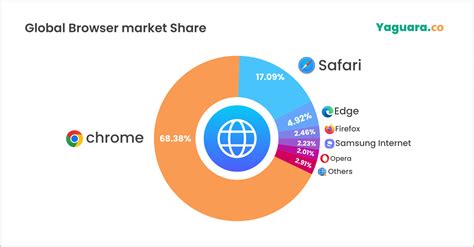
The issue of browser support is not static, of course. As older browsers are phased out and newer versions become standard, WebP's compatibility landscape improves. However, the transition period can be lengthy, and specific industries or user demographics may lag in adopting the latest browser technologies. This means that for the foreseeable future, developers will likely need to continue managing the dual provision of WebP and traditional image formats. The "edit image" feature observed in some Chrome-based browsers, while a convenience for individual users, does not address the fundamental issue of cross-browser display compatibility for website owners.
Quality Considerations: The Nuances of Compression
While WebP is often praised for its ability to maintain image quality, it's crucial to understand that this is not always a given. In certain cases, aggressive compression settings can lead to visible quality loss. This is particularly true for lossy compression, where some image data is discarded to achieve smaller file sizes. The effectiveness of WebP’s compression is highly dependent on the specific content of the image and the chosen compression parameters.
The user's observation about the limitations of WebP's chroma subsampling (4:2:0 in most cases, except in lossless mode) points to a technical detail that can impact image fidelity, especially in scenarios involving fine color gradients or detailed textures. While this might be equivalent to converting a JPEG to PNG in terms of bridging a gap, it highlights a specific technical constraint. The argument is that with formats like PNG, there's an inherent understanding of maintaining losslessness. With JPEG, the expectation is that some loss is acceptable. WebP, however, occupies a space where the distinction is less clear-cut without deeper inspection or additional metadata.
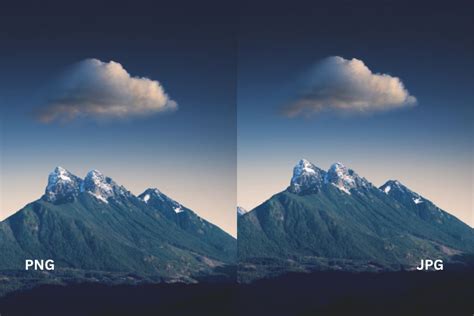
The "pipeline" analogy is particularly insightful here. When processing images, knowing the inherent properties of the file format is essential for making informed decisions about subsequent manipulations. If you start with a PNG, you know you should strive to maintain losslessness throughout the process to preserve the original quality. If you have a JPEG, you understand that it's already a lossy format, and further loss might be acceptable or even expected. With WebP, this inherent knowledge is less readily available from the file extension alone. This ambiguity can lead to suboptimal processing choices if the pipeline is not explicitly aware of WebP's compression characteristics and potential for quality degradation.
The ability to "edit image" directly within a browser like Chrome, while a user-facing feature, also hints at the underlying complexity. It suggests that the browser itself might be performing on-the-fly conversions or manipulations, and the clarity of the original image's properties might be abstracted away. For a developer or a content creator working with image assets, this lack of immediate, format-inherent knowledge can be a point of friction. It necessitates a more meticulous approach to image management, ensuring that the chosen compression settings align with the desired visual outcome and that potential quality compromises are understood and accepted.
The Subjectivity of "Uselessness": Diverse Perspectives on WebP
The assertion that "webp files are useless" is a strong statement that, upon closer examination, reveals a spectrum of reasons why individuals might hold this view. It's not a monolithic hatred, but rather a collection of specific, often technical, grievances. While the format offers undeniable benefits in terms of file size and performance, these advantages are not universally applicable or appreciated by all users and developers.
One common point of contention, as articulated, revolves around the inherent properties of the format when used within an image processing pipeline. If the goal is to maintain absolute fidelity, particularly for graphics that rely on precise color information or transparency, the limitations of WebP’s compression can be a significant drawback. The user's specific concern about 4:2:0 chroma subsampling, except in lossless mode, is a valid technical limitation. While lossless WebP exists, it doesn't always achieve the same level of compression as lossless PNG, and the default lossy mode's chroma subsampling can lead to color banding or loss of detail in certain images, especially those with sharp color transitions.
What is a WebP File? (vs JPG and PNG Explained)
The analogy of knowing whether to treat a file as a PNG (always maintain losslessness) or a JPEG (accept loss) is crucial. The file extension of PNG or JPEG provides an immediate, albeit sometimes oversimplified, cue about the expected handling. WebP, on the other hand, introduces a degree of ambiguity. Developers might need to either rely on external tools or metadata to understand the specific compression applied to a WebP file, or simply assume a certain level of loss, which might not always be accurate or desirable. This lack of immediate, intuitive understanding can complicate workflows, especially in automated image processing systems.
Furthermore, the "edit image" functionality in browsers, while convenient for end-users, can be seen as a workaround for the format's limitations rather than a solution. It implies that the browser is making assumptions or performing conversions behind the scenes, which might not align with the developer's original intent or the desired outcome of image manipulation. This can lead to unexpected results or a loss of control over the image's final appearance.
The perception of WebP's "uselessness" can also stem from the effort involved in implementing it. While the format offers performance benefits, the need for fallback mechanisms, potential for quality degradation if not configured correctly, and the learning curve associated with its specific compression parameters can be seen as overhead. For some, the marginal gains in file size might not outweigh the added complexity and the potential for unexpected issues.
Ultimately, the utility of WebP is context-dependent. For websites where rapid loading and reduced bandwidth are paramount, and where the images are primarily photographic or decorative, WebP can be an excellent choice. However, for applications requiring precise color reproduction, intricate graphics with alpha channels, or a straightforward, predictable image processing workflow, the limitations of WebP might make it a less attractive or even unsuitable option. The ongoing debate around WebP highlights the trade-offs inherent in image compression and the continuous evolution of digital media formats.