The WebP image format, developed by Google as a modern alternative to established formats like JPEG, PNG, and GIF, offers significant advantages in terms of file size reduction and enhanced features such as animation and transparency. However, understanding how this format is recognized and handled by various software and systems is crucial for seamless integration into workflows and web development. A key aspect of this handling is the MIME type, which dictates how a file is interpreted. This article delves into the intricacies of the WebP MIME type, exploring its significance, how it's identified, and common issues encountered, such as the peculiar association of WebP files with musical notation icons.
The Essence of MIME Types in Digital Communication
MIME (Multipurpose Internet Mail Extensions) types are fundamental to the internet's ability to handle various types of data beyond plain text. At its core, a MIME type is a two-part identifier, consisting of a "type" and a "subtype," separated by a forward slash (e.g., text/html, image/jpeg). The type denotes a general category of data, such as text, image, audio, or video, while the subtype specifies the exact kind of data within that category.
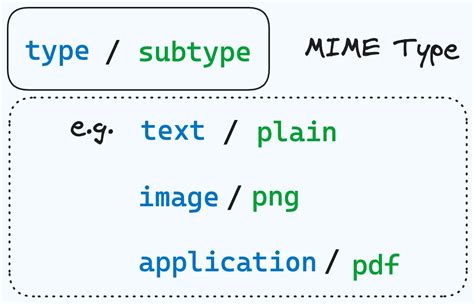
Web servers and browsers rely heavily on MIME types to correctly process and display content. When a server sends a file to a browser, it includes the MIME type in the HTTP header. The browser then interprets this information to determine how to render the received data. For instance, a text/html MIME type signals that the data is an HTML document to be rendered as a webpage, whereas an image/jpeg type indicates it's a JPEG image to be displayed as such. Without this crucial information, browsers would be unable to distinguish between different file formats, leading to a fragmented and inconsistent user experience.
The importance of MIME types extends to security as well. Certain MIME types, particularly those associated with executable programs, can pose significant security risks if not handled properly. By correctly identifying and managing MIME types, systems can prevent the execution of malicious code and ensure the safe delivery of content.
Identifying the WebP MIME Type: The image/webp Standard
For the WebP image format, the universally recognized MIME type is image/webp. This designation clearly communicates that the file contains image data encoded using the WebP standard. When a web server correctly identifies a .webp file and sends it with the image/webp MIME type, browsers that support WebP will display it as an image.
However, the process of MIME type identification isn't always straightforward. Several mechanisms are involved:
File Command: In Unix-like operating systems, the
filecommand is a powerful utility that inspects the initial bytes of a file to determine its type, often more reliably than relying solely on file extensions. If thefilecommand correctly identifies a.webpfile asimage/webp, it's a strong indicator that other applications, including file managers, should also be able to recognize it.Application Desktop Files: In Linux desktop environments, application configuration is often managed through
.desktopfiles located in directories like/usr/share/applications. These files can specify the MIME types an application is associated with. Editing these files or related MIME type configuration files (such asmimeapps.list) can help associate specific applications with theimage/webpMIME type or correct misconfigurations.Operating System Registries: Operating systems maintain internal registries or databases that map file extensions and MIME types to specific applications and icons. Issues can arise if this mapping is corrupted or incomplete.
The "x-riff" Conundrum: A Case of Misassociation
A common point of confusion and frustration, as highlighted by user experiences, is when .webp files are mistakenly associated with an incorrect icon, such as a musical notation symbol, and a non-existent MIME type like application-x-riff. This typically occurs due to a misconfiguration in the system's MIME type database or the file manager's icon theme.
The x-riff designation is particularly perplexing because "riff" is commonly associated with audio file formats (like Resource Interchange File Format, which can contain audio data), not images. The RIFF container format itself is a generic container that can hold various types of data, including audio and video. While WebP does use the RIFF container format, the MIME type should still reflect the content as an image, hence image/webp.
The root cause of this misassociation often lies in:
- Incomplete or Corrupted MIME Database: The system might lack an explicit entry for
image/webpor have a faulty entry that incorrectly links it toapplication-x-riff. - Icon Theme Issues: The icon theme used by the file manager might have a default icon for
application-x-riffand, due to the misconfiguration, is applying it to.webpfiles. - Application-Specific Handling: Some applications might have their own internal MIME type handling that overrides system defaults, leading to unexpected behavior.
Solving this requires correcting the underlying MIME type association. This might involve:
- Installing Necessary Libraries: Ensuring that the system has the necessary libraries or "pixbuf loaders" installed that enable applications to correctly interpret WebP images. For example, installing a
libwebppackage is essential. - Updating MIME Databases: Running commands to update the system's MIME type database (e.g.,
update-mime-database). - Manual Configuration: In some cases, manual editing of configuration files within
/usr/share/applicationsor related directories might be necessary to explicitly map.webpfiles to theimage/webpMIME type and a suitable image icon.

WebP in the Wild: Browser and Application Support
The adoption of WebP has been steadily increasing, driven by its performance benefits. However, compatibility can still be a consideration, particularly with older software and systems.
- Browser Compatibility: Modern web browsers, including Google Chrome, Mozilla Firefox (since version 65), Microsoft Edge (based on Chromium), and Safari (from macOS Big Sur and iOS 14 onwards), offer robust support for WebP. Older versions of Safari on macOS and iOS prior to version 14 had limited or no support, a factor that historically impacted its widespread adoption for critical web assets.
The Most HATED Image Format
- Application Support: A wide array of image editing and viewing software now supports WebP, including Adobe Photoshop, GIMP, Pixelmator, IrfanView, XnView, and many others. However, as the user experience with ROX-Filer illustrates, the correct configuration and recognition of the
image/webpMIME type are essential for these applications to function correctly within the operating system's file management context. - Content Management Systems (CMS): While many CMS platforms like WordPress now offer native WebP support or plugins for automated conversion, it's not always a default feature. Developers may need to implement specific solutions to leverage WebP for optimal web performance.
The Technical Underpinnings of WebP
WebP's efficiency stems from its advanced compression techniques, which are based on the VP8 video codec. It supports both lossy and lossless compression, as well as animation and alpha channel transparency.
- Lossy Compression: Utilizes predictive coding, where blocks of pixels are predicted based on neighboring blocks. Mispredicted data is then compressed using transforms like the discrete cosine transform.
- Lossless Compression: Employs entropy coding, advanced 2D locality techniques, and a color cache for recently used colors, achieving higher compression ratios than traditional lossless formats.
- RIFF Container: WebP files are typically encapsulated within the Resource Interchange File Format (RIFF) container. This flexible container allows for various features beyond basic image encoding, such as metadata (Exif, XMP), ICC profiles, and tiling for very large images. The "Extended File Format" added in 2011 further enhanced WebP's capabilities, enabling animation and richer metadata support.
The complexity of its compression method means that WebP files can take longer to create compared to JPEGs or PNGs. However, this trade-off is generally considered worthwhile due to the significant reduction in file size, leading to faster page load times and reduced bandwidth consumption.
Addressing WebP Compatibility Challenges in Web Development
For web developers, ensuring WebP compatibility involves a multi-faceted approach:
Responsive Images with
<picture>Element: The HTML<picture>element allows developers to serve different image formats based on browser support and other conditions. This is a robust way to offer WebP to compatible browsers while providing fallbacks (e.g., JPEG) for others.<picture> <source srcset="image.webp" type="image/webp"> <img src="image.jpg" alt="Description of image"></picture>JavaScript Fallbacks: For older browsers that don't support the
<picture>element, JavaScript-based solutions can detect WebP support and dynamically load appropriate images. However, this adds complexity and can impact performance if not implemented carefully.Server-Side Negotiation: Web servers can be configured to detect the browser's
Acceptheader and serve the most appropriate image format.Content Delivery Networks (CDNs): Many CDNs offer automatic image optimization and format conversion, including WebP, simplifying the process for developers.
Redirects (with caution): While a 307 redirect can temporarily serve an alternative format (like JPEG) if WebP is not supported, it's not a foolproof solution due to inconsistencies in how some services handle redirects.
The Evolving Landscape of Image Formats
The development of WebP is part of a broader trend towards more efficient image formats for the web. Other contenders and complementary formats include:
- AVIF (AV1 Image File Format): Built on the AV1 video codec, AVIF offers even better compression than WebP, especially for lossless images, and supports HDR.
- JPEG XL: A more recent format designed to be a versatile replacement for JPEG, offering superior compression, wider color gamut support, and animation capabilities. It aims to provide a smoother transition from legacy JPEG workflows.
- FLIF (Free Lossless Image Format): An earlier lossless format that claimed superior compression ratios but has seen less widespread adoption.
The continuous innovation in image formats underscores the ongoing effort to balance visual quality with efficient data transmission, a critical factor in the performance and accessibility of the modern web.
Security Considerations and Vulnerabilities
While WebP offers numerous benefits, it's not immune to security vulnerabilities. In September 2023, two critical vulnerabilities (CVE-2023-4863 and another) were disclosed, affecting the libwebp library, which is used by numerous applications, including web browsers. These vulnerabilities, particularly CVE-2023-4863 with a CVSS score of 8.8, could lead to out-of-bounds writes, potentially causing denial-of-service or even remote code execution when processing maliciously crafted WebP files. The widespread use of libwebp highlighted the significant challenge in patching these vulnerabilities across a vast ecosystem of software, emphasizing the importance of timely updates and robust security practices when handling image files from untrusted sources.
The ongoing development and refinement of image formats like WebP, coupled with a keen awareness of their implementation details and potential security implications, are essential for building a faster, more efficient, and secure digital world. The correct identification and handling of the image/webp MIME type are foundational steps in achieving these goals.