The digital art world is largely dominated by the Adobe Suite, with Adobe Illustrator often cited as the industry standard for graphic design. However, the landscape is evolving, and robust alternatives are gaining traction. Among these, the Affinity suite, comprising Affinity Photo for image editing, Affinity Designer for graphic design, and Affinity Publisher for print and document layout, stands out. The recent acquisition of Affinity by Canva has further amplified interest, with the potential for increased resources and innovation. For graphic designers considering a switch or exploring new tools, understanding Affinity Designer's capabilities and how it stacks up against established players like Adobe Illustrator is crucial.
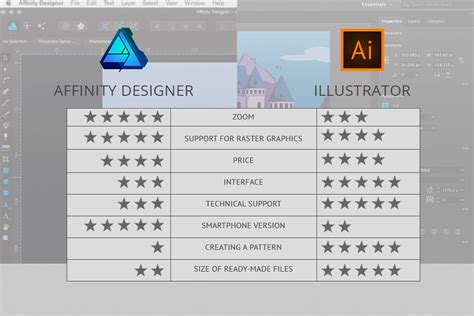
Vivienne Le, a graphic designer based in Germany, recently undertook a comparative project, designing a book cover using both Adobe Illustrator and Affinity Designer, paired with a Wacom One tablet. This practical exploration offers valuable insights into the user experience, workflow efficiency, and feature sets of each application. Her experience highlights that while Adobe Illustrator has long been the default choice for many, the competitive landscape is intensifying, particularly with the Canva acquisition.
The Design Process: A Comparative Look
Vivienne's project involved creating a book cover inspired by a collection of Vietnamese queer and sexuality slang. Her setup included a MacBook Pro connected to a monitor and her Wacom One drawing tablet. She opted for the Wacom One for its ease of integration with her existing laptop setup, allowing for a centralized file management system.
Navigating Adobe Illustrator
Beginning with Adobe Illustrator, Vivienne found the user interface familiar, a common experience for designers accustomed to the Adobe ecosystem. The Wacom One tablet connected seamlessly, requiring no complex settings adjustments. The basic Brush Tool allowed for straightforward vector path creation, tracing over her initial sketch. Working with stroke and fill gradients was intuitive, involving simple drag-and-click actions to define gradient direction.
A key tool in Vivienne's Illustrator workflow was Image Tracing, a feature exclusive to Adobe Illustrator. The software also offers extensive text-based features, making it a strong contender for designers who work heavily with typography, requiring detailed control over kerning, distortions, and font modifications. For her project, she chose the Google Font "Be Vietnam," appreciating its inclusion of Vietnamese letterforms and adaptive diacritics, which are essential for readability in that language.
While recent updates to Illustrator aim for increased user-friendliness, Vivienne found the new AI pop-up bar, intended to suggest contextual tools, to be intrusive and often disruptive to her workflow.
Embracing Affinity Designer
Transitioning to Affinity Designer, Vivienne immediately appreciated its streamlined user interface and smooth performance. The application includes essential tools like the Pen and Brush tools, and its lighter feel made sketching directly with the Pencil Tool a more appealing option for quick ideation. Similar to Illustrator, her Wacom tablet worked without any configuration issues, but the drawing experience felt noticeably smoother.
Vivienne found her overall workflow in Affinity Designer to be significantly easier, with fewer open menus to manage. The gradient tool functions similarly to Illustrator's, though she noted that Illustrator offered more aesthetically pleasing default color swatches. While both applications offer extensive gradient customization, including the ability to add noise, Affinity Designer's navigation and overall workflow were perceived as more modern and intuitive. For newcomers to vector graphics or those migrating from Illustrator, Affinity Designer's tool placement is generally comparable, but it presents a curated experience, seemingly prioritizing frequently used tools and presenting them with greater clarity and efficiency.
The native file format for Affinity Designer is .afdesign. For collaboration, users can share these files with other Affinity users or export to common formats like PNG, JPG, SVG, PDF, and even Photoshop's .PSD. However, Vivienne cautions that exporting to other formats carries the inherent risk of elements being lost or altered during translation, potentially leading to issues with print files.
Despite Illustrator's edge in certain niche features, Vivienne found her actual drawing experience in Affinity Designer to be more enjoyable. She summarized Affinity Designer as faster, cleaner, easier to use, and significantly more affordable, available as a one-time purchase for around $50, with a free three-month trial often bundled with hardware like the Wacom One tablet.
While Affinity Designer may not completely displace Adobe Illustrator as the industry standard overnight, Vivienne's experience suggests that for many core tasks, there are viable workarounds within Affinity Designer. The ultimate choice between the two often comes down to individual preferences, specific workflow needs, and budget constraints.
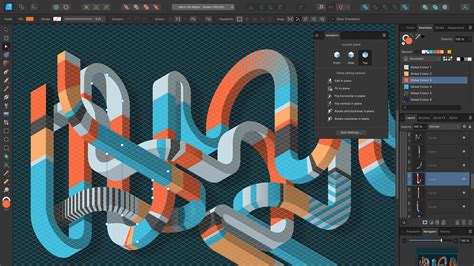
The Core Strengths of Affinity Designer
Affinity Designer is positioned as a professional-grade graphic design software that prioritizes user control and creative freedom. It's designed to be responsive and adaptable, allowing users to customize their workspace to match their individual working styles.
Precision and Control
The software offers meticulous control over every shape, grid, and guide. Users can edit curves and nodes with exceptional precision using the pen tool. Robust snapping and alignment tools ensure that elements are positioned exactly where intended. The use of symbols and constraints is invaluable for maintaining consistency across icons, logos, and UI components across multiple artboards. Furthermore, Affinity Designer's non-destructive editing capabilities, real-time pixel previews, and reliable export options empower users to refine their work extensively, confident that their vector creations will consistently deliver sharp and dependable results.
Versatility and Integration
Affinity Designer is characterized by its open and flexible approach to vector design. Users can manipulate shapes, construct new forms, and expand or contract paths on the fly. The inclusion of expressive brushes allows for the addition of texture and depth, seamlessly integrating digital illustration with logo design and UI elements. The software also provides pathways to advanced photo editing and layout tools within the same environment, fostering a fluid workflow that prevents momentum loss.
Custom Letter Logo Tutorial In Affinity Designer
Responsive and Intuitive Workflow
The vector design experience in Affinity Designer is designed to feel responsive, smooth, and under control. It is capable of handling complex tasks, such as designing an entire UI system, yet is agile enough for quick logo ideation during a meeting. Every action is processed in real-time, contributing to an effortless creative process.
Curves and Shapes
Affinity's curve editing tools are engineered for complete control, enabling users to sculpt lines with precision. The Shape Builder tool simplifies the creation and customization of geometric elements, from basic shapes to intricate systems.
Gradients and Fills
The Fill Tool provides comprehensive control over fills, allowing for the application of bitmap fills, hatch patterns, and various gradient types, including linear, radial, and mesh gradients. This enables designers to add depth, color, and texture to their designs.
Image Tracing and Non-Destructive Editing
Affinity Designer's Image Trace feature converts flat images into crisp, editable vectors, establishing a clean, scalable foundation without the need for manual redrawing. Non-destructive editing ensures that original layers remain intact, allowing for real-time modifications to strokes, paths, and corners without committing to permanent changes.
Typography and Raster Effects
The software supports advanced typography features, including flowing text along paths, creating custom typefaces, and utilizing ligatures, artistic text, character, and paragraph styles. Additionally, it allows for the integration of raster brush textures into vector illustrations.
The "Made in Affinity" Ecosystem
The commitment of Affinity to supporting creatives is evident in its continuous development and feature enhancements. Testimonials from users like Sphelele âEllspheeâ Gumede, an illustrator, highlight how Affinity "continues to push boundaries and proves once again that they are way ahead of the curve," underscoring the software's dedication to its user base.
Vector Tools for Every Creative
Affinity Designer is presented as a comprehensive graphic design studio, offering a full suite of tools for illustrators, web designers, game developers, and other creative professionals. Its capabilities extend to the creation of logos, icons, mockups, UI designs, illustrations, concept art, templates, merchandise, and print projects.
The Canva Integration and AI Capabilities
With the integration into Canva, Affinity Designer users gain access to Canva's premium AI tools. This includes the "Generate Vector" feature, which allows for the creation of fully editable vectors from simple text prompts, eliminating the need for manual tracing or extensive pen tool work. These AI-generated graphics are clean, node-based, and fully adjustable, enabling users to modify, recolor, and reshape them as needed.
Getting Started with Affinity Designer
Accessing Affinity Designer is straightforward. Users can download the macOS or Windows version from the Affinity website, signing in with or creating a free Canva account. Once installed, users can create new documents or open existing files within the Vector Studio, where all the professional design and illustration tools are readily available.
Customizing Your Workspace
Affinity Designer's workspace is highly customizable. Users can tailor their environment by removing unused tools, adding specific studios like photo editing or layout, or simply organizing panels to suit their personal workflow. Multiple custom setups can be saved and switched between easily, and shared with others.
Crafting Designs and Exporting
The software is equipped to handle a wide range of design projects, from concept art and print materials to logos, icons, and UI designs. A significant advantage is the ability to export directly to Canva, facilitating seamless collaboration and scaled production of finished designs.
Affinity Designer: Accessibility and Value
A frequently asked question revolves around the cost of Affinity Designer. The software is indeed free to use, offering unrestricted access to all tools across its Vector, Pixel, and Layout studios, along with customization and export features. Free updates with new features and improvements are also provided.
For users with a Canva premium plan (Pro, Business, Enterprise, or Education), additional benefits include access to Canva's AI tools within Affinity via the Canva AI Studio. The company emphasizes its commitment to keeping Affinity free, as detailed in their "Why we made Affinity free, and how weâll keep it that way" statement.
File Compatibility and Collaboration
Affinity Designer supports a broad range of export formats, including PDF, SVG, PNG, JPEG, TIFF, and WebP, with options for exporting by object, slice, or artboard, alongside batch export and print-ready presets. It also allows for direct export to Canva.
Importing files from Adobe Illustrator or other applications with PDF compatibility is supported, with vector shapes, paths, and layers generally importing cleanly. However, advanced effects or appearance stacks might be flattened or simplified. Exporting to formats like AI from Affinity Designer does not preserve full editability. For seamless collaboration, sharing the native .afdesign file is recommended, as anyone can open and edit it for free.
Affinity vs. Illustrator: Key Distinctions
While both Affinity Designer and Adobe Illustrator serve similar purposes, from logo design to digital illustration, the primary differentiator is Affinity's perpetual license model and its free accessibility, coupled with an integrated suite of vector, layout, and photo editing tools in a single, customizable application. Adobe Illustrator, conversely, operates on a subscription basis.
The "Free Forever" Promise
The commitment to providing Affinity for free is a cornerstone of its strategy. Users can access all vector, layout, and pixel tools without any payment or restrictions. The integration with Canva means that a free Canva account grants access to Affinity. However, unlocking advanced Canva AI tools within Affinity requires a Canva premium subscription. These AI tools, when unlocked, can be integrated into any of the Affinity studios without needing to switch applications.
A Deep Dive into Affinity Designer's Features
Affinity Designer is lauded for its performance, particularly its speed and responsiveness. Built from the ground up, the software is designed for efficiency, with an intuitive layout that accelerates workflow. Unlike some other applications that can feel clunky or slow to apply effects, Affinity Designer handles most operations in real-time. The customizable interface further enhances this efficiency.
Pricing and Value Proposition
Priced at approximately $50 as a one-time purchase, Affinity Designer offers significant value compared to free alternatives that may have a steeper learning curve or less user-friendly interfaces. It also presents a cost-effective alternative to professional applications that can run into hundreds or thousands of dollars. The ongoing updates, which frequently introduce new features rather than just bug fixes, add to its long-term value. While competitors might offer more "bells and whistles," Affinity Designer provides the essential tools most users need, with a clear roadmap for future developments.
Continuous Improvement and Broader Ecosystem
Affinity's development is marked by regular updates that bring substantial new features. The company has also expanded its offerings with Affinity Photo for photographers and plans for a dedicated document editor. The availability of Affinity on Windows has broadened its accessibility. Compatibility features also enable collaboration across different platforms.
In-House Tutorials and Learning Resources
Affinity provides a wealth of online tutorials that are tool-driven, focusing on familiarizing users with the software's functionalities rather than specific design outcomes. These resources are invaluable for learning the application and troubleshooting.
File Format Flexibility
Primarily a vector-based software, Affinity Designer excels at creating scalable graphics that can be resized without loss of quality. It also offers the flexibility to work with raster formats within the application. The software supports a comprehensive range of import and export formats, including Jpeg, Png, Gif, Pdf, Svg, Eps, Psd, and Tiff.
Creative Freedom and Adaptability
Affinity Designer champions creative freedom by offering all necessary design and photo editing tools within a single, free application. Its core strength lies in its adaptability, with built-in Vector, Pixel, and Layout studios that can be rearranged and customized to create personal workspaces. This flexibility allows users to save and switch between different setups, fostering a workflow that truly adapts to the individual.
A Unified Design Environment
The software provides a single space to craft designs, edit images, and lay out documents without needing to switch between applications. This integrated approach streamlines the creative process.
Performance and Precision
Affinity is engineered for speed, smoothness, and precision. It keeps pace with demanding workflows, with live updates for adjustments, filters, and layer effects, ensuring that users see their work exactly as it will be exported, leading to pixel-perfect results.
Non-Destructive Workflow
The non-destructive editing paradigm is central to Affinity Designer. It preserves original layers and files, allowing for extensive experimentation. Edits can be stacked, tweaked, erased, reordered, or removed without permanent commitment, offering peace of mind and creative flexibility.
Comprehensive Photo Editing
Beyond vector capabilities, Affinity offers robust photo editing tools, from non-destructive RAW editing to advanced retouching and epic image compositing. Features like stacks, batch processing, and macros further enhance efficiency.
Advanced Vector and Layout Tools
Affinity's vector design tools are powerful enough for complex UI systems yet agile for quick sketches. The curve editing tools offer precise control, while the Shape Builder simplifies geometric element creation. The Fill Tool provides sophisticated gradient and texture options. The Image Trace feature is a powerful tool for converting raster images to editable vectors. For print and publishing, Affinity offers advanced layout management, typography controls, and press-ready export options, including data merge functionality.
File Compatibility and Collaboration
Affinity Designer is designed to be compatible with existing workflows. It can import a variety of file formats, including PSD, AI, IDML, and DWG, preserving structure, layers, and creative intent. Because Affinity is free, collaborators can open and edit these files without incurring additional software costs.
The "Made in Affinity" Philosophy
The software is developed with a deep respect for creative craft, appealing to users who appreciate meticulous detail and clean design. The "Stop renting software" slogan directly addresses the subscription-based model of competitors, advocating for a perpetual ownership model.
A Free and Empowering Tool
Affinity Designer embodies the principle of accessible professional design. Its free availability, coupled with its powerful feature set and continuous development, makes it a compelling choice for a wide range of creative professionals and aspiring designers alike. The integration with Canva further enhances its collaborative potential and access to cutting-edge AI tools, solidifying its position as a significant player in the digital design arena.
Affinity Designer, alongside its sibling applications Affinity Photo and Affinity Publisher, represents a significant shift in the professional creative software market. Developed by Serif, it has consistently pushed the boundaries of whatâs possible outside of the established Adobe ecosystem. The software's perpetual license model, offering a one-time purchase for lifetime ownership, has been a major draw for users seeking to avoid ongoing subscription fees. This approach, coupled with a commitment to delivering powerful, feature-rich applications, has fostered a loyal user base.
The recent acquisition by Canva, a widely recognized platform for accessible design, signals a new chapter for Affinity. While the long-term implications are still unfolding, the potential for synergistic development and expanded reach is substantial. This integration could bring even more resources and innovative features to Affinity Designer, further solidifying its position as a formidable competitor.
The core of Affinity Designer's appeal lies in its performance, intuitive user interface, and comprehensive toolset. It offers a streamlined experience, allowing designers to focus on their creative process without being bogged down by overly complex menus or slow rendering times. The real-time feedback provided by the software ensures that every adjustment is immediately visible, leading to greater efficiency and accuracy.
For professionals and hobbyists alike, Affinity Designer provides a powerful yet accessible platform for creating a wide array of digital assets. Its ability to handle both vector and raster elements, coupled with its robust typography and layout features, makes it a versatile tool for graphic design, illustration, UI/UX design, and print production. The ongoing updates and the commitment to user feedback suggest that Affinity Designer will continue to evolve, meeting the ever-changing demands of the creative industry.
The philosophy behind Affinity Designer is one of empowerment and creative freedom. By offering professional-grade tools at an accessible price point, it democratizes high-quality design. The emphasis on non-destructive editing, precise control, and a customizable workspace ensures that users have the flexibility and power to bring their visions to life. As the digital design landscape continues to evolve, Affinity Designer stands as a testament to innovation, value, and a user-centric approach to software development.