Allegorithmic’s Substance Painter, now known as Adobe Substance 3D Painter, stands as an incredibly powerful and versatile 3D painting tool, fundamentally transforming the way artists approach texturing. Its primary purpose is to create and apply textures to 3D models, moving beyond the limitations of purely 2D applications. This software has become an integral part of the Adobe Substance Suite, providing a comprehensive solution for 3D design and creation, and is essential for anyone delving into 3D modeling and texturing.
The Core Purpose: Bringing 3D Models to Life with Textures
The main purpose of Substance Painter is to texture models. It achieves this through advanced masking and procedural texturing tools that allow for the creation of highly intricate and realistic textures, often much harder to achieve in purely 2D programs like Photoshop. The software empowers artists to paint directly on 3D models, manage texture maps, and simulate realistic surface properties like weathered surfaces, scratches, and other effects. This ability to blend traditional artistry with cutting-edge digital techniques makes it revolutionary, serving industries that include gaming, film production, and product design.
Before the advent of Substance Painter, many artists, like Thomas, a 3D creative with extensive experience in high and low poly modeling, would resort to a combination of Photoshop and Zbrush, constantly switching between the two programs. Substance Painter has effectively combined this workflow into a single, streamlined program, considerably increasing work speed and efficiency. The software is so powerful for quickly editing and creating textures for models that they will seamlessly integrate into any game engine they are imported to.
Key Features and Capabilities: A Deep Dive
Adobe Substance 3D Painter brings a suite of features designed to enhance and streamline the 3D painting process. With its Physically-Based Rendering (PBR) workflow, users can create lifelike textures that respond realistically to light. The tool supports non-destructive workflows through layers and masks, mirroring the functionality of Adobe Photoshop, which allows users to alter designs without losing previous work. Additionally, Adobe Substance 3D Painter's integration with the broader Adobe ecosystem offers numerous import/export options, fostering collaboration and ensuring compatibility with other creative software.
Real-Time Feedback and Dual Viewports
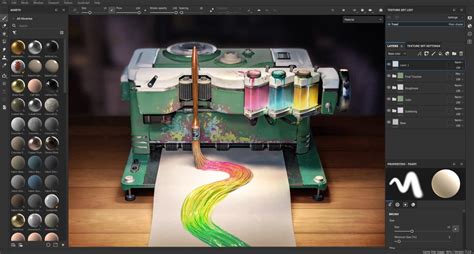
One of the most significant advantages of Substance Painter is the ability to paint both on the 2D maps as well as directly onto the 3D model in the 3D viewport. This provides real-time editing capabilities, allowing artists to see their edits as they happen and know exactly how their texture will turn out on the final model. The interface features a central area dedicated to these two windows: the 2D window displays the texture as it appears on an unwrapped map once exported, while the 3D window shows the model as it will look after export. This immediate visual feedback is crucial for iterative design and ensures that the artist's vision is accurately translated to the 3D asset.
The Importance of UV Unwrapping
Before diving into Substance Painter, it is essential to have a polygonal model that has been properly UV unwrapped. UV unwrapping is the process of flattening a 3D model's surface into a 2D representation, essentially creating a blueprint for applying textures. Without proper UVs, textures would be distorted or incorrectly placed on the model.
Interface Familiarity and Customization
Substance Painter's interface is designed to be intuitive, especially for those familiar with other 3D software packages or Adobe Photoshop. At the top, a standard toolbar offers familiar drop-down menus for file operations and editing. Below this, on the left side, various settings control texture size, allow for the addition of additional base maps, and modify viewer settings. The bottom of the GUI hosts the shelf, a comprehensive library of brushes, alphas, and other maps that can be used for painting or masking. This shelf also contains pre-set materials and textures that can be applied to models and edited to fit a specific aesthetic.
In the top right, the layers panel is where most of the texture composition takes place. Within this panel, a drop-down menu allows for the selection of individual attributes of a layer, crucial for working with the various map types inherent in 3D PBR textures, such as "height" and "normals." Below the layers panel is the properties panel, which serves as the hub for most customization options. Here, artists can adjust brush sizes, colors, and fine-tune how various individual parts of the texture function. Experimenting with these settings is encouraged to fully grasp their capabilities.
Baking Tools: Bridging the Detail Gap
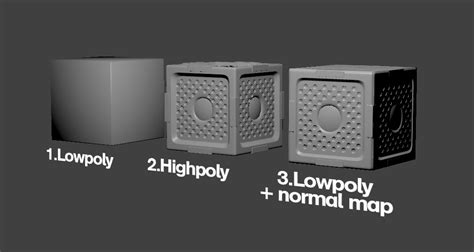
One of Substance Painter’s most useful and powerful features is its baking tools. In game development, there's often a limitation on the polygon count of a model to maintain performance. Baking allows artists to take a low-polygon base mesh and create a second, high-polygon mesh using the base mesh as a template. Once all the desired detail is sculpted into the high-poly mesh, this detail can then be "baked" onto the low-poly mesh.
Normal maps, often appearing as a purplish map, store lighting data within their vibrant colors. When this map is applied to the low-poly mesh, the game engine or renderer reads the normal map, influencing how light reacts to the model. This process creates the illusion of high detail on a computationally inexpensive mesh. While baking tools can be found in other 3D software like 3DS Max, Substance Painter's implementation is often more robust and streamlined for texturing workflows. These baking tools can be used to generate intricate details like rain streaks, cracks, or leaks on models, resulting in hyper-realistic grunge effects when executed skillfully.
Advanced Masking Techniques
Masking is an indispensable tool in digital art and editing, allowing artists to protect specific parts of a texture from being altered. Substance Painter offers several powerful masking options. These include selecting individual polygons, utilizing material IDs assigned during the modeling phase, selecting by flat colors, and the fundamental method of painting masks directly onto the texture. These masking capabilities provide granular control over texture application, ensuring precision and allowing for complex layered effects.
How To : Use Quick Masking in Adobe Substance 3D Painter
Who Uses Adobe Substance 3D Painter?
Adobe Substance 3D Painter is widely adopted by professionals across a diverse range of industries. Game design, film production, virtual reality, and product design all heavily rely on this tool for crafting detailed visual elements. Teams, from burgeoning startups to large digital agencies and established entertainment companies, depend on its capabilities. Key roles that benefit immensely from this software include 3D artists, texture painters, material artists, and visual effects designers. These professionals leverage Substance Painter to achieve precise, artistically crafted textures and effects that elevate their digital projects. Companies such as Capcom and Activision, along with high-profile games like Uncharted 4 and Horizon Zero Dawn, are testament to its industry-wide adoption.
Alternatives and the Competitive Landscape
While Substance Painter is a leading tool, understanding its place within the broader ecosystem is beneficial. Several alternatives exist, each with its own strengths:
- Blender's Texture Paint Tool: As a free and open-source option, Blender offers a robust texturing feature. However, it may not possess the same intuitive user interface or the depth of specialized texturing features found in Adobe Substance 3D Painter.
- Quixel Mixer: This tool is affordably priced and focuses heavily on photorealistic texturing. While excellent for certain workflows, it doesn't provide the same level of artist-driven brush capabilities and comprehensive procedural texturing found in Substance Painter.
- 3D Coat: This software uniquely combines sculpting and painting functionalities within a single application. Despite its versatility, some users find its interface less intuitive compared to Substance Painter's streamlined approach to texturing.
- Blacksmith3D: Offering powerful texturing tools for modeling, Blacksmith3D is a capable alternative. However, it is generally less integrated with other design software and workflows compared to the seamless connectivity offered by Adobe's suite.
The Bottom Line: An Indispensable Tool for 3D Artists
Adobe Substance 3D Painter remains a pivotal tool for anyone engaged in 3D modeling and texturing. It offers unparalleled depth and control within a user-friendly package, making it particularly important for its ability to bridge the skills of traditional artists and digital creators. By enabling the production of stunning, lifelike textures, it significantly enhances any 3D project, solidifying its position as an industry standard. If you haven't explored its capabilities, downloading the demo and experimenting with its features is highly recommended to unlock new levels of creative potential.