Clip Studio Paint, a powerful digital painting and illustration software, has become an indispensable tool for artists, illustrators, and creators seeking to bring their visions to life in the digital realm. Developed by CELSYS, a company with a strong reputation in the creative software industry, Clip Studio Paint offers an extensive array of tools and features designed to meet the diverse needs of artists across various disciplines, from manga and comic art to intricate digital illustrations. The software distinguishes itself through its exceptional brush customization, a vast library of digital assets, and robust vector capabilities, cementing its status as a preferred choice for digital artists globally.
Understanding the Core Strengths of Clip Studio Paint
At its heart, Clip Studio Paint is celebrated for its superior brush engine, which delivers a remarkable level of detail and responsiveness crucial for intricate artwork. This allows artists to achieve nuanced strokes that closely emulate traditional media. The software’s support for both raster and vector layers introduces a significant degree of flexibility, enabling sophisticated manipulation and refinement of digital illustrations. Furthermore, Clip Studio Paint fosters a vibrant community and offers an expansive resource library, equipping artists with a wealth of tools and materials to enhance their creative output. Its intuitive user interface ensures accessibility for newcomers, while simultaneously providing advanced functionalities for seasoned professionals.
Mimicking Traditional Media with Digital Precision
Clip Studio Paint excels in its ability to replicate the feel of traditional art tools. Artists can access a wide variety of brushes designed to mimic the characteristics of oils, watercolors, pencils, and more. This fidelity to traditional media allows for a seamless transition for artists accustomed to physical mediums. A particularly noteworthy feature is the software's line correction tool, which is invaluable for refining sketches with exceptional accuracy, ensuring clean and precise linework.
An Expansive Ecosystem of Resources
Creative professionals highly value Clip Studio Paint's extensive resource library. This library is a treasure trove of assets, including 3D models that can be posed and integrated into scenes, a vast collection of customizable brushes, and a wide range of background materials and patterns. These resources significantly contribute to both the quality and efficiency of the artistic production process, allowing artists to focus more on their creative vision rather than the repetitive tasks of asset creation.
Animation Capabilities for Dynamic Storytelling
Beyond static illustrations, Clip Studio Paint offers robust animation support. This feature set empowers artists to create dynamic movements and sequences, making it an attractive option for animators and storyboard artists. The software provides tools for frame-by-frame animation, enabling the creation of fluid and engaging animated content.
Who Benefits from Clip Studio Paint?
The versatility of Clip Studio Paint makes it a valuable asset for a broad spectrum of creative professionals. From small teams in digital creative agencies and animation studios to independent artists working on personal projects, the software's depth and adaptability are highly appreciated. Primarily, roles such as illustrators, comic artists, animators, and concept artists find Clip Studio Paint particularly beneficial. Its powerful features are closely aligned with the demands of artists engaged in character design, manga creation, and the production of detailed digital artwork.
Applications in Professional Creative Workflows
In digital creative agencies, Clip Studio Paint is employed for a multitude of tasks, including the creation of marketing illustrations, concept art for games and films, and storyboards for animation and advertising. Animation studios leverage its animation tools for creating keyframes, in-betweens, and even full animated sequences. Independent creators and freelance artists often rely on Clip Studio Paint for its comprehensive feature set, which allows them to produce professional-quality work across various genres and styles without needing multiple specialized software packages.
Exploring Alternatives and Comparative Strengths
While Clip Studio Paint stands out, understanding its place within the broader software landscape is important. Several alternatives offer comparable functionalities, each with its own set of strengths and weaknesses.
Adobe Photoshop: The Industry Standard
Adobe Photoshop is widely recognized as an industry standard for image editing and digital art. Its extensive feature set and deep integration with other Adobe Creative Cloud applications make it a powerful and versatile tool. However, Photoshop is generally more expensive, especially with its subscription-based model, and can present a steeper learning curve for beginners compared to Clip Studio Paint. While it excels in photo manipulation and general digital painting, it may not offer the specialized tools for comic and manga creation that Clip Studio Paint provides out-of-the-box.
Krita: The Open-Source Contender
Krita is a free and open-source painting program that offers a budget-friendly alternative with a rich set of painting tools. It is particularly favored by artists looking for a powerful program without the cost associated with commercial software. Krita provides excellent brush customization and is well-suited for digital painting and concept art. However, it may lag behind Clip Studio Paint in terms of specialized features for comic and manga production, such as advanced vector layer manipulation and integrated 3D model support. Liz Staley, a long-time user and author of books on Clip Studio Paint, notes that while Krita offers animation templates and customizable brushes, its vector layer tools are less intuitive, and it lacks native 3D model support, which is a significant advantage of Clip Studio Paint. She also found Krita's user interface less intuitive than Clip Studio Paint's.
Procreate: The iPad Powerhouse
Procreate has gained immense popularity for its intuitive interface and portability on the iPad. It offers a fluid drawing and painting experience, making it a favorite among artists who prefer working on a tablet. Its ease of use and direct drawing feel are highly praised. However, Procreate is exclusive to iOS devices and lacks the robust desktop capabilities, extensive vector tools, and the comprehensive asset management system found in Clip Studio Paint. For artists who need to work across different platforms or require advanced vector editing and 3D integration, Procreate might not be sufficient on its own.
Clip Studio Paint vs. Krita: A Deeper Dive
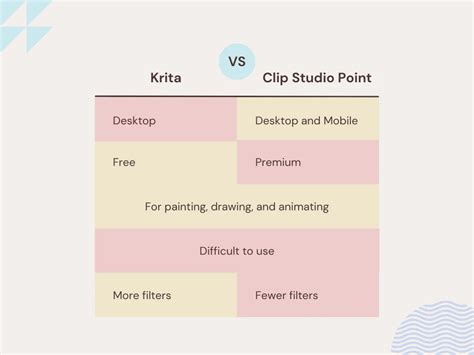
When comparing Clip Studio Paint (CSP) and Krita, several key differences emerge that can influence an artist's choice. Both programs offer powerful customizable brush engines, allowing users to create brushes from scratch or modify existing ones to suit their specific workflow and artistic style. This level of control is essential for achieving a unique artistic voice.
Vector Layer Functionality
A significant differentiator lies in their vector layer tools. Clip Studio Paint provides advanced functionality for working with vector layers. Users can easily draw lines with a pen tool, simplify them, manipulate control points, and adjust line thickness with variation. This makes vector work highly flexible and precise. In contrast, Krita's vector layer tools are perceived by some users, like Liz Staley, as less functional. The ability to use pen tools directly on vector layers and achieve line thickness variation appears to be limited in Krita, making vector work more cumbersome.
3D Model Integration
Clip Studio Paint boasts native support for 3D models and objects. This feature is invaluable for artists creating complex poses, character references, or detailed backgrounds. 3D models can be imported, posed, and rendered within the software, significantly speeding up the workflow and improving accuracy. Krita, on the other hand, lacks direct 3D model support. While plugins exist that can stream Blender windows into Krita, it does not offer the seamless integration that Clip Studio Paint provides.
The Material Library Advantage
Clip Studio Paint's Material Library is frequently cited as one of its strongest assets. This integrated library provides quick access to a vast array of downloadable assets, including brushes, 3D models, poses, patterns, and workspace configurations. A few clicks are all that is needed to import a material directly into the canvas. Furthermore, the user's Clip Studio account stores all downloaded materials, ensuring easy retrieval when switching between computers. Krita does not have a comparable, integrated material management system.
User Interface and Accessibility
User interface design is subjective, but many users, including Liz Staley, find Clip Studio Paint's interface to be more intuitive and user-friendly than Krita's. The organization of tools and panels in CSP often leads to a smoother learning curve, especially for those transitioning from other digital art software. Krita, while powerful, can sometimes feel overwhelming to new users due to its extensive options and layout.
Pricing Models
The pricing of software is a crucial consideration. Krita is entirely free and open-source, making it an attractive option for artists on a budget. Clip Studio Paint, however, operates on a different model. It requires either a subscription (monthly or annual) or, for desktop versions (Windows and macOS), a one-time perpetual license purchase. While perpetual licenses can be a significant upfront investment, CELSYS often offers sales throughout the year, making them more accessible. The mobile versions (iOS, Android) are typically free to download but require a subscription for full functionality, including cloud storage.
Key Features and Functionalities of Clip Studio Paint
Clip Studio Paint is engineered with a comprehensive suite of features tailored for digital art creation. Its naturalistic pens and brushes are a cornerstone, offering a drawing experience that feels authentic and responsive.
Natural and Responsive Drawing Tools
The software comes equipped with an extensive collection of brushes that emulate traditional media like watercolors, oil paints, crayons, and colored pencils. This allows artists to achieve a wide range of textures and effects. The drawing experience is further enhanced by its ability to draw smooth and natural lines with a stylus or even a finger on touch-enabled devices.
Advanced Coloring and Line Art Tools
Clip Studio Paint offers features that simplify the coloring process. Artists can easily fill areas, even those with gaps in their lines, ensuring clean and complete color fills. The software also includes tools for applying filters to blur and extract lines with a single tap, streamlining the workflow for certain artistic techniques.
Versatility Across Devices
A significant advantage of Clip Studio Paint is its availability across multiple platforms. It can be used on Windows, macOS, iPad, iPhone, and Android devices. This cross-platform compatibility allows artists to work on their projects regardless of their chosen device, seamlessly transitioning between desktop and mobile workflows.
Licensing and Trial Options
CELSYS provides flexible options for acquiring Clip Studio Paint. Users can opt for a free trial period, often extending up to six months, to explore the software's capabilities before committing to a purchase. Post-trial, users can choose between affordable monthly or annual subscription plans. For desktop users, a one-time perpetual license is also available, offering ownership of a specific version of the software.
Support for Beginners and Professionals
Clip Studio Paint is designed to cater to a wide range of skill levels. With its natural pens and brushes and rich support features, beginners can approach digital art with confidence. The availability of numerous official tutorial articles and instructional videos further aids in the learning process, making complex techniques more accessible.
The Evolution and History of Clip Studio Paint
Clip Studio Paint, originally marketed as Manga Studio in North America, has a history rooted in the creation of comic and manga art. Developed by the Japanese graphics software company Celsys, it has evolved into a comprehensive application for digital comics, general illustration, and 2D animation. The software's lineage can be traced back to earlier Celsys products like ComicStudio and IllustStudio.
The initial releases of Manga Studio gained significant traction among comic artists due to their specialized tools for paneling, speech bubbles, and screentones. As digital art evolved, Celsys expanded the software's capabilities, rebranding it as Clip Studio Paint to reflect its broader appeal beyond just manga. This rebranding coincided with the introduction of more advanced illustration and animation features.
Over the years, Clip Studio Paint has seen continuous development, with regular updates introducing new tools, improving existing functionalities, and expanding platform support. From its early versions on Windows and macOS, it has progressively become available on mobile platforms like iOS and Android, and even ChromeOS, broadening its user base significantly. The transition to subscription models and perpetual licenses for desktop versions, alongside app store distribution for mobile, reflects industry trends and user preferences. The ongoing development, as seen with the introduction of new features in versions like 2.0 and 3.0, such as enhanced 3D referencing tools and layer comps, demonstrates Celsys' commitment to keeping Clip Studio Paint at the forefront of digital art software.
Hiring Clip Studio Paint Specialists
For businesses and creative teams looking to leverage the power of Clip Studio Paint, finding skilled professionals is essential. Platforms like Pangea.app specialize in connecting companies with top fractional experts in various software, including Clip Studio Paint.
Finding and Hiring Experts
To find Clip Studio Paint specialists, one can utilize platforms that focus on connecting businesses with freelance or fractional talent. These platforms often employ AI-powered matching systems to quickly identify professionals with the specific skills and experience required for a project. This can significantly reduce the time spent on recruitment, often delivering suitable candidates within 24 hours.
Essential Skills Beyond Clip Studio Paint
When hiring for Clip Studio Paint expertise, it's beneficial to look for complementary skills. A strong foundation in digital illustration, concept art, and character design is crucial. Proficiency in other industry-standard tools like Adobe Photoshop and Procreate can also be advantageous, as these skills often overlap and enhance a professional's versatility. A well-rounded candidate will demonstrate not only mastery of Clip Studio Paint but also a broader understanding of the digital art pipeline.
The Benefits of Fractional Hiring
Fractional hiring offers a flexible and cost-effective solution for businesses that need specialized skills for specific projects or a limited duration. Instead of committing to a full-time employee, companies can engage experienced Clip Studio Paint artists on a part-time or project basis. This allows access to high-level talent without the overhead of traditional employment, making it ideal for startups and growing businesses.
Crafting an Effective Job Description
When posting a job for a Clip Studio Paint artist, a clear and detailed job description is vital. It should outline the specific types of projects the artist will be working on, such as creating illustrations for marketing campaigns, developing character designs for a game, or producing comic pages. Clearly state the required skills and experience level in Clip Studio Paint, along with any other relevant software proficiencies. Mentioning the desired artistic style or the specific deliverables expected will also help attract the right candidates.