Wondershare Filmora, often referred to simply as Filmora, has emerged as a prominent video editing software, catering to a broad spectrum of users, from absolute beginners to seasoned professionals. Designed to simplify the video creation process, Filmora aims to bridge the gap between basic, user-friendly applications and complex, pro-level suites. Its appeal lies in its ability to deliver polished results with an intuitive interface, a vast library of assets, and an increasing array of AI-powered features.
Filmora's AI-Powered Innovations: Transforming Content Creation
In the rapidly evolving landscape of digital content, Filmora has embraced artificial intelligence to streamline and enhance the video editing experience. These AI-driven tools are designed to automate complex tasks, spark creativity, and enable users to produce professional-looking videos with unprecedented ease.
Visionary AI Features for Creative Expression
Filmora introduces a suite of powerful AI features that empower creators to bring their ideas to life. The Image to Video tool allows users to transform their creative concepts into dynamic visual stories simply by typing in their ideas, letting AI magically animate photos. Complementing this is Text to Video, which enables the creation of AI-generated movies from simple text prompts, effectively visualizing complex ideas into compelling narratives. For dynamic visual manipulation, VideoGen offers a seamless way to swap or add elements within existing videos, providing a level of creative control previously reserved for more advanced software.
The necessity of clear communication in video content is addressed by Dynamic Captions, which automatically convert speech into word-by-word captions, enhancing viewer engagement. Unwanted distractions in footage can be effortlessly removed using the AI Remover tool, which expertly erases distracting elements from videos. For those looking to condense their footage, AI Auto Cut intelligently stitches together highlight moments, crafting cinematic narratives from raw clips.
Music synchronization is made effortless with AI Beats, a feature that seamlessly syncs video highlights to the rhythm of music. For creators needing voiceovers, Text to Speech transforms written text into professional-sounding audio. To complete the audio landscape, AI Music & Sound Effects enables the generation of royalty-free, high-quality music and soundscapes, perfectly tailored to complement video content.

User-Friendly Editing for Beginners: A Gentle Introduction to Video Production
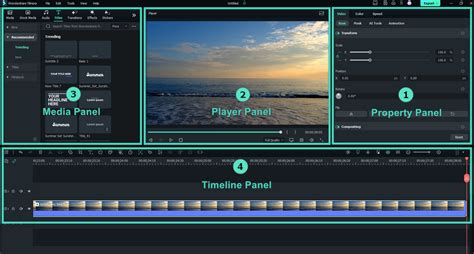
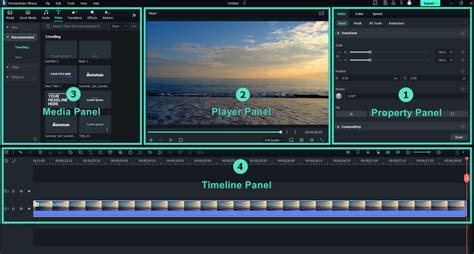
Filmora is particularly lauded for its accessibility, making it an ideal choice for individuals new to video editing. The software's design prioritizes a low learning curve, allowing users to quickly grasp fundamental editing techniques.
Effortless Creation with Templates and Core Tools
The availability of stunning templates provides a one-click solution for creating professional-looking videos, ideal for users who need to produce content quickly and efficiently. Basic editing operations such as trimming, splitting, duplicating, or merging video clips are straightforward and can be performed without any loss of quality. The interface also allows for the easy addition of text, emojis, and exclusive stickers to personalize video content.
For audio enhancement, users can incorporate music, sound effects, and voice-overs. Filmora provides a royalty-free built-in music library and sound effects, eliminating the need for external sourcing and licensing concerns. The software also offers the flexibility to extract music from existing videos and split audio tracks to remove unwanted segments. Essential visual adjustments are readily available, including the ability to rotate or crop clips to achieve the desired orientation or aspect ratio. Furthermore, the speed of video clips can be adjusted to create fast or slow-motion effects, adding dynamic flair to productions.
Full-Featured Editing for Professionals: Advanced Tools for Polished Productions
While Filmora excels in user-friendliness, it does not compromise on offering robust features for professional users. These advanced tools provide greater control and enable more complex and nuanced editing.
Precision and Control in the Editing Workflow
The All-in-one Keyframe feature is a significant asset for professionals, offering extensive adjustment options for keyframes. When combined with color and special effects, keyframing allows for the creation of sophisticated animations and dynamic visual elements. The Speed Curve offers granular control over video speed, with customizable and pre-set curves designed for various thematic effects, enabling intricate slow-motion and fast-motion sequences.
PIP (Picture in Picture) functionality allows for the layering of multiple video clips, images, stickers, special effects, and text, creating dynamic compositions. The Masking tool enables users to cover and blend video clips to achieve diverse visual effects and transitions. For dynamic object and subject focus, Smart Tracking supports intelligent tracking of stickers, text, and PIP elements, whether the target is a face, an object, or any other element within the frame.
Enhanced Workflow and Creative Freedom
Filmora Pro Subscription unlocks the full potential of the software, granting access to all features and premium editing materials, including exclusive stickers and filter packages. This subscription also automatically removes watermarks and logo rolls, ensuring a professional, unbranded output. Similar comprehensive access is available through the "Android Pro" and "iOS Pro" subscriptions for mobile users. Users can manage their subscriptions by disabling auto-renewal through their account settings.
The software's commitment to precision is further demonstrated by the Pen Tool, which allows users to draw custom motion paths, shape curves with precise speed control, and create smooth, intricate transitions. For data visualization, Animated Charts enable users to import data and transform numbers into clear, engaging visuals, effectively showcasing strategies and results. Dynamic Captions can be customized to match a creator's style, further enhanced by AI, ensuring messages are delivered with impact.
The Dual-Timeline Editing feature provides an efficient workflow by allowing edits to be made across two timelines simultaneously, with the ability to preview source and sequence clips together, maintaining complete control over the editing process. Anchor & Keyframes offer precise control over every on-screen movement. The ability to Import Subprojects allows for the seamless integration of work from different projects, enabling color matching with AI and ensuring narrative flow. This feature is particularly useful for mixing shots from various cameras to achieve harmony within each frame.
Filmora also provides access to millions of royalty-free assets, a vast array of ready-to-use templates, and creative effects, significantly reducing the time spent searching for external resources. The platform also serves as a learning hub, offering "Expert Stories" that guide users through pro effects and new tricks to refine their editing skills.
Platform and Performance: Accessibility and Optimization
Filmora is designed for cross-platform compatibility, ensuring users can edit on their preferred devices. Its performance has also been enhanced through technological integrations.
Cross-Platform Availability and Metal Rendering
Filmora is available for download on Windows and macOS, as well as for mobile devices on iOS and Android. This broad availability ensures that creators can maintain a consistent workflow regardless of their hardware. For Mac users, Filmora for Mac has integrated Metal rendering support, leveraging Apple's advanced graphics technology. This integration significantly boosts video editing performance by providing efficient access to the GPU, resulting in smoother playback, faster rendering times, and an overall increase in productivity. By utilizing Metal, Filmora ensures optimal compatibility with the latest Mac hardware and software.
Exporting and Integration with Online Platforms
Filmora offers direct export options to popular platforms like YouTube through an integrated "YouTube Upload" mode, which automatically compresses videos according to YouTube's recommended settings for optimal performance and quality.
Licensing and Commercial Use: Navigating Filmora's Resources
Understanding the licensing and commercial usability of Filmora's assets is crucial for creators. The software distinguishes between AI-generated and non-AI-generated resources.
Commercial Usability of Filmora Assets
For AI-generated resources, such as AI Music explicitly labeled "Commercially available," they are suitable for commercial use. Similarly, non-AI resources within Filmora, including music, sound effects, transitions, effects, filters, and stickers that are labeled "commercially available," can be used for commercial purposes. This clarity ensures that users can confidently incorporate Filmora's assets into their business-related projects.
Filmora's Ecosystem: Subscriptions, Trials, and Support
Filmora offers various plans and support structures to accommodate different user needs and budgets.
Subscription Models and Trial Periods
Users can opt for a free trial of Filmora. Upon purchasing a subscription, any unused portion of a free trial period is forfeited. The software offers unlimited subscription access to all features and paid editing materials. For users who purchase Filmora from third-party platforms like the Google Store or Apple Store, login is required using their respective accounts. Refund requests for purchases made through these platforms are managed and processed by Google Play or the Apple Store, in accordance with their policies.
Technical Specifications and Supported Formats
Filmora supports a wide range of import and export formats, ensuring compatibility with diverse media files and output requirements.
File Format Compatibility and System Requirements
Filmora supports a variety of import formats, including MP4, MOV, TS, WebM, MPEG-2, 3GP, MTS, FLV, MKV, WMV, and AVI. Similarly, it supports export formats such as MP4, MPEG2, WebM, 3GP, TS, FLV, MKV, WMV, AVI, and MOV.
For Windows users, Filmora requires a CPU of Intel i5 or better (2GHz+), with Intel 6th Gen or newer recommended. 8GB of RAM is the minimum, with 16GB recommended for HD and 4K videos. A compatible GPU is necessary, such as Intel HD Graphics 5000 or later, NVIDIA GeForce GTX 1050 Ti or later, or AMD Radeon RX R5 or later. Keeping graphics drivers updated is advised. 10GB of free hard-disk space is required, with an SSD recommended for editing HD and 4K videos.
Filmora for Mac also benefits from Metal rendering. For mobile devices, Filmora requires iOS 13.0 or later for iPhones and iPod touches, and iPadOS 13.0 or later for iPads. Apple Vision support requires visionOS 1.0 or later.
Filmora vs. Professional Suites: Finding the Right Balance
While Filmora is a powerful tool, it's important to understand its positioning relative to industry-standard professional software like Adobe Premiere Pro. Filmora is often considered ideal for solo creators and small businesses, offering a balance of features and ease of use that makes it highly competitive. It's not uncommon for users to find Filmora to be a more approachable and faster option for everyday editing tasks, tutorials, marketing videos, and travel vlogs compared to the steeper learning curve and complexity of professional suites.
Ease of Use and Feature Set
Filmora's drag-and-drop interface, intuitive timeline, and extensive library of templates, effects, and presets significantly reduce the time and effort required to achieve polished results. Features like ripple delete, track locking, audio scrubbing, and speed ramping are essential video editing functionalities that are readily accessible. The software's massive built-in effects library, including transitions, filters, LUTs, titles, and animations, allows users to quickly apply professional looks without extensive tweaking.
AI Integration and Advanced Capabilities
Filmora's heavy integration of AI tools, such as auto-enhance, object removal, and smart cutting, addresses common editing pain points effectively. Features like AI background removal, speech-to-text, and AI portrait effects are surprisingly robust for a consumer-level editor. Content generation tools, including text-to-video and image-to-video animation, further enhance its creative capabilities. AI Mate, Filmora's built-in editing copilot, provides an additional layer of assistance.
Audio and Color Tools
The software simplifies audio editing with features like audio ducking, which automatically lowers background music when speech is detected. It also includes beat detection, sound effects, and royalty-free music. For color grading, Filmora strikes a balance between professional control (tweakable color temperature, contrast, HSL, curves, exposure) and beginner-friendly options (applying LUTs).
Screen Recording and Production Studio Capabilities
Filmora extends beyond editing, offering screen recording, webcam capture, and voiceover tools, making it a comprehensive mini-production studio, particularly beneficial for educators, gamers, and businesses.
Pricing and Value Proposition: Understanding the Cost
Filmora offers a tiered pricing structure, with a free version available alongside paid subscription plans.
Free vs. Paid Plans
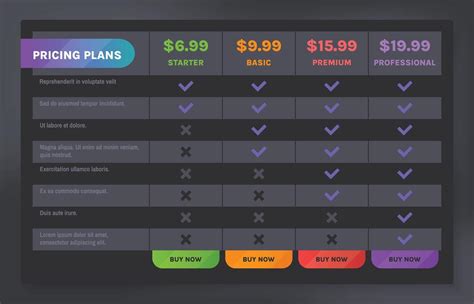
The free version of Filmora is functional for testing and learning, but it includes a watermark on exported videos, rendering it unsuitable for professional use. Paid plans are necessary to remove watermarks and access advanced features, including AI credits and cloud storage. The yearly Filmora plan typically costs around $67.97, with a lifetime access option available for approximately $97.97. Business plans are also available.
The value of Filmora's pricing is contingent on an individual's editing workflow. The free tier is for exploration, while the Basic plan offers affordability but limited AI capabilities. The Advanced plan, often around $59.99/year, is considered the sweet spot for many creators, providing updates, AI credits, and sufficient cloud storage. Costs can scale based on AI feature usage, cloud storage needs, and reliance on the asset library.
User Feedback and Reliability: A Consensus on Filmora
User feedback generally praises Filmora for its ease of learning, powerful features for its price point, and its ability to instill confidence in beginners through its effects. However, some users express concerns about an increasing reliance on subscriptions and AI credits. Performance can sometimes be an issue with very large files, leading to lag. The lifetime plan's binding nature, where upgrades to major new versions may require a separate license, is another point of consideration.
Despite these potential downsides, Filmora is widely recognized as a leader in video editing, particularly for its user-friendly approach and comprehensive feature set. It consistently receives high ratings and positive reviews from various tech publications and user feedback platforms.
Conclusion: Who is Filmora For?
Wondershare Filmora is an exceptional choice for beginners, casual creators, and anyone seeking to edit videos quickly and efficiently without a steep learning curve. It delivers fast results, polished exports, and a non-intrusive editing experience. While it can handle professional projects up to a certain point, it may become limiting for advanced color grading, complex multi-track timelines, or highly specialized cinematic workflows. For the vast majority of creators aiming for accessible yet powerful video production, Filmora presents a highly compelling and valuable solution.
The software's commitment to innovation, particularly with its AI-powered features, ensures it remains at the forefront of video editing technology, catering to the evolving needs of modern content creators. Its blend of simplicity, power, and affordability makes it a go-to editor for millions of creators worldwide.
tags: #what #is #filmora #wondershare