For iPad users aspiring to unleash their inner artist or simply explore their creative potential, the Procreate app stands as a beacon of digital artistry. This groundbreaking application has empowered countless individuals to elevate their creativity, leaving an indelible mark on the art world. But what exactly is Procreate, and when did this transformative tool first emerge? Join us as we delve into the origins and evolution of Procreate, uncovering why it has become one of the most sought-after applications on the iPad.
Whether you are a novice dabbling in digital art for the first time or a seasoned professional, Procreate offers a rich tapestry of intuitive tools and features designed to help you craft stunning digital masterpieces directly on your iPad. This exploration will provide an in-depth look at what Procreate is, how it functions, and the key elements that have cemented its status as a premier choice for digital artists worldwide.
The Dawn of Procreate: A 2011 Revelation
Procreate, a sophisticated digital art application, made its debut on the Apple iPad. The app was originally released in 2011, marking a significant moment in the landscape of digital creation tools. This release laid the foundation for a platform that would soon revolutionize how artists conceptualize, create, and share their work. The journey of Procreate began with a vision to democratize powerful artistic tools, making them accessible to a broad audience.
The development of Procreate was spearheaded by Savage Interactive, a software company founded by James Cuda and Lloyd Bottomley, both hailing from Tasmania, Australia. Cuda, an artist himself, envisioned an app that would simplify the process of sketching, painting, and illustrating on a digital canvas. Recognizing the need for a skilled coder, he found a perfect collaborator in Bottomley. Together, with Cuda's wife Alanna serving as CFO, they established Savage Interactive and embarked on the ambitious project of developing Procreate.
The development process was arduous, spanning 18 months of intense work. The team dedicated their nights and weekends to this endeavor, juggling freelance projects while refining the app. This period was characterized by over 100 design reviews and three complete overhauls of the application. The founders invested a modest $15,000 to fund the launch and initial operations, a testament to their belief in the project. James Cuda, having grown up in humble circumstances, viewed this risk as a natural progression, confident in his ability to navigate potential setbacks.
The official launch of Procreate occurred on March 8, 2011. The app was quickly embraced by users globally, rapidly gaining traction and establishing itself as an indispensable tool for both professional artists and enthusiastic amateurs. Its immediate adoption signaled a strong demand for intuitive yet powerful digital art software on the iPad.
Procreate's Core Functionality and Purpose
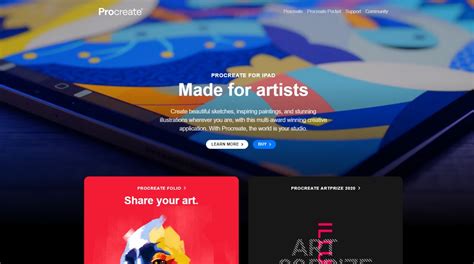
At its heart, Procreate is a digital art application meticulously crafted for the Apple iPad. Its design philosophy centers on providing a realistic drawing and painting experience, seamlessly integrated with the robust capabilities of digital tools. This is particularly evident in its synergy with the Apple Pencil, which, when used with Procreate, offers a remarkably tactile and responsive drawing sensation, akin to traditional mediums but amplified by the power of digital technology.
The app's versatility is a key reason for its widespread appeal. Procreate is not confined to a single artistic discipline; rather, it serves as a dynamic platform for a diverse range of creative pursuits. Users can leverage Procreate for:
- Hand Lettering: Crafting elegant and expressive typography.
- Graphic Design: Developing logos, branding materials, and visual assets.
- Digital Watercolor Art: Recreating the fluid and nuanced effects of traditional watercolors.
- Digital Sketching: Producing quick studies, concept art, and detailed illustrations.
- Animation: Bringing static images to life through various animation techniques.
- Illustration: Creating a wide array of visual content for books, websites, and more.
The sheer breadth of possibilities within Procreate stems from its extensive toolkit. The app is equipped with a vast array of features that cater to both simple and complex artistic visions. For instance, users can create digital art for stickers, design SVG files compatible with cutting machines like Cricut, and develop custom digital app icons for iPhones, among numerous other applications. Its adaptability makes it a favorite among hobbyists and professionals alike.
For crafters, Procreate is an invaluable asset. The ability to design custom graphics that are instantly digital and can be seamlessly integrated with other design programs streamlines the creative process. This ease of use, combined with professional-grade output, makes Procreate an ideal starting point for anyone looking to bring their design ideas to fruition.
Essential Requirements for Procreate Users
To embark on your creative journey with Procreate, certain technical prerequisites must be met to ensure optimal performance and compatibility.
iPad Compatibility and Operating System
To utilize Procreate on your iPad, your device must be running iOS 14.4 or a later version of the operating system. This ensures that the app can leverage the latest performance enhancements and features offered by Apple's mobile platform.
Apple Pencil Integration
Procreate is engineered to work in concert with Apple's stylus, the Apple Pencil, providing an unparalleled drawing experience. Depending on your specific iPad model, Procreate is compatible with both the first-generation and second-generation Apple Pencil. The advanced pressure sensitivity and tilt recognition of the Apple Pencil are fundamental to achieving nuanced and expressive strokes within the app.
While an Apple Pencil significantly enhances the Procreate experience, it is not an absolute requirement to use the app. However, for those seeking the most professional and intuitive digital art creation, the Apple Pencil, particularly the second generation, is highly recommended due to its advanced technology and seamless integration. Even without an Apple Pencil, users can employ other inexpensive styluses or even their fingers to interact with the canvas, though the precision and control offered by the Apple Pencil are generally considered indispensable for advanced work.
A Deep Dive into Procreate's Feature Set
Procreate distinguishes itself through a comprehensive suite of features that empower users to achieve a high level of artistic control and creative expression. These tools are designed to be both powerful and accessible, catering to a wide spectrum of artistic needs.
Custom Canvas Creation
A fundamental aspect of digital art is the canvas. Procreate offers exceptional flexibility in this regard, allowing users to easily create custom canvas sizes and resolutions tailored to specific needs. This means an artist can set up a canvas perfectly suited for a social media graphic, a print-ready illustration, or a detailed animation sequence. The ability to save these custom dimensions means artists can maintain a consistent workflow and quickly initiate new projects with their preferred settings.
Brush Customization and an Expansive Brush Library
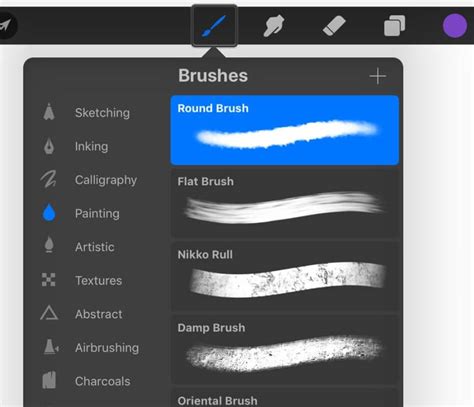
The heart of any digital painting application lies in its brushes, and Procreate excels in this domain. The app comes preloaded with over 100 different, high-quality brushes that mimic a wide range of traditional art tools, from pencils and inks to oils and watercolors. However, Procreate's capabilities extend far beyond its built-in library.
Users have the power to import brushes created by other artists, which can offer incredibly realistic textures and effects. Many artists meticulously design and sell Procreate brushes, some so sophisticated they blur the line between digital and traditional media. Furthermore, Procreate provides an unparalleled level of brush customization through its Brush Studio. Within this studio, artists can modify brush settings such as streamline (for smoother lines), size restrictions, opacity, texture, shape dynamics, and much more. This granular control allows for the creation of entirely unique brushes perfectly suited to an individual's style or project requirements. Artists can even design their own brushes from scratch, creating stamp brushes or specialized brushes for specific uses like watercolor blending, detailed shading, or even generating letter grids. The ability to combine two brushes to create a "Dual Brush" further expands the creative possibilities.
Custom Color Palettes and Management
Color is a vital element of any artwork, and Procreate offers robust tools for color selection and management. Similar to brushes, Procreate allows users to customize and create their own color palettes. The color selection tool is designed for user-friendliness, enabling quick and intuitive discovery of the perfect hue for any project.
A particularly useful feature is the ability to import custom color palettes. This can be done directly from photographs, allowing artists to capture the color schemes of the real world, or from palettes shared by other designers. This seamless integration of color inspiration streamlines the workflow and ensures a cohesive aesthetic in digital creations.
The Power of Layers
For those familiar with professional desktop art programs like Adobe Photoshop or Illustrator, Procreate's layer system will feel intuitive and powerful. Layers are fundamental to digital art, allowing artists to create and edit distinct components of their artwork independently. This separation means that changes to one element, such as adjusting the color of a character's shirt, do not affect other parts of the illustration, like the background.
Procreate's layer panel supports essential features like clipping masks and alpha lock, which provide advanced control over how layers interact and are edited. Layers are a critical capability for professionals, enabling complex compositions and facilitating efficient revisions. For crafters creating designs for machines like Cricut or Silhouette, understanding and utilizing layers is essential for generating clean and editable cut files. The maximum number of layers available in a Procreate document varies depending on the canvas size and iPad model, with larger canvases supporting fewer layers to maintain performance.
Pressure Sensitivity: Mimicking Traditional Artistry
Procreate is engineered to harness the full potential of the Apple Pencil's advanced technology, particularly its pressure sensitivity. This feature allows the app to detect how firmly or lightly the Apple Pencil is pressed against the screen, translating that input into variations in line thickness, opacity, and color intensity. This mimics the natural experience of using traditional art tools like colored pencils, where increased pressure results in a bolder, more opaque mark, while lighter pressure yields a fainter line. This nuanced control is indispensable for creating professional-grade digital art with a natural, organic feel.
Font Compatibility and Integration
Typography plays a significant role in many forms of digital art, and Procreate fully supports the use of custom fonts. While the app comes with a selection of pre-installed fonts, users can easily upload and use their own font files within Procreate. This allows for consistent branding and the use of preferred typefaces in projects, whether for graphic design, lettering, or illustration. The app supports text boxes, enabling the integration of text elements directly into the artwork.
Seamless Photos App Integration
Procreate offers a streamlined workflow by allowing direct import of images from the iPad's Photos app. This feature is incredibly useful for artists who wish to use existing photographs as references, incorporate them into digital collages, or use them as the foundation for entirely new digital paintings. The seamless integration ensures that importing and working with photos is a fluid and intuitive process.
Getting Started with Procreate: A Beginner-Friendly Approach
Despite its professional-grade capabilities, Procreate is remarkably accessible to beginners. The app's design philosophy emphasizes ease of use, allowing new users to jump in and start creating without an overwhelming learning curve. The interface is clean and intuitive, focusing the artist's attention on the canvas.
The initial steps to creating art in Procreate are straightforward:
- Purchase and Download the App: Procreate is available for a one-time purchase from the Apple App Store.
- Open Procreate: Launch the application on your iPad.
- Create a New Canvas: Tap the "+" icon to open a new canvas. You can choose from a variety of pre-set sizes or create a custom one.
- Select a Brush: Browse the extensive Brush Library and choose a tool that suits your needs.
- Choose a Color: Utilize the intuitive color picker to select your desired hue.
- Start Drawing: Begin creating your artwork directly on the canvas.
Procreate even includes helpful features like QuickShape, which automatically refines hand-drawn shapes into perfect circles, squares, or polygons when you hold your stylus at the end of the stroke. This feature is particularly beneficial for beginners looking to achieve clean lines and precise forms. For very young aspiring artists, Procreate can even be used with fingers, offering a mess-free digital finger-painting experience.
The Evolution Beyond the Canvas: Procreate Dreams
While Procreate has long been the reigning champion for 2D digital art on the iPad, its creators at Savage Interactive have continued to innovate. Recognizing the growing interest and potential in animation, they unveiled Procreate Dreams on September 8, 2023. This new application is specifically designed to bring animation creation to a broader audience, from beginners to seasoned professionals.
Procreate Dreams boasts a suite of next-generation painting tools, a revolutionary multi-touch timeline, and unique real-time performing capabilities. It aims to democratize animation by offering an intuitive and delightful user experience, characteristic of the Procreate brand. The app empowers users to seamlessly blend drawing, cel animation, keyframing, video editing, and compositing within a single, portable studio.
The motivation behind Procreate Dreams, as explained by CEO James Cuda, is to encapsulate the boundless potential of dreams within an app. It's about creating without the constraints of reality, allowing for pure imaginative expression. This philosophy is reflected in the app's advanced painting and compositing engine, which enhances the already fluid painting experience familiar to Procreate users.
Procreate Dreams supports raster projects with resolutions up to 1 million by 1 million pixels, offering a vast workspace. For animation, it includes features like Flipbook, reminiscent of traditional frame-by-frame animation, and an intuitive timeline that responds to multi-touch gestures and Apple Pencil input. The innovative "Performing" feature allows users to animate by simply recording their touch actions as the animation plays, making complex motion and effects accessible to all.
The app was released globally on November 22, 2023, with a one-time purchase price of $19.99 USD, reinforcing Procreate's commitment to a subscription-free model. Procreate Dreams represents a significant expansion of Savage Interactive's creative ecosystem, promising to empower a new generation of storytellers and animators.
Procreate's Impact and Future Trajectory
Since its initial release in 2011, Procreate has fundamentally reshaped the digital art landscape. Its intuitive design, powerful feature set, and accessible pricing model have made it a favorite among millions of users worldwide. The app has been instrumental in creating everything from intricate illustrations and graphic designs to professional movie posters and animations.
Savage Interactive continues to evolve its products, demonstrating a strong commitment to innovation. The ongoing development of Procreate and the introduction of Procreate Dreams highlight the company's dedication to providing cutting-edge tools for creatives. The company has also made a point of affirming its commitment to ethical development, notably pledging "no generative AI" in its illustration app, a stance that resonates with many artists concerned about the future of AI in creative fields.
The success of Procreate is not merely measured in downloads or revenue but in the vast community of artists it has empowered. It has lowered the barrier to entry for digital art, enabling individuals from all walks of life to explore their creative passions and, in many cases, turn those passions into professions. As technology advances, Procreate remains at the forefront, consistently adapting and expanding its capabilities to meet the evolving needs of the global artistic community.
Procreate: A Timeline of Key Milestones
- 2011: Procreate is first released on the Apple App Store, introducing a revolutionary digital art experience to iPad users.
- 2011 (November 8): Early reviews highlight Procreate's potential as a new painting app for the iPad.
- 2011 (November 10): Further reviews emerge, solidifying Procreate's position as a strong contender in the digital art space.
- 2014 (December 28): Procreate Pocket, an iPhone version of the popular iPad art app, is released, extending Procreate's reach to a wider audience.
- 2015 (October 7): Disney animators are noted for using the iPad Pro and Apple Pencil to sketch characters, showcasing the growing adoption of these tools in professional animation.
- 2016 (April 9): Marvel and DC Comics illustrators are observed utilizing an iPad Pro and Apple Pencil for their work, underscoring Procreate's professional appeal.
- 2017 (January 4): The New Yorker features a cover illustration created with an Apple Pencil, demonstrating the app's capability for high-profile publications.
- 2017 (March 6): The iconic "Logan" movie poster is revealed to have been painted on an iPad Pro, further cementing Procreate's role in major entertainment projects.
- 2018 (December 4): Procreate is recognized in Apple's "Best of 2018" awards, signifying its excellence within the Apple ecosystem.
- 2019 (April 15): James Cuda of Savage Interactive discusses the company's origins and vision in Tasmania.
- 2019 (September 6): Procreate announces a new graphics engine and the ability to import Photoshop brushes, enhancing its compatibility and performance.
- 2023 (September 8): Procreate CEO and Co-founder James Cuda unveils Procreate Dreams, a new animation app for iPad, at Playgrounds In Motion.
- 2023 (November 22): Procreate Dreams is released globally, offering a powerful and accessible 2D animation and content creation experience.
- 2024 (June 6): Procreate Dreams is honored with an Apple Design Award, recognizing its outstanding design and innovation.
- 2024 (May 15): Procreate's adoption of a new graphics engine and Photoshop brush import capabilities are highlighted, showcasing continuous improvement.
- 2024 (August 20): Procreate publicly states its commitment to avoiding generative AI in its illustration app, a significant stance in the current technological landscape.