The XP-Pen Artist Pro 16 (Gen 2) emerges as a compelling option in the competitive landscape of pen displays, offering a high-specification drawing experience at a price point that challenges its rivals. This review delves into the features, performance, and overall value proposition of this impressive device, examining how it stacks up against established brands and what makes it a potentially game-changing tool for digital artists.
Unpacking the Value: Price and Core Features
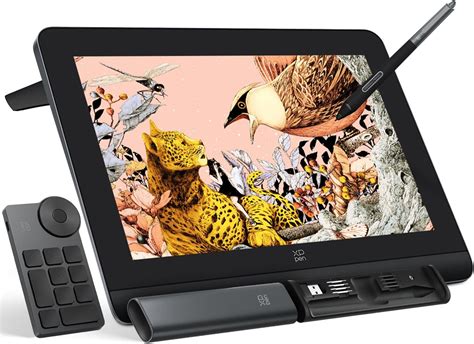
At its core, the XP-Pen Artist Pro 16 (Gen 2) is positioned as a fantastic drawing tablet that provides a pen display with high specifications for less than its competitors. The initial shock for many will be its retail price of $599.99 / £529.99, a figure that seems almost too good to be true for a device boasting such advanced features. Even with regular discounts, such as its sale price of $539.99 / £476.99 at the XPPen store, it remains a significant value proposition. This aggressive pricing strategy places it in direct contention with devices that typically command higher figures, making the question of whether it's "too good to be true" a valid one.
The tablet is not alone in its value-driven approach; a slightly smaller sibling, the XPPen Artist Pro 14 (Gen 2), is available for $419.99 / £399.99 (on sale for $377.99 / £359.99), offering a similar feature set in a more compact form factor. When compared to comparable pen displays that often offer standard 8K pressure levels and lack the 16K innovation of the Artist Pro 16 (Gen 2), this tablet is undeniably a bargain.
The 16K Pressure Sensitivity: A Game-Changer for Detail and Durability
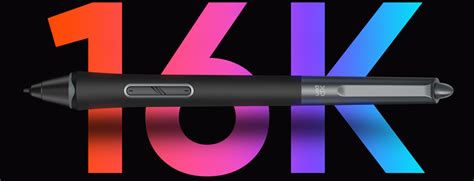
One of the most striking features of the XP-Pen Artist Pro 16 (Gen 2) is its astonishing 16,384 (16K) levels of pressure sensitivity. This represents a new standard for drawing tablets and is a significant leap from the more common 8,192 (8K) levels found in many devices, including some of XPPen's own previous models like the Artist 13.3 Pro. While it's acknowledged that for many users, 16K pressure levels might be considered overkill, it is undeniably a standout feature that enhances the overall quality of the drawing experience.
This high level of pressure sensitivity translates into incredibly responsive and accurate drawing. The on-screen marks move from thin lines to thick with remarkable speed and precision, offering a more refined control than experienced on some other tablets, even those in a higher price bracket. This granularity makes sketching and fine detail work particularly easier and, dare we say, more enjoyable.
Beyond the immediate artistic benefits, the heightened pressure sensitivity offers a practical advantage: reduced wear and tear. Because users don't need to press as hard against the display to achieve deeper colors and thicker strokes, both the display surface and the stylus nib experience less abrasion. This is a crucial benefit for digital artists who spend long hours creating, potentially extending the lifespan of their equipment. The stylus nib itself, even after two months of consistent use by a dedicated hobbyist, showed minimal wear, maintaining its shape and form.
Display Quality: Clarity, Color, and Comfort
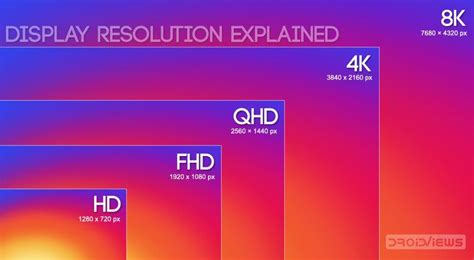
The display on the XPPen Artist Pro 16 (Gen 2) is a fully laminated 15.9 x 11.4 x 0.7 inches panel designed to eliminate parallax error - the visual mismatch between the pen tip and the cursor on screen. This lamination ensures that the pen feels directly connected to the line being drawn, providing a more natural and intuitive workflow. The resolution of 2560 x 1600, while not true 4K like some premium offerings such as the Wacom Cintiq Pro 16, is perfectly adequate for artwork at this screen size. It provides a sharp and detailed canvas for creative endeavors and can even serve effectively as a second monitor.
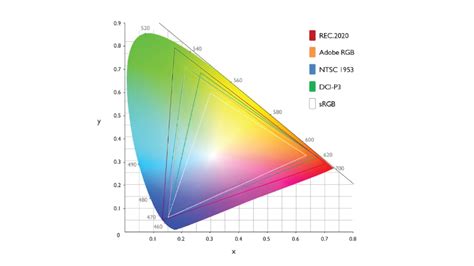
The display boasts a 99.8% sRGB color gamut coverage ratio and 250cd/m² brightness, ensuring that colors are reproduced with impressive accuracy and vibrancy. This is further enhanced by a Calman-verified status and a Delta E value of less than 1.5, signifying high color accuracy that meets the standards of creative professionals. The ability to display 1.07 billion colors (10-bit color depth) contributes to dynamic and lifelike images with smooth color transitions. For those who require specific color spaces, the Artist Pro 19 model, for instance, supports switching between sRGB, Adobe RGB, and Display P3, catering to diverse professional needs.
An anti-glare surface is integrated into the display, performing admirably even in direct sunlight, a testament to its effectiveness in various lighting conditions. This feature is particularly valuable for artists who may not always work in a controlled studio environment. Furthermore, the display is TÜV SÜD certified for low blue light emissions, contributing to improved eye comfort during extended creative sessions.
Design and Ergonomics: Thoughtful Features for a Seamless Workflow
The build quality of the XPPen Artist Pro 16 (Gen 2) is robust, featuring a sturdy metal frame that gives it a premium feel. The display is surrounded by a bezel of approximately two inches, which, along with a slightly larger strip below the screen, provides ample space to lean onto the tablet and rest the wrist. This design aids in achieving a good sweep or arc to pen strokes and offers a comfortable grip.
A significant design departure from previous XPPen Artist series tablets is the relocation of quick keys from the tablet's side to a separate wireless X-Remote Control. This remote features a tactile dial and ten programmable shortcut keys, a setup that frees up the tablet's workspace and is reminiscent of the approach taken by Xencelabs. This separation is a design choice that many will appreciate, allowing for a more focused drawing experience on the screen itself. The X-Remote Control is designed for ambidextrous use, making it suitable for both left- and right-handed artists. However, it lacks a frame clip for positioning, meaning it typically rests on the desk.
The tablet itself is cleanly designed with minimal buttons and switches. An easily accessible on/off switch is located on the top left, alongside a jogger for adjusting display brightness. The rear of the tablet features two small rubber grips, with two more at the top, effectively preventing any unwanted movement when laid flat. The overall aesthetic is one of understated elegance, with a light grey/silver metal finish contributing to its robust feel.
The ONLY tools YOU need for Digital Art
Connectivity and Software: A Smooth Onboarding Experience
The XPPen Artist Pro 16 (Gen 2) offers broad compatibility, connecting to most current devices, including Windows, Mac, Android, and Chrome operating systems. The setup process involves connecting the tablet and installing the necessary drivers. While some budget drawing tablets can falter in their software and onboarding experience, XPPen appears to have refined this aspect. The setup guide effectively walks users through calibrating both the pen stylus and the X-Remote Controller, with the option to revisit and adjust settings at any time.
A minor point of note is that the application might need to be accessed periodically to reconfigure the basic workspace settings. However, this is a small inconvenience compared to the overall seamless performance. The tablet supports dual USB-C ports for connection to a laptop and power supply, offering flexibility in setup.
The X-Remote Control: A New Paradigm for Shortcuts
The introduction of the X-Remote Control marks a significant shift in how users interact with the Artist Pro 16 (Gen 2). By moving shortcut keys off the display, XPPen has prioritized screen real estate and a more fluid drawing experience. This wireless device, with its responsive dial and ten programmable keys, offers a high degree of customization. Artists who rely heavily on shortcuts will find this a boon, allowing for rapid access to frequently used functions like zooming, brush size adjustment, and more. The combination of keys and the jog dial ensures that a wide range of user preferences can be accommodated.
While this design offers distinct advantages, it's worth noting that the XPPen Artist Pro 16 (Gen 2) does not feature a touchscreen or gesture controls. This means users will primarily rely on the X-Remote Controller for functions like zooming, unless these controls are programmed onto the stylus itself. However, it's important to reiterate that touch control is a feature rarely found in pen displays at this price point.
Stylus Performance and Longevity
The stylus accompanying the XPPen Artist Pro 16 (Gen 2) is a joy to use, offering an incredibly smooth and accurate drawing experience. Its design is often compared favorably to Wacom styluses, featuring a comfortable taper and a light weight. The stylus comes with a hard nylon nib as standard, but also includes a felt nib for a more paper-like drawing sensation.
The stylus also incorporates practical design elements. The metal case it comes in has a satisfying click-lock mechanism, revealing a stylus tray that houses accessories and a nib replacement tool, making the process of swapping nibs straightforward. The stylus itself features dual shortcut keys for easy function switching and a digital eraser at the tail, adding to its versatility. For personalized comfort, it offers a replaceable silica-gel grip and a cone shape designed to fit naturally in the hand, ensuring users stay on top of every stroke.
Areas for Consideration: Where Costs Were Saved
While the XP-Pen Artist Pro 16 (Gen 2) excels in many areas, it's important to acknowledge where cost savings have been made to achieve its competitive price point. One notable omission is the lack of an integrated stylus holder on the side of the tablet, a small but convenient feature found on some more expensive Wacom pen displays.
The primary consideration for potential buyers will be their comfort level with the separation of quick keys into a remote device. For artists who prefer their shortcut keys directly on the tablet surface, more premium options like the Wacom Cintiq Pro 16 exist, though at a significantly higher cost ($1,599.95 / £1,399.99). The Cintiq Pro 16 does, however, include touch control. For those seeking a more affordable pen display with touch capabilities, the XPPen Artist Pro 16TP is an option at $899.99 / £799.99.
Conclusion: A Compelling Choice for Value-Conscious Artists
The XP-Pen Artist Pro 16 (Gen 2) stands out as one of the best pen displays available, particularly within its budget-friendly price range. It is a well-made, high-specification device that delivers an accurate and precise drawing experience, enhanced by its industry-leading 16K pressure levels. The reduced need for firm pressure not only improves the drawing feel but also contributes to the longevity of both the tablet and the stylus.
Even when viewed independently of its price, the tablet offers a compelling set of features and performance metrics. The only significant drawback for some users might be the reliance on a separate remote for shortcut keys. However, for those willing to adapt to this design choice, or who already appreciate the benefits of detached shortcut controls, the XP-Pen Artist Pro 16 (Gen 2) represents exceptional value. It is a testament to XPPen's commitment to delivering high-end features at accessible price points, making professional-grade digital art tools more attainable for a wider audience.