In the ever-evolving landscape of digital art, XPPen has consistently pushed the boundaries of innovation, offering tools that empower creators to bring their visions to life. The XPPen Magic Drawing Pad emerges as a significant advancement, aiming to redefine the concept of a mobile art studio. This comprehensive device integrates professional-grade features into a remarkably portable form factor, promising a seamless creative experience wherever inspiration strikes. From its advanced stylus technology to its paper-like display and robust standalone capabilities, the Magic Drawing Pad is engineered to be a true extension of an artist's imagination.
The X3 Pro Slim Stylus: Precision in Hand
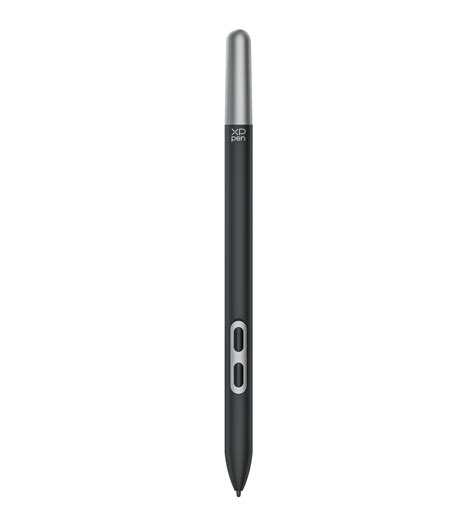
At the heart of the XPPen Magic Drawing Pad experience is the X3 Pro Slim Stylus. This isn't just another digital pen; it's a meticulously engineered instrument designed to transform every stroke into an exact digital reflection of your ideas. Slim yet powerful, it embodies a new standard for drawing and creating on a tablet, offering a delicate, precise, and fluid interaction.
Chip-Powered Performance for Unrivaled Precision
The stylus is powered by a drawing-dedicated smart chip, the X3 Pro Smart Chip. This chip incorporates an advanced algorithm that ensures smarter and more stable performance, aligning perfectly with an artist's hand muscle memory. This intelligent design moves beyond the capabilities of common digital styli, offering a more intuitive and responsive drawing experience.
A New Benchmark: 16K Pressure Levels
The X3 Pro Slim Stylus boasts the world's first 16K pressure levels, a staggering 200% increase compared to common tablet pencils. This groundbreaking feature translates into the smoothest and most precise lines ever achieved on a digital canvas. It delivers each stroke exactly as expected, empowering artists to excel in hyper-nuanced creation and push the boundaries of detail in their artwork.
EMR Technology for Uninterrupted Creativity
Leveraging Electro-Magnetic Resonance (EMR) technology, the X3 Pro Smart Chip Stylus accurately tracks the movement of the pen nib. Crucially, it is designed to be battery-free, eliminating the need for charging and allowing creators to work without interruption. This "free of charging, free of pairing" philosophy means artists can simply pick up the stylus and draw the moment inspiration strikes, ensuring that their creative flow is never broken by technical limitations.
Instant Response and Accurate Positioning
The stylus offers instant response with accurate positioning, supporting 60° tilt and maintaining an Initial Activation Force (IAF) of just 3g. This ensures there are no lags or broken lines, providing a fluid and natural drawing experience. With a retraction distance of 0.6±0.2mm and an accuracy of ±0.4mm (Center) and ±1.5mm (Corner), the precision is further enhanced, making it a truly reliable tool for detailed work.
A Stark Contrast: X3 Pro Slim Stylus vs. Capacitive Stylus
The technological superiority of the X3 Pro Slim Stylus is evident when compared to standard capacitive styli found on most tablets. While capacitive styli often have thicker nibs and lack tilt support, the X3 Pro Slim Stylus features a thin nib, 60° tilt support, and a significantly lighter weight of just 10g, reducing hand strain during extended creation sessions. Furthermore, the X3 Pro Slim Stylus, powered by its dedicated chip, offers 16,384 pressure levels, is battery-free, anti-interference, and can distinguish between fingers and the stylus, unlike many common styli which are battery-powered, require frequent charging and Bluetooth pairing, and are susceptible to interference.
Ergonomics and Design
Designed for comfortable creation, the stylus measures 157mm in length and weighs a mere 10g, perfectly lightening the hand's burden for enduring and comfortable creation. Its delicate design includes hidden details like two shortcut keys that can be set up as needed, activated with a cover plate for a balance of practicality and effectiveness. Pen refills can be stored at the end of the pen, making it easy to carry the stylus anywhere without limitations on the location of creation.
The X-Paper Display: A Natural Canvas
The X-Paper Display on the Magic Drawing Pad is crafted to provide a drawing experience that feels remarkably natural, mimicking the tactile sensation of drawing on traditional paper. This display offers full color, without glare and without harmful blue light, ensuring both visual comfort and fidelity.
A Paper-Like Drawing Experience
Emulating the feel of traditional art mediums, the X-Paper display utilizes AG etched technology. This technology creates the friction and resistance of premium paper as the stylus moves across the surface, while simultaneously reducing unwanted glare and fingerprints. This intuitive and familiar feel allows artists to draw naturally, focusing on their creativity rather than the digital interface.
Life-Like Colors for Vibrant Artistry
With 97% sRGB high color gamut coverage and 16.77 million vibrant colors, the X-Paper display effectively showcases stunning creative images. This ensures that even artwork with the most color-intensive requirements can be accurately depicted with exceptional vibrancy, bringing digital creations to life with true-to-life color fidelity.
Eye Comfort: TÜV Rheinland Certified
Thoughtfully designed with eye comfort in mind, the X-Paper display is TÜV Rheinland certified. It is further enhanced with 10 steps of soft light treatment, allowing artists to create without worrying about straining their eyes, even when racing against deadlines. This focus on user well-being is crucial for extended creative sessions.
A Larger Canvas for Unrestricted Flow
The 12.2-inch X-Paper display features a 3:2 aspect ratio, offering a more expansive space for ideas to flourish and enhancing the creative flow. This larger canvas allows artists to effortlessly capture the entirety of their vision without the constant need to zoom in and out, facilitating a more immersive and uninterrupted workflow. Compared to the common 16:9 ratio of other pads, the 3:2 ratio provides 18.5% more canvas space.
Pre-installed Apps and Exclusive Benefits
The Magic Drawing Pad comes equipped with essential creative tools, making it ready for use right out of the box. The integration of top Android drawing applications ensures that artists have powerful software at their fingertips.
Top Android Drawing Applications
The device comes with Clip Studio Paint, ibis Paint X, and Medibang pre-installed. These applications contain any tool that an artist might need to create and style their art like a pro, taking their work to the next level.
Generous Free Memberships and Benefits
Users receive a 3-month free membership to both Clip Studio Paint and ibis Paint X upon activating their account along with the purchase of the Magic Drawing Pad. Additionally, exclusive benefits for Medibang are provided, including 20GB of cloud storage, special brushes/materials, and an ad-free experience. These offerings significantly enhance the value and utility of the device for new and existing users.
Seamless Stylus Integration and Customization
The Magic Drawing Pad is seamlessly compatible with the X3 Pro Slim Stylus, enabling function customization within the app settings. Artists can configure the stylus's button settings to suit their workflow, switching functions by pressing the button. While stylus function settings may vary depending on the software used, this level of integration adds another layer of efficiency.
A World of Apps at Your Fingertips
Beyond the pre-installed applications, the Google Play Store offers access to a vast array of other popular drawing apps, including Sketchbook, Nomad Sculpt, Concepts, Infinite Painter, and Tayasui Sketches, further expanding the creative possibilities of the Magic Drawing Pad.
Super Portability: Your Mobile Studio
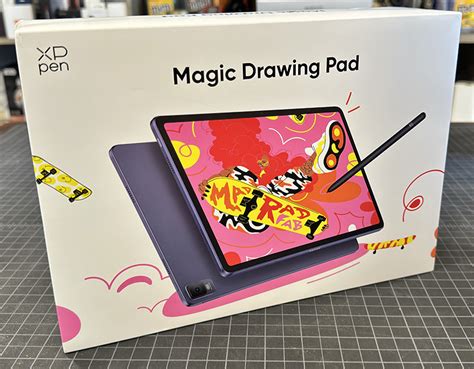
The XPPen Magic Drawing Pad is designed with ultimate mobility in mind. Its slim profile and lightweight construction make it an ideal companion for artists who need to create on the go, transforming any location into a professional studio.
Ultra-Slim and Lightweight Design
Measuring a mere 6.9 mm in slimness and weighing only 590g, the Magic Drawing Pad is incredibly easy to slip into a bag and carry anywhere. This super portability ensures that artists are not tethered to a traditional desk setup and can create wherever inspiration strikes.
Standalone Workstation: No Computer Required
A key innovation of the Magic Drawing Pad is its standalone functionality. It operates independently on a built-in Android system, eliminating the need for a Mac or PC connection. This means artists can pick it up and start creating immediately, making it a truly self-contained creative powerhouse.
Ample Storage for Your Creative Portfolio
With 8GB of RAM and 256GB of ROM, the Magic Drawing Pad offers spacious storage for a vast number of drawings and projects. This ample space ensures that artists always have their entire portfolio at their fingertips, ready to impress prospects with their artwork at a moment's notice.
All-Day Battery Life and Fast Charging
The device is equipped with an 8000 mAh battery, providing up to 13 hours of battery life for non-stop creation. This extended usage time is complemented by support for 33W fast charging and reverse charging capabilities, allowing artists to lend power to their phone while on the travel.
Create Anytime, Anywhere: Breaking Free from Constraints
The Magic Drawing Pad liberates artists from the confines of a fixed desk setup, offering unparalleled flexibility in how and where they work. Its design encourages spontaneous creativity and adapts to various working styles.
Ultimate Flexibility in Work Location
Whether from the comfort of a couch, the convenience of a coffee shop, or an outdoor adventure, the Magic Drawing Pad offers the ultimate flexibility. Artists can work the way they like, transforming any environment into a productive creative space.
Instant Inspiration, Always Ready
Always ready to capture ideas, the standalone drawing tablet ensures that artists never miss a moment of creativity. Whether on a subway commute or camping out, the Magic Drawing Pad is by their side, ready for instant inspiration.
Diverse Scenarios for Creative Expression
The versatility of the Magic Drawing Pad extends to various scenarios. From sketching in a garden to capturing moments during travel, the device facilitates joyful creation. It also proves invaluable for creative discussions, enabling seamless showcasing of work and real-time adjustments during collaborations.
More Ways to Enjoy the Pad: Entertainment and Productivity
Beyond its primary function as a creative tool, the XPPen Magic Drawing Pad is a versatile device that offers a rich multimedia experience and enhanced productivity features.
Expandable Storage for All Your Needs
With support for Micro SD cards up to 1TB expandable storage, users have extra enormous space for tons of e-books, videos, and games. This ensures that there is always something to relax with or explore when not engaged in creative work.
Immersive Audio Experience
The inclusion of 4 speakers provides a rich audio experience, ensuring that users never miss any memory-worthy moments, whether enjoying quality family time or exploring a breathtaking countryside.
Effortless Multitasking with Dual Windows
The dual window feature allows for effortless multitasking. Users can simultaneously shop and watch TV series by simply clicking the screen splitting function in the floating bar, making multitasking easier than ever.
Your All-Around Creativity Assistant: Enhanced Connectivity
The Magic Drawing Pad is designed to be more than just a standalone device; it integrates seamlessly with other hardware to further enhance the creative workflow.
DP-IN Function for Secondary Display
The Magic Drawing Pad supports the DP-IN function via its Type-C port, allowing it to act as a secondary screen for a laptop. This portable screen solution powers creativity by extending the workspace.
Simplified Connectivity with 3-in-1 Cable
For use as a secondary display, the device features a convenient 3-in-1 cable design, eliminating the need for adapters and quickly connecting to a computer. This simplifies the workspace and powers creativity efficiently.
Creative Workflow Enhancement: The Red Dial Interface
For users who prefer a more tactile and customizable control scheme, XPPen offers solutions that integrate with their devices. While the Magic Drawing Pad focuses on a streamlined, standalone experience, XPPen's broader product line, such as the Artist 13.3 Pro, showcases innovative interfaces designed for efficiency.
Customizable Shortcut Keys and Red Dial
The creative Red Dial interface, featured on some XPPen products, combines 8 fully customizable shortcut keys, crafted to make the creative workflow as smooth as possible. The red dial fits comfortably in the hand and, together with the shortcut keys, can be programmed for extensive customization. This allows for quick capture and expression of ideas, even when switching between software, as the shortcut key and dial functions can be programmed to adapt.
Natural Tilt for Shading and Expressive Strokes
The XPPen Artist 13.3 Pro, for instance, supports up to 60 degrees of tilt function. This natural tilt support eliminates the need to constantly adjust brush direction in software. Artists can simply tilt to add shading to their creations, enjoying smoother and more natural transitions between lines and strokes, a feature that enhances the expressiveness of digital art.
Display Technology: Clarity and Color Accuracy
XPPen's commitment to visual fidelity is evident in their display technology. Whether it's the X-Paper display on the Magic Drawing Pad or the advanced screens on their Artist series, the focus is on delivering a clear, color-accurate, and immersive visual experience.
Fully-Laminated Technology for Reduced Parallax
Adopting fully-laminated technology, XPPen displays seamlessly combine the glass and screen, creating a distraction-free working environment with virtually no parallax. This ensures that the cursor appears exactly where the pen tip is, providing a more accurate drawing experience.
Vivid Colors and Wide Viewing Angles
The XPPen Artist 13.3 Pro, for example, features an FHD Display that pairs superb color accuracy with an 88% NTSC (123% sRGB, 91% Adobe RGB) color gamut and a 178-degree viewing angle. This delivers rich colors, vivid images, and dazzling details from a wider view, making the creative world as powerful as it is colorful.
Enhanced Screen Protection
The XPPen Artist 13.3 Pro comes with a replaceable anti-glare optical film. This film offers high transparency and scratch resistance, reducing glare while keeping the screen crisp and clear even in bright light, ensuring durability and optimal viewing conditions.
XPPen's Evolution and Product Philosophy
XPPen, originally established in Japan in 2005 and now headquartered in Shenzhen, China, has a rich history in the development and distribution of graphics tablets. As a holding subsidiary of Hanvon Ugee Group since 2019, XPPen has consistently focused on integrating digital art products, content, and services, specifically targeting the needs of digital artists, particularly Gen Z creators. The company operates in 163 countries and regions worldwide, serving over ten million digital art creators. XPPen's product lineup is segmented into series like the Magic (all-in-one drawing displays), Artist Pro and Artist (drawing displays), and Deco Pro and Deco (drawing tablets), catering to diverse user groups and application scenarios.
The Drive Towards Chip-Powered Development
In 2021, XPPen entered the chip-powered development stage, a move that has clearly influenced the advanced technology seen in products like the X3 Pro Slim Stylus. This strategic direction signifies a commitment to pushing the boundaries of performance and efficiency in their digital art tools.
Supporting Diverse Operating Systems
XPPen ensures broad accessibility by supplying drivers for Windows 7 (or later), Chrome OS 88 (or later), Linux (including specific versions like CentOS, Linux Mint, and Ubuntu), and Mac OS X 10.10 (or later). This wide compatibility allows artists to integrate XPPen devices into their existing workflows, regardless of their preferred operating system.
The Magic Drawing Pad: A Synthesis of Innovation
The XPPen Magic Drawing Pad represents a significant leap forward in portable digital art creation. By combining the advanced X3 Pro Slim Stylus with its 16K pressure levels and EMR technology, the natural feel of the X-Paper display, the convenience of a standalone Android system, and the power of pre-installed creative applications, XPPen has crafted a device that truly embodies the concept of a "Magic Studio On The Go." It empowers artists to create without compromise, wherever inspiration may lead them.