The XPPen Magic Drawing Pad has emerged as a significant innovation in the art and design industry, establishing itself as a prominent standalone drawing tablet. Its ability to function independently of a computer offers artists and designers unparalleled convenience, allowing for creative endeavors to take place anywhere, anytime. This review delves into the features, benefits, and diverse applications of the XPPen Magic Drawing Pad, exploring how it redefines the concept of a mobile art studio.
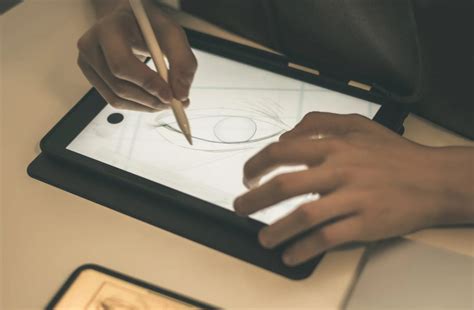
The XPPen Magic Drawing Pad: A Comprehensive Overview
The XPPen Magic Drawing Pad is meticulously designed with the on-the-go artist in mind. Its sleek, portable form factor is characterized by an ultra-slim exterior measuring just 6.9mm in thickness and weighing a mere 590g, embodying the pinnacle of portability. Central to its design is the 12.2-inch X-Paper Display, a high-definition canvas that replicates the tactile experience of traditional drawing.
What truly sets the Magic Drawing Pad apart is its standalone capability. Featuring a built-in Android system, it liberates artists from the necessity of a computer connection. This means work can commence irrespective of location or time, without the encumbrance of cables. The tablet comes pre-loaded with drawing applications and provides access to the Google Play Store for an even broader selection of software. It promises a studio-quality experience, boasting high pressure sensitivity and versatile compatibility, all within a portable package.
Key Features That Define the Magic Drawing Pad
The X3 Pro Slim Stylus: Precision Redefined
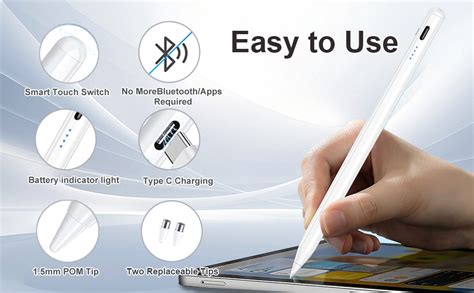
Bundled with the Magic Drawing Pad is the X3 Pro Slim Stylus, an accessory packed with groundbreaking features. The stylus offers an astounding 16,484 levels of pressure sensitivity and tilt support, a revolutionary specification in the digital art world. This unparalleled sensitivity grants artists meticulous control over their strokes, allowing for nuanced variations in weight and opacity, resulting in a more organic and natural creation process.
The X3 Pro Slim Stylus leverages Electro-Magnetic Resonance (EMR) technology, eliminating the need for charging or pairing. Artists can simply pick up the stylus and begin creating instantly, free from setup hassles or interruptions caused by dead batteries. Furthermore, its lightweight and ergonomic design ensures comfort during extended art sessions.
X-Paper Display: A Natural Drawing Sensation
The X-Paper Display is another hallmark of the Magic Drawing Pad, offering a 12.2-inch surface that emulates the feel of traditional paper. Engineered with AG etched technology, it replicates the friction and resistance encountered when drawing on actual paper, fostering a more authentic creative experience.
Beyond its paper-like texture, the display incorporates anti-glare properties and is TÜV Rheinland certified for reduced blue light emission, safeguarding artists' eyes during prolonged use. With a wide color gamut of 109% sRGB, the X-Paper Display ensures that artwork is rendered with lifelike colors, rich in detail and true to the artist's vision. The display's 3:2 aspect ratio also provides an 18.5% larger canvas compared to common 16:9 displays, offering more room for creative flow.
Unparalleled Compatibility
A significant advantage of the Magic Drawing Pad lies in its exceptional compatibility. It seamlessly integrates with a wide array of popular drawing software, including industry standards like Clip Studio Paint, as well as versatile options such as ibis Paint X and Krita. This flexibility, combined with its standalone nature, empowers artists to utilize their preferred tools and workflows wherever inspiration strikes.
Enhancing the Creative Workflow with Useful Accessories
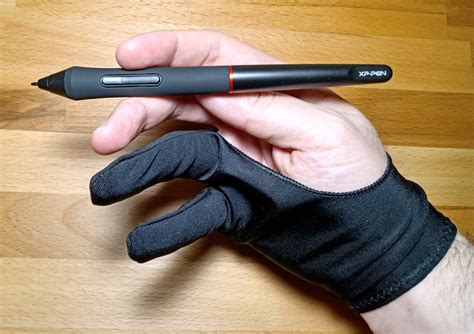
XPPen further elevates the drawing experience by offering a suite of useful accessories for the Magic Drawing Pad. The XPPen Magic Drawing Pad Keyboard, for instance, provides artists with quick access to shortcuts and commands, streamlining the creative process. A drawing glove is included to minimize friction between the hand and the screen, ensuring smoother movements. Additionally, spare stylus refills guarantee uninterrupted work sessions, addressing a common concern for digital artists.
Versatility Beyond Drawing
The Magic Drawing Pad's utility extends far beyond its primary drawing and painting capabilities. Through Super Display or Spacedesk technology, users can connect it to other devices, transforming it into a secondary computer or smartphone display. This added layer of functionality significantly enhances workflow efficiency, making the Magic Drawing Pad a truly valuable and adaptable tool.
An Accessible Price Point
Despite its advanced features and sophisticated functionality, the XPPen Magic Drawing Pad is competitively priced, falling under the $500 mark. This accessible price point democratizes access to its "magic," making it a viable option for aspiring artists and students, while simultaneously offering professional-grade functionality that meets the demands of seasoned creators.
Diverse Applications of the Magic Drawing Pad
Drawing and Sketching: The Core Strength
At its heart, the Magic Drawing Pad is engineered for drawing and sketching, a task it performs with exceptional prowess. Whether for rapid concept ideation or detailed, lengthy illustration projects, the tablet’s high pressure sensitivity and paper-like display ensure a reliable and satisfying experience. The integrated palm rejection technology further enhances usability by allowing artists to rest their hand on the screen without inadvertently affecting their work.
Digital Painting: Bringing Art to Life
The Magic Drawing Pad excels in the realm of digital painting, offering features that digital painters will find immensely appealing. Its color accuracy, pressure sensitivity, and ability to replicate the studio experience outdoors are significant draws. The 12.2-inch high-resolution display, coupled with its anti-glare properties, ensures that artwork is presented with vivid detail and clarity. Artists can freely experiment with various styles and techniques, from watercolor washes to textured oil painting effects, thanks to its broad software compatibility.
I TESTED THE SIMPLEST TO FANCIEST DRAWING TABLETS // feat xppen
Graphic Design: Creativity on the Move
The Magic Drawing Pad proves to be an invaluable asset for graphic designers. Its portability allows for logo design, layout work, and other creative tasks to be undertaken from any location. Powered by Android, it grants access to a rich ecosystem of design software, further expanding its utility.
Animation: From Storyboard to Screen
For animators, the Magic Drawing Pad offers a robust platform for sketching storyboards and executing animation sequences. The expansive display and innovative stylus facilitate the creation of fluid animations, while the tablet’s powerful hardware efficiently supports animation software. This empowers animators to craft intricate, multi-layered animations with greater ease.
Photo Retouching: Precision Editing Anywhere
Photographers can leverage the Magic Drawing Pad for on-the-spot photo retouching. Its stylus allows for precise and detailed edits, resulting in natural-looking enhancements. The tablet’s support for non-destructive editing software provides photographers with the flexibility to experiment with various effects. Furthermore, its ample memory and efficient processor ensure smooth image handling during editing tasks.
Industrial Design and Architecture: Visualizing Concepts
The Magic Drawing Pad serves as a versatile platform for design applications in fields such as architecture and product design. Its portability enables on-site sketching and client presentations. The pressure sensitivity allows for detailed and nuanced work, varying in weight and texture. Compatibility with 3D modeling applications enables visualization of concepts in three dimensions, with rendering software bringing designs to life.
Digital Signatures and Signage: Streamlined Operations
The multipurpose nature of the Magic Drawing Pad extends to applications like collecting digital signatures and creating digital signage. Its standalone operation makes it ideal for environments where complex setups are impractical, such as retail or event settings. The high-resolution display ensures legible handwriting, and the tablet can be paired with secure software for protecting sensitive information.
Entertainment: Beyond the Creative Canvas
Beyond its professional applications, the Magic Drawing Pad doubles as an entertainment device. Users can stream videos, listen to music, engage with digital coloring books, and play games. The responsive screen and bundled stylus also enhance interactive storytelling apps and e-book annotation while on the go.
Who Should Embrace the XPPen Magic Drawing Pad?
The XPPen Magic Drawing Pad is a versatile tool catering to a broad spectrum of users across various industries. Its portability and ability to produce high-quality artwork on the fly make it indispensable for anyone engaged in creative pursuits. Graphic artists will appreciate the flexibility to work in diverse locations without compromising on tool quality.
Students in art and design programs will find the Magic Drawing Pad particularly appealing due to its affordable price. It offers an advanced feature set and bundled accessories without the need for an expensive computer setup, making it ideal for hobbyists and learners alike. Working professionals, such as architects or product designers who require on-site sketching capabilities, will also find it highly suitable.
Ultimately, the Magic Drawing Pad is a flexible tool for content creators, seamlessly bridging the gap between work and entertainment. It stands out as an excellent choice for those seeking a single, powerful, and portable device for creation, entertainment, and artistic expression.
A Comparative Look at Drawing Tablet Types
Understanding the landscape of drawing tablets reveals distinct categories, each with its own set of advantages and disadvantages.
1. Screenless Tablets (No Display)
These tablets require a connection to a computer or PC, with drawing programs running on the host machine. The user draws on the tablet surface, and the output is reflected on the computer monitor. This setup often involves a learning curve due to the disconnect between hand and screen. Benefits include reduced cable management and a lower cost. Examples include Wacom Intuos or XPPen Deco series.
2. Pen Displays (With Screen/Display)
These tablets feature an integrated display, eliminating the need to look solely at a separate computer monitor. The entire computer screen is mirrored onto the pen display. The XPPen Artist series, such as the Artist 12 3rd Gen, is often recommended for beginners, offering a balance of portability, performance, and affordability. Professional-grade pen displays boast exceptional pen precision and pressure sensitivity, often with single-cable connectivity options.
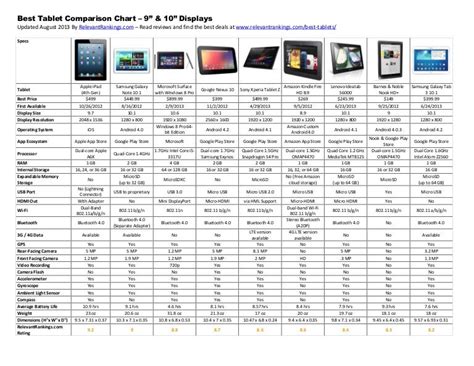
3. Standalone Drawing Tablets (No Computer Required)
Standalone drawing tablets integrate computing hardware and features like a processor, graphics card, RAM, and storage, allowing them to operate independently without an external computer. These devices can run drawing apps and software directly, offering maximum portability. XPPen's Magic Drawing Pad exemplifies this category, running on an Android operating system, enabling independent use. This contrasts with devices like the Wacom Mobile Studio Pro, which also offers standalone capabilities.
The XPPen Magic Drawing Pad: A Detailed Examination
The XPPen Magic Drawing Pad has been lauded for its portability, with a slim profile of 6.9mm and a weight of just 590 grams. It is equipped with the X3 Pro Slim Stylus, featuring 16,384 levels of pressure sensitivity and tilt support, promising a professional-grade drawing experience without computer tethering.
Display Technology and Quality
The tablet features an "Ultra Retina XDR display" in some configurations, with resolutions up to 2420x1668. Models equipped with Apple's M4 chip are noted for their processing power. However, the Magic Drawing Pad itself utilizes a TFT-LCD X-Paper display with a resolution of 2160x1440. This display offers a high color gamut coverage, including 109% sRGB, for vibrant and accurate color reproduction. The aspect ratio is a more expansive 3:2, providing a larger creative workspace compared to the common 16:9.
Portability and Ergonomics
The Magic Drawing Pad strikes a balance between portability and build quality. Its 6.9mm thickness and 590g weight make it comfortable to hold and transport. The 12.2-inch screen size offers ample drawing space without becoming overly cumbersome.
Stylus Technology and Performance
The included X3 Pro Slim Stylus is a key component, utilizing EMR technology and powered by a dedicated smart chip. It boasts 16,384 levels of pressure sensitivity and 60° tilt support, aiming for a precise and natural drawing feel. Unlike many capacitive styli, it is battery-free, requiring no charging or pairing, and offers a retraction distance of 0.6±0.2mm with an accuracy of ±0.4mm (center) and ±1.5mm (corner). This technology is designed to be more durable and less susceptible to interference than common stylus technologies.
Software and Operating System
The Magic Drawing Pad runs on the Android 12 operating system, granting access to the Google Play Store for a vast array of applications. It comes with pre-installed drawing software such as Clip Studio Paint, ibis Paint X, and Medibang, often with exclusive benefits or free membership periods.
Battery Life and Storage
The 8,000mAh battery is rated for approximately 13 hours of use at medium brightness, supporting 33W fast charging and reverse charging. Internal storage options typically include 256GB, with expandability up to 1TB via a microSD card.
Build Quality and Design
The tablet features a slim and attractive design. Physical controls are minimal, consisting of power and volume buttons, USB-C port, microphones, and speakers. It also includes front and rear cameras, adding to its general tablet functionality.
XPPen Magic Drawing Pad vs. Competitors
When considering alternatives, the XPPen Magic Drawing Pad is often compared to devices like the Apple iPad 10.9 and the Wacom Movink.
- XPPen Magic Drawing Pad: Priced competitively around $499.99, it offers a standalone Android experience with a dedicated drawing display and stylus included. Its strengths lie in its value proposition and integrated creative ecosystem.
- Apple iPad 10.9: While a capable all-purpose tablet, it requires the purchase of an Apple Pencil separately for drawing and lacks the integrated drawing-optimized features of the Magic Drawing Pad. Its strength lies in its robust app ecosystem and processing power.
- Wacom Movink: This is not a standalone tablet but a high-quality portable pen display. It offers a premium OLED display and the highly customizable Wacom Pro Pen 3, but at a significantly higher price point and requiring a separate computer connection.
The Drawing Experience: A Deep Dive
The tactile feedback of the X-Paper Display is a standout feature, closely emulating the feel of drawing on paper. The textured surface provides a satisfying resistance, enhancing control and reducing accidental smudging. While lag is generally minimal, it can occasionally be perceived during intensive zooming or complex brushwork, though it’s rarely disruptive enough to detract from the overall experience. Color accuracy is impressive, with 109% sRGB coverage ensuring vibrant and true-to-life hues.
The X3 Pro Slim Stylus, with its 16,384 pressure levels, allows for incredibly subtle line variations. The absence of charging and pairing requirements is a significant convenience, especially for artists who frequently work away from a power source. The integrated shortcut button on the stylus is a practical addition for quick undo actions or other customizable functions.
User Experience and Practicality
The Magic Drawing Pad’s Android operating system provides a familiar and intuitive user interface. Multitasking is facilitated through dual-window functionality, allowing users to run multiple applications simultaneously. The inclusion of front and rear cameras, while not professional-grade, adds utility for tasks like photo referencing or scanning.
The bundled accessories, including a drawing glove and protective case, enhance the out-of-the-box usability. However, the design of the case, with its rear pen holder and lack of a built-in stand, might not suit all users.
Conclusion: A Powerful and Accessible Mobile Studio
The XPPen Magic Drawing Pad represents a compelling advancement in standalone drawing tablet technology. It successfully integrates a powerful creative tool with the convenience and versatility of a modern Android tablet. Its combination of a paper-like display, an exceptionally sensitive stylus, robust software compatibility, and an accessible price point makes it an attractive option for a wide range of artists, from beginners to professionals. The ability to create, edit, and present artwork anywhere, without being tethered to a computer, positions the Magic Drawing Pad as a truly transformative device in the digital art landscape.
The XPPen Magic Drawing Pad is an innovative solution for artists on the go. Due to its standalone capabilities, top-tier features designed for drawing, versatility in various applications, and its affordable price, the XPPen Magic Drawing Pad can cater to a lot of users and industries, making it one of the best multipurpose, standalone drawing tablets in the market. So if you are an artist or designer, regardless if you are a beginner or a professional, and you are looking for an all-in-one device that is portable yet powerful enough to become your digital drawing canvas, the XPPen Magic Drawing Pad is absolutely a tablet that is worth writing down on your list.
tags: #xp #pen #standalone #tablet